
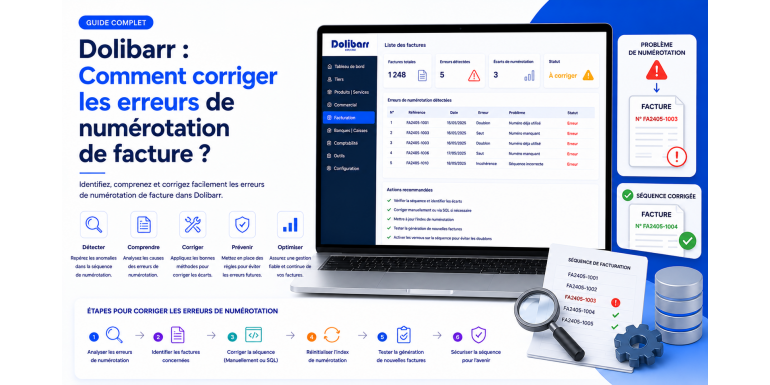
Invoice numbering is one of the most delicate topics in any management system. In Dolibarr as elsewhere, it must comply with strict legal rules: continuous sequence, no duplicates, traceability of any corrections. A numbering error, even a minor one, can lead to a tax adjustment, a challenge to your accounting, or difficulties in the event of an audit. Yet these errors occur regularly: gap in the sequence after a deletion, duplicate after a wrong manipulation, inconsistent restart at the new year, mask poorly configured at the start…
Good news: most of these errors can be corrected, provided you act methodically and respect accounting and tax requirements. In this comprehensive guide, NEXT GESTION explains how invoice numbering works in Dolibarr, how to diagnose anomalies, how to correct them legally, and how to prevent them from happening again. Whether you are a business owner, accountant, integrator, or advanced user, you will find here the best practices to keep impeccable accounting.
Table of Contents
- Why is invoice numbering so important?
- The legal framework to comply with
- How Dolibarr generates invoice numbers
- The main numbering masks
- The most frequent errors
- Diagnosing an anomaly
- Legal approach: prefer correction over deletion
- Practical case: a gap in the sequence
- Practical case: a duplicate number
- Practical case: fiscal year transition
- Practical case: changing the mask mid-year
- Practical case: unused draft invoices
- The role of credit notes in correction
- Cancellation vs deletion: what the law requires
- Documenting corrections (audit trail)
- Helpful tools and modules
- Prevention strategies
- Working with your accountant
- Conclusion
- FAQ
1. Why is invoice numbering so important?
Invoice numbering is not just a filing convention: it is an accounting and tax obligation. It allows the tax administration, your accountant, and yourself to guarantee the completeness of invoicing and the absence of manipulation. Concretely, compliant numbering must be:
- Continuous: no gap between two consecutive numbers.
- Chronological: a later number corresponds to an invoice issued later.
- Unique: no number should be assigned to two different invoices.
- Stable: an issued number cannot be reassigned after deletion.
A numbering error can arouse suspicion during an audit. Even if it is purely accidental, it will require you to justify and document it to avoid sanctions. That is why the right reflex is never to "tinker" directly with the database, but to proceed by the legal route.
2. The legal framework to comply with
In France, the General Tax Code (article 289) requires chronological and continuous numbering. Every invoice issued must bear a unique number. Once issued, an invoice can no longer be modified or deleted: it can only be canceled by a credit note.
At the European level, Directive 2006/112/EC sets the same fundamental requirements for all member states. Local implementations vary (Italy with FatturaPA, Germany with XRechnung, Spain with Facturae), but the principle remains identical.
Added to this is the reliable audit trail (PAF in French regulations), a French and European requirement that mandates the ability to reconstruct the complete journey of an invoice from its issuance to its accounting record. Consistent numbering is one of the pillars of this traceability.
The upcoming arrival of mandatory e-invoicing will make these rules even stricter: dematerialization platforms will check the compliance of each invoice transmitted.
3. How Dolibarr generates invoice numbers
Dolibarr offers a very flexible numbering mask system. Each document type (quote, order, customer invoice, supplier invoice, shipment, credit note) has its own counter and a mask that determines the form of the generated number.
The number is assigned upon validation of a draft (transition from "Draft" to "Validated" status). As long as the invoice remains in draft state, it bears a temporary "PROV1234" number that has no accounting value.
Once the invoice is validated:
- The final number is assigned according to the configured mask.
- The counter is incremented for the next invoice.
- The invoice becomes immutable on its accounting information (number, date, amounts, lines). It can no longer be freely modified.
This logic complies with legal obligations, but it also implies that any direct manipulation (deletion of a validated invoice, modification of the number) creates significant risks.
4. The main numbering masks
Dolibarr offers several predefined numbering models. The most used are the following.
The Mars / Terra model (simple numbering)
This is Dolibarr's historical model. It generates numbers like FA0001, FA0002, FA0003 with a free prefix (FA for invoice, for example) and an incremental counter. This model is simple but does not separate fiscal years.
The Mercure / Elephant model (numbering by year and month)
Much more used in practice, this model generates structured numbers such as FA2603-0001 (invoice issued in March 2026, first number of the month) or FA2026-0001 (depending on the configuration). It facilitates reading by fiscal year and allows annual or monthly reset of the counter.
The Phoenix model
Variant of the Elephant model, it offers greater flexibility in the composition of the mask (prefix per company, numbering per profit center, per series, etc.).
The Pegasus / Cicero model
More advanced models allowing conditional numbering depending on customer type, country, currency, or any other configurable criterion.
Configuration
The mask configuration is done in Setup > Modules > Invoices > Configuration. You can choose the model, define the prefix, the year format (two or four digits), the counter length, the separator, and the reset rules.
NEXT GESTION advice: choose your mask from the very start of Dolibarr and do not change it without support. Changing the mask mid-fiscal year is one of the most frequent sources of errors.
5. The most frequent errors
Through our interventions with our clients, NEXT GESTION has identified several recurring categories of errors.
Gap in the sequence
This is the most frequent error. An invoice validated then deleted creates a "gap" in the numbering. For example, you have invoices FA2026-0001, FA2026-0002, FA2026-0004 but the number FA2026-0003 is missing. This anomaly is immediately detectable by an auditor.
Duplicate number
Rarer but more problematic: two invoices bear the same number. This can happen after manual database manipulation, an uncontrolled import, or a counter malfunction in case of very high emission frequency.
Unexpected reset at new year
If you use an annual mask, the counter is supposed to return to 1 on January 1. But poor configuration or retroactive invoice issuance can produce inconsistent sequences.
Mask change mid-year
You start the year with FA2026-0001 then decide to switch to 2026-FA-0001. Consequence: the sequence is broken and an auditor will consider that invoices are missing.
Poorly partitioned multi-company
With the multi-company module, each entity must have its own sequence. Poor configuration can mix counters and create inconsistencies between legal entities.
Abandoned drafts
Invoices left in draft do not bear a final number, but they sometimes consume a temporary number that can lead to confusion during audits.
Retroactive issuance
You issue an invoice in March 2026 but with a February 2026 issue date. Depending on the configuration, the assigned number may not correspond to actual chronology.
6. Diagnosing an anomaly
Before any correction, you must precisely diagnose the nature and extent of the problem.
List invoices by number
Go to Accounting > Customer Invoices and sort the list by number. Browse the numbers in order: any jump, duplicate, or inconsistent format should be noted.
Verify chronological consistency
For each invoice, compare the number and the issue date. An invoice with a higher number must have a date greater than or equal to the previous one. Any inconsistency should be investigated.
Identify deleted invoices
If you are an administrator, you can consult the event logs in Dolibarr (table llx_events or Audit module) to identify invoice deletions and their author.
Check the counter
In the Invoices module configuration, you can consult the current counter value. If it does not correspond to your last validated invoice, there is a discrepancy to investigate.
List drafts
Filter the invoice list by "Draft" status. Drafts that are too old should be archived or properly deleted before being finalized or abandoned.
7. Legal approach: prefer correction over deletion
The fundamental principle to remember: a validated invoice is never deleted. If an invoice contains an error (amount, customer, date, label), the legal procedure consists of:
- Issuing a credit note that cancels the erroneous invoice.
- Creating a new corrected invoice with a new number.
This approach, called "by reversal", guarantees complete traceability and respects the principle of immutability. Any other approach (direct modification, deletion and re-creation) constitutes a major legal risk.
Dolibarr facilitates this approach: from a validated invoice, you can generate in one click a credit note that automatically takes back the lines in negative. You then create a new invoice with the correct information.
8. Practical case: a gap in the sequence
Imagine you discover the following gap: you have invoices FA2026-0001, FA2026-0002 and FA2026-0004. The number FA2026-0003 is missing.
Identify the cause
Three possible causes:
- A validated invoice was illegally deleted by a user.
- An invoice was created then canceled (Dolibarr offers the "Abandoned" status).
- A technical error caused the counter to skip.
Consult the logs to identify the cause.
If the invoice was abandoned
In Dolibarr, the "Abandoned" status keeps the number and trace but marks the invoice as invalid. This is good practice: the number remains "visible" in the sequence, simply with a cancellation notice. Verify that invoice FA2026-0003 is not actually in this status, but filtered by default.
If the invoice was deleted
This is more problematic. You must:
- Document the incident in an internal log specifying the date, author, and reason.
- Issue a regularization invoice with the missing number if possible (to be confirmed with your accountant).
- Keep evidence (screenshot, backup) to justify the correction in case of audit.
If a technical error is involved
In some rare cases, an interrupted transaction may have incremented the counter without creating the invoice. The solution is then to issue an explanatory invoice or to document the incident in your audit trail. Do not directly touch the database.
9. Practical case: a duplicate number
Two invoices bear the same number. This anomaly is technically impossible with a properly configured mask, but it can occur in some cases (import, direct manipulation, bug).
Diagnose
Run a control query (your accountant or an integrator can help) to confirm the duplicate and identify the two invoices concerned.
Correction procedure
- Cancel by credit note the second invoice (the most recent in date).
- Reissue a new invoice with the next available number.
- Document the incident in your audit trail with an explanatory note.
- Keep both versions of the initial invoice (duplicate number) with a clear mention of the anomaly.
Never try to directly modify the number of one of the two invoices in the database: you would break the accounting integrity and create a legal risk greater than the initial problem.
10. Practical case: fiscal year transition
The transition to a new fiscal year (generally on January 1) is a critical moment for numbering. Several scenarios can pose problems.
The counter does not reset
You expect FA2026-0001 but Dolibarr generates FA2026-1845 (continuing the 2025 sequence). Check the mask configuration: some variants do not reset automatically and require manual intervention.
The clean solution is to modify the mask in the configuration to integrate the year as a variable and reset annually. This operation must be performed before the first emission of the year and with the help of an integrator if you are not comfortable.
The counter resets too early
Conversely, some configurations reset the counter as soon as an invoice is issued in a new period, which can cause confusion if you still issue invoices from the previous fiscal year.
Retroactive invoices in early year
It is January 5, 2026 and you forget to issue an invoice dated December 28, 2025. If you issue it now, Dolibarr may assign it a number from the 2026 sequence whereas it is accounted for in 2025. Discuss with your accountant the best approach: issue the invoice with a 2026 number but a 2025 accounting date, or assign a number from the end of the 2025 sequence (this last option is delicate and requires a documented procedure).
11. Practical case: changing the mask mid-year
You started the year with a FA2026-0001 mask and want to switch to 2026-FA-0001 or vice versa. This is one of the most risky decisions you can make mid-fiscal year.
Why it is risky
- The current sequence is interrupted.
- An auditor may consider that there is discontinuity.
- Invoices issued before and after the change no longer have the same format, which complicates reconciliation.
If the change is unavoidable
- Document the decision: reason for the change, date, management authorization.
- Issue an internal note specifying that sequence A ends at
FA2026-XXXXand sequence B begins at2026-FA-0001. - Keep both prefixes in your archives and accounting systems.
- Inform your accountant and accounting service.
NEXT GESTION strongly recommends waiting for the fiscal year change to modify the mask. This is the natural moment to start over on a new basis, without disruption mid-year.
12. Practical case: unused draft invoices
Accumulated drafts often pose diffuse problems. They have no final number (only a PROV) but can create misunderstandings.
Should they be kept?
No. A draft abandoned without intention to validate it should be deleted (deletion of a draft is legal and authorized since it has no accounting value). Before deleting it, verify that it does not correspond to a real case that should have been invoiced.
How to avoid their accumulation?
- Define an internal rule: any draft over 30 days old must be validated or deleted.
- Conduct a monthly audit of drafts in progress.
- Educate teams: creating a draft "to see" without intention of using it should be avoided.
13. The role of credit notes in correction
The credit note is the legal correction tool par excellence. It allows partial or total cancellation of an issued invoice without breaking the sequence or manipulating the database.
When to use a credit note?
- Error in amount or service.
- Wrong customer (wrong company).
- Critical date error (fiscal year change).
- Commercial dispute leading to a refund.
- Return of merchandise.
Best practices
- The credit note must have its own number in the credit note sequence (generally separate from the invoice sequence).
- It must explicitly mention the canceled invoice (number and date).
- It must take back the same lines as the initial invoice, but in negative amounts or quantities.
- The customer must receive the credit note as formally as the invoice.
- The credit note must be recorded in accounting in the same way as the initial invoice.
Dolibarr automates all this: from a validated invoice, the menu offers "Create credit note" which generates the compliant document.
14. Cancellation vs deletion: what the law requires
The distinction is fundamental.
Cancellation consists of acknowledging that an issued invoice is no longer due, by issuing an equivalent credit note. The accounting trace is preserved, the sequence is not broken, control remains possible. This is the only legal method.
Deletion consists of erasing the invoice from the system. It breaks the sequence, makes the trace disappear, and constitutes a violation of accounting obligations. It is prohibited for validated invoices.
Dolibarr respects this distinction: a validated invoice cannot normally be deleted by standard users. Only an administrator can do so, generally for exceptional cases (immediate error before transmission to the customer, for example). And even in this case, the operation must be documented in the audit trail.
NEXT GESTION recommendation: restrict deletion rights to administrators and impose an internal procedure of double validation for any deletion.
15. Documenting corrections (audit trail)
Any numbering correction must be documented. This is a requirement of the reliable audit trail and a protection in case of audit.
What to document?
- Date of the correction.
- Invoice number(s) concerned.
- Nature of the anomaly (gap, duplicate, mask error, etc.).
- Identified cause.
- Corrective measures taken (credit note issued, new invoice, etc.).
- Author of the correction.
- Validation by hierarchy or accountant.
In what form?
A simple internal register (Excel file, Word document, or note in Dolibarr) is sufficient. The important thing is that it is accessible during an audit and that it provides a coherent explanation of the anomaly.
For more structured companies, a dedicated traceability module can centralize this information and associate it with the affected invoices.
16. Helpful tools and modules
Several tools can help you diagnose and correct numbering errors.
Audit Trail Module
Available on the Dolistore, it enriches Dolibarr's native traceability by recording every modification, validation, deletion, and state change. Essential for companies subject to frequent audits.
Sequence Checker Module
This type of module (sometimes included in compliance modules) automatically scans your invoice sequence and alerts you in case of gap, duplicate, or inconsistency. It can be scheduled daily.
Native accounting reports
Dolibarr offers accounting reports that list invoices by sequence. Filter by fiscal year and type to quickly identify anomalies.
External export and analysis
You can export your invoice list to Excel and use simple formulas to identify sequence breaks. This manual approach remains effective on moderate volumes.
Integrator support
For complex anomalies (counter corruption, multi-company, custom masks), the help of a Dolibarr integrator like NEXT GESTION is often the best option. We have internal tools to analyze databases in depth without risk.
17. Prevention strategies
The best correction remains prevention. Here are the best practices NEXT GESTION recommends to its clients.
Choose a robust mask from the start
Define your numbering mask when installing Dolibarr and do not modify it. Prefer a mask including the year for clean reset at each fiscal year.
Restrict rights
Limit the right to validate an invoice to actually authorized users. Limit even more strictly the right to delete an invoice: ideally, only one or two administrators have this permission.
Monthly audit
Set up a monthly audit of the sequence: someone (accounting manager, executive) checks every month that the numbering is continuous. Five minutes is enough to spot an anomaly early and correct it easily.
Regular backups
A daily backup of your Dolibarr allows you to restore the previous state in case of incident. This is a precious insurance.
Team training
Users must understand why numbering is so important and what to do in case of error. Initial training and regular refreshers prevent the majority of incidents.
Written procedures
Document in writing the procedure for issuing, validating, and canceling invoices. These procedures serve as a reference in case of doubt and facilitate the arrival of new collaborators.
18. Working with your accountant
The accountant is your best ally on these subjects. They know the legal requirements specific to your sector and can validate your correction procedures.
When to involve them?
- At Dolibarr installation, to validate the chosen mask.
- At each fiscal year closing, to verify the sequence.
- As soon as an anomaly is detected, to decide on the appropriate procedure.
- Before a tax audit, to prepare justifications.
What to transmit?
- The list of invoices issued by fiscal year with their numbers.
- The related credit notes and their justifications.
- The register of documented corrections.
- Any mask modifications with their justification.
Close coordination with the accountant transforms a potentially anxiety-inducing subject into a controlled routine.
19. Conclusion
Invoice numbering errors in Dolibarr are not inevitable, but they cannot be resolved lightly either. The golden rule to remember: a validated invoice is never deleted, it is corrected by credit note and the operation is documented. This simple principle protects you legally and preserves the integrity of your accounting.
Beyond incident correction, it is prevention that makes the difference: choose a good mask from the start, restrict rights, audit regularly, train teams, and work in close coordination with your accountant. With these practices, numbering becomes a controlled subject, no longer a source of stress during audits.
At NEXT GESTION, we support companies on all aspects of their Dolibarr management: initial configuration, compliance audit, anomaly correction, training, ongoing support. If you are currently experiencing difficulties with your numbering or wish to secure your installation before an audit, contact us at contact@nextgestion.com. We will offer a free audit of your invoicing sequence and an action plan tailored to your situation.
20. FAQ: Invoice Numbering in Dolibarr
Can an invoice be deleted in Dolibarr? A draft invoice can be freely deleted. A validated invoice should not be deleted: it must be canceled by credit note. Only an administrator can technically erase a validated invoice, but this operation must remain exceptional and always documented.
How to fill a gap in the numbering? A gap cannot be legally "filled". You document the anomaly in a register, identify the cause, and continue the sequence normally. In case of audit, it is the documentation that will justify the incident.
Is a sequence per company needed in multi-company? Yes. Each distinct legal entity must have its own invoice sequence. Dolibarr's Multi-company module allows this separation, provided it is properly configured.
Can the mask be changed mid-year? Technically yes, legally it is risky. It is better to wait for the fiscal year change. If unavoidable, document the change precisely and inform your accountant.
What to do if I discover a duplicate number? Issue a credit note on the second invoice, create a new invoice with the next number, document the incident. Never directly modify the database.
Does the temporary (PROV) number have legal value? No. It is a temporary number used by Dolibarr for drafts. It has no accounting value and can be freely reused.
How to verify the compliance of my numbering? Sort your invoices by number, verify continuity, absence of duplicates, chronological consistency. An annual audit by your accountant is also recommended.
Is Dolibarr compliant with French e-invoicing requirements? Recent versions (V20 and beyond) integrate the Factur-X formats and connectivity with PDPs. Compliance, however, depends on your configuration and practices.
Article written by NEXT GESTION, expert in Dolibarr ERP/CRM integration and consulting. For an audit of your numbering or corrective assistance, contact us at contact@nextgestion.com.