
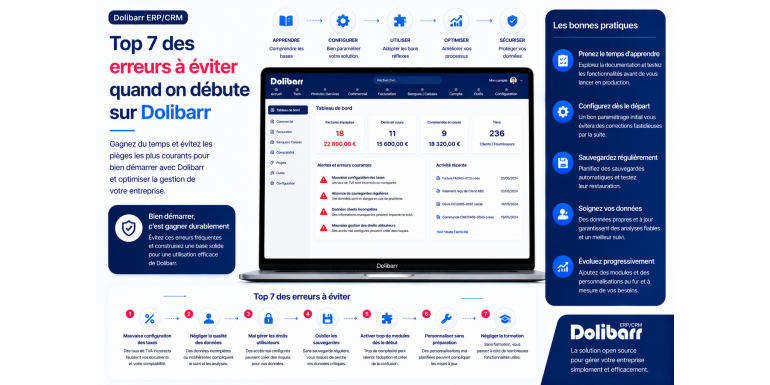
Top 7 mistakes to avoid when starting out with Dolibarr
The 2026 guide to getting started effectively with your open source ERP and avoiding common pitfalls
Have you just installed Dolibarr ERP & CRM and are eager to start using it to manage your business? Excellent decision! Dolibarr is one of the best open-source business management software solutions on the market, capable of effectively replacing paid solutions costing hundreds of euros per month. However, like any powerful and comprehensive software, Dolibarr requires careful handling. Certain mistakes made at the start can hinder you for months, or even years, when they could have been avoided with a few simple precautions.
Over the years, we've observed that most of the problems encountered by novice Dolibarr users are recurring and predictable . Incorrect initial settings, poorly structured data, neglected backups, unnecessarily activated modules, and inadequate team training: these errors relentlessly reappear. The benefit of knowing these pitfalls in advance is immense: you start on a solid foundation, you avoid having to start all over again a few months later, and you get the most out of Dolibarr from the very first weeks of use.
In this practical guide, we present the top 7 mistakes to absolutely avoid when starting out with Dolibarr. For each mistake, we explain the problem in detail, its concrete consequences for your business, and above all, the best practices to adopt to avoid falling into the trap. Whether you're a freelancer discovering Dolibarr, a small business owner in the implementation phase, an administrative manager of an SME learning the software, or a consultant supporting clients, this guide will save you valuable time and prevent major frustrations. Get ready to transform your approach to Dolibarr now.
Article summary
• Why do so many users make these mistakes?
• Mistake #1: Activating too many modules from the start
• Mistake #2: Neglecting the initial company settings
• Mistake #3: Poorly structuring your product and third-party catalog
• Mistake #4: Forgetting regular backups
• Mistake #5: Working alone without building your team
• Error #6: Ignoring Dolibarr updates
• Error #7: Directly modifying the source code
• Other common mistakes to know
• How to train effectively in Dolibarr
• When to use a service provider
• Conclusion: Your 10-step action plan
1. Why do so many users make these mistakes?
Before delving into specific mistakes, let's take a moment to understand why they are so common. This understanding will help you avoid them more effectively.
The functional richness of Dolibarr
Dolibarr offers a multitude of features: sales management, CRM, accounting, project management, HR, inventory, and more. This wealth of features, which is its greatest strength, is also its main challenge for beginners. Faced with so many possibilities, it's tempting to want to activate, configure, and use everything right from the start. This initial overkill is one of the most frequent sources of errors.
The lack of default support
As open-source software, Dolibarr doesn't offer standard paid support like a traditional software vendor. There's no dedicated project manager, no consultant provided, and no training included. You're responsible for finding the documentation, understanding best practices, and training yourself. This autonomy is liberating but can lead to mistakes if you don't take the time to get started properly.
The pressure of time
Most companies adopt Dolibarr in the context of an urgent migration or pressing need: replacing software that has become too expensive, quickly launching a new business, or complying with an accounting requirement. This time pressure often leads to rushing the process and neglecting the initial scoping and configuration phase. However, it is precisely this phase that determines 80% of your future experience with the software.
Lack of awareness of best practices
Many beginners have never used an ERP system before. They base their use of Dolibarr on their Excel habits or those of simpler software. However, an ERP has its own logic: you have to think in terms of interconnected processes, shared repositories, and data consistency. Without this business understanding, errors multiply.
Learning through failure
Many users learn by making mistakes: they make a blunder, suffer the consequences, and then correct their approach. This learning is valuable, but costly. It's better to learn from the mistakes of others to avoid making them yourself. That's precisely the goal of this guide: to allow you to benefit from the experience accumulated by thousands of users before you.
2. Mistake #1: Activating too many modules from the start
❌ ERROR #1 : ACTIVATING TOO MANY MODULES FROM THE START
The classic trap of the enthusiastic beginner
This is probably the most universal mistake. A new user discovers Dolibarr, browses the list of available modules, and succumbs to temptation: Third Parties, Invoices, Quotes, Accounting, Projects, HR, Expense Reports, Calendar, Document Management, Inventory Management, Point of Sale, Newsletter, Surveys, Holidays, Notes, Wiki, Forums... Why deprive yourself when it's free? A few minutes later, the Dolibarr interface resembles a commercial airliner cockpit with a hundred menus that you don't understand and never use.
Why this is a mistake
Activating a module has several consequences: it adds menus to the interface (which becomes confusing), it consumes server resources (decreasing performance), it complicates settings (each module has its own options), and it can create unexpected interactions between modules. The more modules you have active, the harder it is to find what you truly need on a daily basis. The learning curve becomes steep and discouraging.
⚠️ CONSEQUENCES: An overloaded interface, more complex user training, degraded performance, and above all, a feeling of complexity that can lead to the outright abandonment of Dolibarr in favor of a simpler solution. Many users give up on Dolibarr because of this flaw, even though the software would have perfectly met their needs with a more streamlined configuration.
The recommended minimalist approach
At startup, activate ONLY the modules that are truly essential to your immediate business. For the vast majority of businesses, the starter pack includes: Third Parties (for the customer/supplier database), Sales Proposals (quotes), Customer Invoices, Banks (cash flow monitoring), and possibly Products/Services if you invoice recurring items. That's all. With these 4-5 modules, you cover 80% of the daily needs of a very small business.
Gradual activation
As you master the basic modules, gradually add the others: Supplier Invoices when you want to track your purchases, Projects when you manage several projects simultaneously, and Accounting when you want to go beyond sales tracking. This gradual rollout is far more effective than an initial, massive activation.
✅ THE SOLUTION: Start with a maximum of 5 essential modules. Master them completely (creation, modification, search, statistics). Only after several weeks of regular use should you activate a new module. This disciplined approach guarantees solid skill development.
3. Mistake #2: Neglecting the initial company settings
❌ ERROR #2 : NEGLECTING THE INITIAL COMPANY SETUP
The "I'll see later" mistake
Many users, eager to test the software, skip or rush through the crucial step of setting up their company. They only enter the company name, forgetting the SIRET number, VAT number, full address, and APE code. When they issue their first invoice, they realize with horror that all this information is missing from the PDF. Worse, they may have already sent it to the client before noticing the problem.
Why this is a mistake
Your company information appears on ALL business documents: quotes, invoices, purchase orders, and correspondence. This information is also legally REQUIRED for invoicing: company name, full address, SIRET number, intra-community VAT number (if applicable), APE code, legal structure, share capital for companies, and specific details for sole traders. A document lacking this information may be legally challenged and subject to tax penalties.
⚠️ CONSEQUENCES: Invoices issued without mandatory legal information, risk of tax reassessment in case of audit, unprofessional image with customers, invoices to be regenerated once the configuration is complete, management in degraded mode for weeks.
The complete settings in detail
Go to Configuration > Company/Organization. Carefully fill in ALL fields: exact business name (the one that will appear on invoices), full address (street, postal code, city, country), professional telephone and email, website, 14-digit SIRET number, APE/NAF code, legal form (SARL, SAS, EURL, EI, etc.), share capital for companies (with mention "capital of X euros"), RCS number and city of registration, intra-community VAT number.
Upload a good logo
Use the settings to upload your logo. Criteria: PNG format preferred (transparency), sufficient resolution (minimum 300 ppi), reasonable size (no more than 500 KB to avoid slowing down PDFs). A high-quality logo makes a huge difference to the professional perception of your documents.
Configure accounting details
Also, don't forget: the default currency (EUR for France), the primary language, the time zone, the fiscal year (usually from January 1st to December 31st), the VAT settings (taxable or exempt), and the default payment terms. All these elements influence your documents and your accounting.
✅ THE SOLUTION: Take 30 minutes to 1 hour to FULLY configure your company from day one. This step is never wasted: anything done correctly from the start won't need to be redone. Have your configuration reviewed by your accountant if possible.
4. Mistake #3: Poorly structuring your product and third-party catalog
❌ MISTAKE #3 : POORLY STRUCTURING YOUR PRODUCT AND THIRD-PARTY CATALOGUE
The anarchic seizure
The classic mistake: creating third-party and product listings haphazardly, without prior planning. At first, a few entries are manageable. But after six months, you end up with duplicates (the same customer created three times with different spellings), products without categories, inconsistent descriptions (sometimes in uppercase, sometimes lowercase), and randomly assigned codes. The catalog becomes an unmanageable mess, and retroactive cleanup is extremely time-consuming.
The concrete consequences
You're looking for a client: 5 results appear (you don't know which one is the right one). You want to analyze revenue by product category: impossible because there's no categorization. You want to contact all clients in a specific area: no filtering is possible. You want to export to a new software program: the data quality is so poor that the export is unusable. This disorganization is permanently hindering your use of Dolibarr.
⚠️ CONSEQUENCES: Inefficient searches, false statistics, duplicates everywhere, inability to filter, degraded decision quality, and a general feeling of disorder that ultimately discourages proper use of the software.
Define a consistent coding
Before creating your first third party or product, define your coding system. For third parties: CLI-0001, CLI-0002 (simple coding) or with a sector prefix (CLI-IND-001 for industry, CLI-SVC-001 for services). For products: PROD-001 or with a category (T-001 for T-shirts, P-001 for pants). This coding must be: unique, legible, expandable, and consistent.
Organize using categories
Create a category tree for your third parties and products BEFORE you begin entering them. For third parties: by sector of activity, by size (micro-enterprise, SME, large enterprise), by geographic area, by status (prospect, active customer, inactive customer). For products: by category, by supplier, by use case. This organization will determine all your future analyses.
Ensure the information entered is accurate and up-to-date.
For each listing you create, take the time to fill it out completely: all relevant fields, clear and consistent labels, the full address (not just "15 flower street"), a named main contact person, complete contact details, VAT number, and SIRET number for businesses. A well-filled-out listing from the start will save you hours of searching later.
Implement quality control
If several people are entering data, establish clear rules (data entry guidelines): uppercase or lowercase letters, phone number format, SIRET number format, and who is authorized to create what. Data entry guidelines prevent everyone from doing things their own way, which can lead to chaos.
✅ THE SOLUTION: Before any mass data entry, define your coding system, category hierarchy, and data entry rules in writing. Have them validated by the relevant users. Document this charter in a file accessible to everyone. This ensures a clean and usable database in the long term.
5. Mistake #4: Forgetting regular backups
❌ MISTAKE #4 FORGETTING REGULAR SAVEMENTS
The myth of "it won't happen"
"I installed Dolibarr on a reliable server, hosted by a major provider, so I don't need to back up." This is the wishful thinking that precedes every IT disaster. Hard drive crash, ransomware attack, accidental deletion of data, botched update, physical damage to the data center: the causes of data loss are numerous and unpredictable. Without a backup, you lose everything.
The frightening statistics
According to several cybersecurity studies, 60% of SMEs that experience a massive data breach close within six months. Ransomware attacks are increasing by 150% annually. Hardware failures occur even on the newest servers. Human error is the number one cause of data loss in companies with fewer than 50 employees. The question isn't "Will it happen?" but "WHEN will it happen?"
⚠️ CONSEQUENCES: Total loss of your commercial and accounting history, inability to produce tax returns, inability to respond to a tax audit (serious penalty), loss of customer contacts and relationships, several months to reconstruct missing data (if possible), risk of business closure in the most serious cases.
The golden rule: 3-2-1
The universal backup rule is the 3-2-1 rule: three copies of your data, on two different media, one of which must be stored off-site. For Dolibarr, this means: your original data on the Dolibarr server (copy 1), a local backup on an external drive or NAS (copy 2 on media 2), and a remote cloud backup (copy 3 off-site). This redundancy protects you against virtually all disaster scenarios.
What to save in Dolibarr
A complete Dolibarr backup includes two distinct elements that should not be overlooked: the MySQL/MariaDB database (containing all structured data: customers, invoices, payments, journal entries), and the documents folder (containing files: generated invoice PDFs, attachments, images). Backing up only one of these two will render the installation unusable in case of a restore.
Automate completely
Manual backups are routinely forgotten, especially during busy periods. Automate them: use a daily cron script on Linux, a scheduled task on Windows, or the built-in functionality for managed hosting. The recommended frequency is at least daily, or even several times a day for critical activities (e-commerce). Also, configure automatic backups to an external service.
Testing the restorations
An untested backup is NOT a backup. At least once a quarter, test a full restore: take a recent backup, restore it to a test environment, and verify that everything works. Too many people discover at the worst possible time that their backups have been corrupted or incomplete for months.
✅ THE SOLUTION: Configure an automatic backup system compliant with the 3-2-1 rule FROM DAY 1. Test the restore at least once to validate its functionality. Implement a quarterly verification schedule. This investment of time could save your business.
6. Mistake #5: Working alone without building your team
❌ MISTAKE #5 : WORKING ALONE WITHOUT BUILDING A TEAM
The lone expert syndrome
You've installed Dolibarr, configured it, and mastered it. But your colleagues are still working in Excel, sending invoices via Word, and entering their hours on paper. You're the only one entering the data into Dolibarr, which creates a bottleneck. The more business grows, the more overwhelmed you become. And if you get sick or go on vacation, business grinds to a halt.
The numerous problems generated
This error generates several interconnected problems: massive loss of time (you enter what others have already prepared elsewhere), transcription errors (sometimes misinterpretation of what the team wanted), entry delays (you can no longer keep up), obsolete information (the data in Dolibarr is always several days behind), feeling of isolation and overload, demotivation.
⚠️ CONSEQUENCES: Unmanageable personal overload, resignations linked to stress and the feeling of being chained to the software, data always partial and late, inefficient business processes, return to a disguised pre-Dolibarr operation, progressive abandonment of the most powerful features of the software.
Identify the right users
Go around your team and identify who should be using Dolibarr and for what purpose: salespeople for quotes and CRM, administrative assistant for invoicing, accountant for accounting, manager for dashboards, warehouse worker for inventory. For each profile, list the features that are truly necessary (and only those).
Create suitable user profiles
Dolibarr allows you to create profiles with different access rights. A salesperson doesn't need access to accounting. A warehouse worker doesn't need to see margins. Limit access rights to what's strictly necessary for each profile: it's simpler for the user (a streamlined interface) and more secure for the company (no accidental manipulation of sensitive data).
Investing in training
User training is not a cost but an investment. A few hours of initial training per user can prevent weeks of inefficiency. Several approaches are possible: in-house training (you explain things yourself, economical but time-consuming), training by a provider (1 to 3 days, generally €1,000 to €3,000), or online training (video courses, e-learning platforms). The important thing is to train EVERYONE on what concerns them.
Documenting internal procedures
Create an internal user guide tailored to your company: "How to create a quote with us," "What is the procedure for recording a payment," "How to initiate monthly invoicing." These procedures, which complement the official Dolibarr documentation, are invaluable for new users and for occasional reminders.
✅ THE SOLUTION: Identify future users from the very beginning of the project. Create tailored user profiles. Train them progressively on its features. Document procedures specific to your company. The more intelligently you delegate, the more Dolibarr becomes a true asset instead of an additional burden.
7. Error #6: Ignoring Dolibarr updates
❌ ERROR #6 : IGNORE DOLIBARR UPDATES
The false sense of security of "if it works, don't touch it"
“My Dolibarr is working fine, why update it? I risk breaking everything.” This approach, while understandable, is dangerous and gradually leads to completely obsolete installations. After two or three years without an update, you've fallen so far behind that migrating to a recent version becomes a complex and risky project in itself. Meanwhile, you accumulate unpatched security vulnerabilities.
What you're missing out on by not updating
Dolibarr updates bring several types of improvements: bug fixes (sometimes critical), security patches (for discovered vulnerabilities), new features (which could save you time), performance improvements, compatibility with new versions of PHP and MySQL, and compliance with legal changes (new VAT rules, GDPR, etc.). By not updating, you miss out on all of these benefits.
⚠️ CONSEQUENCES: Unpatched security vulnerabilities (risk of intrusion or ransomware), known but unpatched bugs in your version, obsolete features compared to the competition, progressive incompatibilities with third-party modules, increasingly complex migration when you finally decide to do it, legal non-compliance in some cases.
Dolibarr's update policy
Dolibarr follows a structured update cycle: major versions (one or two per year) that introduce significant new features, minor versions (regular) that fix bugs, and LTS (Long Term Support) versions that are maintained for several years. For cautious users, LTS versions are ideal: fewer fundamental changes, longer maintenance periods, and proven stability.
The secure update method
Follow this protocol for updates: 1) Perform a full backup (database + documents folder + configuration file). 2) Read the release notes to identify important changes. 3) Test the update in a test environment (clone of your production environment). 4) Verify that third-party modules are compatible with the new version. 5) Schedule the production update during a period of low activity. 6) Test critical features immediately after the update.
The recommended frequency
A sensible approach: update to the latest minor version every 2-3 months (bug fixes and security patches), migrate to a new major version once a year if relevant to your needs, and stay on an LTS version to avoid overly rapid leaps. This frequency ensures a good balance between stability and the benefits of updates.
✅ THE SOLUTION: Implement a regular update schedule. Always back up beforehand. Test in a test environment if possible. For critical operations, use LTS versions that offer stability and long-term maintenance. An up-to-date installation is a secure and high-performing installation.
8. Error #7: Directly modifying the source code
❌ ERROR #7 : DIRECTLY MODIFY THE SOURCE CODE
The temptation of DIY
Because Dolibarr is open source, you have access to its entire source code. That's great, but it's also tempting. You want to modify a PDF invoice template, adjust a calculation, add a specific note. You find the relevant file, you modify it directly, and it works. How satisfying! Except that this satisfaction is short-lived: with the next Dolibarr update, all your changes will be overwritten and lost.
Why it's a trap
The Dolibarr source code files (located in the htdocs/core/, htdocs/install/, etc. directories) are replaced with the official versions with each update. All your modifications, even the smallest ones, disappear. You then have to redo them every time, which quickly becomes unmanageable. Worse still, if you forget certain modifications, Dolibarr's behavior can subtly change without you noticing.
⚠️ CONSEQUENCES: Modifications lost with each update, regular redesign of customizations, unstable software behavior, refusal to update Dolibarr to preserve modifications (and therefore accumulation of delays and vulnerabilities), dependence on the person who made the modifications, non-existent traceability of changes.
The right approach: custom modules
Dolibarr provides a specific mechanism for customizations: the htdocs/custom/ folder. This folder is NOT overwritten by updates. All your specific modifications (custom modules, overrides, customized PDF templates) must be placed in this folder. This separation guarantees the longevity of your customizations across different versions.
Create a custom module
For significant modifications, create your own module and place it in /custom/. Dolibarr provides a ModuleBuilder module that helps create custom modules through a graphical interface. This approach is more structured and professional than directly modifying the code. The created module can even be temporarily disabled for testing.
Custom PDF templates
To customize a PDF invoice template, for example: DO NOT modify the original file. Copy it to the /custom/ folder with a new name, modify the copy, and configure Dolibarr to use your new version. During updates, your template will remain intact. Later, you can compare your template with the new official version to incorporate the improvements.
Documenting customizations
For each change, document what was changed, why, when, and by whom. This documentation is vital for long-term maintenance. Without it, in two years, no one will know what was customized or why. Use a README file in your custom/ folder or a version control system like Git.
✅ THE SOLUTION: NEVER directly modify Dolibarr's core files. Always use the /custom/ folder for your customizations. Create custom modules for significant modifications. Document every change. This discipline will save you weeks of problems with each update.
9. Other common mistakes to know
Beyond the 7 main mistakes, here are some other common pitfalls to avoid.
Bonus error 1: Not configuring SMTP
Dolibarr allows you to send emails (invoices, quotes, reminders) automatically. However, this requires that the SMTP server be correctly configured. Many users skip this step and end up having to send everything manually. Configure SMTP from the start: your email provider (Gmail, OVH, etc.), with the correct authentication information, and test sending an email.
Bonus mistake 2: Mixing personal and business accounts
For self-employed individuals and small business owners, the temptation is strong to mix personal and professional expenses in Dolibarr. This is a serious mistake: it drastically complicates accounting, skews profitability analyses, and exposes you to tax risks. Maintain a strict separation: use Dolibarr solely for professional purposes.
Bonus mistake 3: Neglecting bank reconciliation
Many users create invoices but never record the corresponding payments. As a result, the list of unpaid invoices in Dolibarr is completely inaccurate. Make it a habit to regularly reconcile payments with invoices, ideally weekly. It's quick and ensures an accurate view of your business.
Bonus mistake 4: Not using statistics
Dolibarr offers numerous dashboards and statistics that most users are unaware of: revenue trends, top customers, top products, payment terms, and profitability per project. These analyses are invaluable for managing your business. Dedicate 30 minutes a month to reviewing them.
Bonus error 5: Refusing to use the community
The French-speaking Dolibarr community is very active and supportive. On the official forum, Facebook groups, and subreddit, you'll find answers to 90% of your questions. Many users prefer to experiment on their own rather than ask questions, for fear of judgment. This is a mistake: the community is there to help, so take advantage of it.
Bonus mistake 6: Not planning for growth
You're configuring Dolibarr for 2 users and 50 clients? Great. But what happens if you scale up to 10 users and 5,000 clients? Plan for growth from the start: scalable coding, scalable server performance, and user profiles prepared. This proactive approach prevents troublesome disruptions during development.
10. How to train effectively in Dolibarr
One of the best ways to avoid mistakes is to get proper training from the start. Here are the most useful resources.
Official documentation
The official Dolibarr wiki (wiki.dolibarr.org) contains a wealth of information: installation tutorials, user guides for each module, FAQs, and configuration tips. It's the most reliable and comprehensive source, and it's regularly updated. Make it a habit to check it first when you have a question.
YouTube videos
Many French-language YouTube channels offer Dolibarr tutorials: step-by-step demos, presentations of specific modules, and practical advice. The advantage of videos is that you can see exactly how to do things. Search for "Dolibarr tutorial French" and you'll find dozens of high-quality resources.
The community forum
The official forum (dolibarr.org/forum) is extremely active, especially its French-language section. You can ask questions there (users usually reply within a day), browse existing discussions (your question has probably already been asked), and follow the project's developments. It's an invaluable resource.
Facebook and LinkedIn groups
Several Facebook and LinkedIn groups bring together French-speaking Dolibarr users. More interactive and user-friendly than the forum, they allow you to exchange ideas with other users, share tips, and discover use cases. Search for "Dolibarr France" on these platforms.
Paid training courses
For a more structured approach, paid training options are available: in-person or online courses (generally 1 to 3 days, between €500 and €2,000), self-paced online courses (videos with exercises, €100 to €500), and on-site training (a trainer comes to your location, more expensive but customized). For organizations with a budget, this is the most effective option.
Learning by doing
The best training is still hands-on experience. Create a test environment (a Dolibarr instance separate from your production environment), experiment freely, make mistakes without consequence, and test the functionalities. This experimental approach complements other resources and retains knowledge much more permanently than passive reading.
11. When to use a service provider
Not everyone has the skills or time to manage Dolibarr on their own. Hiring a service provider can be an excellent decision in many situations.
The complex initial installation
If you need a secure, self-hosted installation with server configuration, SSL certificate, and performance optimizations, using a service provider avoids costly technical errors (security breaches, degraded performance, downtime). Budget: €500 to €2,000 depending on complexity.
Migration from another software
If you are migrating from Sage, EBP, Ciel, or another ERP system, the technical complexity is significant: data export, transformation, import, mapping, and verification. A specialized service provider can secure this critical operation. Budget: €2,000 to €10,000 depending on the volume and complexity.
Advanced customization
If you require specific customizations (bespoke modules, complex PDF templates, integrations with other software), a Dolibarr developer is essential. In-house development without the necessary skills can take weeks and result in a fragile solution. Budget: €1,000 to €20,000 depending on the scope of the project.
The team's formation
To train your employees quickly and effectively, an experienced trainer is a very cost-effective solution. A few hours of training can save weeks of trial-and-error learning. Budget: €500 to €3,000 for 1 to 3 days of training.
Ongoing support
If Dolibarr is central to your business, a maintenance and support contract with a service provider may be worthwhile: availability in case of problems, advice on upgrades, and managed updates. Budget: €50 to €500 per month depending on the service level.
How to choose the right service provider
Several criteria should be considered when choosing a Dolibarr provider: specialization in Dolibarr (not a generalist just discovering the solution), references in your sector, a structured project methodology, support availability, transparent pricing, and certifications (official Dolibarr partner). Always request multiple quotes and speak with previous clients.
12. Conclusion: Your 10-step action plan
You are now equipped to get started with Dolibarr while avoiding the most common pitfalls. Finally, here is a concrete 10-step action plan that you can implement right away to get started or to correct an existing installation.
Your action plan
• Step 1: Assess your current setup. What mistakes have you made? Which corrections are a priority?
• Step 2: If you are starting out, activate ONLY 4-5 essential modules. If you have overloaded your system, deactivate unnecessary modules (unless you actually use them).
•