
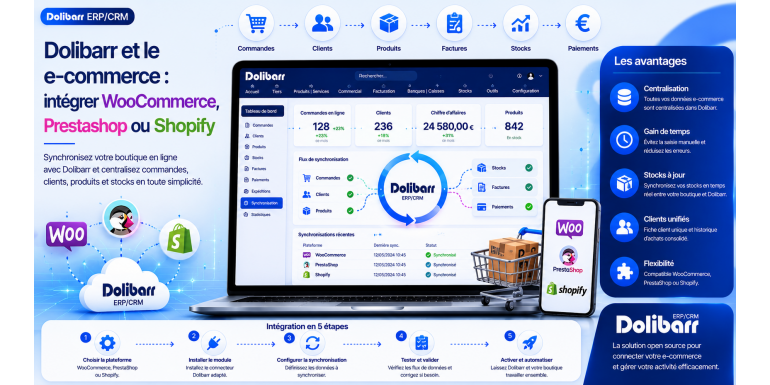
Dolibarr and e-commerce:
integrate WooCommerce, PrestaShop or Shopify
The 2026 comparative guide to connecting your online store to your open source ERP
E -commerce is experiencing explosive growth in France and worldwide. According to FEVAD, the French e-commerce market is projected to exceed €160 billion annually by 2025, with sustained double-digit growth. Whether you're an established e-tailer or just launching your business, managing your online activity presents numerous challenges: order tracking, real-time inventory management, invoicing, accounting, customer relations, and marketing. Without a centralized tool, you can quickly lose control of your online store, emails, Excel spreadsheets, and various sales channels.
This is precisely the role of an ERP like Dolibarr ERP & CRM : to centralize all your business data in a single system. But for this to work, your Dolibarr must be connected to your online store. Three platforms largely dominate the French e-commerce market: WooCommerce (the most widely used in the world, based on WordPress), PrestaShop (the French e-commerce champion), and Shopify (the leading international SaaS platform). Each has its own specific features, advantages, and integration methods with Dolibarr.
In this comprehensive guide, we'll explore in detail how to connect Dolibarr with each of these platforms. You'll discover the challenges of a successful integration, the tangible benefits for your business, the different integration methods available (dedicated modules, REST APIs, third-party tools like Zapier or Make), the specific features of each platform, the costs involved, the pitfalls to avoid, and best practices for successful implementation. Whether you're starting your e-commerce business or looking to optimize an existing store, this guide will give you all the keys to making the right choices and ensuring a successful integration.
Article summary
• Why integrate Dolibarr into your e-commerce business?
• Understanding the technical challenges of integration
• Comparative presentation of the three platforms
• Integrating Dolibarr with WooCommerce
• Integrating Dolibarr with PrestaShop
• Integrating Dolibarr with Shopify
• The different integration methods
• Synchronize products and catalogs
• Synchronize inventory in real time
• Automatically retrieve orders
• Manage invoicing and accounting
• Synchronize the customer database
• Detailed integration costs
• Common pitfalls to avoid
• Best practices and practical advice
• Conclusion
1. Why integrate Dolibarr into your e-commerce?
Before delving into the technical aspects, let's first understand the concrete benefits of integrating Dolibarr with your e-commerce platform. These benefits are often underestimated but can radically transform your business.
The end of double entry
Without integration, each order placed on your website must be manually re-entered into Dolibarr to generate the invoice, update inventory, and track payment. This double entry results in considerable wasted time (5 to 15 minutes per order) and errors (incorrectly copied references, wrong prices, omissions). With proper integration, each order is automatically imported into Dolibarr in seconds, without any human intervention.
Ensuring the reliability of stocks
One of the e-commerce merchant's nightmares is selling a product that's out of stock. A complaint, a refund, a dissatisfied customer leaving a bad review. With real-time integration, your Dolibarr inventory (your reference) is automatically synchronized with your online store's inventory. When an item is sold on the website, the stock is immediately decremented. When you receive a restock, the online store is updated.
The unified customer view
Your customers contact you through various channels: online purchases, email inquiries, phone calls, and even visits to your physical store. Without integration, each channel has its own perspective on the customer. With Dolibarr integration, you have a single customer record that consolidates all history: online orders, quotes, invoices, exchanges, and payments. It's a revolution for customer service.
Accounting automation
E-commerce sales generate revenue that needs to be recorded, VAT that needs to be declared, and payments that need to be reconciled. Without integration, this is a tedious and error-prone manual process. With Dolibarr connected, each sale automatically generates the corresponding accounting entries. VAT returns and annual financial statements are significantly simplified.
The time saved for development
Ultimately, the biggest benefit is the time you free up. With all the repetitive administrative tasks automated, you can dedicate your energy to what truly creates value: improving your product catalog, optimizing your marketing, nurturing customer relationships, and developing new products. For an e-commerce business, this is often the difference between stagnating and growing.
???? KEY FIGURE: Based on our experience, a successful Dolibarr integration saves an e-commerce merchant managing 50 to 200 orders per day an average of 10 to 20 hours per week. Over the course of a year, this is the equivalent of a full-time part-time job.
2. Understanding the technical challenges of integration
Before choosing a platform and integration method, it is necessary to understand the underlying technical issues. This understanding is essential for making the right choices.
Data streams to synchronize
A complete e-commerce integration involves several distinct data streams. Products: descriptive information, prices, images, categories. Inventory: real-time stock levels. Orders: purchases made on the website, including products, quantities, addresses, and payments. Customers: personal information, purchase history. Payments: transactions recorded by the payment system. Each of these streams can be synchronized independently, in one or both directions.
Unidirectional or bidirectional synchronization
One-way synchronization means that one system is the master and the other is the slave. For example, Dolibarr is the master for products and inventory (you manage everything in Dolibarr and the website copies it), and the website is the master for orders (sales are made on the website and copied to Dolibarr). This is generally simpler to implement. Two-way synchronization allows each system to modify data and synchronizes in both directions. It is more powerful but also more complex and riskier (potential conflicts).
Real-time or delayed synchronization
The synchronization rate is crucial. Real-time (instantaneous) means that as soon as an order arrives on the website, it appears in Dolibarr within a second. Ideal, but requires a robust infrastructure. Delayed synchronization (hourly, twice a day, etc.) is more economical but can cause problems: sales may occur while the displayed stock is still the old stock. The best compromise depends on your volume and the criticality of your orders.
REST APIs: the backbone
All modern integrations rely on REST (Representational State Transfer) APIs. An API is an interface that allows two software programs to communicate. WooCommerce, PrestaShop, and Shopify all offer REST APIs, as does Dolibarr. Integration essentially consists of enabling these APIs to communicate with each other, either directly or through an intermediary tool.
Performance and limitations
All APIs have limitations: maximum number of calls per minute, maximum response size, and latency. If your site processes 1,000 orders per day, a poorly optimized integration can quickly overload the APIs. Anticipate these constraints from the design stage: is real-time synchronization truly necessary, or can operations be grouped? Is a processing queue needed for peak loads? These technical questions are essential for a sustainable integration.
Security and confidentiality
The integration process handles sensitive data: customer information, payment details, and purchase prices. Security is paramount. Use encrypted connections (HTTPS), protected API keys (never in public code), and rigorous access controls. Also, consider GDPR compliance: customer personal data in transit must be protected and processed in accordance with regulations.
3. Comparative presentation of the three platforms
Before discussing specific integrations, let's take a look at the three platforms to better understand their philosophies and characteristics.
|
Criteria |
WooCommerce |
PrestaShop |
Shopify |
|
Kind |
Open source |
Open source |
Proprietary SaaS |
|
technical basis |
WordPress + PHP |
Standalone PHP |
Ruby (cloud) |
|
Monthly cost |
€0 (excluding accommodation) |
€0 (excluding accommodation) |
Starting at $29 |
|
Accommodation |
Self-hosted |
Self-hosted |
Included (cloud) |
|
Customization |
Very high |
High |
Limited |
|
Learning curve |
Moderate |
High |
Very easy |
|
Dolibarr Integration |
Official module |
Official module |
Via API/third-party tools |
|
global market share |
~28% |
~3% |
~10% |
|
Community |
Huge (WordPress) |
Active (French) |
Important |
|
Ideal profile |
Multipurpose micro-enterprises/SMEs |
Specialized e-commerce retailers |
Modern DTC brands |
WooCommerce in brief
WooCommerce is a free plugin that transforms a WordPress site into an online store. Its strength lies in its vast ecosystem (WordPress powers over 40% of the world's websites) and its complete flexibility thanks to the thousands of available plugins. It's the most popular solution in the world, particularly well-suited to very small businesses and SMEs that want a scalable store without significant recurring costs.
PrestaShop in brief
PrestaShop is a French-developed, open-source e-commerce platform, particularly popular with specialized online retailers and SMEs. More sophisticated and focused on pure e-commerce than WooCommerce, it natively offers numerous advanced features (multi-store management, multi-language support, multi-currency support, and granular inventory management). It's an excellent choice for online retailers seeking a dedicated and powerful solution.
Shopify in brief
Shopify is a turnkey SaaS platform and the world leader in hosted e-commerce. Its main advantage is its simplicity: everything is managed (hosting, security, performance, updates) in exchange for a monthly subscription and sales commissions. It is particularly popular with modern DTC (Direct-to-Consumer) brands, dropshippers, and e-commerce merchants who want to focus on business rather than technology.
4. Integrating Dolibarr with WooCommerce
As WooCommerce is the most widely used platform in the world, its integration with Dolibarr is one of the most mature and well-documented. Let's look at the different possible approaches.
The official Dolibarr-WooCommerce module
A dedicated WooCommerce integration module is available on the Dolistore. It enables complete bidirectional synchronization: products (descriptions, prices, images, categories) from Dolibarr to WooCommerce, real-time inventory in both directions, orders from WooCommerce to Dolibarr, customers from WooCommerce to Dolibarr, payments, and statuses. Prices range from €100 to €300 depending on the included features, sometimes with an annual subscription for updates.
Installation and configuration
Installation is a two-step process: first, install the module in Dolibarr (upload the ZIP file, activate it, and configure it), and then install the complementary plugin in WooCommerce (usually included with the Dolibarr module). Next, you need to enter the API keys and synchronization parameters: which elements to synchronize, how often, and in which direction. Initial setup typically takes 2 to 4 hours.
Configure the correspondences
One of the most delicate steps is mapping the concepts between Dolibarr and WooCommerce. Product categories, attributes (size, color), order statuses, payment methods, and shipping methods: all these elements exist on both platforms, but sometimes with different names and structures. Take the time to configure these mappings correctly to avoid surprises later.
Test with a pre-production environment
Before launching the integration into production, it is essential to test in a pre-production environment: a test WooCommerce site and a test Dolibarr installation. Validate each workflow (product creation, test sale, stock modification) before switching over. This precaution prevents production disasters.
Alternative plugins
Besides the official module, several third-party plugins exist to connect WooCommerce to Dolibarr. Some are free with basic features, others are paid with advanced features. Compare before choosing: consider the features covered, update frequency, quality of support, and user reviews. Avoid abandoned or poorly maintained plugins that may break with the next WordPress update.
Integration via REST API
For organizations with highly specific needs or an in-house developer, integration can be custom-built using the REST APIs of WooCommerce and Dolibarr. This is more expensive in terms of development time but offers complete freedom. Expect to pay between €5,000 and €20,000 for professional development, depending on the complexity.
???? RECOMMENDATION: For getting started, the official Dolibarr-WooCommerce module from Dolistore is the most balanced option. It covers the essential needs at a reasonable cost and benefits from regular support.
5. Integrating Dolibarr with PrestaShop
PrestaShop, like Dolibarr, is of French origin, and the integration between these two tools is particularly well-developed and benefits from an active French-speaking community.
The official Dolibarr-PrestaShop module
An official PrestaShop integration module is available on Dolistore, often considered one of the most mature and comprehensive platforms. It offers complete two-way synchronization covering all aspects: catalog, inventory, orders, customers, shipping carriers, and payment methods. The investment ranges from €150 to €400 depending on the version, typically including an annual subscription for support and updates.
PrestaShop specifics you should know
PrestaShop has a few specific features to consider: native multi-shop management, which may require specific configuration for Dolibarr; the system of product combinations and variations; customer groups with differentiated pricing; and the detailed management of carriers and shipping costs. The integration module must handle all these features correctly.
Install the PrestaShop module
The PrestaShop installation is done via the back office: Modules > Module manager > Upload a module. Once installed, the module requires configuration: your Dolibarr URL, API key, and selection of items to synchronize. On the Dolibarr side, you also install the add-on module and configure the connection settings.
Managing variants and variations
One of the critical points is the synchronization of products with variants (sizes, colors, etc.). In PrestaShop, these are called combinations. In Dolibarr, they are called variants. The mapping must be flawless to avoid confusion. Activate the Variants module in Dolibarr before configuring PrestaShop synchronization.
Synchronize languages and currencies
If your PrestaShop store is multilingual or supports multiple currencies, configure the mappings with Dolibarr. For each language or currency, the module synchronizes product labels, descriptions, and prices in the corresponding language/currency. This is an advanced but essential feature for international e-commerce businesses.
Alternative modules
Several alternatives exist on the Dolistore and the PrestaShop ecosystem: free modules with basic functionalities, modules from specialized developers, and custom developments. The French-speaking community is very active around PrestaShop-Dolibarr, which facilitates feedback and the sharing of solutions.
6. Integrate Dolibarr with Shopify
Since Shopify is a proprietary SaaS platform, its integration with Dolibarr differs from that of WooCommerce or PrestaShop. Let's look at the available approaches.
No official direct module
Unlike WooCommerce and PrestaShop, there isn't an official Dolibarr-Shopify module that's as mature and comprehensive. This is due to several reasons: since Shopify is SaaS, integration can only be done via API (no access to the code), and Shopify has its own app store (Shopify App Store) with specific rules. Therefore, integration requires alternative approaches.
Using the Shopify REST API
Shopify offers a very comprehensive and well-documented REST API. For a custom integration, it's the most powerful option. You (or a developer) write scripts that: retrieve orders from Shopify and create them in Dolibarr, synchronize Dolibarr inventory to Shopify, and update the catalog. Development costs between €5,000 and €25,000 depending on the complexity, but provides an integration perfectly tailored to your needs.
No-code tools: Zapier and Make
For moderate needs, no-code tools like Zapier or Make (formerly Integromat) allow you to connect Shopify and Dolibarr without coding. You visually configure "scenarios": "When a new order arrives on Shopify, create a customer and an invoice in Dolibarr." These tools are paid (10 to 50 euros per month depending on the volume) but avoid development costs.
The self-hosted n8n option
For a cost-effective alternative to Zapier, n8n is an open-source automation tool that you can self-host. It offers the same integration capabilities through a visual interface, but without recurring costs (just the hosting fee). It's a good option if you already have a server and basic technical skills. The learning curve is slightly steeper than Zapier's.
Shopify-ERP specialized modules
Some vendors offer specialized Shopify-Dolibarr modules or applications, sometimes available on the Shopify App Store or through integration providers. These solutions are generally paid (20 to 100 euros per month) but offer more advanced integration than no-code tools. Compare before choosing.
The case of multi-channel
If you sell on Shopify as well as other channels (Amazon, eBay, marketplaces, physical stores), multi-channel management platforms like Linnworks, Sellsy, or Mirakl can serve as a hub between all channels and Dolibarr. It's a more complex but essential approach for multi-channel e-commerce businesses.
???? WARNING: Shopify-Dolibarr integration is generally more expensive and complex than for WooCommerce or PrestaShop. If Dolibarr is central to your strategy, this factor may influence your choice of e-commerce platform.
7. The different integration methods
Beyond the specifics of each platform, several main integration methods exist. Understanding their advantages and disadvantages will help you choose the right approach.
Method 1: Dedicated Module
This is the simplest approach: a module is installed on one end, and the other manages all communication. Advantages: simple installation, vendor support, regular updates, and tested features. Disadvantages: dependence on the module vendor, sometimes limited functionality compared to a custom solution, and recurring support costs. This is the recommended option for 80% of cases.
Method 2: No-code tools (Zapier, Make, n8n)
You use an intermediary tool that handles everything. Advantages: user-friendly visual configuration accessible to non-developers, flexibility to adjust workflows, and the ability to integrate other tools (Slack, email marketing, etc.). Disadvantages: recurring cost (except for self-hosted n8n), sometimes significant latency, and dependence on a third-party tool. A good compromise for moderate needs.
Method 3: Custom Development
You (or a service provider) develop the integration using the REST APIs of both platforms. Advantages: perfect adaptation to your specific needs, optimized performance, independence, scalability. Disadvantages: high initial investment cost (€5,000 to €30,000), maintenance on your part, need for technical skills. Suitable for organizations with specific needs or large volumes.
Method 4: ETL or specialized middleware
For more complex organizations, middleware solutions (Talend, Mulesoft, Boomi) or integration platforms (iPaaS) can manage the data flows between Dolibarr, e-commerce, and any other systems. Advantages: power, scalability, and granular error handling. Disadvantages: significant cost, complexity, and a steep learning curve. Suitable for large organizations only.
Method 5: Manual synchronization via CSV
The most basic method: you regularly export orders from the website as a CSV file and import them into Dolibarr. Advantages: no cost, no technical complexity. Disadvantages: very time-consuming, prone to errors, no real-time data. Suitable only for very small businesses with a maximum of a few orders per month.
Choosing the right method
The choice depends on several factors: order volume (below 50/day, a module is sufficient; above that, consider a custom solution), initial vs. recurring budget (custom = large initial cost, low recurring costs; modules = small initial cost, moderate recurring costs), available technical skills (without a developer, stick to modules or no-code tools), and specific business needs (very particular requirements = custom solution). For most French e-commerce businesses, a dedicated module remains the best option.
8. Synchronize products and catalogs
Product synchronization is usually the starting point for integration. Let's look at best practices to ensure a smooth process.
Which system is dominant?
The first fundamental question is: who is the master for the products, Dolibarr or the e-commerce site? Recommendation: Dolibarr as the master. You manage your catalog in Dolibarr (creation, modification, pricing, descriptions), and the site synchronizes. This centralized approach is simpler and avoids conflicts. Conversely, if you have several people who are only comfortable with WordPress, you can choose the site as the master.
Information to synchronize
For each product, several pieces of information need to be synchronized: name and title, short description (summary), long description (rich HTML), price excluding and including VAT, VAT rate, EAN barcode, weight and dimensions (to calculate shipping costs), images (several per product), categories, attributes and characteristics, and status (active/inactive). Configure precisely what should be synchronized to avoid any surprises.
Manage product images
Image synchronization is often a challenge because the files are large. Several approaches exist: synchronizing only new images (incremental synchronization), performing the initial synchronization and then leaving the images alone, or managing images only on the website side (Dolibarr only synchronizes references). Choose according to your visual update frequency.
Category mapping
Product categories must match between Dolibarr and the website. If your categories in Dolibarr are "Clothing > Sweaters > Men's Sweaters," they must exist identically on the website. First, create the category structure in the master system, then ensure it is replicated exactly in the other system. Any discrepancies will result in incorrectly categorized products.
Initialize synchronization
Initialization is the riskiest step: you have products in Dolibarr and products on the website, how do you link them? Several strategies exist: matching by product code (the most reliable, provided you have consistent unique codes), matching by EAN barcode (reliable for products with an EAN), and manual matching product by product (laborious but secure). Allocate sufficient time for this initial phase.
Test with a small number
Before synchronizing 5,000 products, test with 5 or 10. Verify that all information is correctly transferred, images display correctly, categories are accurate, and prices are preserved (rounded or not). Once validated on the sample, confidently launch the full synchronization.