
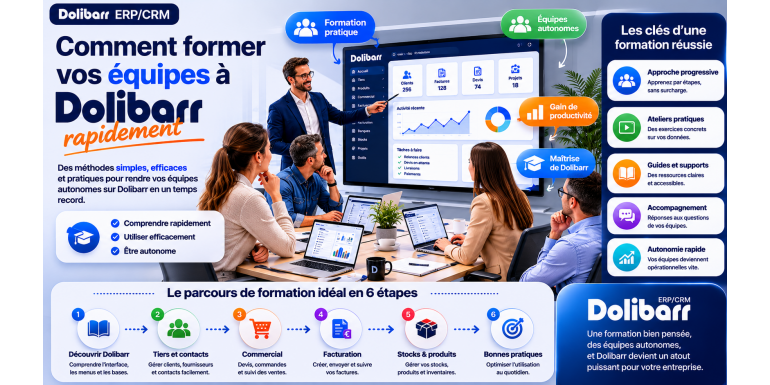
How to quickly train your teams on Dolibarr
The 2026 practical guide for effective skills development for your employees
You've decided to adopt Dolibarr ERP & CRM to manage your business: excellent decision! But once the software is installed and configured, a major challenge awaits: training your teams to use it effectively . This step, often underestimated by managers, is nevertheless crucial to the success of your ERP project. Without proper training, even the best software in the world will be misused, or even rejected by employees. Conversely, a well-trained team can get the most out of Dolibarr in just a few weeks.
The challenge is significant: how to quickly train your employees without disrupting operations, without exceeding the training budget, and while ensuring that everyone acquires the necessary skills for their role? Should you prioritize self-directed learning, use an external trainer, or create internal training materials? How do you manage resistance to change? How do you measure the effectiveness of the training? There are no one-size-fits-all answers to these questions: the right strategy depends on your specific context , the size of your team, the profiles to be trained, and your budget.
In this practical guide, we present a comprehensive methodology for training your teams on Dolibarr quickly and effectively. You will discover how to identify the right user profiles and their needs, how to choose between different training approaches, how to structure an effective training program, how to create materials tailored to your company, how to manage change and resistance, and how to measure the success of your training. Whether you are the head of a very small business with 2-3 employees to train or the HR manager of a small or medium-sized enterprise with 20 users, you will find the best practices here to successfully complete this crucial step.
Article summary
• Why training is crucial for Dolibarr success
• Identify the user profiles to be trained
• Define the skills to be acquired by profile
• The different training approaches
• Self-study vs. guided training
• Create an effective training program
• Prepare appropriate training materials
• Facilitating training sessions
• Managing change and resistance
• The key role of internal ambassadors
• Measuring the effectiveness of training
• Budgets to plan for
• Conclusion: 7-step action plan
1. Why training is crucial for Dolibarr success
Before diving into the methodology, let's understand why team training is one of the most crucial factors in the success of a Dolibarr project. This understanding will help you give this step the priority it deserves.
The gap between potential and actual use
Dolibarr is an extremely feature-rich software. It offers dozens of modules, hundreds of functionalities, and thousands of possible settings. Without proper training, your employees will only use 10 to 20% of the software's capabilities. They will find workarounds to do what they don't know how to do in Dolibarr (reverting to Excel, creating parallel files), they will miss out on features that would save them time, and they will accumulate frustrations with a tool they don't master.
The hidden cost of not investing in training
Many managers view training as a cost to be minimized. This is a strategic mistake. Without training, you pay another, much higher cost: lost productivity due to trial and error, data entry errors that pollute your information, the time you yourself spend answering questions, and demotivated teams faced with a poorly mastered tool. These hidden costs quickly exceed what you would have invested in initial training.
The adoption or rejection of the software
Training directly influences user adoption of the software. A well-trained team quickly adopts Dolibarr and even becomes an advocate. A poorly trained team resists change, finds excuses not to use the tool, and can even cause the project to fail completely. According to several studies on ERP projects, user buy-in is the number one success factor, ahead of the quality of the software itself.
Data reliability
An ERP system is only as good as the quality of the data entered into it. A poorly trained employee will enter data incorrectly, omit information, and put the correct data in the wrong places. Over time, your database will become an unmanageable mess. With proper training, everyone understands the importance of each field, adheres to conventions, and contributes to maintaining a clean and usable database.
Return on investment
Investing a week of training for a team of five typically costs between €2,000 and €5,000. If this training allows each employee to save two hours per week thanks to improved skills, this represents 520 hours per year for the team, equivalent to a value of €30,000 to €50,000. The ROI often exceeds 1,000% in the first year. No other business investment offers such a return.
???? KEY FIGURE: According to several studies, every euro invested in ERP training yields between 10 and 50 euros in the first year, thanks to increased productivity and reduced errors.
2. Identify the user profiles to be trained
Before training, you need to know who to train and for what purpose. This preliminary analysis structures your entire training plan.
Auditing future users
Start by listing all the employees who will need to use Dolibarr, even occasionally. For each one, note: their current position, their main responsibilities, their general IT skills, their willingness to adapt to change, and any experience they may have with another ERP system. This audit often reveals surprises: some you hadn't considered needing Dolibarr, while others can manage without it.
Typical profiles
In most companies, you'll find a few recurring profiles with distinct needs. The executive or manager needs dashboards, statistics, and approval processes. The salesperson needs CRM, quotes, and customer tracking. The administrative staff needs invoicing, payments, and reminders. The accountant needs accounting, journal entries, and tax returns. The warehouse worker or logistics specialist needs inventory management, receiving, and shipping. The technician or field service representative needs intervention tracking and expense reports.
Adjust the scope by profile
Not every user profile needs to know everything about Dolibarr. A salesperson doesn't need to understand cost accounting. An accountant doesn't need to master the inventory module. This differentiation of needs is essential to avoid unnecessarily overloading training programs. Clearly define the functionalities required by each profile and focus the training on those specific areas.
Identify the levels
Beyond the job profile, several levels of proficiency are required: basic user (consults information, may be able to enter basic data), advanced user (uses daily, masters the functionalities relevant to their role), super-user or expert (trains others, manages settings, resolves problems), administrator (manages permissions, modules, infrastructure). Each level requires different levels of training in terms of depth and duration.
Take into account individual characteristics
Beyond typical profiles, each person has their own unique characteristics. A 25-year-old salesperson comfortable with computers will learn faster than a 60-year-old accountant resistant to change. Adapt the pace and approach to each individual's personality. For those who are more resistant, plan for longer, more personalized support. For those who are more comfortable with technology, give them autonomy and make them key contacts.
3. Define the skills to be acquired by profile
For each identified profile, precisely define the skills to be acquired. This detailed list structures the training content.
The common core for all
Regardless of their background, certain skills are essential for all users: logging into Dolibarr and navigating the interface, understanding the menu structure, searching for information (third parties, invoices, products), modifying personal preferences, managing passwords, and understanding document statuses (draft, validated, etc.). This core curriculum only takes 1-2 hours to teach but prevents countless minor misunderstandings.
Salesperson skills
For a salesperson, key skills to acquire include: creating and qualifying leads, managing sales opportunities, creating detailed quotes, sending quotes by email from Dolibarr, tracking quote status (pending, signed, rejected), converting quotes into invoices, viewing complete customer history, using the calendar to schedule appointments, and leveraging sales statistics. Typical training duration: 4 to 8 hours.
Administrative and invoicing skills
For administrative profiles: create and validate invoices, configure payment terms, record received payments, manage customer reminders, process credit notes, create and update third-party records, manage associated contacts, send emails from Dolibarr, generate exports and reports. Typical duration: 6 to 10 hours.
Accountant's skills
For an accountant: setting up the chart of accounts, transferring invoices to accounting, performing bank reconciliations, generating VAT returns, editing the general ledger and trial balance, producing the FEC file, managing opening balance entries, and closing the fiscal year. This is the most technically focused profile; training duration: 10 to 20 hours.
Warehouse worker skills
For inventory management: record goods receipts, scan barcodes, manage stock withdrawals, process inter-warehouse transfers, conduct inventories, manage alert levels, and track valuations. Typical duration: 4 to 8 hours.
The skills framework
Formalize all of this in a structured document: a table with skills in rows, profiles in columns, and the required level (to know, to master, to teach to others) in each cell. This framework serves as a compass throughout the training project and allows you to measure each individual's progress.
4. The different training approaches
Several training approaches exist, each with its own advantages and disadvantages. The best strategy often combines several approaches.
Self-training through documentation
First approach: let users explore Dolibarr using the official documentation (Dolibarr.org wiki) and online tutorials. Advantages: free, self-paced, no time constraints. Disadvantages: very time-consuming, requires a high degree of autonomy, not well-suited to users with limited technical skills, risk of uncorrected learning. Recommended only for independent and motivated users.
Video tutorials
Second approach: use the numerous video tutorials available on YouTube or specialized platforms. Advantages: visual and practical, on-demand, inexpensive or free. Disadvantages: variable quality, not always up-to-date with your version, general and therefore not tailored to your specific settings. A useful supplement but rarely sufficient on its own.
In-house training by a designated expert
Third approach: designate an internal mentor (often yourself initially) to train colleagues. Advantages: in-depth knowledge of the company and its processes, cost-effective, gradual knowledge transfer. Disadvantages: requires a significant time commitment from the mentor, depends on their own expertise, may transmit errors or inaccuracies. Well-suited to small organizations with an involved manager.
Training by an external consultant
Fourth approach: bring in a Dolibarr consultant to train the team. Advantages: specialized expertise, a fresh perspective on your practices, professional training methods, and significant time savings. Disadvantages: cost (1,000 to 3,000 euros per day), and the need to thoroughly brief the consultant. This is an excellent solution for teams of more than 5 people or for complex needs.
E-learning training
Fifth approach: using e-learning platforms offering structured Dolibarr training. Advantages: structured, professional, sometimes certified, accessible at any time. Disadvantages: less interactive than in-person training, variable costs, not always tailored to your specific needs. A good compromise for organizations with standard requirements.
Blended learning
The sixth approach, often the most effective, is to combine several methods. For example: e-learning for the basics (self-directed), face-to-face training for practical application (consultant-led), video tutorials for refresher courses (on demand), and an internal contact person for day-to-day questions. This diversity of approaches accelerates learning and adapts to different learning styles.
???? RECOMMENDATION: For most very small and small businesses, the combination of "consultant training to get started + an internal mentor for ongoing support" offers the best cost-effectiveness. Invest 2-3 days of consultant time at the start, then build on that with an internal mentor.
5. Self-directed learning vs. guided training
The big dilemma: should we prioritize self-training to save money, or invest in guided training? Let's analyze the decision criteria.
Arguments for self-education
Self-directed learning offers real advantages: minimal cost (just the time of employees), complete flexibility in pace and schedule, learning through real-world practice, and independence from an external provider. It's the natural option for small businesses where the manager is also a user and has the time to explore.
The limitations of self-education
However, self-training also has significant limitations: it takes considerably longer (2 to 5 times longer than with a trainer), there's a risk of undetected errors in learning, user frustration due to roadblocks, a lack of methodology, and the impossibility of transmitting tacit best practices. For many users, self-training results in a partial and makeshift use of the software.
When self-education is enough
Self-training may suffice if: your team is small (1 to 3 people), your needs are basic (simple invoicing, no advanced accounting), your employees are comfortable with computers and work independently, you have time (no pressure to use Dolibarr quickly), and you are willing to develop your skills over several months. Otherwise, guided training is far preferable.
The benefits of supported training
Professionally guided training offers: structured learning, early identification of best practices, significant time savings (learning is 3 to 5 times faster), immediate correction of bad habits, sustained motivation through group dynamics, and post-training support for any remaining questions. For every 5 people trained in 2 days, the equivalent in self-study would easily take 1 to 2 months.
Calculating the return on investment
Let's do the math. Consultant training at €1,500 per day for a team of 5 people costs €3,000 to €4,500 over 2-3 days. Without training, each user will spend approximately 40 hours learning on their own, totaling 200 hours for all 5 people. At €30 per hour of uploaded time, that represents €6,000 in wasted time. And that doesn't even include the mistakes made during this learning period. The training pays for itself very quickly.
The gradual approach
A good intermediate option is to start with guided initial training to get off to a good start, then switch to self-study for more advanced topics. This approach combines a quality start with long-term cost savings. The initial training instills good habits, and subsequent training can be managed internally with less risk.
6. Create an effective training program
Regardless of the approach chosen, a structured program significantly accelerates learning.
Basic pedagogical principles
Several principles significantly improve training effectiveness: prioritize practice over theory (doing rather than watching), proceed in progressive stages (from simple to complex), repeat key exercises to solidify automatic responses, contextualize with real-world business examples from the company, and vary the pace to maintain attention. Good training is not a long monologue but a series of structured exercises.
The 70-20-10 rule
This well-known rule in professional training states that 70% of learning comes from on-the-job practice, 20% from interactions with peers and mentors, and 10% from formal training. This means that in-person or online training represents only a small part: the bulk of the learning happens through daily use of Dolibarr, by exchanging ideas with colleagues, and by asking questions of the expert. Your program must incorporate these three dimensions.
Divide into short modules
Rather than a marathon one-day training session, opt for several short sessions (1 to 2 hours) spread over 1 to 2 weeks. Advantages: less tiring, better assimilation, the possibility of applying the material between sessions, and the potential for adjustments based on feedback. An 8-hour training course divided into four 2-hour sessions is far more effective than one intensive day.
The typical 2-week program
Here is an example of a typical program for training a team of 5 people:
• Day 1 (2 hours): common core - getting to grips with the interface, navigation, search.
• Day 2 (2 hours): Third-party management - creation, modification, search, categorization.
• Day 3 (3 hours): creating a quote - practical exercises with real business cases.
• Day 5 (2 hours): Invoicing - from creation to payment, including credit notes.
• Day 7 (2 hours): feedback after a week of practice, questions, adjustments.
• Day 10 (3 hours): Advanced features specific to each profile.
• Day 14 (1 hour): overall review, validation of acquired skills, continuous support plan.
Plan for practical exercises
For each session, plan practical exercises: "create a quote for client X with these 3 services," "invoice order Y in two installments," "record the payment for invoice Z received yesterday," etc. The closer the exercises are to real-world situations, the more effective the learning. Use actual company data (anonymized if necessary).
Post-training follow-up
Training doesn't end on the last day. Plan for structured follow-up: availability of the trainer or mentor for the first few weeks, weekly team meetings to share challenges, a documented and regularly updated FAQ, and a debriefing session one month later to make adjustments. Without this follow-up, much of the learning is lost when returning to work.
7. Prepare appropriate training materials
Well-prepared training materials multiply the effectiveness of learning and serve as a lasting reference for users.
The internal user guide
The central resource is the internal user guide, tailored to your company. This document, specific to your installation, details the procedures: how to create a quote WITH US (using your templates, references, and practices), how to invoice WITH US, and how to manage payment reminders WITH US. This guide is far more useful than the generic official documentation. Recommended format: a 20- to 50-page PDF with numerous screenshots.
Short procedure sheets
In addition to the guide, create short fact sheets (1 to 2 pages) for frequently used procedures: "Creating a quote in 5 steps," "Recording a payment," "Issuing an invoice." These concise fact sheets are perfect for quick daily reminders. Display them near workstations or create a shared folder.
Internal video tutorials
For complex or particularly important procedures, create short videos (3 to 5 minutes maximum) demonstrating the action on screen. Tools like OBS Studio, Loom, or Camtasia make it easy to create these videos. Videos are especially effective for visual learners and allow them to review a procedure as many times as needed.
The internal FAQ
Gradually compile a FAQ with frequently asked questions from your colleagues: "How do I cancel an invoice that's already been approved?", "What should I do if the customer paid in two installments?", "How do I delete a product created in error?". This FAQ will grow over time and become a goldmine for users. Host it on your intranet or a shared wiki.
The job glossary
Dolibarr uses specific vocabulary that can sometimes be confusing: third parties, writing, again, ventilation, etc. Create a short glossary that defines these terms in clear language, with concrete examples. This glossary will be particularly helpful for newcomers or those unfamiliar with ERP jargon.
Visual aids in training
For training sessions, prepare visual aids: a structured PowerPoint presentation, explanatory diagrams of the processes, and printed examples (sample quotes, sample invoices). These materials facilitate knowledge transfer and serve as a reference after the training. Avoid overloading the presentation: one idea per slide.
???? TIP: Invest time in creating good training materials: these are "training courses that can be replicated endlessly." A good user guide will be useful for years to come, helping each new user and saving considerable time.
8. Facilitate training sessions
The quality of the facilitation directly impacts the effectiveness of the learning. Here are the key principles for successful sessions.
Prepare each session
Improvised training yields mediocre results. For each session: prepare a timed schedule (10 minutes of theory, 30 minutes of practice, 10 minutes of questions, etc.), test the exercises in advance, prepare the environment (workstations, login credentials, test data), and anticipate likely questions. This preparation takes time but prevents problems during the session.
Start with the objectives
At the beginning of each session, clearly state the objectives: "By the end of this session, you will know how to create a complete quote and send it to a client." This clarity gives meaning to the learning and motivates participants. Without explicit objectives, learners don't know where they are going and lose focus.
Prioritize "doing with"
The worst teaching approach is passive demonstration (the trainer does it, the others watch). Conversely, "learning by doing" is very effective: the trainer demonstrates a step, then each participant replicates it at their workstation. This immediate practice reinforces learning and allows for the immediate identification of difficulties. Provide one workstation per learner; this is non-negotiable.
Managing rhythms
Not all learners progress at the same pace. To manage this diversity: provide extra exercises for faster learners ("bonus"), offer individual support to slower learners, don't hesitate to take breaks if concentration wanes, and alternate between theory and practice. A session rigidly structured at a single pace will leave either the faster learners (who get bored) or the slower learners (who lose focus).
Encourage questions
Many learners hesitate to ask questions for fear of judgment. Create an environment where questions are welcome: "There are no stupid questions," "If you're wondering, others are too," "It's normal not to understand; it's new." This supportive approach encourages open discussion and reveals real difficulties.
Documenting the returns
During and after the sessions, note recurring questions, difficulties encountered, and suggestions from participants. This feedback fuels continuous improvement: adjusting materials, adding points to the FAQ, and modifying Dolibarr settings if necessary. This feedback loop makes the training increasingly relevant over time.
9. Managing change and resistance
Any introduction of new software generates resistance. Anticipating and managing this resistance is essential to the project's success.
Understanding the sources of resistance
Resistance is normal and understandable. It stems from several sources: fear of the unknown ("I used to be able to do it, now I'm lost"), fear of failure ("I'll never manage it"), attachment to old tools ("my Excel worked perfectly well"), perceived overload ("I already have too much work"), and distrust of management ("we're being forced to change again"). Identifying the source allows you to find the right solution.
Communicate in advance
The classic mistake: announcing the project just before implementation. Instead, communicate several weeks or even months in advance: why this change, what benefits are expected, what the plan is, and what support will be provided. The more employees understand the rationale, the stronger their buy-in will be. This communication can take the form of meetings, emails, or a dedicated section on the intranet.
Involve users from the design stage
Rather than imposing a finalized Dolibarr version, involve representative users from the initial setup phase. Gather their needs, constraints, and ideas. This collaborative approach transforms potential opponents into allies. Those who contributed to designing the tool are always more likely to adopt it than those on whom it is imposed.
Valuing ambassadors
Identify the most enthusiastic or technically skilled employees and value their role: they become mentors for their colleagues. This group dynamic is powerful: peers often have more credibility than managers. Give them the resources they need to fulfill their mission: in-depth training, dedicated time to support colleagues, and recognition of their role.
Providing individual support to those who are most reluctant
For those who are particularly reluctant, don't force the issue in group meetings. Offer individual, ongoing support. Understand their specific concerns, patiently demonstrate the benefits, and celebrate initial successes. This personalized approach is more time-consuming but prevents outright rejection. Often, those most hesitant at the start become the most convinced once they overcome the initial hurdle.
Celebrating successes
As adoption progresses, celebrate successes: the first invoice issued in Dolibarr, the first month without data entry errors, measurable time savings, positive customer feedback. These celebrations, even modest ones, reinforce positive momentum and reassure employees that they made the right decision to commit. An email to the whole team, a shared breakfast, a mention in a meeting: whatever the form, the important thing is to mark the occasion.
10. The key role of internal ambassadors
Internal ambassadors (also called super-users or experts) are employees who are particularly proficient in Dolibarr and act as intermediaries for others. Their role is central.
Why have ambassadors?
There are several benefits to investing in ambassadors: they are easily accessible (in the next office rather than an external consultant), they have in-depth knowledge of the company's practices, they facilitate peer-to-peer knowledge transfer (often more effective), they free up your time as a manager or board member, and they maintain momentum over the long term. Without ambassadors, you remain the sole point of contact for any questions, which quickly becomes unmanageable.
Identify the right profiles
Who should be chosen as an ambassador? Several criteria: technically proficient (but not necessarily an expert), good at explaining things to others, empathetic (doesn't judge naive questions), respected by their peers (colleagues trust them), and motivated by the project (not forced). Ideally, one ambassador per department or profession to represent the different profiles.
Intensive training for ambassadors
Ambassadors require more in-depth training than standard users: complete mastery of their reference module, understanding of settings, ability to diagnose common problems, and knowledge of the official documentation to find information. Expect 2 to 4 days of training for an ambassador, compared to 1 to 2 days for a standard user.
Define their mission
Formalize the ambassador's role: answering colleagues' questions (priority), supporting newcomers, reporting issues to the administrator, suggesting improvements, and facilitating regular sharing sessions. This role should be officially recognized: it represents time taken from their primary work, which should be valued.
Engaging the ambassador community
If you have multiple ambassadors, foster a dynamic among them: monthly meetings, a dedicated discussion group (Slack, Teams), ongoing training, and sharing of questions and solutions. This internal community is extremely valuable: ambassadors support each other, share tips, and collectively develop their skills.
Recognize their contribution
Ambassadors dedicate their time to the community: recognize this contribution. This can take many forms: formal recognition of their role, paid training, certification, a one-time bonus, or career advancement. Without recognition, their motivation quickly wanes. With proper recognition, they become long-term pillars of the project.
11. Measure the effectiveness of the training
"What is not measured is not improved." Measuring the effectiveness of your training program allows you to adjust it and justify the investment.
Level 1: Satisfaction
Immediately after each session, gauge participant satisfaction: Did they find the training useful? Was the pace appropriate? Was the trainer a good teacher? Were the materials clear? A simple 5-question survey is sufficient. Note: satisfaction doesn't measure actual effectiveness, only the perceived level of learning. A participant can be very satisfied without having actually learned anything.
Level 2: Prior knowledge
More relevant is to measure what learners have actually retained. This can be done through a practical test ("create a quote in Dolibarr following our rules"), a written quiz, or a demonstration. The test should be administered a few days after the training to avoid measuring only immediate memory. Comparing before and after training is even more revealing.
Level 3: Behavior
Is the learner actually using Dolibarr as taught? This is assessed a few weeks after the training, in the field: direct observation, audit of data entry, and feedback from colleagues. This is the most important level: learning is pointless if it isn't applied in practice. If behavior doesn't change, there's a problem (resistance, forgetfulness, unfavorable circumstances).
Level 4: Business Results
The ultimate goal: does the training produce measurable business results? Reduced average billing time, lower data entry error rate, decreased administrative time, improved customer satisfaction. These concrete indicators justify the ROI of the training and guide future investments. Measuring these results requires defining KPIs before the training and monitoring them afterward.
Indicators to monitor
Some easy-to-track, concrete indicators include: the number of active users in Dolibarr, the number of support tickets submitted to the designated contact person, the average time to complete a task (creating quotes, invoicing), the data entry error rate, and feedback from the team (through periodic surveys). Monitoring these indicators over time shows progress and allows for adjustments if momentum slows.
The 3 and 6 month progress report
Conduct formal assessments 3 and 6 months after the initial training: Where are we now? What are the strengths? What are the obstacles? What needs adjusting? These assessments allow you to adjust your strategy: supplement the initial training with specific modules, strengthen ambassador support, communicate differently, etc. Without these assessments, problems are discovered too late.
12. Budgets to be planned
How much does it really cost to train a team in Dolibarr? Here is a realistic overview depending on the approaches chosen.
Minimum budget: self-study alone
Direct cost: