
1. Introduction
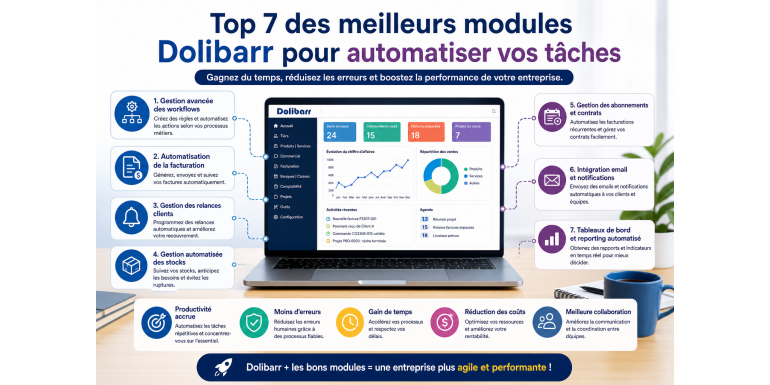
Task automation has become a key priority for companies looking to improve productivity, reduce costs, and increase operational efficiency. In an environment where business processes are becoming increasingly complex, managers are seeking solutions that can simplify daily operations while ensuring better data reliability. This is precisely where open-source ERP systems like Dolibarr ERP CRM stand out. Thanks to its modular architecture, Dolibarr allows easy integration of specialized modules capable of automating a wide range of repetitive tasks. In this article, we will explore in detail the 7 best Dolibarr modules that help automate your business processes and optimize your company management.
2. Why Automate Your Tasks with Dolibarr
Before exploring the modules, it is important to understand why automation has become essential. Manual tasks consume time, increase the risk of errors, and slow down decision-making. Automation helps standardize processes, improve team productivity, and ensure better traceability of operations. Dolibarr provides a strong foundation for automation through modules that can be activated according to specific business needs. This allows companies to precisely align the ERP system with their performance objectives.
3. Module 1: Advanced Workflow Management
The first essential module for automating your processes is workflow management. This type of module allows you to define automatic rules that trigger actions based on specific events. For example, when an order is validated, an invoice can be automatically generated and sent to the customer. Workflows also allow automation of internal approvals, notifications, and status updates. This module is particularly useful for companies aiming to structure their internal processes and reduce manual interventions.
4. Module 2: Automated Invoicing
Invoicing is an essential but often repetitive task. An automated invoicing module allows you to generate invoices automatically from orders, contracts, or subscriptions. It can also send invoices by email and track payments in real time. This type of module significantly reduces human errors and speeds up the billing cycle. It directly contributes to improving the company’s cash flow.
5. Module 3: Customer Reminder Management
Tracking payments is often time-consuming for administrative teams. An automatic reminder module allows you to send payment reminders to customers in case of delays. Reminders can be scheduled based on specific timeframes and customized according to customer profiles. This automation improves receivables collection and reduces payment delays, directly impacting profitability.
6. Module 4: Automated Inventory Management
Inventory management is a key element of operational performance. An advanced module allows automation of stock movements, restocking alerts, and inventory processes. It can also anticipate needs based on past sales data. This automation helps avoid stock shortages and reduce overstocking costs. It also improves data accuracy and customer satisfaction.
7. Module 5: Subscription and Contract Management
For companies offering recurring services, a subscription management module is essential. It allows automation of recurring invoice generation, contract renewals, and deadline tracking. This module ensures smooth management of recurring revenue and reduces administrative workload related to periodic billing.
8. Module 6: Email Integration and Automated Notifications
Communication is a key aspect of business processes. An email integration module allows automatic sending of notifications to customers and team members. It can be used to inform about status changes, approvals, or important deadlines. This automation improves team responsiveness and enhances customer satisfaction.
9. Module 7: Automated Dashboards and Reporting
Decision-making relies on data analysis. An automated reporting module allows you to generate reports and dashboards in real time. Key performance indicators are updated automatically, enabling managers to monitor performance without manual intervention. This automation facilitates strategic decision-making and improves overall business management.
10. Impact of Automation on Productivity
Integrating these modules into Dolibarr can significantly transform work organization. Teams can focus on high-value tasks instead of repetitive operations. Automation reduces errors, accelerates processes, and improves service quality. It also enhances collaboration between different departments within the company.
11. Cost Reduction Through Automation
One of the main benefits of automation is the reduction of operational costs. By limiting human intervention, companies reduce the risk of errors and the costs associated with corrections. In addition, process optimization saves time and improves overall efficiency. Dolibarr, through its modules, provides a cost-effective solution to achieve these goals.
12. Improved Quality and Reliability
Automation ensures greater consistency in processes and higher data reliability. Since actions are executed automatically based on predefined rules, the risk of errors is significantly reduced. This improves service quality and strengthens customer trust.
13. Adaptability to Business Needs
One of Dolibarr’s major strengths is its flexibility. Modules can be added or removed depending on business needs. This adaptability allows the ERP system to evolve alongside company growth and specific requirements. Businesses can therefore build a tailored system.
14. Return on Investment of Modules
Investing in automation modules quickly pays off. Productivity gains, cost reductions, and improved management lead to a rapid return on investment. Companies that adopt these solutions typically see significant improvements in performance.
15. Conclusion
Task automation is a crucial lever for improving business performance. Thanks to Dolibarr modules, it is possible to automate a large number of processes and optimize daily management. The modules presented in this article represent the best solutions to transform your ERP into a powerful and efficient tool. By adopting these modules, you can enhance productivity, reduce costs, and strengthen your competitiveness in the market.