
1. Introduction
In the world of business management software, the promise of “free” solutions attracts many companies, especially SMEs and startups looking to control costs while benefiting from powerful tools. Among the most popular options, Dolibarr ERP CRM is often presented as a free and open-source ERP. But is it truly free? Or are there hidden costs that companies need to anticipate? This article aims to answer this question in depth by analyzing the real cost of Dolibarr and, more broadly, open-source solutions. We will explore financial, technical, and strategic aspects to help you determine whether Dolibarr is genuinely free and, more importantly, whether it is cost-effective for your organization.
2. What Is Open-Source Software
Before discussing costs, it is important to understand what open-source software means. Open-source software is a program whose source code is freely accessible. This means anyone can use, modify, and distribute it. This philosophy is based on transparency, collaboration, and freedom of use. However, open source does not necessarily mean completely free in every aspect. It is important to distinguish between the license cost, which is usually zero, and the operational costs associated with using the software.
3. Is Dolibarr Free to Install
Yes, Dolibarr is free to download and install. Unlike many proprietary ERP systems, there is no license fee required to use the base version. This represents a significant advantage for companies that want to get started quickly without a large initial investment. This free access is one of Dolibarr’s strongest selling points, especially when compared to solutions like SAP ERP or Microsoft Dynamics 365, which require costly subscriptions.
4. Hidden Costs of Open Source
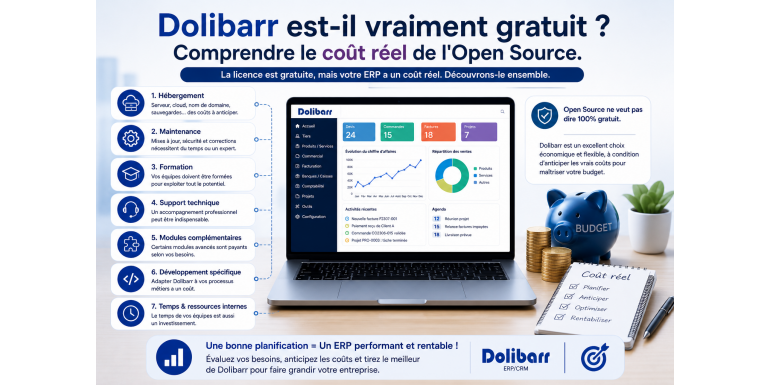
Even though the software itself is free, using it involves indirect costs. These costs are often underestimated during the initial decision-making process. They include hosting, maintenance, training, technical support, and custom development. Understanding these costs is essential to accurately evaluate Dolibarr’s overall value.
5. Hosting Costs
To use Dolibarr, you need to host it on a server. This can be either an internal server or a cloud-based solution. In both cases, there is a cost involved. Hosting expenses vary depending on the size of your business and the volume of data. A small company may have minimal costs, while a larger organization may require a more robust and expensive infrastructure.
6. Maintenance Costs
An ERP system requires regular maintenance to ensure proper operation. This includes updates, bug fixes, and system security. If you have an internal technical team, this cost may be absorbed into your payroll. Otherwise, you will need to rely on external service providers, which adds to your expenses.
7. Training Costs
Even though Dolibarr is known for its simplicity, training is often necessary for optimal use. Users need to learn how to use features, configure the system, and analyze data effectively. This training can be conducted internally or through external providers, but it represents both a time and financial investment.
8. Technical Support Costs
Unlike proprietary solutions, technical support is not always included with open-source software. To benefit from professional support, companies often need to subscribe to paid services or hire experts. The cost depends on the level of support required and the complexity of your system.
9. Cost of Additional Modules
Dolibarr operates with a modular system. While some modules are free, others are paid. These modules add specific functionalities tailored to business needs. Their cost varies depending on complexity and the developer. In some cases, purchasing multiple modules can represent a significant investment.
10. Cost of Custom Development
Every company has unique requirements. It is often necessary to develop custom features to align the ERP with your business processes. This development can be done internally or outsourced to a service provider. In both cases, it represents a significant cost but ensures a tailored solution.
11. Cost of Time and Internal Resources
Using an ERP system requires time and human resources. Teams must dedicate time to system management, data entry, and analysis. This time represents an indirect cost that must be considered in the overall evaluation.
12. Comparison with Proprietary ERP Systems
Proprietary ERP systems often have higher license costs but usually include support, maintenance, and updates. Dolibarr, on the other hand, offers greater flexibility but requires more autonomy in management. The choice between open source and proprietary solutions depends on your strategy and available resources.
13. Return on Investment of Dolibarr
Despite these costs, Dolibarr remains a highly cost-effective solution. The absence of license fees significantly reduces the initial investment. Additionally, its flexibility allows companies to scale expenses according to their needs. Businesses can start with a basic setup and gradually expand.
14. Which Companies Benefit Most from Dolibarr
Dolibarr is particularly well-suited for SMEs, startups, and associations with limited resources. It allows them to benefit from a complete ERP system without heavy upfront costs. However, for large organizations with complex processes, indirect costs may be higher.
15. Conclusion
Dolibarr is indeed free in terms of licensing, but its use involves indirect costs that must be carefully considered. Open source offers great flexibility and freedom, but it requires greater involvement from the company. By understanding these costs, you can make an informed decision and determine whether Dolibarr is the right solution for your business.