
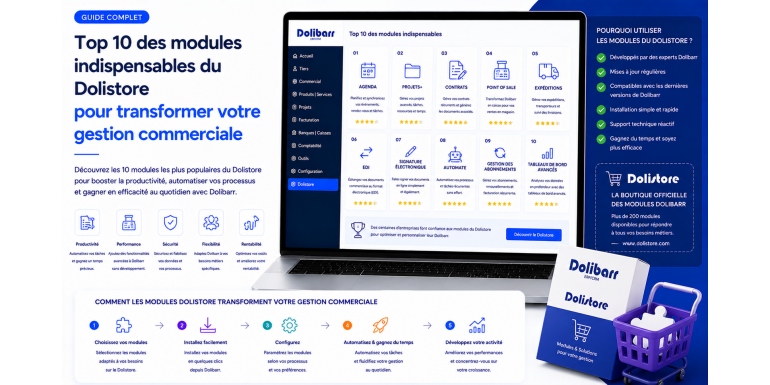
Dolibarr in its standard version already covers the vast majority of an SME's needs in terms of business management, accounting, inventory and projects. Yet as soon as your activity reaches a certain maturity, you feel the need for more advanced features: electronic signature of quotes, visual dashboards, integration with your online store, marketing automations, fine margin management. This is precisely where the Dolistore comes in, the official Dolibarr add-on module marketplace. With several thousand modules available, the Dolistore transforms Dolibarr into a modular platform capable of adapting to your specific business without costly development.
But faced with this abundance, how do you choose? Not all modules are equal. Some are essential and provide immediate value, others are accessory or redundant. Some are perfectly maintained by their publishers, others have been abandoned for years. In this guide, NEXT GESTION shares its selection of the ten Dolistore modules that truly transform an SME's business management. This selection comes from our experience on hundreds of deployments and reflects daily feedback from our clients. Each module is presented with its business interest, typical use cases and our integration advice.
Table of Contents
- What is the Dolistore and How to Use It
- Module #1: Electronic Signature for Quotes and Contracts
- Module #2: E-commerce Marketplace with WooCommerce and PrestaShop Connectors
- Module #3: BI and Visual Dashboards
- Module #4: Advanced CRM with Pipeline and Automations
- Module #5: Recurring Billing and Subscriptions
- Module #6: Advanced Inventory and Stock Management
- Module #7: Online Customer Portal
- Module #8: Marketing Automation and Email Campaigns
- Module #9: Electronic Invoices in Factur-X and Peppol Standards
- Module #10: Advanced Financial and Budget Reporting
- How to Install and Maintain Your Dolistore Modules
- Tips for Choosing the Right Module
- Frequent Mistakes When Choosing Modules
- NEXT GESTION Support for Your Modules
- FAQ: Frequently Asked Questions About Dolistore Modules
1. What is the Dolistore and How to Use It
The Dolistore is the official Dolibarr marketplace, accessible at Dolistore.com. There you find several thousand modules, themes and extensions developed by independent publishers, partner integrators and the community. Some modules are free, others are paid with prices ranging from a few tens of euros to several hundred depending on complexity. Paid modules generally include a lifetime license for one instance and a period of support and updates.
Installing a Dolistore module takes only a few clicks. You buy the module on Dolistore, download a zip file, import it into your Dolibarr through the module installation menu, and activate the module. Specific configuration is then done through the configuration screens of the module concerned. For SaaS-hosted Dolibarr, installation sometimes goes through the hosting provider, who validates technical compatibility before deployment.
The quality of a Dolistore module depends on several factors: publisher reputation, update frequency, compatibility with your Dolibarr version, level of documentation, technical support quality. Before buying, verify these criteria and consult available user feedback. NEXT GESTION advises its clients on module selection based on their precise context and installs selected modules as part of its services.
2. Module #1: Electronic Signature for Quotes and Contracts
Electronic signature is probably the most profitable module you can install on your Dolibarr. It radically transforms the sales cycle by reducing quote signature from several days to a few minutes. The salesperson sends the quote, the client receives a personalized link, signs directly online from their computer or phone, and the quote automatically moves to signed status in Dolibarr.
Electronic signature modules available on Dolistore integrate with various recognized providers such as Yousign, DocuSign, Universign or more economical solutions. The legal value of signatures depends on the chosen level: simple signature for everyday contracts, advanced signature for important commitments, qualified signature compliant with the European eIDAS regulation for high-value legal acts. In all cases, the Dolibarr module manages the workflow end-to-end: sending, tracking, archiving of proof.
The measurable benefits are significant. The average delay between quote sending and signature typically goes from five to ten days to less than forty-eight hours. The conversion rate of quotes to orders increases by fifteen to twenty-five percent depending on sectors. Tracking becomes automatic: no more phone calls to know where the signature stands, the information is in Dolibarr in real time.
For an SME issuing about twenty quotes per month, the investment in electronic signature pays back within a few weeks. NEXT GESTION installs this feature with almost all its clients and systematically observes significant improvement in the sales cycle.
3. Module #2: E-commerce Marketplace with WooCommerce and PrestaShop Connectors
If you manage an online store under WooCommerce, PrestaShop, Magento or Shopify, integration with Dolibarr is a major productivity issue. Without a connector, you enter each order twice, update stocks manually, synchronize customer records by hand. With a good Dolistore connector, all this flow is automated.
Dolistore e-commerce connectors synchronize both ways. Orders placed on your online store automatically arrive in Dolibarr within minutes, with their lines, prices, payment methods and delivery addresses. Statuses evolve in parallel: an order shipped in Dolibarr becomes shipped on the store. Stocks decrease as sales occur, and the arrival of new goods in Dolibarr updates online availability. Product records are created only once in Dolibarr and published on the store with their images, descriptions and prices.
Several publishers offer quality connectors on Dolistore. Choice depends on the e-commerce platform used and the complexity of your catalog. For stores with product variants, multi-warehouse management or per-client rates, verify that the connector handles these cases. NEXT GESTION systematically recommends testing the connector on a pre-production environment before going live.
The return on investment of a good e-commerce connector is massive. An SME processing fifty online orders per day saves several hours per day of manual entry, equivalent to a half-time that can be redeployed to higher-value tasks like customer service or marketing.
4. Module #3: BI and Visual Dashboards
Dolibarr natively offers some dashboards, but they remain limited for advanced steering needs. Business Intelligence modules from the Dolistore fill this gap by offering visual, configurable and dynamic dashboards that transform your data into strategic indicators.
A good BI module displays key business indicators at a glance: monthly and yearly revenue, comparison with previous period, top products, top customers, gross margin by segment, customer outstanding, cash flow forecast, quote conversion rate, productivity per salesperson. These indicators are presented as interactive charts, gauges, dynamic crosstabs. You can create several dashboards adapted to different profiles: management, sales, accounting, production.
Dolistore BI modules generally offer a drag-and-drop mode that allows a non-technical user to build their own views. This autonomy is precious: each manager can compose the dashboard that answers their questions without depending on the IT service.
The benefit of BI is not measured in hours saved but in improved decisions. A leader who sees their margin by activity in real time makes better commercial decisions than a leader who discovers figures three weeks after monthly closing. NEXT GESTION systematically sets up a BI module with its management clients who want data-driven steering.
5. Module #4: Advanced CRM with Pipeline and Automations
Dolibarr covers basic CRM functions with its third parties, proposals and opportunities modules. For structured sales teams, advanced Dolistore CRM modules bring an important qualitative leap. They introduce the notion of visual pipeline, opportunity weighting, follow-up automations, fine management of interaction history.
The visual pipeline presents your commercial opportunities as columns corresponding to the stages of your sales cycle: qualified, presentation, quote sent, in negotiation, signed, lost. You move each opportunity from one column to another by simple drag-and-drop. At each stage, the module calculates the revenue weighted by signature probability, giving a realistic projection of your future order book.
Follow-up automations eliminate forgetting, the main brake on conversion rate. An opportunity that hasn't evolved in ten days automatically triggers a reminder to the salesperson. A signed quote automatically sends a welcome email to the customer. A lost customer without recorded reason triggers a satisfaction survey. These automations standardize commercial best practices without burdening daily life.
The enriched history keeps track of every interaction: call, email, meeting, demonstration, progress point. When opening a customer record, the salesperson has complete context in seconds, transforming customer relationship quality. NEXT GESTION supports its clients in setting up advanced CRM modules, particularly in service agencies and multi-salesperson structures.
6. Module #5: Recurring Billing and Subscriptions
If your activity includes recurring revenue, monthly subscriptions, maintenance contracts, hosting, support, the advanced recurring billing module is a quickly profitable investment. Dolibarr natively offers some contract functions, but specialized Dolistore modules radically industrialize and secure this process.
A good recurring billing module manages several cadences: monthly, quarterly, semi-annual, annual. It supports loyalty discounts, tiered pricing by volume, automatic contractual increases, free trial periods, automatic renewals. At each deadline, the module automatically generates the invoice, sends it by email to the customer, awaits payment, automatically reconciles when it arrives. In case of unpaid, automatic reminders are triggered, up to possible service suspension.
Integration with a payment provider like Stripe, GoCardless or a SEPA direct debit provider allows going even further with automatic debit. The customer authorizes the direct debit once, and all subsequent invoices are settled automatically at maturity. Average payment delay goes from several weeks to a few days, and the unpaid rate collapses.
For service agencies, software publishers, hosting companies and all businesses with a subscription model, this module transforms financial mechanics. NEXT GESTION supports several clients in this structuring of their recurring revenue.
7. Module #6: Advanced Inventory and Stock Management
For retailers, industrial companies and e-merchants, fine stock management is critical. Advanced Dolistore management modules bring professional features that the standard version does not cover in depth: barcodes and labeling, rolling inventories, detailed multi-locations, replenishment forecasts, batch and expiry date management.
Barcode and mobile terminal support transforms receiving and preparation operations. The warehouse worker scans a product barcode, the application immediately displays location, available quantity, pending orders. A supplier reception goes from several hours to a few dozen minutes, with quasi-zero error rate.
Rolling inventories avoid the annual breakdown of complete inventory. The module plans a partial inventory each week, on a fraction of the catalog. Throughout the year, the entire stock is verified without ever blocking activity. Detected discrepancies are immediately adjusted, maintaining data reliability.
Replenishment forecasts use sales history to anticipate supplier orders. The module suggests quantities to order based on forecast sales, supplier delays and configured safety stocks. This anticipation reduces stockouts and limits costly overstocks. NEXT GESTION recommends these modules to clients whose business heavily depends on physical goods management.
8. Module #7: Online Customer Portal
The online customer portal is a module that creates a secure web space where your customers can consult their documents, track orders, download invoices, submit support requests and even place new orders. It transforms the customer relationship by reducing administrative solicitations while improving perceived service quality.
Typical customer portal uses are numerous. A customer wants to retrieve an invoice from six months ago: instead of calling your accounting, they log into the portal and download it in thirty seconds. A customer wants to know where their order stands: they consult status in real time without soliciting your sales service. A customer wants to report a problem: they open a ticket on the portal, which automatically creates an intervention in Dolibarr.
This module has two major benefits. On one hand, it frees your administrative team from repetitive low-value-added solicitations. On the other hand, it professionalizes your image by offering your customers a modern service that values them. Customers perceive the quality of the tool made available to them and associate this quality with your company.
Installing and configuring the portal requires particular attention to security, access rights and consistency with your visual identity. NEXT GESTION supports its clients in deploying customer portals adapted to their sector, from the simple invoice download portal to the advanced portal with orders and tickets.
9. Module #8: Marketing Automation and Email Campaigns
The marketing module integrated with Dolibarr allows managing professional email campaigns from your ERP, with perfect consistency between your customer data and your communications. Dolistore modules enrich this mechanic with advanced functions of segmentation, personalization, tracking and automation.
Fine segmentation allows precisely targeting recipients of each campaign. You send your monthly newsletter to active customers of the last twelve months, your promotional offer to qualified but not yet converted prospects, your loyalty reminder to customers without purchase for six months. Each segment is defined by crossed criteria on Dolibarr records, guaranteeing send relevance.
Message personalization radically improves engagement rates. The recipient receives an email that addresses them by first name, mentions their last purchase, offers an adapted offer for their sector. These personal touches, automated from Dolibarr data, transform a generic message into targeted communication.
Tracking measures the effectiveness of each campaign: open rate, click rate, conversion rate, unsubscriptions. Lessons feed continuous improvement of subsequent campaigns. Integration with recognized email providers such as Brevo, Mailjet or Mailchimp via Dolistore connectors strengthens deliverability and GDPR compliance.
10. Module #9: Electronic Invoices in Factur-X and Peppol Standards
With the generalization of electronic invoicing in Europe, having a standards-compliant module has become critical. The Dolistore offers several modules that make Dolibarr compatible with Factur-X, ZUGFeRD, Peppol BIS 3.0, Italian FatturaPA and German XRechnung standards.
The Factur-X format combines a readable PDF and a structured XML file in a single document. For the human recipient, it's a normal PDF invoice. For the customer's IT system, the XML allows automatic integration without entry. This dual nature radically simplifies exchanges between companies and accelerates accounting processing.
The Peppol network is the European infrastructure for electronic invoice exchange. Peppol modules for Dolibarr allow sending and receiving invoices via this network transparently, with automatic compliance validation. This is particularly useful for companies working with public administrations or major European clients.
Investing in a compliant electronic invoice module is doubly justified. On one hand, it anticipates regulatory obligations that are generalizing across Europe. On the other hand, it accelerates your flows and improves your image with demanding clients. NEXT GESTION supports its clients in Factur-X and Peppol compliance with a pragmatic and progressive approach.
11. Module #10: Advanced Financial and Budget Reporting
The tenth module of our selection concerns financial and budget reporting. Dolibarr offers standard accounting reports, but Dolistore modules bring financial steering functions worthy of a real management ERP: budgets by cost center, variance reports, cash flow forecast, multi-axis analyses, multi-entity consolidation.
Budget management allows defining at the start of the year a forecast budget by activity, project, cost center. Throughout the year, the module compares achievements to budgets in real time and alerts on overruns. This mechanic transforms the company's financial culture by moving from a posteriori observation to anticipated steering.
Cash flow forecast projects in the coming weeks and months the probable evolution of your liquidity, integrating invoices to collect, invoices to pay, recurring charges, revenue forecasts. You anticipate tensions before they become critical, and you make financing, follow-up or investment decisions wisely.
Multi-axis analyses cross your financial data along several dimensions: products, customers, salespeople, geographies, projects. These crossings reveal strategic information invisible in standard reports: which combinations are really profitable, where to concentrate efforts, which segments to abandon.
For mid-sized companies or growing SMEs that want to professionalize their financial steering, these modules are a decisive investment. NEXT GESTION supports these deployments with its accounting and management control experts.
12. How to Install and Maintain Your Dolistore Modules
Installing a Dolistore module is technically simple but requires some precautions to preserve your Dolibarr stability.
Before any installation, fully back up your Dolibarr database and files. This backup allows rollback in case of problem. Then check module compatibility with your Dolibarr version, indicated on the Dolistore listing. A module designed for an old version may generate malfunctions on a recent version.
First install the module in a test or pre-production environment. This precaution reveals potential conflicts with other installed modules or with specific customizations of your instance. Validate complete module operation in this environment before deploying to production.
Document each installation: module name, version, publisher, purchase date, license key, specific configuration. This register becomes precious as your instance accumulates modules. It facilitates updates, diagnostics and knowledge transfer between contributors.
Monitor updates. Publishers regularly publish new versions of their modules to fix bugs, add functions, maintain compatibility with new Dolibarr versions. Good hygiene consists of applying these updates regularly, after testing, to benefit from improvements.
NEXT GESTION systematically includes third-party module monitoring in its Dolibarr maintenance contracts. This centralized management prevents your modules from becoming obsolete or sources of vulnerabilities.
13. Tips for Choosing the Right Module
Faced with the thousands of modules available on Dolistore, a few simple criteria orient an informed choice.
Check update frequency. A module updated recently, in the last six to twelve months, is generally actively maintained. A module whose last version dates from several years ago is probably abandoned, posing long-term compatibility risks.
Read reviews and comments. Real user feedback often reveals practical aspects that the commercial listing does not mention. A majority of positive reviews over several years is a reliable quality indicator.
Examine documentation. A serious publisher provides clear, up-to-date, illustrated documentation. Lack of documentation or poor documentation is a warning signal.
Evaluate support level. Some publishers offer professional technical support included in the price or as an option. Others leave the user to fend for themselves. For a module critical to your activity, favor those with documented and reactive support.
Test before deploying in production. Most serious publishers offer a demo or trial period. Take advantage to validate that the module actually meets your needs in your precise context.
Favor ecosystem consistency. Rather than accumulating modules from ten different publishers, grouping several complementary modules from the same publisher facilitates maintenance and integrations. Some Dolistore publishers offer consistent suites for agencies, e-commerce, construction or other sectors.
14. Frequent Mistakes When Choosing Modules
A few mistakes return frequently with users discovering the Dolistore.
First mistake, multiplying modules without a plan. Faced with the offering's richness, the temptation is to buy ten modules at once. The result is often a heavy instance, conflicts between modules, degraded user experience. Better to identify real priority needs and add modules one by one, validating each one's contribution.
Second mistake, underestimating training. A module installed without training remains unused. Expected benefit only materializes if users understand and adopt the new functions. Planning a half day of training per significant module is a good rule.
Third mistake, neglecting maintenance. Once installed, a module requires follow-up: updates, configuration adjustments, compatibility tests. Without this discipline, a module ages poorly and ends up posing problems.
Fourth mistake, choosing only on price. A ten-euro module that doesn't do the expected job ends up costing more than a two-hundred-euro module that actually transforms your activity. Reason in value brought, not acquisition cost.
Fifth mistake, forgetting consistency with your process. The world's best module is worth nothing if it doesn't fit into your business process. Before buying, model the complete flow and verify where the module fits and what precise gains it brings.
15. NEXT GESTION Support for Your Modules
NEXT GESTION supports its clients at each stage of their Dolibarr modular enrichment approach.
The initial audit maps your priority business needs and identifies improvement axes where complementary modules bring the most value. This analysis results in a modular enrichment roadmap aligned with your strategy.
Module selection is based on our in-depth knowledge of the Dolistore and our feedback from more than one hundred fifty deployments. We recommend the most reliable modules best adapted to your profile, avoiding pitfalls and overhyped modules.
Installation is conducted methodically: backup, pre-production test, adapted configuration, acceptance with your business referents, production deployment. This discipline preserves your instance stability and guarantees proper functioning of new modules.
User training accompanies each significant deployment. Without appropriation, modular investment remains dead letter. Our training modules are adapted to each module and each user profile.
Continuous monitoring, integrated into our maintenance contracts, ensures updates, configuration adjustments and scope evolution according to your needs. You benefit from a partner who knows your instance in detail.
If you want to transform your business management by fully exploiting Dolistore potential, NEXT GESTION is at your side to design, deploy and maintain the module combination adapted to your business.
16. FAQ: Frequently Asked Questions About Dolistore Modules
Are Dolistore modules safe? Modules published on Dolistore undergo minimum technical validation from the Dolibarr community. However, quality varies by publisher. Favor modules from recognized publishers with many clients and regular updates.
Can multiple modules be installed simultaneously? Yes, but with caution. Some modules can conflict if they modify the same Dolibarr areas. Sequential installation, with testing at each step, is more prudent than mass installation.
Are modules compatible with all Dolibarr versions? No. Each module specifies supported Dolibarr versions. Systematically verify this compatibility before purchase. During a Dolibarr version upgrade, also verify that your modules are compatible before migrating.
How much does a Dolistore module cost on average? Prices range from a few tens of euros for simple modules to several hundred for complex modules. Most business modules cost between fifty and two hundred euros, with a lifetime license and included update period.
Can you develop your own Dolibarr module? Yes. Dolibarr's modular architecture allows developing specific modules for particular business needs. NEXT GESTION offers this custom development service for clients with atypical needs.
What happens if I uninstall a module? Uninstallation removes the module but generally keeps entered data. Always check in module documentation if uninstallation is reversible and if it can lead to data loss.
Do modules work on Dolibarr SaaS? It depends on the provider. Some Dolibarr SaaS hosts allow installation of third-party modules, others limit themselves to a closed catalog. Verify this policy before subscription if you plan to use specific modules.
How to know which module to choose for my need? The Dolistore offers search by category and keyword. For an informed choice, support from an experienced integrator like NEXT GESTION saves time and avoids errors.
Article written by NEXT GESTION, Dolibarr expert and partner of companies in selecting, deploying and maintaining Dolistore modules. Want to transform your Dolibarr with the right modules? Contact our consultants: contact@nextgestion.com.