
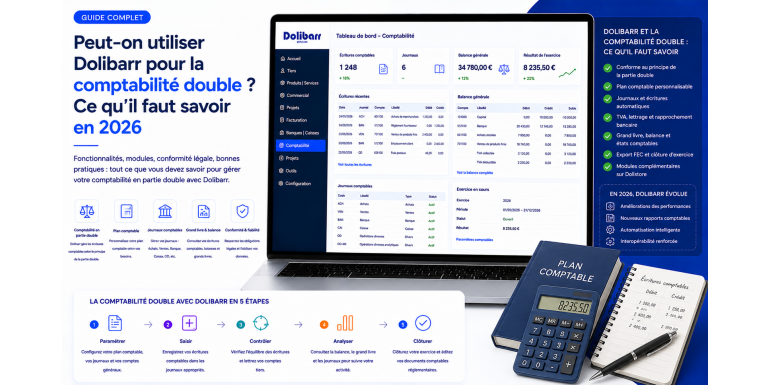
Dolibarr has emerged in recent years as a leading open source ERP/CRM for small and medium businesses. Its modularity, free license and simplicity of use make it a natural choice for sales management, invoicing, inventory or projects. However, one question frequently comes up among executives and their advisors: can you go further and use Dolibarr to maintain a true double-entry accounting system, compliant with tax requirements and the general chart of accounts? The answer, in 2026, is nuanced and deserves a thorough analysis.
On one hand, Dolibarr has had a double-entry accounting module for several versions, enriched year by year. It now allows configuration of the chart of accounts, automatic generation of entries from sales and purchases, production of the general ledger, balance and balance sheet, as well as export in the FEC format required by tax authorities. On the other hand, this module does not replicate identically the experience of specialized accounting software like Sage, Cegid, QuickBooks or Xero. Some advanced features, specific automations and ergonomic levels remain the prerogative of pure accounting publishers. The decision to use Dolibarr as the main accounting tool therefore deserves structured reflection. In this guide, NEXT GESTION shares its experience from over one hundred Dolibarr accounting setup missions and helps you decide with full knowledge of the facts.
Table of Contents
- Double-Entry Accounting: Recap of Principles
- Dolibarr's Accounting Module: Functionality Overview
- Chart of Accounts Configuration
- Automatic Entry Generation from Operations
- Available Accounting Journals
- VAT Management in Dolibarr
- General Ledger, Trial Balance and Financial Statements
- FEC Export and Tax Compliance
- Benefits and Limits Versus Dedicated Accounting Software
- Business Profiles for Which Dolibarr Is Sufficient
- Business Profiles for Which Dolibarr Is Insufficient
- How to Work with Your Accountant Using Dolibarr
- The Role of Dolistore Complementary Modules
- Best Practices for Successful Dolibarr Accounting
- Frequent Mistakes to Avoid
- NEXT GESTION Support for Dolibarr Accounting
- FAQ: Frequently Asked Questions About Dolibarr Accounting
1. Double-Entry Accounting: Recap of Principles
Double-entry accounting is the bookkeeping system used by all commercial businesses in most developed countries. Its principle is ancient and simple: each economic operation is recorded twice, once as a debit in one account and once as a credit in another account. This duality allows simultaneously tracking the origin and destination of every financial flow and guarantees the permanent balance of accounts.
Concretely, when you issue an invoice of one thousand euros to a customer, two entries occur. On one side, you increase customer receivables by one thousand euros, this is the debit to account 411. On the other, you record income, this is the credit to account 707 if it's a merchandise sale. The sum of debits always equals the sum of credits, and this is what makes accounting auditable and reliable.
This mechanic applies to all operations: purchases, sales, payments, collections, salaries, expenses, depreciation. As entries accumulate, you progressively build the general ledger that details each movement by account, the trial balance that synthesizes the balances, and finally the year-end financial statements: the balance sheet, the income statement and notes to financial statements.
Double-entry accounting is regulated in each country by the local general chart of accounts, which defines the accounts to use and the recording rules, as well as by tax obligations for archiving and transmission. In France, the FEC accounting entries file has been a mandatory export format since 2014 for tax audits. Every business must be able to produce its FEC on demand from the administration.
It is in this demanding framework that the question arises: can Dolibarr seriously fulfill the role of accounting tool for the business?
2. Dolibarr's Accounting Module: Functionality Overview
Dolibarr's double-entry accounting module is integrated natively into the software and activatable from administrator settings. It has undergone major evolutions since its initial version and now offers a solid functional panel.
It supports complete chart of accounts definition, starting from standard French plans for companies, associations or sole proprietors. You can adjust this plan by adding or modifying accounts according to your specific needs. The module also handles auxiliary accounts associated with each third party, allowing individual tracking of customer receivables and supplier debts.
It automatically generates accounting entries from operations recorded in other Dolibarr modules: customer invoices, supplier invoices, payments, collections, fixed assets, salaries if the HR module is used. These entries are created in draft mode, then validated and posted definitively.
The module offers several accounting journals: sales, purchases, bank, cash, miscellaneous operations. Each journal groups entries of a given nature and facilitates consultation and audit.
It produces the general ledger by account, the general balance by period, the income statement and the balance sheet. It also produces VAT statements and the FEC export compliant with French tax authority requirements.
This functional base is sufficient for a small business or standard SME wishing to maintain its accounting itself or in close collaboration with its accountant. For more complex structures or specific needs, Dolistore complementary modules enrich these functions, as we will see later.
3. Chart of Accounts Configuration
Chart of accounts configuration is the founding step of any accounting setup in Dolibarr. It conditions the consistency of all future entries and their compliance with the general chart of accounts.
Dolibarr offers several predefined charts of accounts as standard: French general chart of accounts for commercial companies, association chart of accounts, sole proprietor chart, charts of accounts from other countries such as Belgium, Switzerland, Spain, Italy or Germany. You select the plan suited to your structure during initial module activation.
Once the plan is imported, you enrich it according to your activity. Some companies need specific accounts to finely track certain types of revenue or expenses. For example, a communications agency may create several 706 accounts to distinguish revenues from consulting, creation and production. A retail business may create several 607 accounts to track purchases by product family. This customization is entirely free in Dolibarr.
Configuration also includes linking commercial elements to accounting accounts. Each product or service is associated with a sales account and a purchase account. Each VAT rate is linked to a collection or deduction account. Each payment method points to a bank or cash account. These links automate entry generation and guarantee their consistency.
NEXT GESTION systematically conducts this configuration phase with the client's accountant or recommends a partner firm if the client doesn't have one. The chart of accounts must reflect your real activity and anticipate your reporting needs, requiring business expertise as much as technical know-how.
4. Automatic Entry Generation from Operations
One of Dolibarr's great strengths is the automation of accounting entry generation. Rather than manually entering each entry, the module retrieves operations recorded in other modules and transforms them into accounting entries ready to validate.
Customer invoices are the first source of automatic entries. When you validate an invoice in Dolibarr, the accounting module prepares the corresponding entry: debit to customer account, credit to revenue account and collected VAT account. This entry is placed in draft, and you can consult it before posting it definitively.
Supplier invoices follow the same logic. Entering a purchase invoice automatically prepares the debit to expense accounts and deductible VAT, as well as the credit to the supplier account. Entries are created as inputs occur and await their accounting validation.
Payments and collections also generate automatic entries. A customer payment settling an invoice debits the bank account and credits the customer account. A supplier payment produces the symmetrical entry. Bank reconciliation thus becomes natural from entries already prepared by Dolibarr.
Miscellaneous operations, more specific like depreciation allowances, payroll entries or inventory adjustments, can either be generated by other Dolibarr modules or entered manually in the miscellaneous operations journal.
This automation represents considerable time savings and drastically reduces the risk of transcription error. Provided initial configuration is correct, lest cascading errors propagate. Validation by an accountant during the first weeks of use is an essential step.
5. Available Accounting Journals
Dolibarr organizes entries in several accounting journals corresponding to classic French accounting practices.
The sales journal groups all entries related to customer invoices: issuances, credit notes, adjustments. It is automatically fed by the invoicing module and allows finding each sale with its accounting detail.
The purchase journal centralizes supplier invoices and expense reports. It feeds expense and asset traceability based on accounts used.
The bank journal records all bank movements: collections, disbursements, banking fees, internal transfers. It serves as the basis for monthly bank reconciliation.
The cash journal works on the same principle for physical cash movements. For retail or structures with cash receipts, this journal is essential.
The miscellaneous operations journal hosts all entries that don't fit into the preceding journals: depreciation allowances, salaries, closing entries, adjustments. Entry there is manual but can be facilitated by reusable entry templates.
Each journal can be consulted, exported, audited independently. This organization respects accounting conventions and facilitates the work of the accountant who finds their usual landmarks.
6. VAT Management in Dolibarr
VAT is a sensitive subject in accounting. Its correct management conditions both tax compliance and company cash flow. Dolibarr offers native VAT management that covers the majority of standard cases.
Configuration starts with defining rates applicable to your activity. For France, main rates are 20%, 10%, 5.5% and 2.1%, supplemented by special cases like reverse charge at 0% for construction subcontracting. Each rate is associated with a collected VAT account and a deductible VAT account.
At product and service level, you assign each item a default VAT rate. At customer file level, you can specify a particular VAT status: exempt, intra-community, outside EU. These configurations ensure the correct VAT is automatically applied to invoicing.
When generating accounting entries, Dolibarr correctly breaks down the net, VAT and gross amounts into appropriate accounts. At VAT declaration time, you extract totals from each necessary line: collected VAT, deductible VAT on goods and services, VAT on fixed assets, intra-community acquisitions.
For the cash basis VAT regime, applicable to service providers, Dolibarr distinguishes VAT due on invoicing from that due on collection, avoiding declaration errors.
For special regimes, like reverse charge, margin scheme on second-hand goods, or intra-community distance sales, specific configurations are necessary. NEXT GESTION supports its clients in setting up these complex regimes.
7. General Ledger, Trial Balance and Financial Statements
Once entries are recorded and validated, Dolibarr enables the production of fundamental accounting statements.
The general ledger details for each account all entries concerning it over a given period, with a progressive balance. For a customer's 411 account, you see all invoices issued and all payments received, with the balance due at each line. This view is precious for fine analysis and controls.
The trial balance synthesizes for each account the total debits, total credits and net balance over the selected period. It exists in general version, presenting all accounts, and in auxiliary version, detailing balances by third party. The trial balance is the basic tool for verifying overall accounting consistency and preparing closing.
The income statement presents the aggregation of income and expenses over the period, showing the net result for the year. Dolibarr produces it according to French general chart of accounts conventions, with usual groupings into operating, financial and exceptional income and expenses.
The balance sheet presents the patrimonial situation at a given date: assets, liabilities and equity. Its production requires year-end operations like inventory adjustments, depreciation and provisions. Dolibarr allows performing these operations and producing a preliminary balance sheet useful for steering, with the final balance sheet generally validated by the accountant.
These statements are consultable on screen, printable and exportable to PDF or spreadsheet formats. Their production in a few clicks, without re-entry, is a considerable gain compared to old practices.
8. FEC Export and Tax Compliance
Since 2014, the French tax authority requires that any company subject to a control can produce a FEC accounting entries file in standardized format. This file contains all entries for the year in a structured text format, with mandatory columns: entry number, date, account, description, debit, credit, supporting document, reconciliation.
Dolibarr natively produces a FEC export compliant with regulatory requirements. The function is in the accounting export options of the module. You select the relevant year, launch the export, and Dolibarr generates the file in the expected format. This export can be transmitted as is to a tax controller or accountant.
Beyond the FEC, Dolibarr offers other accounting exports in formats accepted by the majority of professional accounting software: Sage, Cegid, EBP, Quadratus, Coala, ACD, Pennylane. This compatibility facilitates data transfer to the accountant who can integrate them directly into their tool, without re-entry.
Tax compliance doesn't stop at file format. It also assumes respect for inalterability, security and archiving rules for accounting data. Dolibarr offers an accounting closing function that locks entries for a period and prevents their subsequent modification. This closing, combined with rigorous database backup, satisfies the legal ten-year retention requirements.
The arrival of mandatory electronic invoicing in France from 2026, with progressive dates by company size, adds new requirements. Dolibarr adapts to these evolutions with dedicated Dolistore modules that handle Factur-X, Peppol formats and exchanges with dematerialization platforms.
9. Benefits and Limits Versus Dedicated Accounting Software
The question is not only whether Dolibarr can technically do accounting, but to compare its benefits and limits to those of specialized accounting software like Sage, Cegid, EBP, ACD, Quadratus or a more recent player like Pennylane.
On the benefits side, Dolibarr offers native integration between sales management and accounting. When you issue an invoice in Dolibarr, the accounting entry is automatically prepared, without double entry or risk of desynchronization. This continuity is rare and precious, particularly for companies wanting a unified information system.
Dolibarr is also much more economical. The software is free and open source, and even taking into account complementary modules, hosting and support, total cost remains far below that of proprietary accounting software with subscription.
Autonomy and sovereignty are other advantages. Your data remains where you decide, you control your instance, you are not dependent on a publisher who could change pricing or conditions.
On the limits side, Dolibarr presents some less mature areas compared to accounting heavyweights. The ergonomics of accounting screens, designed for occasional users, are less fluid than those of specialized tools designed for massive daily entry. Some very specific automations, like complex provision calculations or multi-company consolidation entries, require complementary modules or specific developments.
Accounting business support is less developed. On specialized accounting software, you benefit from technical support trained in fiscal and accounting subtleties. On Dolibarr, support focuses on software, and the accounting expertise dimension must come from your accountant or an integrator like NEXT GESTION that combines both competencies.
Finally, consolidation functions, multi-entity group reporting and advanced analytical accounting are less developed in standard Dolibarr and often require complementary modules.
10. Business Profiles for Which Dolibarr Is Sufficient
For a large part of small and medium businesses, Dolibarr is perfectly suited to maintaining accounting, either autonomously or in collaboration with an accountant.
Small businesses with fewer than ten employees with standard accounting are excellent candidates. A service, trading or craft activity, with moderate entry volume and no particular sector specificity, can be entirely managed from Dolibarr. The accountant retrieves the FEC at year end and produces the tax return.
SMEs up to fifty employees can also opt for Dolibarr in internal bookkeeping, designating an accounting referent trained in the tool. This route requires a bit more structure but offers great mastery and significant savings compared to market solutions.
Associations and non-profit organizations find in Dolibarr a tool suited to their needs, often simpler than classic commercial accounting. The association chart of accounts is natively supported.
Sole proprietors with simplified accounting obligations but wanting rigorous tracking find in Dolibarr a tool largely oversized compared to their obligations, but which gives them good reflexes for transitioning to incorporation.
International structures with French presence wanting to unify their management through a single tool appreciate Dolibarr's multi-country modularity and the ability to adapt the chart of accounts to each entity.
For these profiles, NEXT GESTION supports accounting setup with a pragmatic approach: adapted configuration, user training, link with the accountant, regular maintenance.
11. Business Profiles for Which Dolibarr Is Insufficient
Some business profiles or accounting needs require more specialized tools than Dolibarr.
Accounting firms themselves do not find in Dolibarr the mass production tools they need to manage hundreds of client files. Business software like ACD, Quadratus or Sage Generation Experts remain their reference.
Mid-sized companies or groups consolidating several entities with complex internal rules need consolidation and group reporting tools that exceed standard Dolibarr scope. Heavier ERP solutions like Sage X3, Microsoft Dynamics or SAP better cover these needs.
Highly regulated sectors with specific accounting obligations, like banks, insurance or certain public collectivities, need certified tools for their profession. Dolibarr can intervene as complement but rarely as main tool.
Structures with extremely developed analytical accounting, following dozens of crossed axes in real time, may reach Dolibarr's limits. Tools dedicated to axis-based management bring more flexibility then.
For these profiles, NEXT GESTION can intervene in complementary support, for example using Dolibarr for sales management and another software for accounting, with an export gateway between the two. This hybridization leverages the strengths of each tool.
12. How to Work with Your Accountant Using Dolibarr
One of the key topics for Dolibarr users is collaboration with their accountant. Several cooperation modes are possible depending on the firm's profile and work habits.
First mode, the accountant connects directly to Dolibarr as a dedicated user, with rights suited to their role. They consult entries, validate closing operations, produce statements and the tax return from the same tool as the client. This route is the most integrated and efficient, provided the firm agrees to work in a non-standard tool for their profession.
Second mode, regular export of accounting data to the firm's software. Each month or quarter, the accounting export in Sage, Cegid, EBP or other format is generated from Dolibarr and transmitted to the firm, which integrates it into its usual tool. This route is very widespread and works well for most firms.
Third mode, base sharing or read-only access. The firm can consult Dolibarr in read-only mode to verify operations, request supporting documents, anticipate difficulties. Entry remaining internal, the firm only intervenes on year-end entries or specific operations.
NEXT GESTION systematically advises defining the collaboration mode with the accountant from the framing phase, to avoid subsequent friction. We regularly work with our clients' firms to facilitate this cooperation and lift potential reluctance. Several partner firms are now trained in Dolibarr and use it daily with their clients.
13. The Role of Dolistore Complementary Modules
The Dolistore, official Dolibarr module marketplace, offers several extensions that significantly enrich accounting functions.
The automatic bank reconciliation module connects Dolibarr to your bank via modern banking APIs or via import of statements in CSV or OFX format. Bank operations automatically arrive in Dolibarr and reconcile with already entered entries, automating traditionally time-consuming work.
Advanced accounting reporting modules offer visual financial dashboards, multi-axis analyses, multi-year comparisons. They transform raw accounting into a steering tool.
Budget management modules allow defining forecast budgets by item, cost center or project, and tracking in real time the variances between actual and planned. This is a qualitative leap toward management control.
Multi-axis analytical accounting modules bring valuable analytical finesse for structures wanting to track profitability by client, product, project or activity.
Electronic invoicing modules compliant with Factur-X, Peppol and FNFE standards allow meeting the obligations of generalized electronic invoicing in Europe from 2026.
Advanced banking integration modules, like those dialoguing directly with PSD2 banking aggregators, fluidify cash flow tracking and reconciliation.
NEXT GESTION advises its clients on selecting modules suited to their profile and ensures overall consistency to avoid anarchic proliferation of redundant modules.
14. Best Practices for Successful Dolibarr Accounting
A few daily best practices ensure that your Dolibarr accounting remains healthy and compliant over time.
Enter operations as they occur. Don't let weeks of invoices or payments accumulate. Daily or weekly entry avoids errors and allows real-time steering.
Regularly validate the accounting draft. Entries automatically generated by Dolibarr are placed in draft and must be validated to become definitive. This validation, ideally monthly, freezes accounting and prepares closing.
Perform bank reconciliation each month. This is the operation that validates consistency between your accounting and bank account reality. A late reconciliation is a risk of undetected drift.
Keep third party records and chart of accounts updated. Every new customer, every new supplier must be properly created with their auxiliary account. Any evolution of your activity may require a new account in the chart.
Back up daily. Accounting is an irreplaceable business asset. Automated externalized backup, regularly verified, is the non-negotiable condition of serenity.
Have your configuration validated by an accountant. This initial validation, supplemented by an annual audit, guarantees tax compliance and the reliability of produced statements.
Document your internal practices. Entry procedures, allocation rules, operating modes must be recorded to ensure continuity in case of personnel change.
15. Frequent Mistakes to Avoid
Several mistakes return frequently among new Dolibarr accounting users.
First mistake, configuring the chart of accounts without expertise. A poorly designed chart of accounts generates allocation errors for years that are difficult to correct. The intervention of an accountant in this initial phase is non-negotiable.
Second mistake, neglecting draft entry validation. Entries that remain indefinitely in draft are not booked and skew statements. Regular validation, at least monthly, is indispensable.
Third mistake, mixing exercises. Entering a previous-year invoice in the current year skews both years. Rigor of dates and periods is critical.
Fourth mistake, forgetting bank reconciliation. Without reconciliation, accounting gradually drifts from bank reality, and differences become difficult to explain.
Fifth mistake, not archiving supporting documents. Accounting rests on documents: invoices, contracts, payment justifications. These documents must be kept for ten years, ideally attached to entries in Dolibarr.
Sixth mistake, not exporting the FEC regularly. The FEC is mandatory and must be producible at any time. An annual, or even quarterly, export secures the company.
Seventh mistake, underestimating user training. A repeated entry error by a poorly trained operator can generate hundreds of errors to correct. Initial training and skill updating are profitable investments.
16. NEXT GESTION Support for Dolibarr Accounting
NEXT GESTION has particular expertise in setting up Dolibarr accounting. Our team combines experienced Dolibarr consultants and accounting collaborators trained in regulatory subtleties.
The initial audit maps your activity, your accounting volume, your tax obligations, your internal organization and your relationship with your accountant. This audit identifies priority needs and results in specifications for your target Dolibarr accounting.
Configuration is conducted in collaboration with your accountant or with a partner firm if you don't have one. Chart of accounts, VAT rates, journals, auxiliary accounts, entry templates, exports: everything is adjusted to your context.
User training prepares your team for daily accounting use. Entry, validation, controls, statements: each profile receives training adapted to their role.
Startup support covers the first weeks in production, with reactive support for first special cases, first validations and first bank reconciliation. This phase consolidates good reflexes.
Continuous maintenance, integrated into our contracts, ensures updates, regulatory evolutions, annual audits and progressive improvement of your tool. You benefit from a partner who knows your instance and activity in detail.
If you are considering using Dolibarr for your accounting, NEXT GESTION is by your side to help you decide, set up and operate this tool under the best conditions.
17. FAQ: Frequently Asked Questions About Dolibarr Accounting
Is Dolibarr approved by the French tax authority? Dolibarr does not need specific approval for accounting bookkeeping; what matters is the compliance of the produced FEC and respect for inalterability rules of closed entries. Recent versions of Dolibarr respect these requirements.
Can the tax return be produced directly in Dolibarr? The standard module does not produce the tax return formatted for the administration. Usual practice is that the client maintains accounting in Dolibarr and the accountant produces the tax return from exported data.
Can my accountant connect to my Dolibarr? Yes, you can create a dedicated user account with adapted rights. Several firms are now trained in Dolibarr and accept this work modality.
Does Dolibarr manage analytical accounting? Yes, the standard module includes simple analytical accounting with analytical codes assignable to entries. For more advanced multi-axis analyses, Dolistore modules complete these functions.
How much does accounting setup in Dolibarr cost? Initial setup, configuration and training included, typically costs between three and eight thousand euros for a standard SME. This cost is largely amortized over a few years by the savings made compared to proprietary accounting software.
Can existing accounting be imported into Dolibarr? Yes. Entries can be imported by CSV file or via APIs. Resuming mid-year accounting or taking over opening balances are common operations.
Does Dolibarr handle mandatory electronic invoicing in 2026? Yes, via the standard module and complementary Dolistore modules, Dolibarr supports Factur-X, Peppol formats and exchanges with dematerialization platforms provided by the reform.
How many entries can Dolibarr handle? Without absolute software limit. Production Dolibarr handles hundreds of thousands of entries without difficulty. Performance depends on infrastructure sizing.
Article written by NEXT GESTION, Dolibarr expert and partner of companies in setting up their double-entry accounting. Do you want to maintain your accounting in Dolibarr in full compliance? Contact our consultants: contact@nextgestion.com.