
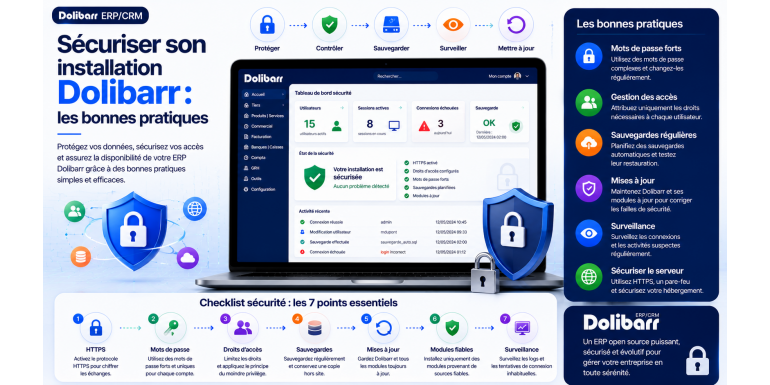
Securing your Dolibarr installation: best practices
Cybersecurity · Open source ERP •
Have you just installed Dolibarr, or has it been running for months without you really giving it a second thought? In either case, one question deserves your attention: is your ERP truly secure? Here, in no unnecessary jargon, is everything you need to put in place to sleep soundly.
Let's be honest: security is rarely the topic that excites us in the morning. We'd rather send quotes, track invoices, and follow up with clients. Yet, the day something goes wrong—a hacked account, disappearing data, ransomware that encrypts everything—we bitterly regret not having dedicated a little time to it.
The problem with software like Dolibarr is that it centralizes absolutely everything that matters in your business: your clients, your invoices, your accounting, sometimes even your HR data. It's your company's digital vault. Except that, by default, this vault isn't double-locked. It's up to you to do it.
The good news? You don't need to be a cybersecurity expert. Most truly effective measures involve a few common-sense adjustments, which I'll detail one by one. By the end of this article, you'll have a clear roadmap for securing your Dolibarr installation, whether you host it on shared hosting, a VPS, or your own server.
Get comfortable, let's get started.
Why you should never neglect the security of your ERP
Before getting into the specifics, let's take thirty seconds to fully grasp the stakes. Because until we understand the risks, we tend to postpone things.
A website hack is annoying. An ERP hack is a different story. Think of everything your Dolibarr contains: your customers' contact information and history, invoice amounts, margins, supplier terms, and perhaps even employee records. In short, personal and strategic data that, in the wrong hands, can cost you dearly—financially, but also in terms of reputation and GDPR compliance.
And contrary to what you might think, these attacks almost never target "you" personally. They are bots that scan the web all day long, looking for the slightest vulnerability: an unprotected login page, outdated software, an accessible configuration file. If your system has one of these weaknesses, it's only a matter of time before it's found.
The key takeaway: never rely on a single layer of protection. This is called "defense in depth": you build up several independent layers so that if one fails, the others still hold. This is the guiding principle for everything that follows.
It all starts with the server
There's a tendency to rush into configuring Dolibarr itself. This is a mistake. If the machine hosting your ERP system is riddled with security holes, all your application-related efforts will be wasted. It's like installing a reinforced door on a house with wide-open windows.
Choosing the right accommodation
Your room for maneuver largely depends on where Dolibarr runs. On shared hosting, you delegate much of the maintenance to your provider, but you have little control over the fine-tuning. On a VPS or dedicated server, it's the opposite: total control, but also total responsibility. Whatever your choice, prioritize a reputable hosting provider that offers free SSL certificates, automatic backups, and ideally, an application firewall.
Keep everything up to date, religiously
I can't stress this enough: most hacks exploit vulnerabilities that have already been patched , on servers that no one has bothered to update. The operating system, the web server, PHP, the database: everything must be kept up to date. On a Debian or Ubuntu Linux server, this is a matter of running a single command regularly:
sudo apt update && sudo apt upgrade -y
Also check that you are running a version of PHP that is still being maintained. An older version no longer receives patches and may even prevent you from updating Dolibarr — ironic, isn't it?
A few PHP settings that change everything
One last point on the server side: remember to disable error display in production. A PHP error displayed on the screen is a goldmine of information for an attacker. In your php.ini file , the basic settings look like this:
display_errors = Off
log_errors = On
expose_php = Off
You log errors so you can diagnose them, but without ever exposing them publicly. And while you're at it, you also hide the PHP version.
Locking Dolibarr: essential steps to remember
The server is solid? Perfect, let's move on to the application itself. A few Dolibarr-specific actions make a real difference, and they only take a few minutes.
Protect the configuration file
The conf.php file , located in htdocs/conf/ , contains the login credentials for your database. It's arguably the most sensitive file in the entire installation. It must be readable only by the user running the web server, and by no one else.
chmod 640 htdocs/conf/conf.php
Never leave the installation script accessible
This is a common mistake. After installation (or an update), the install/ folder must be locked. Otherwise, anyone could relaunch the wizard and regain control of your Dolibarr. Fortunately, the software includes a safeguard: a simple lock file.
htdocs/install/install.lock
As long as this file exists, access to the installer is blocked. Make it a habit to check for its presence after each update. The most cautious users will simply delete the installation folder once the process is complete.
Keep the documents out of sight
Dolibarr stores your attachments and generated files in a data directory. Ideally, this folder should be placed outside the web root directory so that it cannot be accessed by guessing a URL in the browser. Check the `$dolibarr_main_data_root` parameter in your configuration: it should point to a non-public location.
Tip: When it comes to permissions, keep the golden rule in mind — grant the bare minimum. Folders with 755 permissions, files with 644, and truly sensitive files with even more restricted access. There's no need to go any further.
HTTPS: the bare minimum today
It's 2026, and there's simply no excuse for transmitting passwords in plain text over the network. Without HTTPS, anyone on the same Wi-Fi network as your colleague can intercept their login credentials. It's as simple—and as serious—as that.
Installing a certificate is now free and almost automatic thanks to Let's Encrypt . On most servers, the Certbot tool installs and renews the certificate automatically, without you having to think about it.
But be careful: installing a certificate isn't enough. You also need to force all connections to use HTTPS; otherwise, some traffic will continue to travel unencrypted. To do this, configure an automatic redirection from HTTP to HTTPS, and Dolibarr even offers an internal setting, MAIN_FORCE_HTTPS , which enforces encryption at the application level. Enable it, along with secure cookies.
Strong passwords and authentication
The login page is the main entry point. It's where the majority of automated attacks are concentrated. Strengthening it is probably the best return on investment in this entire article.
Forget about weak passwords, for good.
Dolibarr includes a password policy that you can configure in the administration panel: minimum length, uppercase letters, numbers, and special characters. Enable it without hesitation. A good password is at least twelve characters long and does not contain any easily guessable information such as a date of birth or the company name.
• Avoid using default passwords and those reused on other services.
• Encourage your users to adopt a password manager — it's a change in habit that solves 90% of the problem.
• Change the administrator password immediately after installation, without exception.
Rename the account "admin"
Bots attempting to force a login prioritize the most common usernames, and "admin" is at the top of the list. By giving your administrator account a unique name, you significantly complicate their task. A simple but remarkably effective measure.
Enable two-factor authentication
If you were to remember only one key measure, it would be this. Two-factor authentication (2FA) means that even if a password is leaked, the attacker is still locked out: they lack the second code, generated on your phone. Dolibarr supports this through modules compatible with standard authentication applications. Enable it at least for all administrator accounts.
Cut short brute-force attacks
Limit the number of failed login attempts before a temporary block. At the server level, a tool like Fail2ban monitors logs and automatically bans persistent IP addresses. And if your administration interface only needs to be accessible from a few known addresses, restrict access to it: it's even more effective.
Giving everyone their due rights, nothing more, nothing less
Once the front door is locked, the next step is to organize what happens inside. The principle is simple and has a name: least privilege . Each user should only have access to what they truly need for their work.
In practical terms, your salesperson has no reason to access the accounting system, and your accountant shouldn't touch the module configuration. The more power an account has, the more dangerous it is to compromise—so we avoid handing out administrator rights like candy.
To simplify things, use user groups . Instead of setting permissions for each person individually, you define roles (sales, accounting, support, etc.) and assign each user to the correct group. This is more consistent and significantly less prone to errors.
The reflex we always forget: regularly review your user list. An employee leaving? Deactivate their account the same day. A test account created six months ago? Delete it. Dormant accounts are backdoors just waiting to be exploited.
Protecting the reactor core: the database
Everything in Dolibarr resides in its database. If the database fails, everything fails. However, a few precautions are sufficient to keep it largely safe:
• Use a database account dedicated to Dolibarr, with rights limited to its database only. Never use the "root" account, under any circumstances.
• Choose a long, random password for this account, different from all your others.
• If the database and the application are on the same machine, only allow local connections.
• If the database is remote, encrypt the connection and restrict the IP addresses allowed to connect to it.
By isolating access in this way, you ensure that a potential application compromise doesn't escalate into a widespread disaster. The attacker remains confined to a single room.
Keep Dolibarr up to date, without procrastinating
This is undoubtedly the most important measure of all… and the one most often overlooked. Each new version of Dolibarr fixes vulnerabilities discovered in previous versions. Sticking with an old version means leaving those vulnerabilities wide open.
Subscribe to the project's official security announcements. When a vulnerability is made public, it is exploited on a large scale within days: responsiveness makes all the difference.
One recommendation, though: before applying a major update in production, test it on a copy of your installation. This will help you avoid unpleasant surprises related to an incompatible module. And, of course, make a full backup just beforehand—which brings us to the next point.
Finally, consider your add-on modules. They extend Dolibarr's capabilities, but each added module is an additional vulnerability. Only install those from trusted sources, keep them up to date, and uninstall those you no longer use. A module abandoned by its developer becomes a silent risk.
Backups: your digital life insurance
Let's be clear: no security system is perfect. Sooner or later, something can go wrong—a breach, ransomware, a hard drive failure, or simply a mistake. On that day, your only lifeline is a reliable backup.
Beware of the trap: a true Dolibarr backup comprises two inseparable things —the database contents AND the document directory. Backing one up without the other will result in a faulty restore. Exporting the database via the command line is as simple as:
mysqldump -u username -p database_name > backup_dolibarr.sql
Keep in mind the famous 3-2-1 rule : three copies of your data, on two different media, one of which should be stored off-site. That way, even a fire or ransomware attack that encrypts your server won't cause you to lose everything.
The test no one does: a backup that hasn't been tested is just a promise. Make it a habit to restore your backups from time to time, to an isolated environment, to verify that they actually work. Too many companies discover their backups are corrupted the day they desperately need them.
Keep an eye on what's happening
The final layer, often overlooked: monitoring. Because an intrusion can easily go unnoticed for weeks if no one is paying attention to the right signs. Without logging, you're blind.
• Enable logging of connections and sensitive actions in Dolibarr.
• Monitor web server and database logs to spot suspicious access attempts.
• Set up alerts in case of spikes in failed connections or access from unusual addresses.
• Keep these logs long enough to be able to investigate in the event of an incident — while complying with the GDPR.
Monitoring tools can automate all of this and alert you in real time. You don't have to spend your days sifting through logs: you set up the system once, and it alerts you when something goes wrong.
Your Dolibarr security checklist at a glance
We've covered a lot of ground. Here's something to help you stay on track: print this list, keep it handy, and tick the boxes as you go.
✓ System, PHP, web server and database kept up to date.
✓ Error display disabled and software versions hidden.
✓ Installation folder locked ( install.lock file ).
✓ conf.php file is protected, and the documents directory is located outside the web root.
✓ SSL certificate installed and HTTPS enforced everywhere.
✓ Strong passwords, renamed admin account and 2FA enabled.
✓ Protection against brute force (attempt limitation, Fail2ban).
✓ Reduced privileges applied and unnecessary accounts deactivated.
✓ Dedicated database account with limited rights.
✓ Regular backups (database + documents), tested and following the 3-2-1 rule.
✓ Logging and alerts are in place.
Questions I am often asked
Is Dolibarr secure by default?
Yes and no. Dolibarr is developed using best practices and receives regular patches, so the foundation is solid. However, a default installation isn't optimally protected: it's up to you to lock down the installation script, enforce HTTPS, configure permissions, and manage access. Security depends primarily on how you configure your environment.
How often should Dolibarr be updated?
Apply security patches as soon as they are released, and schedule minor version upgrades regularly. For major versions, test first on a backup copy. The key is to follow official announcements to react quickly to critical vulnerabilities.
Shared or dedicated server to host Dolibarr?
Shared hosting is suitable for small businesses and delegates some maintenance, but it limits your control. A VPS or dedicated server offers complete control at the cost of increased responsibility. It all depends on your technical skills and requirements. If you're just starting out, a good, specialized shared hosting provider remains a sensible choice.
What should I do if my Dolibarr is hacked?
Immediately disconnect network access to the server, change all passwords, analyze the logs to understand the attack route, and then restore a clean backup from before the intrusion. Next, apply all patches and strengthen any identified vulnerabilities. And don't forget your legal obligations to notify the authorities in the event of a personal data breach.
In conclusion: safety is a habit.
If you were to remember only one thing, let it be this: securing Dolibarr isn't a one-time checkbox, but a habit to maintain . Hardened servers, enforced HTTPS, enabled 2FA, well-distributed access rights, tested backups, and applied updates: each layer you add makes life harder for attackers and gives you a chance to react.
The best approach? Don't try to do everything in one day. Go back to the checklist above, start with the two or three most impactful measures—updates, HTTPS, and two-factor authentication—then proceed at your own pace. By starting today, you'll protect your business, your data, and the trust your customers place in you.
And you, where are you at? Take a walkthrough of your setup this weekend, checklist in hand. You might be surprised at how far you've come in just one session — and relieved to have filled in the gaps before someone else finds them.