
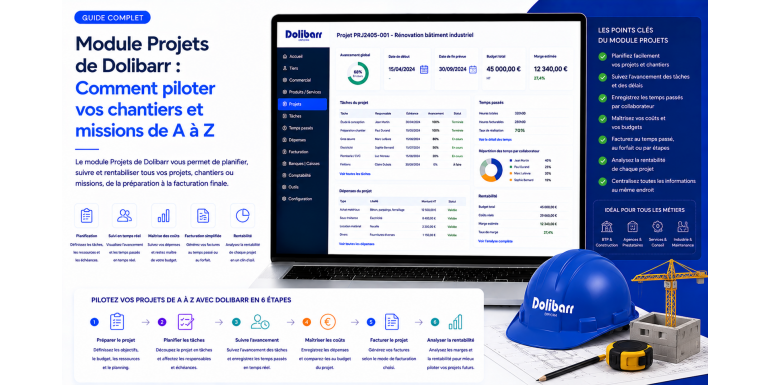
The Projects module is one of the most powerful and most underused pillars of Dolibarr. For many users, Dolibarr remains a sales management and invoicing tool, without them leveraging the module that transforms the solution into a true business management platform. Yet as soon as your company manages construction sites, missions, complex deals, or operations spanning over time, the Projects module becomes the backbone that structures all your information. Quotes, orders, invoices, purchases, subcontracting, time tracking, deliverables, milestones: everything attaches to the project and feeds a unified view that you cannot otherwise obtain.
This transformation is not only organizational. Properly used, the Projects module gives you real-time visibility into the actual margin of each operation, anticipates budget deviations, smooths collaboration between sales and operations, and reliablizes your strategic decisions. In this guide, NEXT GESTION shares the methodology it deploys with its clients to activate, configure and fully leverage the Projects module. You will find key functions, daily best practices, pitfalls to avoid, and feedback from dozens of deployments in construction, service agencies, industry and design offices.
Table of Contents
- Why the Projects Module Is Central in Dolibarr
- Activating and Configuring the Projects Module
- Creating a Project: Best Practices for Structuring
- Tasks and WBS: Decompose to Better Pilot
- Planning with Gantt and Dependencies
- Attaching Commercial Documents to the Project
- Tracking Time Spent on Each Task
- Allocating Purchases and Subcontracting to the Project
- Measuring Margin in Real Time
- Managing Milestones and Deliverables
- The Collaborator Portal and Access Management
- Project Reporting and Dashboards
- Use Cases by Sector
- Dolistore Complementary Modules
- Daily Best Practices
- Frequent Mistakes to Avoid
- NEXT GESTION Support for the Projects Module
- FAQ: Frequently Asked Questions About the Dolibarr Projects Module
1. Why the Projects Module Is Central in Dolibarr
The Projects module acts as the cement that connects all other Dolibarr modules. Without project, your quotes, orders, invoices, purchases and time tracking live in silos, and it becomes impossible to measure operation performance end-to-end. With a well-structured project, all these elements converge toward a single record that becomes the living mirror of your activity.
This centrality presents several strategic advantages. First, customer view enriches: for each customer, you see all projects, their status, profitability, relationship history. Then, analytical measurement becomes native: project margin is mechanically calculated from attached revenues and allocated costs. Then collaboration improves: salespeople, project managers, operators and accountants work on the same record and share the same information. Finally, strategic piloting gains finesse: you know in real time which types of missions are profitable, which segments deserve reinforcement, and which projects are drifting.
In practice, the Projects module suits service structures piloting variable-duration missions as well as construction companies managing physical sites, manufacturers tracking complex deals, creative agencies organizing their work by campaign. The logic remains the same: everything belonging to an economic operation attaches to the corresponding project.
NEXT GESTION observes from its interventions that rigorous activation of the Projects module radically transforms daily Dolibarr usage. Users move from a transactional logic, where each document lives independently, to an operational logic, where each action contributes to a measurable global objective.
2. Activating and Configuring the Projects Module
Activating the Projects module is done from Dolibarr's module administration menu. Once activated, the module adds a new entry in the main menu and triggers the appearance of Project fields on most Dolibarr commercial and financial documents.
Initial configuration requires several structural choices. You start by defining project statuses corresponding to your lifecycle: draft, to validate, open, paused, completed, cancelled. Dolibarr offers standard statuses you can complement with your business practices. This definition orients the entire module mechanic.
You then configure automatic project numbering. Several masks are available, from simple incremental counter to format including year, customer code, operation type. The choice depends on your volume and internal culture. A clear and stable format facilitates search and internal communication.
Project types allow categorizing your operations by nature: study, construction site, support, training, development, R&D. These types are not just decorative labels. They serve filters, reports, profitability analyses by segment. Investing in a relevant typology from the start is a strategic choice.
User rights determine who sees what. A salesperson must see all projects that commercially concern them. A project manager sees projects they are responsible for. An accountant sees projects in their financial dimension. A leader has a global view. These rights, finely configurable, allow partitioning without blocking collaboration.
Finally, linkage to other modules must be activated explicitly. The Projects module can connect to Third Parties, Quotes, Orders, Invoices, Purchases, Stocks, Time, Expense Reports, Tickets modules. The more links you activate, the richer the analytical mechanic becomes. NEXT GESTION recommends activating all links useful to your business.
3. Creating a Project: Best Practices for Structuring
Creating a project seems simple but its impact on piloting quality is considerable. A few best practices structure effective creation.
The project is associated with a customer. This association automatically feeds the attachment of commercial documents and the customer view. For internal operations without external customer, you can associate the project with your own company, allowing tracing internal costs like R&D or training.
The project label must be clear, distinctive and stable. A project called Website Redesign 2026 will be more meaningful than Project 12 two years later. Avoid generic labels that make search painful.
Forecast start and end dates frame the operation in time. These dates are not fixed: they can evolve during the project. But initial entry gives the temporal benchmark serving the schedule and dashboards.
Forecast budget, in days or value, conditions all subsequent tracking. Without budget, you cannot measure drift. With a populated budget, Dolibarr can continuously compare consumed to planned and alert on overruns. This entry, sometimes neglected, is an essential investment.
Project-related contacts identify involved persons: responsible salesperson, project manager, customer technical contact, internal contacts. This traceability smooths communication and collaboration. Multiple contacts per project are possible with different roles.
Custom fields allow enriching the project with business-specific information: internal reference, contract code, agency, sector, technology. NEXT GESTION designs with its clients the custom field grid corresponding to their priority analyses.
4. Tasks and WBS: Decompose to Better Pilot
A project is fine. A project broken down into tasks is much better. Work Breakdown Structure, or WBS, is the tool that transforms an abstract project into a concrete action plan.
In Dolibarr, tasks organize hierarchically under the project. You can create several task levels: lots, sub-lots, elementary tasks. This hierarchy reflects your business reality. A construction site decomposes into lots by trade. A consulting mission decomposes into phases. A software development decomposes into sprints and features. Each structure finds its equivalent.
Each task carries its own attributes: label, detailed description, forecast dates, duration, workload in days, responsible person, status. This granularity allows fine piloting. A late task is spotted immediately. A poorly estimated workload is corrected mid-course.
Subtasks allow going further into detail. For complex projects, three or four levels are not excessive. For simple projects, two levels are largely sufficient. The issue is adapting granularity to piloting need: too fine and you'll bend under task maintenance; too coarse and you'll lose visibility.
WBS also serves delegation. Each task can have a distinct responsible, clarifying who does what. Automatic notifications alert managers of important developments. This accountability transforms the project into a collaborative machine rather than exception management.
NEXT GESTION supports its clients in designing project templates, which are preconfigured WBS models adapted to each mission type. Rather than recreating the structure for each project, you duplicate the template and adapt it to case specificity. This industrialization accelerates launch and guarantees practice consistency.
5. Planning with Gantt and Dependencies
The Gantt chart is the classic visual representation of a project schedule. Dolibarr offers a native Gantt view that displays tasks on a temporal timeline, with their start and end dates, progress, dependencies.
This Gantt view facilitates several analyses. The critical path is visually spotted: tasks aligned on this backbone condition the project end date. Any drift on a critical path task propagates to the project end. Conversely, tasks outside the critical path have flexibility margin.
Task dependencies structure sequencing. A task can be marked as depending on another's completion. This dependency blocks startup until the prerequisite is finished. In practice, rigorous respect of dependencies clarifies responsibilities and anticipates bottlenecks.
Each task's progress updates through a percentage entered by the responsible. This progress feeds the Gantt view and gives immediate reading of the project state. A project where the majority of tasks are at zero percent mid-course is in red alert. A regularly updated project inspires confidence.
For complex projects with hundreds of tasks, Dolistore complementary modules enrich the Gantt view with advanced functions: multi-criteria filters, views by responsible, exports to PDF or spreadsheets, baseline tracking to compare planned schedule to actual. NEXT GESTION selects these complements according to client piloting needs.
6. Attaching Commercial Documents to the Project
One of the strengths of the Projects module is the ability to attach all commercial and financial documents to a project. This association, simple in appearance, transforms analytical quality.
When creating a quote, you select the project it belongs to. The quote attaches and appears in the project documents tab. When the quote is transformed into an order, the order inherits the attachment. The order becoming an invoice retains this link. Payments attached to the invoice also flow up to the project. This native propagation guarantees complete traceability without redundant entry.
On the purchase side, the mechanism is identical. Purchase requests, supplier orders, supplier invoices and associated payments allocate to the corresponding project. This allocation feeds the automatic calculation of the project's direct cost and therefore its margin.
For transversal operations, like an invoice covering several projects, Dolibarr allows distributing amounts between several projects in a single invoice. This fine distribution, configurable at line level, preserves analytical finesse even on grouped operations.
Attachment is not just comfort: it is the condition for the real margin to be calculated correctly. An unattached purchase remains floating and appears in no project. If your operators don't systematically attach, your project margins are wrong, and all your analytical piloting loses reliability. NEXT GESTION systematically insists on this discipline during user training.
7. Tracking Time Spent on Each Task
Time tracking is one of the flagship functions of the Projects module, particularly precious for service agencies, design offices and structures where human time is the raw material.
Each collaborator can enter the time devoted to each task. This entry is done by quarter-hour, half-hour or half-day according to configuration. The weekly timesheet interface presents the list of assigned projects and tasks, with one column per day to fill. This entry can be done in real time, at end of day or end of week.
Time valuation combines several data. The collaborator's loaded hourly cost transforms entered hours into project direct cost. The billing daily rate, defined in the contract or profile, transforms time into generated revenue. The combination of both gives the collaborator's gross margin on the project.
For flat-rate projects, time tracking feeds consumption measurement. On a thirty-day sold flat-rate, you see at any moment how many days have been consumed. This consumption compares to the forecast budget and alerts on drift.
For time-and-materials projects, tracking is even more crucial. It feeds monthly billing. Rigorous entry validated by the project manager guarantees that the issued invoice matches exactly the consumed time.
Time entry mobility becomes a key adoption factor. Mobile applications connected to Dolibarr allow each collaborator to record their time from their smartphone, on mission, at construction sites or in telework. This accessibility significantly increases filling rate and quality. NEXT GESTION supports its clients in choosing and deploying these mobility solutions.
8. Allocating Purchases and Subcontracting to the Project
For many activities, purchases and subcontracting represent a significant share of project cost. Their rigorous allocation to the project conditions calculated margin reliability.
When you enter a supplier invoice in Dolibarr, a Project field allows attaching the invoice to the corresponding project. For purchases specifically engaged for a project, this attachment is direct. For shared purchases, distribution between several projects is possible.
Subcontracting follows the same mechanism. Each subcontractor invoice is allocated to the project it concerns. This allocation feeds project direct cost and net margin calculation.
Stocked purchases present a particular case. A product purchased in stock for general use is not allocated to a project at purchase. But when this product is consumed on a project, its stock exit can be valued and allocated. This mechanic demands careful configuration that depends on your activity nature.
Collaborator expense reports constitute another flow to allocate. A trip, accommodation, specific supplies engaged by a collaborator for a project must allocate to this project. Dolibarr's Expense Reports module allows this allocation directly by the collaborator during entry.
Allocation rigor is a critical point of analytical quality. A leak, that is a cost incurred for a project but not allocated, undervalues the real cost and overvalues the margin. Wrong allocation, that is a cost attributed to the wrong project, distorts several analyses. NEXT GESTION sets up automatic controls and verification routines to make these allocations reliable.
9. Measuring Margin in Real Time
The culmination of all this structuring and allocation work is real-time margin measurement per project. It justifies the initial investment and transforms Dolibarr into a piloting tool.
The project's Analytical tab presents a complete financial synthesis. Revenues consist of issued invoices and forecast amounts of signed quotes and orders. Costs aggregate allocated purchases, subcontracting, valued time spent, allocated expense reports. The difference gives gross margin, and the ratio over revenue gives margin rate.
Several complementary views enrich this analysis. Forecast margin compares planned budget to current commitments. To-date margin compares cashed revenues to actually paid costs. Projected margin combines known elements and remaining estimates to anticipate final margin.
For complex or multi-phase projects, margin breaks down by phase or lot. This granularity allows spotting profitable and deficit phases within the same project, and orienting improvement efforts.
Alert thresholds configure to automatically notify management when a project margin passes below a critical threshold. This automation transforms reactive piloting into anticipated piloting. Instead of discovering a loss-making project at year-end, you identify it in progress and can act.
NEXT GESTION designs with its clients project piloting dashboards aggregating margins across the portfolio. These consolidated views orient strategic arbitrations: where to concentrate sales, which segments to develop, which customers to renegotiate.
10. Managing Milestones and Deliverables
Beyond tasks and time, a project often structures around key milestones and formalized deliverables. The Dolibarr Projects module offers tools to formalize these stages.
A milestone is a pivotal date materializing phase completion or deliverable validation. In Dolibarr, a milestone can be entered as a task without duration, marked as milestone. This representation allows visualizing milestones on the Gantt and tracking them independently of operational tasks.
Deliverables are artifacts produced by the project: audit report, validated mockup, delivered plan, tested prototype, training delivered. Each deliverable can be documented in the project record, with its characteristics, acceptance criteria, production date. This traceability protects the company in case of dispute and facilitates progress billing.
For projects invoiced by stages or progress, milestones serve as billing triggers. When a milestone is validated, the corresponding invoice can be issued. This mechanic, configured in Dolibarr, automates part of the commercial cycle.
Customer milestone validation, ideally with electronic signature, secures the process. A formally validated milestone constitutes acceptance proof making invoicing incontestable. Dolistore electronic signature modules facilitate these remote validations.
NEXT GESTION advises its clients to define from the contract the key milestones, their validation criteria and associated billing conditions. This contractual clarity avoids conflicts and accelerates payments.
11. The Collaborator Portal and Access Management
The Projects module takes its full dimension when it becomes a true collaborative space shared between internal and sometimes external stakeholders. Fine access management is therefore essential.
Internal users access the project according to their rights. A salesperson sees the commercial dimension, a project manager pilots production, an accountant tracks billing, a leader has the global view. This segmentation allows each to focus on what concerns them without being submerged by out-of-scope information.
Customers can access a dedicated portal presenting project progress, produced deliverables, issued invoices, received payments. This transparency reassures the customer and reduces administrative solicitations. Several Dolistore modules offer customer portals connected to Dolibarr.
Subcontractors and partners can also access certain parts of the project. A subcontractor can consult tasks entrusted to them, deposit their deliverables, submit their invoices. This controlled openness smooths external collaboration without compromising security.
Document management centralizes all project-related documents: quotes, orders, invoices, deliverables, reports, correspondence, plans, photos. Each document is versioned, dated, attributed to an author. This centralization replaces file scattering on personal disks and guarantees information durability.
NEXT GESTION supports its clients in setting up this documentary governance and collaborative portals, ensuring balance between necessary collaboration openness and sensitive data confidentiality.
12. Project Reporting and Dashboards
Beyond project-by-project piloting, aggregating Projects module data opens precious analytical perspectives for management.
The active projects dashboard presents a synthetic view of all current projects, with their key indicators: progress, consumption, forecast margin, possible alerts. This panoramic view allows quickly identifying projects requiring attention and those following their course.
The commercial portfolio aggregates opportunities, ongoing quotes, signed orders and active projects to give a prospective view of revenue. This view feeds commercial forecasts and resource piloting.
Segment analyses break down performance by project type, customer, sector, project manager. These crossings reveal your activity's strengths and weaknesses. Such segment is very profitable but low volume. Such customer generates much turnover but little margin. Such mission category has high drift risk.
Periodic reports formalize these analyses for management committees. Monthly, quarterly, annual, these reports structure strategic dialogue and support investment, recruitment or reorientation decisions.
Dolistore BI modules enrich these capabilities with visual dashboards, interactive graphics, predictive analyses. NEXT GESTION selects tools adapted to each client profile and configures views bringing the most value.
13. Use Cases by Sector
The Dolibarr Projects module adapts to very diverse sectors. A few examples illustrate this versatility.
In construction, each site is a project. Lots by trade become tasks. Progress billings invoice by advancement. Subcontractors allocate their interventions. Each site's profitability measures in real time.
In service agencies, each mission is a project. Mission phases become tasks. Time spent by each consultant values at applicable hourly rate. Margin per mission, customer, consultant pilots commercial strategy.
In industry, each customer deal is a project. Study, production, delivery phases articulate in tasks. Specific purchases and production costs allocate to the project. Deal profitability feeds pricing policies.
In design offices, each study project is finely tracked. Analysis, design, validation phases chain together. Formalized deliverables condition customer payments. Capitalization on past projects enriches methods for future projects.
In IT companies, each customer development becomes a project. Sprints, features, deliverables, tests organize in an adapted WBS. Time-and-materials or flat-rate according to contract manage uniformly.
NEXT GESTION has broad sectoral experience and adapts Projects module configuration to each sector's specificities, relying on proven templates and pooled best practices.
14. Dolistore Complementary Modules
The Dolistore ecosystem offers numerous modules enriching the native Dolibarr Projects module.
Advanced Gantt modules bring additional planning functions: complex filters, multiple dependencies, baselines, advanced exports. For highly structured projects, these complements are precious.
Portfolio management modules allow piloting multiple parallel projects with consolidated view, resource arbitration, prospective analyses. They suit mature organizations piloting several dozen simultaneous projects.
Advanced document management modules enrich native functions with sophisticated versioning, validation workflows, electronic signatures, integration with external collaborative spaces.
Integrated communication modules connect Dolibarr to Slack, Teams, or dedicated messaging to smooth exchanges around projects. Notifications, comments, validations pass through channels your teams already use.
Mobility modules extend access to the Projects module on smartphone and tablet, with optimized interfaces for mobile entry, quick time tracking, site photo, on-the-spot signature.
NEXT GESTION regularly audits Dolistore and advises its clients on modules bringing the best benefit-cost ratio for their context.
15. Daily Best Practices
A few daily best practices maximize Projects module value.
Systematically create a project for every commercial operation, even small. This discipline guarantees traceability and analysis consistency. Multiple exceptions pollute reports.
Populate budgets at project launch. Without budget, no drift tracking. The budget can be adjusted mid-project, but must exist from the start.
Decompose the project into significant tasks. Too many tasks drown analysis, too few deprive fine piloting. Aim for granularity matching your piloting rhythm: about ten tasks for a one-month project, for example.
Attach all commercial and financial documents to the project, without exception. This systematization is the basis of reliable analytics.
Track times regularly, ideally daily. Late tracking loses precision and distorts analyses. An end-of-day routine takes five minutes and preserves quality.
Conduct regular project reviews, weekly for active projects. These reviews allow adjusting, reallocating, anticipating. Without ritual, drifts silently install.
Document lessons learned at each project closing. This capitalization enriches methods and improves future costings.
16. Frequent Mistakes to Avoid
A few frequent mistakes harm Projects module value.
First mistake, creating catch-all projects. A project called General Maintenance accumulating all a customer's small operations loses all analytical value. Each significant operation deserves its own project.
Second mistake, forgetting to close completed projects. A project staying open indefinitely distorts dashboards and masks real active projects. A monthly closing ritual is essential.
Third mistake, neglecting purchase allocations. If your operators enter supplier invoices without attaching to project, your margin is wrong. Allocation discipline is non-negotiable.
Fourth mistake, creating overly complex task structures. Fifty tasks on a two-week project drown information and discourage maintenance. Adapt complexity to volume.
Fifth mistake, not training users. A misunderstood Projects module is poorly used. Initial training and periodic reminders are profitable investments.
17. NEXT GESTION Support for the Projects Module
NEXT GESTION supports its clients in activating, configuring and operating the Dolibarr Projects module.
The initial audit maps your current operations, identifies project types to manage, dimensions analytical needs. This audit results in precise specifications for target configuration.
Configuration sets up statuses, project types, numbering masks, user rights, links to other modules. This technical phase is conducted with your business referents to guarantee adequacy with uses.
Project templates are custom-designed for your recurring mission types. A construction site template, consulting mission template, software development template: as many preconfigured structures accelerating future project launches.
User training covers all profiles: salespeople, project managers, operators, accountants, leaders. Each profile receives training adapted to their module usage.
Startup support covers the first months of production use, with reactive support for questions and configuration adjustments. This phase consolidates adoption.
Continuous maintenance ensures evolutions, new templates, adjustments linked to your activity evolution. The Projects module lives with your company and must adapt to its growth.
If you wish to activate or optimize the Projects module of your Dolibarr, NEXT GESTION is at your side to structure this transformation and extract the best return on investment.
18. FAQ: Frequently Asked Questions About the Dolibarr Projects Module
Is the Projects module included in standard Dolibarr? Yes, the Projects module is native and free in all Dolibarr versions. Just activate it in settings. Paid Dolistore complementary modules enrich its functions for advanced needs.
How many projects can Dolibarr manage? No absolute software limit. Production Dolibarr instances manage several thousand simultaneous active projects. Performance depends on infrastructure sizing.
Can multiple projects be invoiced on the same invoice? Yes. Dolibarr allows distributing invoice lines between several projects. This distribution properly feeds each project's analytics.
Does the Projects module manage construction sites with progress billings? Yes. With adapted configuration and possibly complementary modules, the Projects module perfectly suits construction site management, including progress billing.
Can an advanced Gantt schedule be integrated? Yes, either with the native Gantt view for standard needs, or with Dolistore complementary modules for advanced features.
How to share a project with a customer? Several customer portal modules allow your customer to access a shared project view: progress, deliverables, billing. Configuration determines what is visible and what remains internal.
Does the Projects module work on mobile? Yes. Dolibarr is natively responsive, and several complementary mobile applications offer optimized experience for mobile entry, particularly useful for time tracking.
How much does setting up the Projects module cost? For a standard SME, count between two and six thousand euros including configuration, templates, training and startup support. Return on investment is generally rapid thanks to analytical and operational gains.
Article written by NEXT GESTION, Dolibarr expert and partner of companies deploying the Projects module to manage construction sites and missions. Do you wish to activate or optimize the Projects module in your Dolibarr? Contact our consultants: contact@nextgestion.com.