
Introduction: Why CRM Is at the Heart of Your Business Growth
In an increasingly competitive business environment, the ability to effectively manage customer relationships is no longer a luxury — it is an absolute necessity. Companies that successfully convert prospects into loyal customers don't do so by chance: they rely on structured tools, clear processes, and a 360° view of their commercial interactions.
This is precisely where Dolibarr ERP & CRM comes in — an open-source solution recognized and adopted by thousands of SMEs, freelancers, and associations worldwide. Its integrated CRM module offers a centralized platform to manage the entire customer lifecycle: from the first point of contact to long-term loyalty.
In this article, we will explore in depth the Dolibarr CRM module: its key features, competitive advantages, best practices for use, and how it can concretely transform your commercial approach.
1. What Is Dolibarr's CRM Module?
1.1 Dolibarr: Much More Than a Simple ERP
Dolibarr is often presented as an ERP (Enterprise Resource Planning) software, but it is also a full-fledged CRM (Customer Relationship Management) system. Available as open source, it is free, modular, and accessible from any web browser, making it an ideal solution for organizations of all sizes.
Unlike costly proprietary solutions such as Salesforce or HubSpot, Dolibarr offers a free, customizable, and license-free alternative. Its active community ensures regular updates and solid community support.
1.2 The CRM Module: A 360° View of Your Commercial Relationships
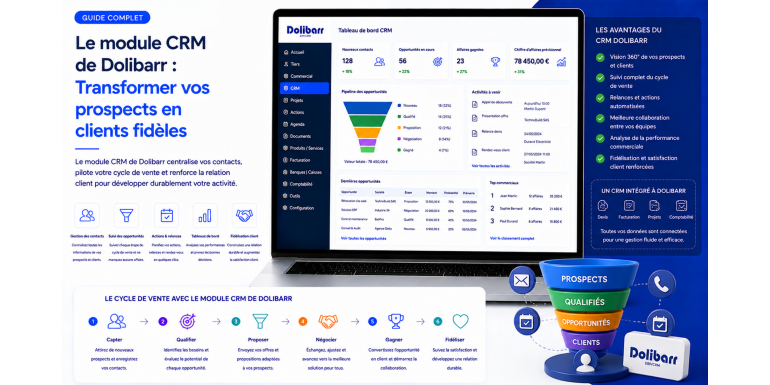
Dolibarr's CRM module is designed to provide a complete and centralized view of all your interactions with prospects and customers. It revolves around several essential components:
-
Third-party management (prospects, customers, suppliers, partners)
-
Sales opportunity tracking
-
Contact and address management
-
Interaction history
-
Agenda and follow-up scheduling
-
Quote and commercial proposal generation
-
Dashboards and analytical reports
2. Prospect Management: From Capture to Qualification
2.1 Creating and Organizing Your Prospects
The first step in any sales process is capturing and organizing prospects. With Dolibarr, this step is simplified to the maximum. From the Third Parties menu, you can create a new prospect by entering:
-
Company or individual name
-
Contact details (email, phone, address)
-
Industry sector
-
Prospecting status (new, in progress, in negotiation, lost, converted)
-
Custom fields according to your business needs
Dolibarr automatically generates a unique customer code according to your numbering rule, ensuring unambiguous management of your database.
2.2 Segmenting Your Prospects with Categories and Tags
One of the major strengths of Dolibarr CRM is the ability to finely segment your contact base. Using categories and tags, you can:
-
Group prospects by geographic area, company size, or commercial potential
-
Quickly filter contacts based on specific criteria
-
Target specific groups for marketing campaigns or commercial follow-ups
This segmentation is essential for personalizing your approach and maximizing conversion rates.
2.3 Defining the Potential and Status of Your Prospects
Dolibarr allows you to assign each prospect a potential level (hot, warm, cold) and a customizable prospecting status. This feature is particularly useful for prioritizing your sales team's efforts and focusing resources on the most promising opportunities.
From the list view, you can modify a prospect's status in a single click, without even opening their file — a considerable time saver for active sales teams.
3. Opportunity Tracking and Sales Pipeline
3.1 Creating and Managing Sales Opportunities
Dolibarr's Opportunities module is the heart of the sales pipeline. It allows you to:
-
Create opportunities linked to an existing prospect or customer
-
Define the stages of the sales cycle (initial contact, qualification, proposal, negotiation, closing)
-
Assign a signing probability to each opportunity
-
Estimate the potential amount and expected closing date
This structured view of the pipeline allows you to anticipate your revenue, identify bottlenecks in your sales process, and adjust your strategy in real time.
3.2 Converting a Prospect into a Customer
One of the most powerful features of Dolibarr CRM is the smooth conversion of a prospect into a customer. When a prospect accepts your commercial proposal, you simply change their status to transform them into an active customer. All data, interaction history, and associated documents are automatically preserved and transferred.
This information continuity prevents data loss and ensures a consistent customer experience from the first contact to the first invoice.
3.3 Generating Quotes and Commercial Proposals Directly from the CRM
Dolibarr natively integrates quote and commercial proposal generation directly from the prospect or customer file. Using a WYSIWYG editor, you can:
-
Create detailed quotes reusing your predefined products and services
-
Apply customized discounts and pricing conditions
-
Send the quote by email directly from Dolibarr
-
Convert the quote into an order or invoice in a single click
4. Interaction Management and Customer History
4.1 Recording All Your Interactions
An effective CRM must allow tracking of all interactions with prospects and customers. Dolibarr offers several tools for this:
-
Events and activities: record every phone call, meeting, email, or field visit
-
Internal notes: add comments and observations to each third-party file
-
Attachments: associate documents, contracts, or presentations directly to the customer file
This complete history is accessible to the entire team, ensuring service continuity even when sales representatives change.
4.2 Planning Follow-Ups with the Integrated Agenda
Dolibarr's agenda is directly connected to the CRM module. You can:
-
Schedule automatic reminders for unsigned quotes
-
Program follow-ups at specific dates
-
Assign tasks to specific team members
-
Synchronize the agenda with Google Calendar or Outlook
4.3 Managing Multiple Contacts Within the Same Company
Dolibarr allows you to create multiple contacts and addresses within the same third-party file. You can distinguish:
-
The main decision-maker (CEO, sales director)
-
The technical or operational contact
-
The accounting department for invoicing
-
The logistics department for deliveries
5. Automation and Productivity Gains
5.1 Automating Repetitive Tasks
One of the great advantages of Dolibarr CRM is its ability to automate time-consuming tasks:
-
Automatic follow-ups for pending quotes or unpaid invoices
-
Internal notifications to alert the team of actions to be taken
-
Automatic document generation (purchase orders, recurring invoices)
-
Customizable workflows to adapt processes to your business
5.2 Integration with Communication Tools
Dolibarr integrates with many external tools to enrich its CRM capabilities:
-
Email marketing: integration with Mailchimp, Brevo (Sendinblue)
-
IP telephony: Click-to-Call function to dial directly from the customer file
-
Customer support: connection with tools like MantisBT or osTicket
-
Calendars: synchronization with Google Calendar and Microsoft Outlook
6. Analysis and Reporting: Measure to Improve
6.1 Commercial Dashboards
Dolibarr offers customizable dashboards providing a real-time view of your commercial activity:
-
Number of prospects created per sales rep and period
-
Quote conversion rate per sales rep
-
Deal amounts by closing date and signing probability
-
Top 10 customers by revenue
-
Monthly evolution of signed quotes with annual comparison
6.2 Reports and Analytical Exports
Beyond dashboards, Dolibarr offers detailed reports exportable in various formats:
-
Sales performance by customer, sector, or sales rep
-
Prospect → customer conversion rate over a given period
-
Margin analysis by product or service
-
Follow-up tracking and response rates
7. Competitive Advantages of Dolibarr CRM
7.1 Open Source and License-Free
Unlike most CRM solutions on the market, Dolibarr is completely free in its basic version. There is no mandatory monthly subscription, no per-user fees, and the source code is freely accessible for any customization.
7.2 Modularity and Scalability
Dolibarr operates on a principle of on-demand activatable modules. You only activate what you need, simplifying the interface and reducing the learning curve. As your business grows, you can activate new modules without changing software.
7.3 Accessibility and Ease of Use
Dolibarr is accessible from any web browser, without local installation. Its intuitive interface allows quick adoption, even for non-technical users.
7.4 An Active Community and Rich Ecosystem
Dolibarr benefits from a very active global community of developers and users. The DoliStore offers hundreds of complementary modules to extend the software's functionality.
8. Best Practices to Maximize Your Dolibarr CRM
-
Maintain a clean and up-to-date database: regularly update contact information, remove duplicates, and archive inactive prospects
-
Train and involve the entire team: a CRM is only effective if everyone uses it correctly
-
Exploit reports to drive performance: organize regular reviews of key indicators
-
Customize Dolibarr to your business: create custom fields, define your own prospecting statuses, configure document templates
9. Use Cases: Dolibarr CRM in Action
9.1 For a Service SME
A consulting firm can use Dolibarr to manage its entire sales cycle: from lead capture to contract signing, through proposal tracking and recurring invoicing.
9.2 For a Freelancer
A freelancer can use Dolibarr as a lightweight CRM to track prospects, send professional quotes, and automatically follow up with unresponsive clients.
9.3 For an Association or NGO
Associations can use Dolibarr's CRM module to manage members, track donations, and maintain personalized relationships with partners and donors.
Conclusion: Dolibarr CRM, Your Ally for Sustainable Growth
Dolibarr's CRM module is far more than a digital address book. It is a true commercial growth engine that allows you to structure your prospecting, optimize your sales pipeline, retain customers, and drive performance with reliable data.
By combining the freedom of open source, the modularity of the platform, and the functional richness of the CRM module, Dolibarr positions itself as a serious and competitive alternative to proprietary CRM solutions.
Ready to take the plunge? Download Dolibarr for free, activate the CRM module, and start structuring your customer relationships today.