
1. Introduction
Installing Dolibarr ERP CRM on a Synology NAS is a popular choice for businesses that want to host their ERP internally while maintaining remote access. However, with the release of Dolibarr version 23, several users have encountered technical issues during installation or migration from older versions.
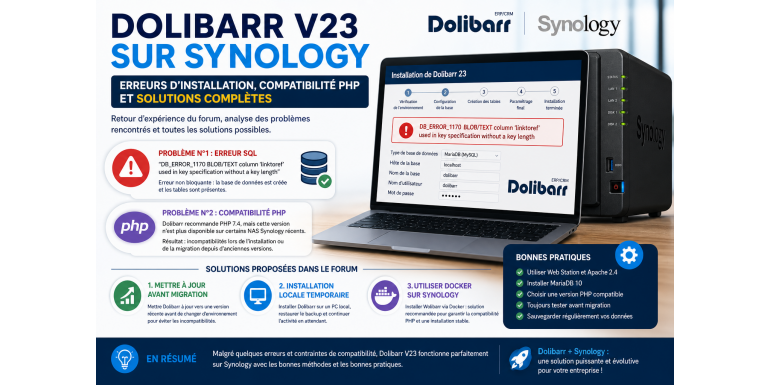
The forum topic analyzed highlights two major problems: an SQL error during installation and incompatibilities related to PHP versions available on Synology. This article provides a detailed analysis of these issues along with the solutions proposed in the discussion.
2. Technical Context of Installation on Synology
The Synology environment typically relies on:
- DSM (DiskStation Manager)
- Web Station
- Apache or Nginx
- PHP (multiple versions)
- MariaDB
To install Dolibarr properly, these components must be correctly configured, especially Web Station, PHP, and the database.
3. Main Issue #1: SQL Error During Installation
During the installation of Dolibarr V23, the user encounters the following error:
➡️ “DB_ERROR_1170 BLOB/TEXT column ‘linktoref’ used in key specification without a key length”
3.1 Problem Analysis
This error is related to MySQL/MariaDB. It occurs when a column of type TEXT or BLOB is used in an index without specifying a key length.
3.2 Real Impact
According to forum responses:
- the error is not blocking
- the database is created successfully
- tables are present
???? Conclusion: the system remains functional despite the error
4. Solution for the SQL Error
The main answer provided in the forum is:
➡️ if you are not using immutable logs, the error can be ignored
4.1 Explanation
The field involved is related to secure (immutable) logging.
If this feature is not used:
- no functional impact
- no urgent action required
5. Main Issue #2: PHP Compatibility on Synology
Another major issue concerns PHP versions:
➡️ Dolibarr documentation recommends PHP 7.4
➡️ but this version is no longer available on some recent Synology NAS systems
6. Analysis of the PHP Issue
On recent Synology DSM versions:
- PHP 7.4 is often removed
- only newer PHP versions are available
This creates compatibility issues for:
- older Dolibarr versions (e.g., v17)
- migration processes to version 23
7. Solutions Proposed in the Forum
7.1 Upgrade Dolibarr Before Migration
➡️ Recommendation:
Upgrade Dolibarr to a recent version before changing the environment
7.2 Temporary Local Installation
➡️ Solution used by the user:
- install Dolibarr on a local PC
- restore the backup
- continue operations
This approach allows bypassing NAS-related limitations.
7.3 Use Docker as an Alternative
➡️ Recommended solution:
Install Dolibarr via Docker on Synology
Advantages:
- independence from PHP versions
- more stable installation
- full compatibility with Dolibarr V23
8. Indirect Issue: Migration from an Older Version (v17)
The forum also highlights a common issue:
➡️ direct migration from an outdated version
Risks include:
- PHP incompatibilities
- database errors
- missing features
9. Recommended Migration Best Practices
The correct approach is to:
- Upgrade Dolibarr progressively
- Test each intermediate version
- Check PHP compatibility
- Then migrate to the new environment
10. General Best Practices for Synology
According to official documentation:
- use Web Station
- install Apache 2.4
- install MariaDB 10
- configure PHP properly
- open required ports
11. Why Synology Introduces Specific Challenges
Synology NAS environments come with specific constraints:
- limited PHP version management
- dependency on DSM updates
- specific web configuration requirements
- varying compatibility depending on updates
12. Recommended Alternatives for Dolibarr on NAS
12.1 Docker (Modern Solution)
- complete isolation
- guaranteed compatibility
- fast deployment
12.2 Local Installation + Migration
- secure data handling
- avoid downtime
12.3 External Hosting
- simplicity
- reduced maintenance
13. Impact for Users
These issues may result in:
- service interruptions
- loss of system access
- migration difficulties
However, with proper practices:
- service continuity can be ensured
- migration becomes controlled
- system stability improves
14. Conclusion
The forum discussion on installing Dolibarr V23 on Synology highlights two major issues: a non-blocking SQL error and PHP compatibility constraints. The proposed solutions show that these challenges can be effectively managed through adapted strategies, such as using Docker or performing progressive upgrades. In 2026, deploying Dolibarr on Synology remains a powerful solution, but it requires solid technical knowledge to avoid pitfalls related to system and dependency evolution.