
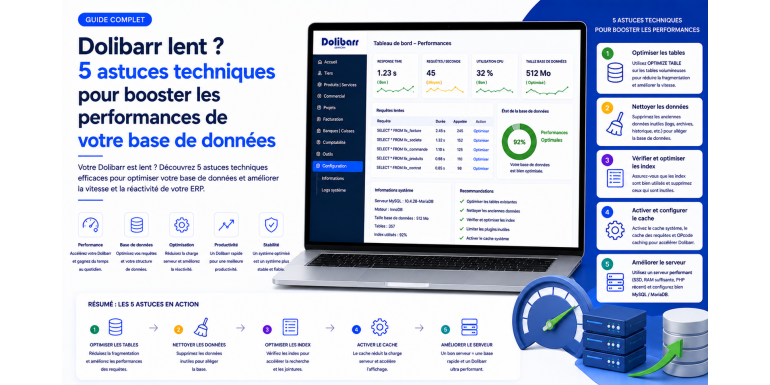
You open the invoice list and have to wait ten seconds. You generate a report and the browser displays a blank screen before the data finally loads. You launch a product search and everything freezes while the database grinds through queries. If these situations sound familiar, your Dolibarr instance is suffering from a performance problem. And in more than eighty percent of cases, the culprit is neither PHP nor the browser, but rather the MySQL or MariaDB database that sits behind your ERP/CRM.
A poorly configured database turns a responsive Dolibarr into a tool your teams end up working around. They go back to Excel, to handwritten notes or to third-party tools, and the promise of a unified information system collapses. The good news is that the vast majority of slowness problems come from known causes that can be identified and fixed. In this guide, NEXT GESTION shares five technical tips proven on hundreds of production Dolibarr instances, ranging from a ten-user retailer to manufacturers with several hundred concurrent connections. These tips cover engine configuration, indexes, maintenance, caching and server architecture. Applied correctly, they can divide your application response times by three, five or even ten.
Table of Contents
- Why Dolibarr Slows Down Over Time: Understanding the Causes
- Initial Diagnosis: Measure Before Optimizing
- Tip #1: Optimize MySQL/MariaDB Configuration
- Tip #2: Work on Indexes and Table Structure
- Tip #3: Regular Database Maintenance
- Tip #4: Enable and Configure Application Caches
- Tip #5: Match Server Architecture to the Load
- Dolibarr-Specific Optimizations
- Continuous Monitoring and Surveillance
- Common Mistakes to Avoid
- Real-World Case Studies
- When Should You Call an Expert?
- FAQ: Frequently Asked Questions on Dolibarr Performance
1. Why Dolibarr Slows Down Over Time: Understanding the Causes
When you start with Dolibarr, the application is fast. Everything runs smoothly, pages display instantly and the user experience is pleasant. Six months, one year or two years later, the same application takes five, ten or twenty seconds to display the same list. What happened?
Several phenomena combine. First, the data volume increases: invoices, sales proposals, orders, stock movements, accounting entries, archived emails, attached files. A table that contained ten thousand rows now holds five hundred thousand, and certain poorly written queries go from one millisecond to two seconds. Then, the number of concurrent users grows as the company expands, multiplying concurrent connections and locks on tables. Add-on modules installed over time bring their own queries and tables. The indexes initially present are no longer enough for new uses. The application cache is not enabled or is poorly sized. Finally, the default MySQL configuration delivered with your hosting, designed to run on a one-gigabyte memory server, has never been adjusted to your actual infrastructure.
Understanding these mechanisms is essential before acting. Performance is not a static state but a dynamic balance between data volume, user load, code quality, available indexes and allocated hardware resources. An effective optimization works on several of these axes simultaneously, and that is precisely what we will detail in the five tips that follow.
2. Initial Diagnosis: Measure Before Optimizing
The golden rule of any optimization is simple: you don't optimize what you don't measure. Before changing a single configuration line, take the time to establish a quantified, reproducible diagnosis of your current situation. Without a baseline, you will be unable to know whether your changes brought a real gain or whether you simply moved the problem.
Start by identifying the slowest pages from the user's point of view. The developer tools built into your browser, accessible via the F12 key, display the full loading time of each page, the time spent on the server and the rendering time on the client side. Record these measurements for five to ten critical actions in your daily routine: opening the invoice list, customer search, generating a report, validating an order, accessing a product file with its stock. These figures form your reference point.
Then enable the slow query log on the MySQL or MariaDB side, setting a low threshold, for example one second. This log captures all queries exceeding this delay and immediately reveals bottlenecks. Combined with an analysis tool such as pt-query-digest or mysqldumpslow, it ranks queries by cumulative time, frequency and average time, telling you exactly where to focus your efforts. Also examine the global server statistics: InnoDB cache hit ratio, ratio of aborted connections, queries waiting for locks, temporary tables written to disk. These indicators immediately guide the diagnosis.
On the Dolibarr side, enable debug mode in the configuration and consult the application log to identify modules or hooks that add time to each page. Measure the size of your database, the size of each main table and the number of rows it contains. A log table weighing several gigabytes or an event table with several million rows is an immediate red flag. Once this overview is established, you know where you stand and you can attack optimizations with full knowledge of the situation.
3. Tip #1: Optimize MySQL/MariaDB Configuration
The default MySQL or MariaDB configuration is one of the fastest and most cost-effective levers for performance gains. It is intentionally conservative, designed to run on a modest server without risk of memory saturation. On a server dedicated to Dolibarr with eight, sixteen or thirty-two gigabytes of RAM, this configuration leaves literally ninety percent of resources unused.
The most impactful parameter is undoubtedly the InnoDB buffer size. InnoDB is the storage engine used by all modern Dolibarr tables, and its buffer is the memory area where MySQL caches data and index pages. The larger this buffer, the less the server needs to read from disk, and the faster queries become. The generally accepted rule is to allocate around seventy to eighty percent of the server's total RAM to this buffer if the machine is dedicated to the database. On a shared server also hosting PHP and the web server, this drops to fifty or sixty percent, ensuring enough memory remains for the rest of the system.
Other parameters deserve careful adjustment. The InnoDB log size directly impacts write performance: a log too small triggers too-frequent flushes and slows mass insertions. The maximum number of connections must reflect your actual load without being excessive, since each connection consumes memory. The sort buffer, join buffer and temporary table cache must be tailored to your most complex queries, without being so oversized that they saturate RAM during peak load. The InnoDB transaction flush mode can be adjusted based on your risk tolerance: the safest value guarantees the durability of each transaction at the cost of more disk writes, while an intermediate value offers an excellent compromise for most SMBs.
Finally, don't forget the query cache engine, now disabled by default on recent MariaDB versions and outright removed on MySQL. If you are still on an old version with this cache enabled and your load is mostly write-heavy, it can paradoxically slow down the application. A configuration audit allows precise determination of what to enable, adjust or disable. NEXT GESTION systematically performs this exercise during its interventions and provides configuration files tailored to each instance size.
4. Tip #2: Work on Indexes and Table Structure
If engine configuration is the fastest lever, indexes are the most powerful one. A well-placed index can transform a five-second query into a one-millisecond query. Conversely, a missing index on a frequently filtered column forces the database to scan the entire table, an operation whose cost explodes as data grows.
Dolibarr ships with a reasonable set of indexes covering standard uses. However, as soon as you add third-party modules, custom fields or custom-developed extensions, these indexes can become insufficient. A search by internal reference on the product table, a status filter on the invoice table combined with a sort by date, a join between two child tables of an additional module: as many scenarios where a complementary index makes the difference between a smooth and a painful experience.
Identifying missing indexes is done from the slow query log and the EXPLAIN tool built into MySQL. EXPLAIN details the execution strategy chosen by the engine for each query: index usage, full sequential read, nested join, temporary table in memory or on disk. A query showing the word ALL in the type column or scanning several million rows is an obvious candidate for optimization. Creating a targeted index, sometimes a composite one across several columns in the right order, is then enough to fix the issue.
Be careful, however, not to fall into excess. Each index has a write cost: with every insert, update or delete, MySQL must update the affected indexes. Adding ten indexes to a heavily write-loaded table can degrade overall performance. Best practice is to index what is actually used, remove redundant or unused indexes, and prefer well-thought-out composite indexes over a multiplication of simple indexes. On the structure side, also check that your columns use the right types: a generously dimensioned VARCHAR consumes more sort memory than a fitted VARCHAR, a TEXT where a VARCHAR would suffice prevents certain optimizations, a DATE type is always faster than a date stored as a string. A schema audit by a Dolibarr expert identifies these improvement opportunities often invisible from the interface.
5. Tip #3: Regular Database Maintenance
A database is a living organism. Successive insertions, updates and deletions fragment pages, swell indexes beyond their optimal size, desynchronize the statistics used by the query optimizer and accumulate obsolete data nobody consults anymore. Without regular maintenance, these phenomena eventually significantly degrade performance, even without any new business activity.
The first maintenance operation is table defragmentation. On InnoDB, this is performed by a command that rebuilds the table and its indexes by reclaiming free space, reorganizing pages and readjusting the size of the data file. Performed quarterly on the main tables, it limits artificial database expansion and preserves data locality, that is, the physical proximity of frequently co-read rows. Tables heavily loaded in writes, such as the accounting entry table, the journal table or the stock table, particularly benefit from this defragmentation.
The second operation is statistics update. The MySQL optimizer chooses its execution plan based on statistics estimating index cardinality and value distribution. If these statistics are obsolete, the optimizer may make absurd decisions, for example refusing to use a perfectly suited index because it thinks the table still contains a thousand rows when it now has a million. The statistics update command, executed periodically, ensures execution plans remain relevant.
The third operation is archiving and purging obsolete data. Application logs, expired sessions, email attachments from five years ago, intermediate unvalidated documents, on-the-fly generated reports: all data taking space with no real business value. A clear, documented and automated retention policy keeps volume under control. On some bases NEXT GESTION audited, more than sixty percent of the volume was devoted to data no user had consulted in years. A simple purge with offline archiving cut the database size by three and mechanically accelerated all operations.
Finally, don't forget integrity verification. A silent corruption, even minor, on a critical table can generate aberrant behavior difficult to diagnose. A monthly check of the main tables and monitoring of MySQL error logs prevents incidents before they become visible to users.
6. Tip #4: Enable and Configure Application Caches
The best query is the one you don't execute. This maxim perfectly summarizes the cache logic: keep the result of expensive operations in memory to serve them instantly on subsequent queries. Dolibarr and its PHP ecosystem offer several cache levels which, properly configured, can drastically reduce the load on the database.
The first cache to enable is PHP's opcache. Without opcache, PHP rereads, parses and compiles each source file with every request, consuming significant CPU and time. With opcache enabled, the compiled bytecode is kept in memory and reused, which can halve the application's overall response time. Configuration consists of allocating enough memory to store all of Dolibarr's files, allowing a number of files consistent with your installation size and adjusting validation parameters to avoid unnecessary checks in production. It's a simple, free optimization with an almost systematically spectacular gain.
The second level concerns Dolibarr's application cache itself. Several application areas can be cached: country lists, currencies, payment types, user rights, global configuration parameters, translations. These data are read on almost every page but change very rarely. Keeping them in memory avoids dozens or even hundreds of redundant queries on each load. Depending on installed modules and the version used, these caches can be enabled via advanced parameters or dedicated extensions.
For higher-load instances, it makes sense to go further with an external cache shared between PHP processes. Solutions like Redis or Memcached cache complex query results, user sessions or reconstituted business objects. The gain is particularly clear on dashboards, figure aggregations and pages loaded simultaneously by many users. Setting it up requires careful configuration, a rigorous invalidation strategy and active monitoring to ensure displayed data consistency. This is typically an intervention NEXT GESTION supports end-to-end on the most demanding Dolibarr instances.
Don't forget the browser cache and HTTP cache. Dolibarr's static resources, such as stylesheets, JavaScript scripts and images, must be served with appropriate cache headers to prevent re-downloading on every page. Careful web server configuration, possibly complemented by a CDN for multi-site deployments, lightens network load and improves perceived speed for the user.
7. Tip #5: Match Server Architecture to the Load
All the software optimizations in the world cannot compensate for an undersized server or an unsuitable architecture. Beyond a certain volume of data, concurrent users or connected integrations, it becomes necessary to revisit the hardware foundation supporting your Dolibarr.
The first parameter to examine is available RAM. A performant database needs abundant RAM, mainly for the InnoDB buffer mentioned earlier. The empirical rule is to aim for total RAM at least equal to the size of your active database part, that is, the tables and indexes you regularly consult. An eight-gigabyte server for a fifteen-gigabyte active base will spend half its time reading from disk, regardless of your tuning. Increasing RAM is often the most cost-effective hardware investment.
The second parameter is the storage subsystem. Moving from a mechanical disk to an SSD generally divides random read latencies by ten, transforming the user experience on complex queries. Moving from a SATA SSD to an NVMe SSD brings significant additional gain on write-intensive loads. On virtualized hosting, check the storage class offered and don't hesitate to upgrade if your measurements point to a disk bottleneck.
The third parameter is the CPU. Dolibarr and its PHP engine are sensitive to clock frequency, even more than to core count, for individual queries. On the other hand, on multi-user loads, core count becomes decisive for absorbing parallel requests. An audit of average load, peaks and operation nature allows choosing the right combination.
Beyond vertical sizing of a single machine, more advanced architectures exist for highly demanded instances. Separating the web server and the database server onto two distinct machines distributes load and avoids resource conflicts. Setting up a primary-secondary replication offloads heavy read queries to a replica while keeping writes on the main server. Using a connection proxy to pool PHP connections to MySQL reduces peak load. These architectures are justified beyond a certain criticality or volume threshold and fit into a global high-availability strategy that NEXT GESTION conducts with its mid-cap and large-account clients.
Finally, the network plays an often-underestimated role. Excessive latency between the user's browser, the web server and the database server significantly degrades the experience, especially on pages multiplying round trips. Hosting located near your main users and a low-latency internal network between the various architecture components often make the difference on intensive business workflows.
8. Dolibarr-Specific Optimizations
Beyond the database engine and architecture, Dolibarr itself offers several optimization levers. Disabling unused modules is probably the simplest and most effective. Each enabled module loads its own libraries, runs its hooks on every page and consumes resources even if you don't use it. Sorting through truly necessary modules reduces the number of queries per page and speeds up overall loading.
Custom field management also deserves particular attention. A poorly designed custom field, for example a dropdown list fed by a heavy query without cache, can significantly slow each file opening. Prefer targeted fields, static lists when possible and optimized queries with appropriate indexes.
Mass exports and heavy reports must be considered in terms of system impact. An export of one hundred thousand rows launched in the middle of the day by a user can paralyze the application for everyone else. Setting up queues, nighttime scheduling or background generation isolates these operations without impacting interactive experience.
On the interface side, some lists display by default expensive aggregated information, such as total open invoices or a product's valued stock. When this information is not critical for daily use, disabling it or computing it on demand lightens each row's rendering and accelerates navigation. NEXT GESTION assists its clients in fine-tuning these displays to align performance with real business needs.
9. Continuous Monitoring and Surveillance
Optimizing once isn't enough. A Dolibarr instance constantly evolves: new users, new modules, new data, new uses. Without continuous monitoring, hard-won gains insidiously degrade. Setting up permanent monitoring is therefore an essential step in any sustainable performance approach.
Monitoring covers several axes. At the system level, you track CPU usage, free memory, storage latency and throughput, average load and number of active processes. At the database level, you monitor the InnoDB buffer hit ratio, slow queries per minute, active connections, locks waiting and main table sizes. At the application level, you instrument the most-used pages to measure their response time and detect regressions.
These metrics must be collected in a centralized tool allowing trend visualization over time, alert definition on threshold breach and event correlation. Open source tools like Prometheus with Grafana, or all-in-one solutions like Zabbix or dedicated SaaS offerings, allow this setup without excessive investment. A clear dashboard, consulted weekly, gives an overall view of platform health and guides corrective actions.
Incident tracking completes the picture. Each slowness reported by a user must be logged, dated, related to system metrics at the time and analyzed. Over time, patterns emerge: Monday morning always saturates, end-of-month weighs down accounting, certain users trigger atypical operations. This fine knowledge of your instance's actual behavior is precious for anticipating rather than enduring.
10. Common Mistakes to Avoid
In the urgency of a performance problem, certain well-intentioned attempts do more harm than good. The first mistake is changing several parameters at once without measuring each change's impact. If the situation improves, you won't know which one worked. If it degrades, you'll be unable to roll back precisely. Any modification must be isolated, measured and validated before moving to the next.
The second mistake is copy-pasting a MySQL configuration found on a blog without understanding it. A configuration optimized for a high-traffic web server has nothing to do with one suited to a transactional ERP. A misunderstood parameter file can multiply bugs, saturate RAM or even prevent service startup.
The third mistake is over-indexing. Faced with slow queries, the temptation is to add an index on every column mentioned in a WHERE. This is rarely the right answer. A well-thought-out index is worth more than ten redundant ones, and each added index penalizes writes.
The fourth mistake is ignoring backups before intervention. An optimization, especially on indexes or table structure, must be preceded by a complete, verified and restorable backup. Working without a safety net on a production database is a risk no one should take.
Finally, the fifth mistake is underestimating the learning effect. An optimization produces its full effect once caches are warm, statistics are up to date and users have regained their habits. Measuring impact in the first hour can give a misleading picture. Let it run for several days before drawing definitive conclusions.
11. Real-World Case Studies
To anchor these principles in reality, here are three examples drawn from NEXT GESTION's interventions, anonymized but faithful to encountered situations.
First case, a professional equipment dealer using Dolibarr for five years, with a twelve-gigabyte database and around twenty-five concurrent users. Diagnosis revealed an InnoDB buffer of one hundred twenty-eight megabytes, the default value, on a server with sixteen gigabytes of RAM. First intervention: MySQL configuration adjustment with the buffer raised to ten gigabytes. Immediate result, response times divided by three across all screens. Second intervention: slow query log analysis and creation of four complementary indexes on heavily used custom fields. Result, reports went from twelve seconds to less than two. Third intervention: purge of eight years of application logs and orphan attachments. Result, base reduced to five gigabytes and backups twice as fast.
Second case, an industrial SMB managing its MRP with Dolibarr and several add-on modules. Material requirement calculations took over forty minutes during the day and blocked the application. Diagnosis identified a combination of poorly optimized queries, lack of suitable indexes on bill-of-materials explosion tables and disabled opcache. After redesigning critical queries, adding five targeted indexes and enabling opcache, the global calculation drops to four minutes and can be launched without disturbing users.
Third case, an e-commerce wholesaler with a Dolibarr connected to an online store via a connector continuously synchronizing stocks and orders. Under load, the application became unusable. Diagnosis: saturated single-server architecture, no external cache, repetitive queries on slowly changing data. Setting up web/database server separation, adding a Redis cache for reference lists and optimizing connector queries. Result, a stable platform even during full sales campaigns, with response times divided by five.
12. When Should You Call an Expert?
Many optimizations are within the reach of a system administrator or experienced Dolibarr integrator. Configuration adjustments, opcache activation, basic monitoring setup, obsolete data cleanup can be conducted in-house with method and caution.
However, some situations justify expert intervention. If your measurements don't converge on a clear cause, if usual optimizations don't produce expected gains, if your instance combines several complex modules or exceeds usual volumes, the accumulated experience of a specialist makes the difference. An in-depth audit identifies points an untrained eye may miss: a non-optimal data schema, a PHP query generating hundreds of subqueries, a third-party module consuming disproportionate resources, a system configuration incompatible with actual load.
NEXT GESTION assists its clients at every stage of this approach. Documented performance audit, quantified optimization plan, correction implementation, internal team training on monitoring and continuous tuning, proactive maintenance contracts. Our method relies on measurement, transparency and skill transfer so your teams remain autonomous after our intervention. If your Dolibarr is slowing and you want to know for sure, contact us for a preliminary diagnosis.
13. FAQ: Frequently Asked Questions on Dolibarr Performance
My Dolibarr is slow only on certain pages, should I still optimize the whole server? No. Targeted slowness almost always points to a specific issue: poorly written query, missing index, particular module, expensive calculation. Slow query log analysis and using EXPLAIN often suffice to identify the cause. A global server optimization will come second if the diagnosis justifies it.
How long does a complete performance audit take? For a standard SMB instance, a complete audit including MySQL configuration, indexes, queries, architecture and application code requires between two and five days depending on complexity. Conclusions are delivered in a detailed report with a prioritized action plan.
Should I update Dolibarr to gain performance? Often yes. Each major version brings its share of optimizations on the most critical queries, additional indexes and sometimes complete module redesigns. Migrating from an old to a recent version generally brings measurable gain, complementing other optimization levers.
Can shared hosting run Dolibarr correctly? For a very small structure with few users and little data, yes. Beyond that, shared hosting limits on MySQL memory, PHP processes and disk latency become prohibitive. A dedicated VPS, even modest, offers a much better quality-price ratio as soon as you cross a few hundred invoices per month.
Does performance depend on user count or database size? Both, but differently. Database size affects individual query duration and pressure on the InnoDB buffer. Concurrent user count affects lock contention, CPU consumption and PHP process memory. An effective optimization considers both dimensions.
Should I regularly purge old data? Yes, while respecting legal retention obligations. Accounting documents, invoices, declarations must be kept for applicable legal durations. However, technical logs, sessions, temporary files and obsolete attachments can be archived or purged risk-free, with notable performance gain.
Would moving to PostgreSQL bring a gain? PostgreSQL is an excellent database engine and Dolibarr can run on PostgreSQL. Pure performance gain is not systematic: a well-configured MySQL/MariaDB remains very performant for Dolibarr's load profile. The choice belongs more to infrastructure strategy and available skills than an obvious performance advantage.
My backups slow the entire application, what should I do? A poorly designed backup locks tables and blocks users. Prefer tools that perform hot backups without locking, schedule full backups outside business hours, use replication to offload backups to a replica. An optimized backup strategy preserves both security and performance.
Article written by NEXT GESTION, Dolibarr expert and partner for businesses on the optimization, security and evolution of their ERP/CRM. Want to audit your Dolibarr instance's performance? Contact our consultants: contact@nextgestion.com.