
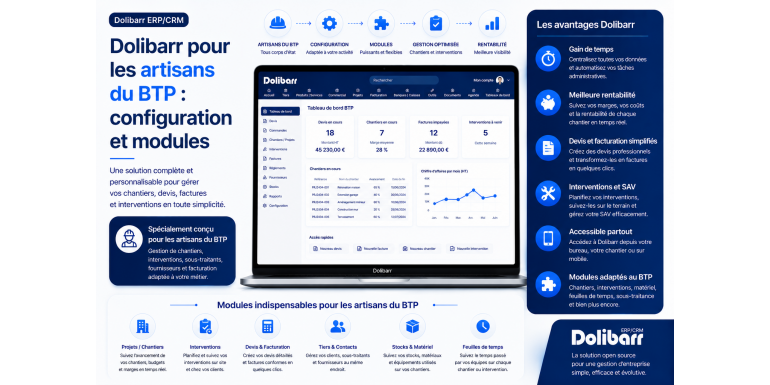
The complete 2026 guide to adapting Dolibarr to the specific needs of the building and public works sector
Construction professionals face unique administrative and management challenges. From drafting complex quotes with multiple work packages and managing progress reports to handling reduced VAT rates, retention payments, mandatory legal certifications, site monitoring, subcontractor and supplier management, and the specific requirements of public and private contracts, the profession demands a management tool tailored to these particularities. Generic software is often inadequate, while traditional construction-specific solutions can cost several hundred euros per month.
Fortunately, Dolibarr ERP & CRM offers a remarkable alternative: free, open-source software that is highly customizable and can be specifically configured to meet the needs of the construction industry. Whether you're a bricklayer, electrician, plumber, painter, carpenter, roofer, landscaper, or general contractor, Dolibarr can become your daily ally for managing all the administrative and commercial aspects of your business. However, you still need to know how to configure it correctly and which add-on modules to install to fully leverage its capabilities.
In this comprehensive guide, we'll explore in detail how to adapt Dolibarr to the specific needs of the construction industry. You'll discover the sector's particularities to consider, the optimal initial setup, dedicated modules available on the Dolistore, managing construction quotes and invoices, reduced VAT rates, retention payments, progress reports, subcontracting, site management, and much more. Whether you're a self-employed tradesperson, a small business owner, or the administrative manager of a construction SME, this guide will give you all the tools you need to leverage Dolibarr for your business.
Article summary
• Specific aspects of the construction industry to consider
• Why choose Dolibarr for your construction business?
• Initial setup: the basics to put in place
• Managing VAT in the construction industry (reduced rates)
• Create quotes structured into lots and sub-lots
• Managing work situations
• The retention money
• Managing construction sites with the Projects module
• Supplier and materials management
• Subcontracting and legal obligations
• Third-party modules specializing in construction and public works
• Mandatory certificates and information
• Adapting your PDF document templates
• Profitability tracking by construction site
• Good daily practices
• Conclusion
1. Specific characteristics of the construction industry to be taken into account
Before configuring Dolibarr, it is essential to understand the specific characteristics of the construction sector that distinguish it from other economic activities. These specificities will determine the configuration choices and the modules to be installed.
The complexity of construction quotes
A construction estimate is nothing like a standard quote. It can include several packages (structural work, finishing work, final touches), detailed sub-packages, precise technical descriptions, references to standards (DTU, NF, Eurocode), references to architectural plans, and specific execution conditions. An estimate for a complete renovation can be 20 to 30 pages long with hundreds of detailed lines. The software must therefore be able to handle this complexity while remaining easy to understand for the client.
Billing based on work progress
Unlike traditional businesses where billing occurs after the service is rendered, construction work is generally billed in installments: progress is invoiced at regular intervals (monthly, for example). The first installment is billed at 30% completion, the second at 60%, the third at 90%, and then the final invoice is issued. This progressive billing system is essential for the company's cash flow and for maintaining client trust.
Reduced VAT rates
The construction industry benefits from reduced VAT rates in several cases: 10% for improvement, conversion, renovation, and maintenance work on dwellings completed more than two years ago, and 5.5% for energy efficiency renovations. Managing these multiple rates on the same project is complex and requires careful attention, not to mention the VAT certificate that the client must provide to benefit from the reduced rate.
The retention money
In public contracts and certain large private contracts, the contracting authority withholds a portion of the payment (generally 5%) as a performance guarantee. This withholding is released once all outstanding issues have been resolved, usually one year after acceptance. Tracking these withholdings across multiple simultaneous construction sites can quickly become a complex task without the right tools.
Specific legal obligations
The construction industry is one of the most regulated sectors. You must provide proof of your ten-year structural warranty, your two-year warranty, your qualifications (Qualibat, RGE, Qualifelec, Qualit'EnR), comply with subcontracting obligations (1975 law), manage your subcontractors' URSSAF certificates, and declare worksites to the CARSAT for preliminary declarations. All these obligations must be trackable in your management tool.
???? KEY TAKEAWAY: The construction industry involves complex quotes, progressive invoicing, multi-rate VAT, retention payments, and specific legal obligations. A suitable tool is essential.
2. Why choose Dolibarr for your construction business?
With so many specific features, one might wonder why choose a general-purpose software like Dolibarr rather than a specialized construction solution like Batigest, EBP Bâtiment, or Codial Bâtiment. Here are the arguments in favor of Dolibarr.
Cost: a major argument
Specialized construction solutions typically cost between €30 and €150 per month for full functionality. Over 10 years, this adds up to several thousand euros. Dolibarr is free for self-hosting, and even as a SaaS solution, its costs remain lower than those of industry-specific solutions. For a self-employed tradesperson or a small business just starting out, this financial advantage is often decisive.
Customization flexibility
Dolibarr is fully customizable. You can add specific fields for the construction industry (project number, type of work, relevant trade), create tailored document templates, and configure specific workflows. Proprietary solutions are often less flexible or charge exorbitant prices for each customization.
The sustainability of your solution
By choosing widely used open-source software, you protect yourself against the disappearance or acquisition of your software publisher. The Dolibarr project is not dependent on a single company and will continue to exist as long as it has users and contributors. This is long-term security.
An ecosystem of dedicated modules
On the Dolistore (the official module store), numerous modules specific to the construction industry are available: work progress management, retention of guarantees, multi-lot quotes, site management, etc. These modules transform Dolibarr into a true sector-specific solution, while maintaining the flexibility of the base.
Scalability
Whether you're a sole trader today and plan to expand with several employees and subcontractors tomorrow, Dolibarr adapts to your growth. Construction solutions are sometimes designed for a certain volume and become unsuitable (too simple or too expensive) when the structure evolves.
French conformity
Dolibarr is a French project, and the French-speaking community is very active. All French tax, accounting, and legal requirements are taken into account: VAT rates, mandatory information, FEC (French accounting file), GDPR compliance, and management of self-employed individuals exempt from VAT. This adaptation to the French context is essential for construction tradespeople.
3. Initial setup: the basics to put in place
Once Dolibarr is installed (as SaaS, self-hosted or local), here are the essential steps to configure it specifically for the construction industry.
Provide company information
Go to Settings > Company/Organization. In addition to standard information (name, address, SIRET number, APE code), remember to enter information specific to the construction industry: intra-community VAT number, share capital, legal structure, details of professional qualifications (Qualibat, RGE, etc.), and ten-year structural warranty insurance details (name of insurer, contract number). This information will automatically appear on all your business documents.
Activate essential modules
Go to Configuration > Modules to activate the modules necessary for the construction industry. The essential ones are: Third Parties (customer and supplier management), Sales Proposals (quotes), Customer Invoices, Supplier Invoices (very important in construction for managing materials), Banks and Cash, Products/Services, Projects (for managing construction sites), Inventory (if you manage equipment or materials), Expense Reports (for travel to construction sites).
Configure the units of measurement
In the construction industry, many specific units are used: m², m³, linear meters, flat rate, day, shift, ton, etc. Go to Configuration > Dictionaries > Units to check that all the units used in your industry are available. Add any missing ones. Proper unit configuration prevents ambiguities in quotes.
Define the appropriate payment terms
The construction industry has specific payment terms: a deposit upon ordering (generally 30%), payments in installments, the balance upon completion of the work, and a 5% retention released after one year. Configure these terms in Dolibarr by going to Configuration > Dictionaries > Payment Terms. You can create custom terms to suit your business practices.
Configure accounting accounts
If you manage accounting in Dolibarr, configure the specific BTP accounts: 706 (services), 707 (sales of goods for supplies), 605 (purchases of materials), 611 (general subcontracting), 44571 (VAT collected), 44566 (VAT deductible) with sub-accounts corresponding to the different rates (20%, 10%, 5.5%).
4. Managing VAT in the construction industry (reduced rates)
Managing VAT rates is one of the most specific challenges in the construction industry. Let's see how to master it in Dolibarr.
The different rates applicable to the construction industry
The construction industry uses several VAT rates depending on the nature of the work:
• Standard rate of 20%: work in professional premises, new construction less than 2 years old, major maintenance on new buildings.
• Intermediate rate of 10%: improvement, transformation, development and maintenance work in dwellings completed more than 2 years ago.
• Reduced rate of 5.5%: energy renovation work (insulation, renewable energy equipment, installation of electric charging stations).
Enable rates in Dolibarr
Go to Configuration > Dictionaries > VAT Rates. Verify that all rates applicable to the construction industry are activated. For each rate, check the associated accounting code. If some rates are missing, add them with their exact values (20.00, 10.00, 5.50).
Define VAT by product or service
For each product or service you invoice, apply the standard VAT rate. For example, insulation installation will have a default rate of 5.5%, while plastering work will have a rate of 10%. You can always adjust this rate on a case-by-case basis if necessary.
The customer's VAT certificate
To benefit from the reduced VAT rates of 10% or 5.5%, individual customers must provide a VAT certificate confirming that the work concerns a property that is more than two years old and that it qualifies for the reduced rate. This certificate is mandatory and must be kept for five years. In Dolibarr, always attach this certificate to the relevant third-party record or project.
???? WARNING: Without a VAT certificate signed by the client, you cannot apply the reduced rates. In the event of a tax audit, the adjustment will be based on the difference with the standard rate of 20%, plus penalties.
Managing a multi-rate quote
On a complex project, you may have several VAT rates applied simultaneously: 5.5% on insulation, 10% on other improvement work, and 20% on the supply of major equipment. Dolibarr naturally manages this diversity by applying the rate line by line. The VAT summary at the bottom of the quote or invoice details the amounts for each rate.
5. Create quotes structured into lots and sub-lots
Construction quotes are generally structured into several lots and sub-lots to make them easier for the client and architect to understand. Let's see how to replicate this structure in Dolibarr.
The typical structure of a construction quote
A construction estimate typically follows this hierarchical structure: Lot 1: Structural work — Sub-lot 1.1: Earthworks (detailed line items), Sub-lot 1.2: Foundations (detailed line items), Sub-lot 1.3: Masonry (detailed line items). Lot 2: Framing and roofing. Lot 3: Exterior joinery. Lot 4: Plumbing. Lot 5: Electrical work. Lot 6: Plastering and insulation. Lot 7: Tiling. Lot 8: Painting and flooring. Each lot can be totaled separately.
Use heading lines
In Dolibarr, you can add special lines that act as section headings. These are lines without prices that visually structure the quote. To add a heading, create a free-form line with only the description (for example, "LOT 1 — STRUCTURAL WORK") and leave the quantity and price at zero. You can then format it in bold.
The BTP-Lots module
To go further, Dolistore offers a specialized module for natively managing lots and sub-lots in construction quotes. This module adds valuable features: automatic lot numbering, subtotals per lot, and lot statistics. It significantly simplifies the creation of complex quotes and their presentation to the client.
Reusing batch templates
If you regularly undertake the same types of work (bathroom renovation, attic insulation, facade restoration), create pre-filled quote templates with all the corresponding lots and line items. For a new, similar project, simply duplicate the template, adjust the quantities and prices, and your quote will be ready in minutes instead of hours.
Add technical descriptions
For each line item, add a detailed technical description: relevant standards (DTU, NF), technical specifications, brand or characteristics of materials, and execution conditions. This level of detail protects the tradesperson in case of a dispute and reassures the client about the quality of the service. Dolibarr allows you to add a longer description to each line item.
6. Managing work situations
Billing based on project status is one of the major specificities of the construction industry. Here's how to manage it effectively in Dolibarr.
What is a construction situation?
A progress invoice is an interim invoice issued based on the actual progress of the project, usually monthly. Instead of waiting until the project is complete to invoice the full amount, you invoice regularly for the work completed, which helps maintain healthy cash flow throughout the project. For a 6-month project, you can issue 6 monthly progress invoices plus the final invoice.
The cumulative mechanism
A work progress report operates cumulatively: each report indicates the percentage of total project completion since the start. For example, Report 1: 25% completion = €25,000. Report 2: 50% completion = €50,000 (of which €25,000 was already invoiced in Report 1, so €25,000 is due). Report 3: 80% completion = €80,000 (of which €50,000 has already been invoiced, so €30,000 is due). This system prevents double billing and ensures consistency.
The Situations module in Dolibarr
Several modules on the Dolistore platform allow for the native management of work progress. These modules add: the creation of progress invoices from the initial quote, the automatic calculation of cumulative and differential amounts, the management of the final statement of account at the end of the work, and the generation of documents compliant with construction industry standards. A very profitable investment for tradespeople who regularly undertake long-term projects.
Manual method without module
If you don't want to invest in a dedicated module, you can manage projects manually in standard Dolibarr. Create the initial invoice with all the lines from the quote and their percentage of completion. Modify this percentage for each project. This method is more laborious but works well for small businesses with few simultaneous projects.
The final general statement of account (DGD)
The final statement of work (DGD) is the document that concludes the contract. It summarizes all the progress reports, incorporates any additional work and penalties, and establishes the final amount due. In Dolibarr, create the DGD by aggregating all the previous progress reports and adding the adjustments. This is an important legally binding document that must be carefully archived.
7. Retention money
Retention of guarantee is another concept specific to the construction industry that needs to be managed in Dolibarr.
The principle of retention of guarantee
On public contracts and certain major private contracts, the project owner withholds 5% of the total cost of the work as a performance guarantee. This sum is not lost: it is paid to you once all outstanding issues have been resolved, generally one year after the project's completion. This retention covers any defects or faulty workmanship that may appear during the one-year guarantee period.
Bank guarantee as an alternative
Rather than having the guarantee withheld from their cash flow, the contractor can provide a bank guarantee for an equivalent amount. The client then immediately releases full payment, and the guarantee protects against any potential claims. This option significantly improves cash flow but comes at a cost (bank commission, approximately 1 to 3% of the guaranteed amount per year).
Plotting deductions in Dolibarr
To track retention payments in Dolibarr, several approaches are possible. You can create supplementary invoices corresponding to the withheld amounts, marked as "pending release." You can also use custom fields on the invoices to indicate the withheld amount and the expected release date. The Construction Projects module typically handles this functionality natively.
One-year follow-up on releases
The most important thing is not to forget to request the release of any outstanding balances. Always create an event in your Dolibarr calendar 11 months after the project completion to remind you to follow up with the client. For companies with numerous projects, this cash flow issue can represent tens of thousands of euros in unpaid invoices.
Accounting for deductions
From an accounting perspective, the retention money remains a receivable you hold against your client. It does not leave account 411 (customers), but can be transferred to a specific sub-account (for example, 411800 – Customers – Retention Money) for better tracking. This accounting breakdown provides a clear view of your actual outstanding balance.
8. Managing construction sites with the Projects module
In the construction industry, each project is a unique undertaking that deserves specific attention. Dolibarr's Projects module is the ideal tool for this.
Activate and configure the Projects module
Go to Configuration > Modules > Projects and activate it. This module allows you to group all associated elements under a single "project" (or site) entity: quotes, invoices, payments, supplier purchase orders, documents, schedules, notes, tasks, etc. It's the equivalent of a complete digital site file.
Create a new construction site
For each new project, create a project in Dolibarr. Enter the following information: the project reference (for example, RENO-2026-001 for the first renovation of 2026), the description (including the client's name and the project address), the third party (client), the start date, the planned end date, the budget, and the status (in progress, on hold, completed). You can also assign a project manager.
Attach all documents to the construction site
Once the project is created, systematically link all the elements to it: the initial quote, any amendments, all progress reports, purchase orders to suppliers, invoices for materials, and travel expense reports. This centralization allows you to immediately find all the elements of a project without having to search in different places.
Follow the tasks on the construction site
The Projects module allows you to create tasks associated with the construction site: demolition, structural work, finishing work, etc. For each task, you can define an estimated duration, a responsible party, and a progress tracker. It's a basic planning tool that may be sufficient for small projects. For complex projects, you can supplement it with a specialized planning tool such as MS Project or GanttProject.
Documents and photos of the construction site
Take advantage of Dolibarr's integrated document management system (DMS) to store all your construction site documents: architectural plans, before/during/after photos, site reports, and various certificates. Photos are particularly valuable: taken regularly, they document progress and can serve as evidence in case of a dispute.
9. Supplier and Materials Management
In the construction industry, material purchases often represent 40 to 60% of revenue. Therefore, rigorous supplier management is essential for profitability.
Create supplier profiles
Go to Third Parties > New Third Party and create each supplier you work with regularly: building material suppliers (Point.P, Brossette, Cedeo, Frans Bonhomme), specialist wholesalers, professional DIY stores (Tout Faire Matériaux, Espace Aubade), equipment rental companies (Loxam, Kiloutou). For each supplier, enter: commercial terms (any discounts), payment terms, dedicated sales contact, and customer account number.
Record supplier invoices
For each project, record all corresponding purchase invoices using the Supplier Invoices module. This data entry allows you to: accurately determine the cost of materials for each project, calculate the actual (not theoretical) profit margin for the project, manage deductible VAT, and prepare tax returns. Assign each supplier invoice to the relevant project for precise tracking.
Order tracking
Before recording the invoice, you can create purchase orders that are sent to the supplier. This process structures purchases and prevents poorly tracked verbal orders. The purchase order can then be converted into an invoice upon receipt. This traceability is invaluable in the event of an order dispute.
Managing material stocks
If you maintain a stock of recurring materials (screws, gaskets, consumables, etc.), activate the Stocks module in Dolibarr. You can: record inflows (purchases) and outflows (on-site use), track stock levels in real time, configure alerts for low levels, and value the stock at the end of the fiscal year. For organizations with little permanent stock, this management may be unnecessary.
Cost analysis by supplier
Dolibarr offers purchase analysis reports by supplier. You can see what percentage of your revenue is spent with each supplier, which is useful for negotiating commercial terms. If a supplier represents more than 10% of your purchases, it's probably time to negotiate a discount.
10. Subcontracting and legal obligations
The construction industry relies heavily on subcontracting, which is subject to strict legal regulations. Dolibarr can help manage these obligations.
The legal framework for subcontracting
The 1975 law on subcontracting imposes several obligations on the main contractor. You must: declare the subcontractor to the project owner (for public contracts), have their payment terms approved, verify their qualifications and insurance, and ensure they comply with their social security (URSSAF) and tax obligations. Failure to comply with these obligations can result in serious penalties.
Tracking subcontractors in Dolibarr
Create each subcontractor as a third party (supplier) in Dolibarr, with a specific "Subcontractors" category. For each subcontractor, keep the following documents attached: Kbis extract or certificate of registration with the trade register, valid ten-year liability insurance certificate, URSSAF compliance certificate (to be renewed every 6 months), and proof of specific qualifications.
URSSAF vigilance certificate
For any subcontracting agreement exceeding €5,000 excluding VAT, you must obtain and retain your subcontractor's URSSAF compliance certificate. This certificate proves that they are up-to-date with their social security contributions. It must be renewed every 6 months. In Dolibarr, configure a calendar event to request renewal before the expiry date.
Managing subcontracting invoices
Subcontracting invoices are recorded like standard supplier invoices, but allocated to the relevant project (worksite). Always verify their consistency with the signed subcontract: amount, services, and payment terms. Subcontracting is recorded in accounting account 611 (general subcontracting).
Direct payment to the subcontractor
In public procurement, declared and approved subcontractors benefit from direct payment: the contracting authority pays them directly, without going through the main contractor. This method protects the subcontractor in case of default by the main contractor. Clearly track in Dolibarr which subcontractors are receiving direct payment to avoid double payments.
11. Third-party modules specializing in construction and public works
Dolistore offers several modules dedicated to the construction industry that transform Dolibarr into a true sector-specific solution. Here is an overview of the most useful ones.
The Construction Quotes and Invoices Module
This module is probably the most important for construction professionals. It enhances the native features with: batch and sub-batch management, detailed unit prices for labor and materials, automatic calculation of direct costs, consideration of specific construction VAT rates, and industry-specific PDF templates. Expect to pay between €50 and €150 for this one-time purchase.
The Work Situations module
Essential for long-term projects. It automates the creation of progress invoices, the cumulative calculation of advance payments, the management of final acceptance certificates, and the generation of documents compliant with construction industry standards. An investment of between 80 and 200 euros that pays for itself quickly.
The Retention of Guarantee module
This specialized module automatically manages retention payments: automatic calculation on invoices, tracking of amounts retained per project, alerts for release at the due date, and generation of release request letters. Particularly useful for companies bidding on public contracts. Cost: 50 to 100 euros.
The Price Library module
This module allows you to manage a construction-specific price library with standard price lists: labor by trade, materials with their variations, supplies, and subcontracting. You can quickly create quotes by selecting from this pre-structured library. Cost: €80 to €200.
Construction accounting modules
To complement Dolibarr's native accounting features, modules add specific functionalities for the construction industry: material stock tracking, cost accounting per project, fixed asset management (equipment, vehicles), and profitability dashboards per project. These modules are often sold in packages for 200 to 400 euros.
Personnel management modules
For companies with employees working on construction sites, modules are available to manage: tracking hours per site and per employee, weekly timesheets, overtime calculations, meal allowances, and long-distance travel allowances. Cost varies depending on the functional scope.
???? TIP: Before purchasing a module, carefully read the reviews on the Dolistore and request a demonstration. Also, check compatibility with your version of Dolibarr and the developer's support.
12. Mandatory certificates and information
The construction industry imposes numerous mandatory requirements on commercial documents. Dolibarr allows you to manage these automatically once properly configured.
Mandatory information to include on quotes
In addition to the standard information, your construction quotes must include: your SIRET number, your intra-community VAT number, your APE/NAF code (generally 41-43 for the building sector), your legal form and share capital for companies, your professional qualifications with references (Qualibat, RGE, Qualifelec, etc.), your ten-year insurance references (insurer and contract number), mention of the two-year guarantee and the ten-year guarantee, the expected completion date of the work, and any penalties for delay.
The certificates to be provided to the client
When signing the contract and throughout the construction project, you must provide the client with several certificates: valid ten-year insurance certificate (to be provided annually), professional liability insurance certificate, Qualibat certificate or other relevant qualification, tax and social security compliance certificate (URSSAF), copy of your Kbis or extract from the trade register.
The information on the invoices
Construction invoices must include all the standard information (date, number, description of services, price excluding and including VAT, etc.) as well as information specific to construction: the expiry date of the ten-year insurance (the invoice must be issued during the validity period), the breakdown by lot or type of service, the applicable VAT rate with its justification, the reference to the initial signed quote, and the complete bank details for payment (IBAN, BIC).
The reduced VAT rate certificate
To apply the reduced VAT rate of 10% or 5.5%, individual customers must sign a simplified declaration (CERFA form no. 1300-SD for improvement work, or 1301-SD for energy-efficient renovations). This declaration commits the customer to the nature of the work and eligibility for the reduced rate. Save it as an attachment to the project in Dolibarr.
Document preservation
Construction documents must be kept for specific periods: 10 years for accounting documents and invoices, 10 years for contracts and agreements (the duration of the ten-year warranty), and 5 years for VAT certificates. Dolibarr automatically archives these documents as long as you maintain your installation and perform regular backups.
13. Adapt your PDF document templates
Dolibarr's default PDF templates are suitable for typical activities, but the construction industry needs templates adapted to its specific needs.
Native models and their limitations
Dolibarr's native Crabe, Sponge, and Octopus templates produce professional quotes and invoices, but they don't reflect the typical structure of a construction document. Batches aren't highlighted, subtotals per batch are missing, and construction-specific information must be added manually. For occasional use, they might suffice; for intensive use, customization is recommended.