
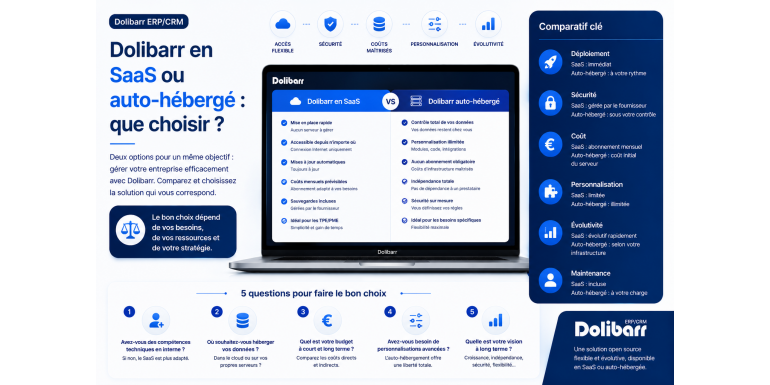
The 2026 comparative guide to choosing the ideal hosting method for your open source ERP
You've decided to use Dolibarr ERP & CRM to manage your business: excellent news! But a crucial question immediately arises: should you opt for a SaaS (Software as a Service) solution managed by a provider, or choose self-hosting to maintain complete control over your installation? This choice, far from being trivial, will have profound consequences on your daily operations: costs, management time, security, performance, flexibility, and technological independence.
There is no single answer to this question. The right choice depends on your profile, your technical skills, your budget constraints, the size of your business, and your customization requirements. A sole trader doesn't have the same needs as a 50-employee industrial SME. A freelance consultant doesn't have the same constraints as a local sports association.
In this comprehensive comparison guide, we'll analyze both options in depth to help you make an informed choice. You'll discover the advantages and disadvantages of SaaS and self-hosting, the true (and often underestimated) costs of each solution, decision criteria based on your profile, the main SaaS providers available, self-hosting options (from dedicated servers and shared hosting to VPS), and much more. By the end of this guide, you'll know exactly which option best suits your needs.
Article summary
• Understanding the two models: SaaS and self-hosting
• Dolibarr as SaaS: presentation and operation
• The advantages of the SaaS model for Dolibarr
• The disadvantages of the SaaS model
• Dolibarr self-hosting: an overview
• The advantages of self-accommodation
• The disadvantages of self-accommodation
• Detailed comparison: SaaS vs. self-hosted
• Analysis of actual costs over 3 years
• The main SaaS providers for Dolibarr
• Self-hosting options: from shared hosting to VPS
• Which option best suits your profile?
• Migrating from one solution to another: is it possible?
• Conclusion: making the right choice
1. Understanding the two models: SaaS and self-hosting
Before comparing the two options in detail, it is essential to fully understand what they actually entail. These concepts are often misunderstood or confused.
What is SaaS mode?
SaaS, or Software as a Service, is a model in which the application is hosted by a provider and accessible via the internet. You don't have to install or maintain anything: you pay a monthly or annual subscription, and the provider takes care of everything. This is the model used by services like Gmail, Salesforce, Slack, and Office 365. For Dolibarr, SaaS means that a specialized hosting provider handles the installation, hosting, backups, updates, and technical support. You access your Dolibarr application from any web browser, without having to worry about the technical aspects.
What is self-hosting?
Self-hosting involves installing and managing Dolibarr yourself on your own infrastructure. This could be your personal computer, a server in your company, shared web hosting that you rent, a VPS (Virtual Private Server), or a dedicated server. In all cases, you are responsible for installation, configuration, security, backups, updates, and troubleshooting in case of problems. In return, you benefit from complete freedom and generally lower recurring costs.
The false dichotomy
It's important to understand that the choice between SaaS and self-hosting isn't an all-or-nothing proposition. Hybrid solutions and nuances exist: self-hosting with outsourced maintenance, SaaS with advanced customization options, and managed hosting that combines the flexibility of self-hosting with the simplicity of SaaS. We'll explore these options throughout this article.
The fundamental criterion: control
The key difference between the two models lies in the level of control you have over the application and its data. With SaaS, you delegate this control to the provider in exchange for ease of use. With self-hosting, you retain complete control but must assume the corresponding responsibilities. This control criterion should be your guiding principle throughout your decision-making process.
2. Dolibarr as SaaS: presentation and operation
Dolibarr's SaaS model has experienced significant growth over the past several years. Let's see how it works in practice.
The general principle
You subscribe to a service with a specialized provider. In just a few minutes, your Dolibarr instance is created on the provider's servers. You receive a personalized access URL (usually something like yourcompany.dolicloud.com) as well as administrator credentials. You can then start using Dolibarr immediately, configuring your company, customers, products, and so on. The provider handles all the technical aspects.
What is included in a typical SaaS subscription
A Dolibarr SaaS subscription typically includes the following:
• Hosting on secure and high-performance servers.
• The initial installation and configuration of Dolibarr.
• Automatic updates to new versions.
• Automatic backups, either daily or several times a day.
• An SSL certificate to secure communications (HTTPS).
• 24/7 monitoring of proper functioning.
• Technical support is available via email or ticket.
• A guarantee of availability (generally 99% to 99.9%).
Variations depending on the service provider
Not all Dolibarr SaaS providers offer the same services. Some include unlimited users, while others charge per additional user. Some allow the installation of third-party modules, while others limit the available modules. Some offer telephone support, while others only provide email support. Pricing varies accordingly, typically ranging from €15 to €50 per month for a small organization.
Accessibility from all devices
One of the major advantages of SaaS is universal accessibility. You can access your Dolibarr from any computer, tablet, or smartphone connected to the internet. This is particularly useful for remote teams, sales representatives on the go, or managers who travel frequently. There's no need to configure a VPN or complex remote access.
3. The advantages of the SaaS model for Dolibarr
The SaaS model offers many advantages that make it an attractive option for many users.
Ease of setup
This is undoubtedly the most obvious advantage of SaaS. With just a few clicks and a credit card, you have a fully functional and ready-to-use Dolibarr installation. There's no need to install a server, configure Apache, MySQL, and PHP, manage file permissions, or understand the intricacies of the Linux command line. It's the ideal option for people who want to focus on their core business rather than the technical aspects.
Zero technical maintenance
The SaaS provider handles all maintenance tasks: operating system security updates, Dolibarr updates, performance optimization, SSL certificate management, and server monitoring. You save several hours per month that can be devoted to your core business.
Automatic professional backups
Reputable SaaS providers perform automatic daily backups, typically with retention periods of several days or weeks. These backups are stored on remote servers to withstand disasters. In the event of a problem, restoration is fast and reliable, requiring no intervention from you.
Enhanced security
Specialized SaaS hosting providers have dedicated security teams. They quickly apply security patches, monitor intrusion attempts, and implement advanced protection measures (application firewalls, intrusion detection, DDoS protection). The level of security achieved is generally higher than what a non-specialist could implement on their own.
Simplified scalability
Is your business growing? SaaS lets you easily scale your resources: more storage, more users, better performance. All this is usually done in just a few clicks, without service interruptions or technical intervention. This flexibility is especially valuable for growing companies.
Seamless updates
Dolibarr is updated several times a year. In SaaS mode, these updates are performed automatically, usually at night to avoid disrupting your business. This way, you always benefit from the latest features and security fixes, without having to worry about it.
Availability guaranteed by contract
SaaS providers contractually commit to a level of availability, generally between 99% and 99.9%. In the event of an outage exceeding these thresholds, you are entitled to compensation. This guarantee is reassuring for companies whose operations heavily rely on Dolibarr.
4. The disadvantages of the SaaS model
Despite its many advantages, the SaaS model also has limitations that should be understood before making a choice.
Long-term recurring cost
The main drawback of SaaS is its recurring cost. At an average price of €20 to €30 per month, the subscription amounts to €240 to €360 per year, or over €1,000 over three years. Over ten years, you will have spent several thousand euros on subscriptions. Compare this to the cost of a well-optimized self-hosted server, which can be less than €50 per year.
Dependence on the service provider
By choosing a SaaS provider, you become dependent on its long-term viability and the quality of its service. If the provider closes, is acquired, changes its pricing, degrades its service quality, or experiences a prolonged outage, you are directly affected. Migrating to another provider is generally possible but can be complex.
Customization limits
For security and resource-sharing reasons, SaaS providers often limit advanced customization options. You generally cannot modify Dolibarr's source code, install any third-party modules, directly access the database, or run custom scripts. This can be a significant limitation for specific business needs.
Data hosted by a third party
In SaaS, your sensitive business data (customers, prices, invoices, accounting data) is stored on the provider's servers. For some companies, particularly those subject to strict regulations (GDPR, healthcare, defense), this outsourcing can be problematic. It is crucial to choose a compliant provider and carefully read the terms and conditions regarding data processing.
Network-dependent performance
Access to your Dolibarr SaaS application requires an internet connection. If your connection is slow or unstable, using Dolibarr can be frustrating. In the event of an internet outage at your home or your service provider's end, you lose complete access to your data. Conversely, a local installation is not affected by these issues.
Uncontrolled evolution
The service provider can decide to change its offers, prices, terms of service, or even discontinue the service. You are subject to these changes without having any control over them. With self-hosting, you remain in control of the timing and nature of these changes.
5. Self-hosted Dolibarr: an overview
Self-hosting is the historical and still the most widely used solution for Dolibarr. Let's see what this means in practice.
The different forms of self-accommodation
Self-hosting isn't a one-size-fits-all solution. Several options exist, each suited to different needs. Local installation on your own computer (using DoliWamp for Windows, or a LAMP environment on Linux/macOS) is ideal for single users working from a single workstation. Shared hosting with a traditional web hosting provider (OVH, Infomaniak, o2switch, Hostinger) offers a simple yet cost-effective compromise for small organizations. A VPS (Virtual Private Server) from OVH, Hetzner, DigitalOcean, or Scaleway provides greater control and performance at a moderate cost. A dedicated physical server offers maximum performance but at a higher price. Finally, self-hosting at home on a Raspberry Pi or a mini-server allows for complete autonomy, but is recommended only for highly technical users.
Technical prerequisites
To host Dolibarr yourself, you need a web server with PHP (version 7.4 or higher recommended), a MySQL or MariaDB database, and an HTTP server such as Apache or Nginx. Configuring these components requires basic technical skills, including knowing how to use a terminal, managing files via SSH, and understanding the fundamentals of web configuration. Fortunately, numerous tutorials are available, and the communities are active.
The installation process
Installing Dolibarr on a self-hosted server typically involves several steps: preparing the server (installing Apache, PHP, and MySQL), downloading the Dolibarr archive from dolibarr.org, extracting the files to the web folder, creating an empty database, accessing the installation wizard via your browser, and following the guided steps (database configuration, creating the admin user, and selecting modules). The entire process usually takes between 15 minutes and 1 hour, depending on your experience.
Regular maintenance
Once Dolibarr is installed, you will need to perform several recurring tasks: monitor available disk space, monitor server performance, apply Dolibarr updates (generally several times a year), apply operating system security updates, perform regular backups, and monitor logs to detect potential problems. This maintenance represents a few hours per month for a simple installation.
6. The advantages of self-accommodation
Self-hosting offers many advantages, especially for users with technical skills or specific needs.
Total cost significantly lower
In the long run, self-hosting is generally much less expensive than SaaS. Shared hosting is sufficient for many uses and costs between €30 and €100 per year. A high-performance VPS can be rented for between €60 and €150 per year. Compared to a SaaS subscription costing €240 to €600 per year, the savings are substantial, especially over several years.
Total control over the installation
You are in complete control: you decide when to update, which modules to install, how to configure the server, where to store backups, and who has access to the data. This freedom is invaluable for companies with specific needs or particular constraints (confidentiality, performance, custom integrations).
Unlimited customization
Self-hosting allows you to customize Dolibarr without any limitations. You can modify the source code, create your own modules, integrate Dolibarr with other software via the API, extensively modify PDF templates, add custom fields, and more. For businesses with complex business processes, this flexibility is often essential.
Data under your control
Your data stays with you (in the broadest sense: on a server you control). This is a compelling argument for companies concerned about their digital sovereignty, for those subject to strict regulatory constraints, or simply for those who prefer not to entrust their business data to a third party. You know exactly where your data is and who has access to it.
No external dependencies
No service provider can unilaterally decide to shut down your service, raise prices, or change terms. Your Dolibarr is in your hands, and it will continue to function even if the Dolibarr project were to cease operations (which is highly unlikely, given its vitality). This technological independence is a true asset.
Performance can be improved
With self-hosting, you can optimize performance to suit your needs: choose a more powerful server if necessary, optimize the MySQL configuration, implement caching, and select a datacenter close to your users. Performance can be fine-tuned, unlike with SaaS where you are limited by the provider's choices.
7. The disadvantages of self-accommodation
Self-hosting is not without its drawbacks, and one must be realistic about the effort it requires.
Technical skills required
This is the main obstacle for many users. To reliably host Dolibarr yourself, you need to know how to use a Linux terminal, understand the basics of web configuration, be able to diagnose server problems, manage file permissions, configure SSL, and so on. If you're starting from scratch, this represents several days of training, or even more.
Total responsibility for safety
When self-hosting, you are solely responsible for the security of your installation. Incorrect configuration, a lack of updates, or a weak password can leave you vulnerable to attacks. The consequences of an intrusion can be serious: data theft, ransomware, and the use of your server for malicious activities. It is essential to strictly adhere to security best practices.
Significant management time required
Even when running smoothly, self-hosting requires time: monitoring, backups, updates, and occasional troubleshooting. Expect to spend an average of 2 to 5 hours per month for a standard setup, and more if problems arise. Over a year, this adds up to several dozen hours that could be better spent on your core business.
Risk in case of an incident
If your server crashes, you fall victim to a cyberattack, or you make a mistake, you're on your own to deal with it. Resolving the issue can take time, sometimes several days, during which your Dolibarr is unusable. With a SaaS solution, the provider's technical team takes care of everything, usually with a rapid response.
Backups are your responsibility
Setting up and maintaining backups is entirely your responsibility. This requires configuring an automatic backup system, regularly testing restores, and storing backups in multiple secure locations. It's perfectly possible, but it requires time and diligence.
No official support included
Unless you pay for a specific support contract, you have no official support in case of problems. You will have to rely on the community (forums, wiki, Facebook groups) to find solutions. The Dolibarr community is very active and knowledgeable, but response times are not guaranteed.
8. Detailed comparison: SaaS vs. self-hosted
To help you make your choice, here is a summary comparison table outlining the main decision criteria.
|
Criteria |
SaaS |
Self-catering |
|
Set up |
Very quick (a few minutes) |
Longer (from 1 hour to 1 day) |
|
Technical skills |
No requirements |
Intermediate to advanced level |
|
Monthly cost |
€15 to €50 |
3 to 15 € |
|
Annual cost |
€180 to €600 |
36 to 180 € |
|
Maintenance |
Included |
At your expense |
|
Backups |
Automatic and included |
To configure and manage |
|
Updates |
Automatic |
Manuals |
|
Customization |
Limited |
Unlimited |
|
Data control |
At the service provider |
Completely at home |
|
Technical support |
Included |
Community or paid |
|
Availability |
Contractually guaranteed |
Depending on your infrastructure |
|
Scalability |
Simple, in just a few clicks |
Request a migration |
|
Dependence |
Strong to the service provider |
None |
9. Analysis of actual costs over 3 years
Cost is often a deciding factor, but it's important to consider the total cost, not just the listed price. Here's a realistic three-year analysis.
Cost of a Dolibarr SaaS over 3 years
For a small business with 2 to 3 users, a SaaS subscription typically costs €25 per month, or €300 per year, or €900 over 3 years. This cost includes everything: hosting, backups, support, and updates. If the business grows to 5 users, the cost can increase to €40 per month, or €1,440 over 3 years. For a team of 10 users, expect to pay around €70 per month, or €2,520 over 3 years.
Cost of shared self-hosting over 3 years
Quality shared hosting costs between €5 and €10 per month, or €60 to €120 per year, or €180 to €360 over three years. To this must be added the cost of management time: if you estimate your time at €30 per hour and spend three hours per month on maintenance, this represents €90 per month, or €3,240 over three years. The calculation is already less favorable.
Cost of a VPS over 3 years
A high-performance VPS costs between €10 and €20 per month, or €360 to €720 over 3 years. With an estimated management time of 4 hours per month (slightly more than shared hosting), the time cost amounts to €4,320 over 3 years at €30 per hour. Total: approximately €5,000.
The real calculation to be made
To make a fair comparison, you need to factor in the cost of your time. If you value your time at €50 per hour (which is reasonable for a manager) and maintenance takes you 3 hours per month, that already adds up to €1,800 per year, compared to the €300 annual cost of SaaS. SaaS then becomes clearly more economical. Conversely, if you already have technical skills and maintenance requires little of your time, self-hosting remains very financially advantageous.
Hidden costs not to be forgotten
Self-hosting involves hidden costs that are often overlooked: purchasing a domain name (10 to 20 euros per year), an SSL certificate if not free (sometimes 50 to 200 euros per year, but Let's Encrypt is free), storage space for external backups (5 to 20 euros per month depending on the volume), initial training time (several days), and occasional troubleshooting services in case of major problems (200 to 500 euros per intervention). These costs can be a deciding factor.
10. The main SaaS providers for Dolibarr
Several providers offer Dolibarr in SaaS mode. Here is an overview of the main offers available on the French-speak