
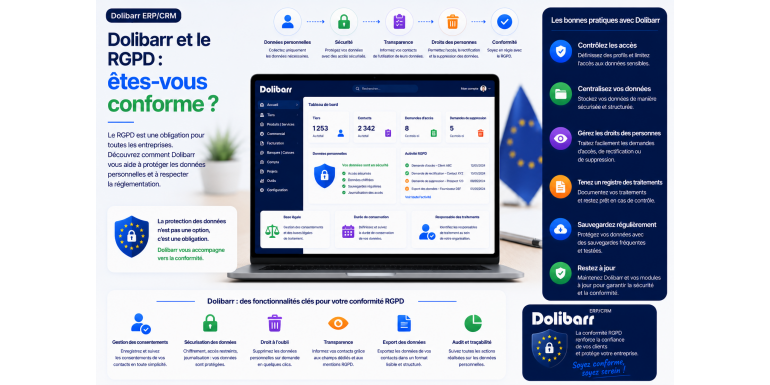
Dolibarr and the GDPR: Are you compliant?
Your ERP system is full of personal data: customers, prospects, contacts, members. But does your Dolibarr installation truly comply with the GDPR? Let's review, without legal jargon, your obligations and the practical tools to achieve compliance.
Compliance · GDPR · Dolibarr • Approximately 12-minute read
Summary
1. The GDPR in brief: what you need to know
2. Why your Dolibarr is directly affected
3. What Dolibarr natively allows
4. The GDPR module: the game-changing tool
5. Summary: native, module or organization?
7. Security, an often-overlooked pillar of compliance
8. The most frequent compliance errors
9. Dolibarr Compliance Checklist
10. Frequently Asked Questions
11. Conclusion: Compliance, a project within your reach
If you use Dolibarr to manage your business, ask yourself a simple question: how much personal data does your software contain? The answer is probably "a lot." Names, addresses, emails, and phone numbers of your customers, prospect records, contact details, information about your members… Your ERP is a veritable goldmine of personal data.
And as soon as you process this data, you fall under the scope of the General Data Protection Regulation , the well-known GDPR, which is in force throughout the European Union. This is not a mere formality: failure to comply with the regulation exposes you to heavy financial penalties and serious damage to your reputation. And your customers' trust depends directly on it.
The good news is that Dolibarr can absolutely be used in compliance with the GDPR. However, it's essential to understand what the software does natively, what requires a dedicated module, and what falls under your organization's specific requirements. In this article, we'll clarify your obligations, review Dolibarr's GDPR-compliant features, and provide a concrete roadmap. By the end, you'll know exactly where you stand—and what you need to do to ensure peace of mind.
Disclaimer: This article provides general information to guide you. It does not constitute legal advice. For an analysis of your specific situation, please consult a legal professional or your data protection officer.
The GDPR in brief: what you need to know
Before discussing Dolibarr, let's set the scene. The GDPR came into effect on May 25, 2018. It applies to any organization that processes the personal data of individuals located in the European Union, regardless of its size—company, freelancer, or association. Its objective is to give individuals back control over their data and impose strict data protection rules on organizations.
Personal data is any information that allows for the direct or indirect identification of a natural person: a name, an email address, a telephone number, an address. "Processing" refers to any operation performed on this data: collection, recording, consultation, modification, storage, deletion.
The main principles to respect
The regulations are based on a few fundamental principles that should guide your use of Dolibarr:
• Lawfulness and purpose: you only collect data for a specific and legitimate purpose.
• Minimization: you only keep the data that is truly necessary for this purpose.
• Retention limitation: you do not keep the data longer than necessary.
• Security: you protect this data against unauthorized access and leaks.
The rights of individuals
The GDPR grants data subjects a series of rights that you must be able to uphold: the right to access their data, the right to rectification, the right to erasure (the well-known "right to be forgotten"), the right to data portability (retrieving their data in a usable format), and the right to object to processing, particularly for direct marketing. In practical terms, if a customer asks you what data you hold about them or demands the deletion of their data, you must be able to respond.
Why your Dolibarr is directly affected
Dolibarr is not simply a neutral technical tool: it's where your personal data resides. As a user, you are the data controller for the data you store there. The software itself is merely a means to an end—your usage determines compliance.
The data covered by the GDPR in Dolibarr is found almost everywhere: in your third-party records (especially individual customers), in contacts associated with companies, in member records if you manage an association, in your email campaigns, and even in the comments and notes you enter. Every module that handles information about a natural person is potentially affected.
Hosting must also be considered. If your Dolibarr is self-hosted, you control the location of your data—an advantage for compliance. If it is hosted by a service provider, they act as a data processor under the GDPR, and you must ensure they also comply with their obligations, ideally through a suitable contract.
What Dolibarr natively allows
In its standard version, Dolibarr already offers several useful components for compliance, even if it doesn't cover everything automatically. Let's take an honest inventory of what you have without adding anything.
Data export
Dolibarr allows you to export data in standard formats such as CSV or spreadsheets. This is invaluable for responding to portability or access requests: you can extract information about a person and provide it to them in a usable format.
Fine-grained access management
Dolibarr's permissions system is a security ally, one of the pillars of the GDPR. By applying the principle of least privilege —each user only accesses the data necessary for their role—you limit the exposure of personal data and reduce the risk of internal leaks.
Manual modification and deletion
You can manually correct or delete a record at any time, which covers the rights of rectification and erasure in straightforward cases. Furthermore, backups contribute to data security and resilience.
The limitations of the standard version
Let's be clear about what Dolibarr doesn't do natively, to avoid any illusion of compliance. By default, structured consent management is not present, automatic anonymization is not integrated (deletion is done manually), there is no native cookie banner on the web side, and encryption of data at rest in the database is not enabled by default. These points must be addressed, either by a dedicated module or through your organization and configuration.
Key takeaway: Dolibarr provides compliance building blocks, but does not automatically make you compliant. Compliance is the result of a combination of the software's features, your configuration, and your internal procedures.
The GDPR module: the game-changing tool
dedicated GDPR module is available for Dolibarr. This module adds precisely the functionalities required by the regulation and automates a significant portion of the work. It manages contacts, specific third parties, and members—that is, the individuals in your database.
Obtaining consent and objection
The module allows you to record your contacts' consent as well as any objections they may have to the processing of their data. Even better: it can send customizable emails to the individuals concerned, containing a link where they can register their consent or objection themselves. Their choice is then automatically reflected in Dolibarr, saving you from tedious manual tracking.
The right to be forgotten: deletion and anonymization
The module manages the right to be forgotten through the deletion or anonymization of data. This dual approach is essential because outright deletion is not always possible: when data is linked to a legal document such as an invoice, it cannot be erased without compromising accounting integrity. Anonymization then becomes the solution: personal data is replaced with anonymous values, while maintaining the consistency of the documents.
Warning: Once anonymized data has been added to an item linked to an invoice or quote, you must not regenerate that document, as this risks overwriting the original anonymized data. Anonymization is an operation that must be handled with care and precision.
Shelf life
In accordance with the principle of data retention limitation, the module allows you to define time periods after which data is automatically deleted or anonymized . For example, a contact that has remained inactive for a specified period can be processed without any intervention from you. To benefit from these automatic functions, the "Scheduled Tasks" module in Dolibarr must be activated.
Dedicated GDPR export
Finally, the module offers a specific export of personal data, designed to meet access and portability requests. Rather than a generic export, you have a format designed for the GDPR context, which is easier to transmit to someone exercising their rights.
Summary: native, module or organization?
To make things clear, this table summarizes where each requirement stands: covered natively, provided by the GDPR module, or falling under your organization.
|
GDPR requirement |
Standard version |
With GDPR module |
|
Export / portability |
Partial (CSV/Excel) |
GDPR-compliant export |
|
Right to erasure |
Manual |
Automatic deletion possible |
|
Anonymization |
No |
Yes, it can be automated. |
|
Consent / Opposition |
No |
Yes, by email |
|
Shelf life |
Manual |
Automatic |
|
Access management |
Yes (permissions) |
Yes (permissions) |
|
Security / Backup |
Yes |
Yes |
Your roadmap to compliance
Compliance isn't decreed, it's built. Here's a step-by-step approach to bringing your Dolibarr into compliance.
1. Map your data. Identify where personal data is located in your Dolibarr: third parties, contacts, members, campaigns. You can only protect what you know.
2. Define the purposes and durations. For each type of data, specify why you hold it and how long you must keep it.
3. Install and configure the GDPR module. Activate it, set up retention periods and automatic anonymization, and also enable scheduled tasks.
4. Implement consent collection. Use the module's emails to collect and track consent from your contacts.
5. Restrict access. Apply the fewest privileges: each user only has access to what they need.
6. Secure the installation. HTTPS, backups, updates: technical security is a full-fledged obligation of the GDPR.
7. Document your data processing activities. Keep a record of processing activities and formalize your procedures for responding to individuals' requests.
Tip: Don't aim for perfect compliance the first time. Start with high-impact actions—mapping, retention periods, access security—then refine them. A gradual, documented approach is better than theoretical compliance that's never implemented.
Security, an often-forgotten pillar of compliance
The GDPR is often associated solely with the rights of individuals, forgetting that data security is a central requirement. Poorly protected data is non-compliant data, even if all consents are in order.
In practical terms, this means that a GDPR-compliant Dolibarr installation is first and foremost a secure installation. Encrypting data exchanges via HTTPS, using strong passwords, implementing enhanced authentication for sensitive accounts, ensuring reliable backups, and performing regular updates are not simply good technical practices: they are direct components of your compliance.
notification obligations , sometimes within short timeframes. Having a well-secured system reduces the risk of this happening, and proper logging will help you understand and document the incident if necessary.
The most frequent compliance errors
In practice, certain errors recur regularly and expose organizations to unnecessary risks. Understanding them allows them to be avoided.
The first is indefinite retention. Many people keep old prospects or inactive customers indefinitely, simply out of habit or fear of "losing" information. However, keeping data beyond its usefulness directly violates the principle of data retention limits. Defining and enforcing retention periods is one of the first steps to take.
The second mistake is confusing deletion with anonymization. Deleting a record linked to an invoice can break accounting consistency; conversely, believing that anonymization is never sufficient and keeping everything "for security" is equally wrong. The correct approach distinguishes between the two depending on the context: deletion when possible, anonymization when the data is legally linked to a document.
The third, and final, mistake is neglecting the human element. We focus on the tool, forgetting that compliance also depends on clear procedures and trained staff. A well-configured module is useless if no one knows how to handle a deletion request received by email. Compliance is as much a matter of organization as it is of technology.
Dolibarr Compliance Checklist
To get down to specifics, here is a checklist to review regularly to assess your level of compliance.
✓ The personal data present in Dolibarr is identified and mapped.
✓ The purposes and retention periods are defined for each type of data.
✓ The GDPR module is installed and configured (consent, anonymization, durations).
✓ Scheduled jobs are enabled for automated processing.
✓ The consent of contacts is collected and tracked.
✓ Access follows the principle of least privilege.
✓ The installation is secure: HTTPS, backups, updates.
✓ You know how to respond to a request for access, portability or erasure.
✓ A record of processing activities is kept and maintained up to date.
✓ The relationship with your hosting provider (subcontractor) is regulated.
Frequently Asked Questions
Is Dolibarr GDPR compliant by default?
No, not automatically. Dolibarr provides useful building blocks (export, access management, manual deletion), but several key requirements—structured consent, automatic anonymization, retention periods—rely on the dedicated GDPR module or your organization. Compliance results from the combination of the software, its configuration, and your procedures.
Is the GDPR module essential?
While not legally mandatory, it significantly facilitates compliance by automating consent, anonymization, and data retention periods. Without it, these operations must be performed manually, which is more time-consuming and increases the risk of oversights. For most organizations, it represents a sound investment.
What if I cannot delete data linked to an invoice?
This is precisely where anonymization comes into play. Data linked to legal documents, such as invoices, must be retained for accounting purposes, but can be anonymized to reconcile legal obligations with the right to be forgotten. Then, be sure not to regenerate the document in question.
Does the hosting of my Dolibarr matter with regard to the GDPR?
Yes. With self-hosting, you control the location and security of your data. With a hosting provider, they become a data processor under the GDPR: you must verify their guarantees and formalize the relationship contractually. The geographical location of the servers can also be important.
Conclusion: Compliance, a project within your reach
So, are you compliant? If you've read this far, you now have the information you need to answer honestly. Using Dolibarr in compliance with the GDPR is entirely possible, provided you combine the right tools and best practices: native features for security and access, the GDPR module for consent, anonymization, and retention periods, and your organization for everything else.
The most important thing is to avoid ambiguity. Compliance isn't a state you achieve once and for all, but an ongoing process involving mapping, configuration, procedures, and vigilance. Each step taken reduces your risk and strengthens your customers' trust.
The best advice? Review the checklist in this article and conduct your own audit, point by point. You'll quickly identify any gaps and priorities. GDPR compliance for your Dolibarr is an achievable project: you just need to start it methodically, today.