
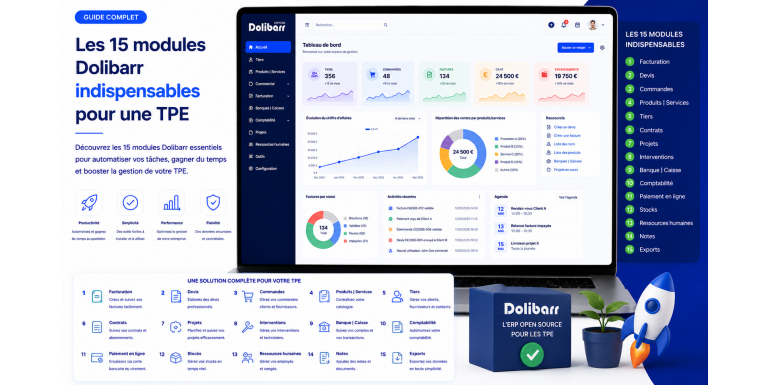
Dolibarr is one of the most popular open-source ERP/CRM systems in France for very small businesses, largely due to its modular structure. Upon installation, the software offers over 100 native modules, with hundreds more available on the DoliStore. But which modules are truly essential for a very small business?
Activating too many modules right from the start is one of the most common mistakes made by new Dolibarr users: the interface becomes cluttered, the learning curve unnecessarily steep, and users get lost in features they don't need. Conversely, failing to activate the right modules from the outset can lead to missing out on features essential to your daily productivity.
In this article, we've selected the 15 truly essential Dolibarr modules for a very small business in 2026, whether it's a sole trader, craftsman, retailer, small service company, or freelancer. For each module, we explain its practical use, how to activate it quickly, and our configuration tips to get the most out of it right away.
1. The Third Party module (Company/Third Party)
The Third Party module is the foundation of any Dolibarr installation. It allows you to manage your customers, prospects, and suppliers in a single, structured repository. Without this module, it's impossible to issue any invoices or track any business relationships.
For each third party, you can record legal information (SIRET number, intra-community VAT number), full contact details, associated contacts, commercial terms (payment deadlines, payment methods, standard discounts), bank account details (RIB), as well as a complete history of interactions and exchanged documents. You can also categorize your third parties (for example: VIPs, hot leads, slow payers) to better segment them.
Tip: Take the time to properly structure your third-party categories from the outset. This segmentation will then allow you to generate relevant statistics, target your marketing campaigns, and prioritize your follow-up actions.
2. The Products and Services Module
The second essential pillar, the Products and Services module, allows you to build your catalog of services and items. Whether you sell physical products, services billed by the hour, or packages, this module centralizes all the necessary information: description, internal reference, selling price excluding/including VAT, VAT rate, long description, photos, and technical specifications.
For small service businesses, create a few standard services (hourly rate, consulting day, audit package, etc.) to facilitate the quick creation of quotes and invoices. For retailers or tradespeople, import your product catalog via the Import module (CSV/Excel) in a single step.
Once this module is activated, your quotes and invoices can be created in just a few clicks: you select the product or service, the quantity, and all the other fields (description, price, VAT) are filled in automatically.
3. The Sales Proposals (Quotes) module
For any small business that needs to price its services before invoicing, the Sales Proposals module is absolutely essential. It allows you to quickly generate professional quotes in PDF format, complete with your logo, terms and conditions, and legal information.
The module manages quote statuses (draft, sent, accepted, rejected, expired), validity dates, overall or line item discounts, and enables automatic conversion to an order or invoice as soon as a quote is signed by the customer. This eliminates double entry and saves valuable time.
Tip: Customize your PDF quote template in Settings > PDF by adding your logo, corporate colors, and a compelling sales message. A well-presented quote significantly increases your conversion rate.
4. The Customer Orders module
The Customer Orders module is particularly useful for very small businesses (VSBs) with a multi-stage sales cycle: quote → order → delivery → invoice. This is especially true for tradespeople, retailers offering delivery, service providers with multiple stages, and trading businesses.
A customer order formalizes the contractual agreement between you and your client: products or services to be provided, quantities, prices, and delivery times. You can generate a purchase order in PDF format, then track the progress of the order (partial delivery, full delivery) and trigger invoicing at the appropriate time.
If your business doesn't require this intermediate step (for example, if you invoice directly after quote acceptance), you can leave this module disabled. However, in most cases, it provides valuable visibility into your order book.
5. The Customer Invoices module
At the heart of business operations, the Customer Invoices module is strictly mandatory for any small business that issues invoices, including all VAT-registered businesses and most others. This module guarantees compliance with French law: continuous and unbroken numbering, mandatory information, and PDF archiving.
Dolibarr manages all types of invoices: standard, down payment, credit note, recurring, as well as progress invoices for the construction industry. The module tracks partial or full payments, automatically calculates outstanding balances, and allows you to generate a payment schedule.
In 2026, also anticipate mandatory electronic invoicing (2026-2027 reform) by activating the Factur-X options which generate invoices in PDF/A-3 format with embedded XML, compliant with French and European regulatory requirements.
6. The Supplier Invoices module
Similar to the Customer Invoices module, the Supplier Invoices module allows you to record all the invoices you receive from your suppliers, service providers, and subcontractors. This is essential for tracking your expenses, managing your cash flow forecast, and preparing your accounting records.
You can scan or upload the PDF of the received supplier invoice, enter essential information (date, pre-tax amount, VAT, due date), record payments made, and generate expense reports by category or supplier. For very small businesses that outsource their accounting, this data can be exported to their accountant in Excel or FEC format.
Tip: Get into the habit of entering your supplier invoices as you receive them, not at the end of the month or quarter. This discipline will give you a real-time view of your financial situation.
7. The Banks and Cashiers module
The Banks module allows you to manage your business bank accounts and cash on hand. You record all your transactions there: incoming and outgoing transfers, direct debits, checks, cash, and bank fees. Bank reconciliation (manual or via import of your bank's OFX/CFONB file) allows you to verify the consistency between your accounting records and your actual account balances.
This module is linked to the Customer and Supplier Invoices modules: when you record a payment received from a customer, it is automatically credited to the selected bank account. Conversely, payment of a supplier invoice debits the account. This gives you a unified and always up-to-date view of your cash flow.
For businesses or activities handling cash, the module also manages physical cash registers, cash floats, bank deposits and the traceability of cash transactions.
8. The Calendar module (Events and tasks)
Often overlooked, the Calendar module is nevertheless one of the most useful on a daily basis in a small business. It allows you to schedule your appointments, tasks, reminders, and automatically track all actions related to a client (phone call, email sent, quote issued, invoice created, payment received).
The calendar can be synchronized with external tools via the iCal/CalDAV protocol, allowing you to integrate it with Google Calendar, Outlook, Apple Calendar, or any other calendar client. This gives you a unified view of your schedule, wherever you are.
Tip: Take advantage of automatic reminder features to ensure you never forget a customer follow-up, a business anniversary, a contract renewal, or an important deadline. Effective use of your calendar significantly improves the quality of your customer relationships.
9. The Stock module (Warehouse Management)
For any small business selling physical products, the Stock module is essential. It allows you to manage one or more warehouses, track movements (inflows, outflows, transfers), value stock (using weighted average cost, FIFO or LIFO), perform inventories and define alert thresholds for replenishment.
The module is integrated with the Orders and Invoices modules: each sale automatically decreases stock levels, while each supplier receipt increases them. This helps you avoid undetected stockouts and costly overstocking. For any business, it's an essential daily tool.
If your business doesn't require physical inventory (services, consulting, freelancing), you can leave this module deactivated. However, for tradespeople with consumables, e-commerce businesses, or retailers, its activation is non-negotiable.
10. The Margins module (Profitability Analysis)
The Margins module is extremely useful for very small businesses concerned about their profitability. It automatically calculates, for each line item of a quote or invoice, the margin earned based on the purchase price or cost price entered in the product or service details.
This gives you a clear, data-driven view of profitability by customer, product, category, or overall. This information is invaluable for identifying your most profitable products and customers, adjusting your pricing, or revising your sales strategy.
Tip: Take the time to accurately enter the cost prices of your products and services in the Products module. This input data is essential for making any margin analysis relevant and reliable.
11. The Projects module
The Projects module transforms Dolibarr into a true project management tool for small service businesses: web agencies, freelancers, consulting firms, tradespeople managing construction sites, etc. You create a project per client or per mission, and you attach all actions to it: quotes, invoices, tasks, time spent, expenses, documents.
This allows you to track the actual profitability of each project (revenue generated minus costs incurred), budget adherence, task progress, and your team's performance. For time-based billing, the module automatically generates invoices from the hours entered in Dolibarr.
This is a key module for organizations that want to manage their business with precision and improve their profitability project after project.
12. The Expense Reports Module
As soon as a small business has more than one employee, or even for a sole manager who wants to separate their business and personal expenses, the Expense Report module becomes extremely useful. It allows users to enter their business expenses (meals, transportation, hotels, supplies), attach scanned receipts, and submit the report for approval.
Once approved, the expense report can be reimbursed via the Banks module, and the amounts are automatically recorded as expenses. This represents a considerable time saving compared to manual management using an Excel spreadsheet.
Tip: Use expense categories to facilitate analysis and reporting later. For example, distinguish between travel expenses, business meals, supplies, etc.
13. The Accounting module (Expert Accounting)
For very small businesses that want to manage their accounting directly in Dolibarr, the Accounting module (sometimes called Expert Accounting) is essential. It integrates the standard French chart of accounts, accounting journals, the general ledger, the balance sheet, the income statement, and, most importantly, the generation of the Accounting Entries File (FEC) required by the tax authorities in the event of an audit.
The module is linked to all the others: every invoice, every payment, every expense report can be automatically recorded according to the rules you define. You save considerable time on accounting entries and significantly reduce the risk of errors.
If your accounting is outsourced to an accountant, this module remains useful for preparing exports to their own tools (Cegid, Sage, EBP, Pennylane) in FEC format or via dedicated gateways.
14. The Backup module
Too often neglected until disaster strikes, the Backup module is one of the most critical for the continuity of your small business. It allows you to generate complete backups of your database and documents with a single click, or automatically via a cron job.
Configure automatic daily backups from the outset, ideally to a remote location (external cloud, NAS, secondary server) to protect against hardware failure or hacking. Keep several generations of backups (at least 7 days, ideally 30 days) to be able to restore a previous state.
Tip: Regularly test the restoration of your backups in a test environment. An untested backup is a useless backup: the time to discover it doesn't work is never the day of a disaster.
15. The Users and Rights module
Even in a small business with just a few employees, the Users and Rights module (enabled by default but requiring careful configuration) is essential for securing access to your data. You create a user for each employee, assign them to a rights group tailored to their role (salesperson, accountant, manager, assistant), and restrict what they can see or modify.
This granular access control system protects sensitive data (profitability, supplier purchase prices, payroll) and tracks each user's actions. In case of questions or errors, you know precisely who did what and when thanks to each user's activity history.
Tip: Never share the super administrator account between multiple employees. Always create a separate account for each user with a unique password. This is a basic cybersecurity rule, too often ignored in small organizations.
Tips for properly activating your Dolibarr modules
Activating modules in Dolibarr is simple: go to Home > Configuration > Modules. Each module can be activated or deactivated at any time without data loss. Therefore, you can start by activating only the essential modules for your initial setup and add others as needed.
Here are some best practices for a successful initial setup:
• Start by activating the Third Parties, Products, Quotes, Customer Invoices, Banks and Calendar modules: these are the 6 basic modules to get started.
• Gradually add the other modules as you identify specific needs, rather than activating everything from day one.
• Document your configuration choices in an internal file, so you can easily find them and train your staff.
• Test each new module on a few real-world cases before rolling it out to the whole team.
• Ask the Dolibarr community (forum, Facebook groups) if you have any difficulties: the answers are often quick and relevant.
In summary: 15 modules for a fully operational small business
These 15 essential Dolibarr modules cover all the fundamental needs of a small business in 2026: sales management (Third Parties, Products, Quotes, Orders, Invoices), financial tracking (Supplier Invoices, Banks, Margins, Accounting), operational management (Calendar, Inventory, Projects, Expense Reports), and security (Backup, Users and Access Rights). With this configuration, you have a truly professional, comprehensive ERP/CRM that complies with French regulations.
Of course, Dolibarr offers dozens of other add-on modules that you can activate depending on your industry or the growth of your business: a Membership module for associations, a Point of Sale module for retail businesses, a Rental module for landlords, advanced CRM modules, e-commerce modules, payroll modules, and more. The official DoliStore also has a wealth of paid third-party modules to meet very specific needs.
The key is not to try to activate everything from the outset, but to build your Dolibarr system gradually, following the actual evolution of your needs. This pragmatic approach guarantees a smooth onboarding process, rapid adoption by your team, and efficient operation from the very first months.
Don't hesitate to seek assistance from a Dolibarr specialist for the initial setup of the most critical modules (accounting, PDF templates, user rights). An investment of a few hundred euros upfront can save you weeks of productivity later on. In any case, you now have a comprehensive list of the modules to activate first to get started smoothly with Dolibarr and transform your small business into an efficient, structured, and compliant organization.
Good setup, and welcome to the Dolibarr universe! With these 15 modules correctly activated and configured, you have a true digital Swiss Army knife capable of accompanying you through all phases of your business growth, without ever having to change tools or pay a single euro for an additional license.