
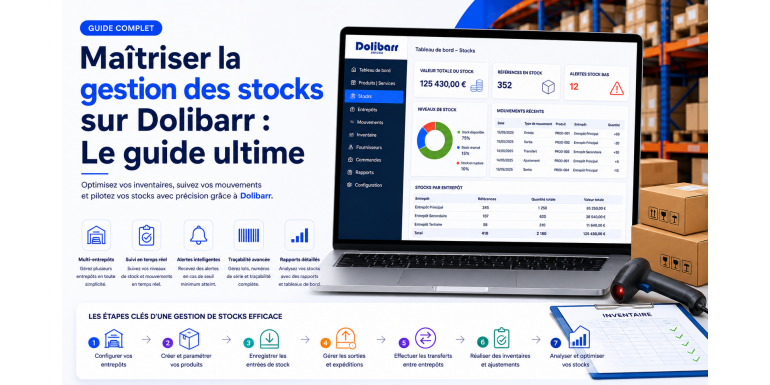
Stock management is one of the strategic pillars of any commercial, industrial, or craft business. Poor inventory control can lead to costly stockouts, paralyzing overstock, or embarrassing accounting discrepancies. Fortunately, Dolibarr ERP/CRM, one of the most widely used open source management solutions in Europe, offers a complete, flexible, and powerful Stock module to address these challenges.
In this ultimate guide, we will explore in depth everything you need to know to master stock management in Dolibarr. Whether you are a beginner or an advanced user, this guide will walk you through every step: from initial configuration to setting up advanced processes such as automatic replenishment, valuation using WAC (Weighted Average Cost), or multi-warehouse management. Get ready to transform your logistics management with Dolibarr.
Table of Contents
- Why choose Dolibarr for your stock management?
- Understanding the Dolibarr Stock module
- Initial configuration of the Stock module
- Creating and managing warehouses
- Setting up products and services
- Stock movements in Dolibarr
- Inventory and stock valuation
- Automatic replenishment and alert thresholds
- Integrating stock with other modules
- Reporting and dashboards
- Best practices for optimal management
- Common mistakes to avoid
- Conclusion: take your stock management to the next level
1. Why choose Dolibarr for your stock management?
Before diving into practice, it is essential to understand why Dolibarr stands out as a benchmark among open source ERPs for stock management. Unlike many expensive proprietary solutions, Dolibarr offers complete freedom of use, customization, and evolution, with no hidden licensing fees.
A modular and scalable solution
Dolibarr operates on a modular logic: you activate only the features you need. The Stock module can be complemented by the Products, Suppliers, Customer Orders, Shipments, Receptions, Inventories, or even MRP (Manufacturing Resource Planning) modules. This modularity allows you to perfectly adapt the tool to your business, whether it's a retail store, a wholesaler, an industrial company, or a craft workshop.
An intuitive and accessible interface
One of Dolibarr's main strengths is its clear web interface, accessible from any browser. No need to install heavy software on each workstation. Your team can check stock levels, record movements, or generate inventories from a computer, tablet, or even a smartphone.
An active community and a rich ecosystem
With more than a decade of existence, Dolibarr benefits from a very active international community. Hundreds of additional modules are available on the Dolistore, allowing you to enhance the native features: advanced barcodes, lot and serial number management, integration with e-commerce platforms (Prestashop, WooCommerce, Magento), accounting connectors, and more.
A solution tailored for SMEs and small businesses
Dolibarr was designed from the start for small and medium-sized enterprises. Its ease of installation, low total cost of ownership, and quick learning curve make it a particularly relevant choice for organizations that want to professionalize their management without committing to an oversized ERP project.
2. Understanding the Dolibarr Stock module
The Stock module in Dolibarr is much more than a simple unit counter. It is a true inventory management system capable of tracking your products across multiple dimensions: physical quantities, monetary value, geographic location, and status (reserved, available, on order, etc.).
Key concepts to master
Before going further, it is crucial to fully understand a few fundamental notions used in Dolibarr:
- Physical stock: the quantity actually present in your warehouses.
- Virtual stock: physical stock adjusted for ongoing customer orders and expected supplier orders.
- WAC (Weighted Average Cost): the valuation method used by default in Dolibarr to calculate the inbound and outbound value of a product.
- Stock movement: any operation that modifies the quantity of a product in a warehouse (incoming, outgoing, transfer, inventory correction).
- Warehouse: a logical or physical storage location. Dolibarr allows the management of an unlimited number of warehouses.
Main features of the module
The Stock module in Dolibarr natively offers:
- The unlimited creation of warehouses and sub-warehouses.
- Tracking of quantities and value of products.
- Manual and automatic stock movements.
- Management of physical inventories and their valuation.
- Replenishment alerts and minimum/optimal stock levels.
- Native integration with customer orders, suppliers, shipments, and receptions.
3. Initial configuration of the Stock module
A solid initial setup is the key to smooth and reliable management in the long run. Here are the essential steps to get started correctly.
Activating the module
Go to Home > Setup > Modules/Applications, then look for the Stock module under the "Product Management" category. Click the toggle to enable it. Also remember to activate the useful complementary modules: Products, Services, Suppliers, Customer Orders, Shipments, and Product Receptions.
Configuring the Stock module
Once the module is activated, access its configuration page via the gear icon. Several strategic options are available:
- Automatic stock decrements: define when stock should be automatically reduced (upon validation of the customer invoice, upon validation of the shipment, etc.).
- Automatic stock increments: choose when stock should be automatically increased (upon validation of the supplier invoice, upon validation of the reception, etc.).
- Valuation method: by default, Dolibarr uses WAC, but you can configure FIFO or LIFO methods through complementary modules.
- Multi-warehouse management: enable this option if you manage multiple storage locations.
NEXT GESTION's tip: We strongly recommend choosing decrements at the shipment validation and increments at the reception validation. This configuration most accurately reflects the physical reality of your logistics flows, independent of administrative and accounting cycles.
Defining units of measurement
Dolibarr allows the management of various units of measurement: pieces, kilograms, liters, meters, etc. Activate the Units module in the configuration and define those that match your products. This step is essential if you sell or buy in bulk, in batches, or in multi-units.
4. Creating and managing warehouses
A warehouse in Dolibarr represents a physical or logical storage location. Whether you have a single facility or several remote sites, multi-warehouse management allows you to precisely locate your stocks.
Creating a new warehouse
Go to Products/Services > Warehouses > New warehouse. Fill in the following fields:
- Label: a short and explicit name (e.g., "Main Paris Warehouse").
- Description: a complete description of the location.
- Full address: useful for delivery notes and shipments.
- Status: a warehouse can be active or temporarily disabled.
Organizing a warehouse hierarchy
Dolibarr allows the creation of sub-warehouses linked to a parent warehouse. This hierarchy is very useful for complex structures: a store with several zones (storeroom, sales floor, production workshop), or a logistics site with multiple zones (aisle A, aisle B, quarantine area, etc.).
Naming best practices
Adopt a consistent naming convention: prefix your warehouses with a code (e.g., "PAR-01" for Paris, main warehouse). This will greatly facilitate searches and exports as your catalog grows.
5. Setting up products and services
Stock management relies on a well-filled product record. Each physical product must be configured as a "product" (and not "service"), as only products can be tracked in stock.
Creating a complete product record
When creating a product via Products/Services > New product, make sure to fill in:
- Unique internal reference: essential to avoid duplicates.
- Clear label: it will be used on quotes, orders, and invoices.
- Detailed description: useful for customer communication and SEO if you sync with an e-commerce platform.
- Barcode: if you use scanners, fill in the EAN or UPC code.
- Category: essential for reporting and filtering.
- Purchase price and sale price: this information feeds the WAC calculation and margins.
- Minimum stock and optimal stock: these thresholds trigger replenishment alerts.
- Photo: improves the visual identification of products in lists.
Managing barcodes and QR codes
For organizations managing a large catalog, the use of barcodes is a real accelerator. The Barcode module of Dolibarr allows the automatic generation of EAN13, UPC, QR code, etc. Combined with a USB or Bluetooth scanner, your team can record entries and exits in seconds.
Lots, serials, and expiration dates
For regulated industries (food, pharmaceutical, cosmetics, electronics), Dolibarr offers tracking by lot numbers and serial numbers, with management of expiration dates or best-before dates. Activate the dedicated module and configure each relevant product. This traceability is not only useful in case of product recall, but is also mandatory in many industries.
6. Stock movements in Dolibarr
Stock movements are the operational core of the module. They reflect any quantity variation of a product in a warehouse. Dolibarr distinguishes several types of movements.
Stock entries
A stock entry corresponds to any operation that increases the available quantity. The most frequent sources of entries are:
- The reception of a supplier order.
- The customer return (the product comes back to stock).
- A positive inventory correction.
- A transfer from another warehouse.
To manually record an entry, go to the product record and click on "Correct stock". Indicate the warehouse, the quantity, the unit purchase price (which will feed the WAC), and a descriptive label. This traceability is essential to understand a product's history afterwards.
Stock outgoings
A stock outgoing decreases the quantity. Reasons are numerous:
- The validation of a shipment to a customer.
- An internal consumption (workshop, production, sample).
- A loss or theft.
- A negative inventory correction.
Transfers between warehouses
The transfer is a double movement: outgoing from a source warehouse and incoming into a destination warehouse, with value preservation. This feature is essential for multi-site businesses. Go to Products/Services > Stock transfers to create a new transfer.
History and traceability
All movements are timestamped, dated, and associated with a user. You can consult the complete history of a product or warehouse from the "Stock movements" tab. This traceability is essential in case of audit, dispute, or post-event analysis.
7. Inventory and stock valuation
The inventory is the operation of comparing the theoretical stock recorded in Dolibarr to the physical stock actually present in your warehouses. It is an essential accounting and operational step, generally carried out at least once a year.
Launching an inventory in Dolibarr
The Inventories module (to be activated if not already done) allows you to plan and execute inventories. Go to Products/Services > Inventories > New inventory. You can:
- Inventory a whole warehouse or a subset.
- Filter by product category.
- Inventory a single product (useful in case of doubt).
Once the inventory is opened, Dolibarr freezes the theoretical stocks. Your teams then enter the actual quantities counted in the field. The system automatically calculates the discrepancies and generates, upon validation, the necessary corrective movements to align physical and theoretical stock.
Valuation by WAC
By default, Dolibarr values your stocks using the Weighted Average Cost (WAC) method. With each stock entry, the system recalculates a new weighted average cost taking into account the quantities and purchase prices. This method has the advantage of smoothing price fluctuations and simplifying accounting.
Concrete example: you have 100 units of a product valued at €10 each (WAC = €10). You purchase 50 additional units at €12 each. The new WAC becomes: ((100 × 10) + (50 × 12)) / 150 = €10.67.
Alternative methods: FIFO and LIFO
For companies wishing to apply FIFO (First In, First Out) or LIFO (Last In, First Out), complementary modules are available on the Dolistore. These methods are particularly used in industries where stock rotation is critical, such as food or pharmaceutical industries.
Editing the valued stock report
Dolibarr allows you to edit at any time a valued stock report, a precious accounting document that presents the quantity, unit WAC, and total value of each product. This report is exportable to PDF, CSV, or Excel for transmission to your accountant or integration into your tax bundle.
8. Automatic replenishment and alert thresholds
One of the great benefits of an ERP like Dolibarr is its ability to automate the detection of replenishment needs. No more discovering a stockout the morning of a customer delivery!
Defining alert thresholds
In each product's record, two strategic fields:
- Minimum stock: threshold below which an alert is triggered.
- Optimal stock or desired: target level to rebuild during a replenishment order.
The replenishment report
Dolibarr offers a replenishment report accessible via Products/Services > Replenishment. This report lists all products whose stock is below the minimum threshold. You can, with a few clicks, directly generate the corresponding supplier orders, grouped by main supplier.
Virtual stock calculation
For a more accurate calculation, enable the option "Take pending supplier orders into account" and "Take pending customer orders into account". Dolibarr then calculates a virtual stock = physical stock − pending customer orders + pending supplier orders. This forward-looking view is much more relevant for managing your purchases.
Advanced automation
For advanced organizations, complementary modules allow you to go further:
- Automatic calculation of minimum threshold based on sales history and supplier lead times.
- Scheduled generation of supplier orders (cron scenarios).
- Email notifications or via Slack/Teams in case of critical alert.
9. Integrating stock with other modules
The strength of Dolibarr lies in the smooth circulation of information between its modules. Stock management does not work in a silo: it is closely articulated with sales, purchases, production, and accounting.
Link with customer orders and shipments
As soon as a customer order is validated, Dolibarr can reserve the necessary quantities (according to your configuration). Upon validation of the shipment, physical stock is automatically decremented. This mechanism avoids double entries and ensures consistency between sales and inventory.
Link with supplier orders and receptions
Conversely, the supplier order announces a forecasted entry. Upon validation of the reception, physical stock is incremented and the WAC is recalculated. Traceability is total: you can trace from a stock movement back to the reception, then to the supplier order, and finally to the purchase invoice.
Link with the Production / MRP module
For industrial companies, the MRP (Manufacturing Resource Planning) module allows the management of manufacturing orders. When a finished product is manufactured, Dolibarr automatically decrements the components used (according to the BOM) and increments the stock of the finished product.
Link with accounting
The Accounting module of Dolibarr can generate stock variation entries from the recorded movements. You can thus feed your accounting balance in an automated and reliable way.
E-commerce synchronization
If you sell online via Prestashop, WooCommerce, Magento, or Shopify, connectors available on the Dolistore allow bidirectional synchronization of stocks between Dolibarr and your store. An online sale immediately decrements stock in Dolibarr, and conversely, a replenishment in Dolibarr updates the availability displayed on the site.
10. Reporting and dashboards
Effective management cannot be conceived without performance indicators. Dolibarr natively offers several dashboards and reports to manage your stocks.
Native reports
- Stock status: instant snapshot of all your stocks, by warehouse and by product.
- Stock movements: detailed log of entries, exits, and transfers.
- Stock rotation: to identify products with low rotation (dormant) or high rotation.
- Valuation by category: useful to analyze the distribution of your immobilized capital.
KPIs to monitor
To manage effectively, focus on a few key indicators:
- Rotation rate = Cost of goods sold / Average stock.
- Stock coverage (in days) = Current stock / Average daily sales.
- Stockout rate = Number of stockout days / Analysis period.
- Dormant stock value: products without movement for X months.
Exports and external BI
For more advanced analyses, you can export your data to Excel, Power BI, Metabase, or Google Looker Studio. Dolibarr also exposes a complete REST API that facilitates integration with third-party decision-making tools.
11. Best practices for optimal management
Beyond technical configuration, mastering stock management relies on organizational best practices. Here are those that NEXT GESTION recommends to its clients.
Adopting rigorous data entry discipline
No solution, no matter how powerful, can compensate for haphazard data entry. Train your teams: every reception, every shipment, every transfer must be recorded in real time and with a clear label. This is the foundation of reliable data.
Performing rolling inventories
Rather than a single large annual inventory that is often stressful, prefer rolling inventories: each week or each month, you inventory a specific area or category. This approach allows you to detect discrepancies as early as possible and reduce the workload.
Using barcodes whenever possible
The investment in a barcode system is quickly profitable. Reduction in entry errors, time savings on inventories and shipments, increased traceability: the benefits are numerous.
Documenting your processes
Write an internal procedure detailing how to receive, ship, transfer, or inventory products in Dolibarr. This document will serve as a reference for training new collaborators and ensure consistency of practices.
Backing up your database regularly
Automatic backup of your Dolibarr database is non-negotiable. Configure daily backups, ideally encrypted and stored on external or cloud storage. A loss of stock data can paralyze your business for several days.
Updating Dolibarr regularly
Each new version of Dolibarr brings improvements, bug fixes, and sometimes major features on the Stock module. Update at least once or twice a year, after testing in a pre-production environment.
12. Common mistakes to avoid
Through our experience accompanying clients, we have identified several classic pitfalls new users fall into.
Confusing product and service
Only products are tracked in stock. If you create an item as a "service", no movement will be recorded. Always check the type when creating a new item.
Forgetting to configure automatic decrements/increments
Without explicit configuration, Dolibarr does not automatically decrement or increment stock. Many beginners end up with stocks that never move and wrongly conclude that the module is faulty. Check the Stock module configuration from the start.
Multiplying warehouses unnecessarily
One warehouse per shelf? Bad idea. Too many warehouses complicate management and multiply transfers. Stay pragmatic: one warehouse per genuinely distinct physical location, and use categories or internal locations for fine granularity.
Neglecting valuation
Many users only fill in the quantity, without entering the purchase price during entries. Result: a flawed WAC and incorrect accounting valuation. Enforce systematic entry of the purchase price during manual entries.
Not training users
Dolibarr is powerful but its power depends on its users. An initial training of a few hours, complemented by ongoing support, allows you to avoid 80% of common mistakes. Invest in your teams' skill development.
13. Conclusion: take it to the next level with NEXT GESTION
Mastering stock management in Dolibarr is a real performance lever for your business. A careful configuration, rigorous operational discipline, and intelligent exploitation of advanced features can transform your logistics: fewer stockouts, less overstock, better cash flow management, and increased customer satisfaction.
However, the functional richness of Dolibarr can be confusing at the start. That is why many companies choose to be supported by Dolibarr experts like NEXT GESTION. Our team supports you in:
- Auditing your needs and current processes.
- Tailored installation and configuration of Dolibarr.
- Custom module development to address your business constraints.
- Training your teams for full autonomy.
- Technical support and managed hosting of your instance.
Whether you manage a few hundred references or several tens of thousands of products in warehouses spread over multiple sites, Dolibarr can meet your challenges. Even better, its open source nature guarantees you complete freedom: no proprietary lock-in, no hidden costs, and unlimited scalability.
Want to go further? Contact NEXT GESTION today for a free audit of your stock management. Together, let's make Dolibarr a true accelerator of your growth.
FAQ: Stock management in Dolibarr
Can Dolibarr manage multiple warehouses? Yes, Dolibarr manages an unlimited number of warehouses and sub-warehouses, with internal transfers and consolidated reporting.
Is Dolibarr suitable for e-commerce? Absolutely. Native connectors or those available on the Dolistore allow bidirectional synchronization with Prestashop, WooCommerce, Magento, Shopify, and many other platforms.
Can lot and serial numbers be managed? Yes, through the dedicated module, Dolibarr allows complete traceability by lot, serial number, and with management of expiration dates.
What valuation method does Dolibarr use? By default, WAC (Weighted Average Cost). FIFO and LIFO methods are available through complementary modules.
Is Dolibarr really free? The software is free and open source (GPL license). Only associated services (hosting, training, support, custom development) are paid if you choose to use them.
Article written by NEXT GESTION, expert in Dolibarr ERP/CRM integration and consulting. To learn more, contact us at contact@nextgestion.com.