
1. Introduction
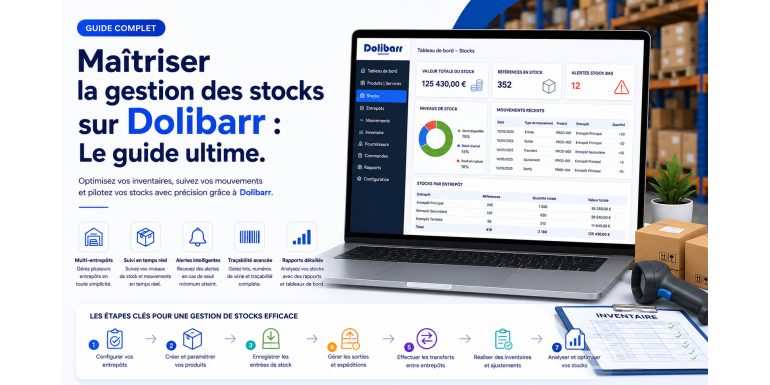
Inventory management is a strategic pillar for any commercial or industrial business. Poor management can lead to stockouts, overstocking, or significant financial losses. With Dolibarr ERP CRM, it is possible to centralize, automate, and optimize inventory management through a powerful and flexible system. This complete guide explains in detail how to master inventory management in Dolibarr, with a strong focus on technical aspects so you can go far beyond standard features.
2. Why Inventory Management Is Essential
Efficient inventory management helps optimize costs, improve customer satisfaction, and secure the supply chain. It ensures product availability while avoiding unnecessary capital immobilization. Dolibarr provides a solution tailored to SMEs to achieve these goals.
3. Activating the Inventory Module
Before any configuration, you need to activate the “Stocks” module. Go to the module configuration section and enable the corresponding module. Once activated, new features will appear in the product and logistics menus.
4. Initial Configuration of Warehouses
Dolibarr allows you to manage multiple warehouses. Technically, warehouses are stored in the llx_entrepot table. You can create a warehouse by defining its name, location, and parameters. This step is crucial for structuring your logistics management.
5. Creating and Managing Products
Products are at the core of the inventory system. Each product is stored in the llx_product table. It is essential to properly define information such as type (product or service), price, and especially enable stock management for the product.
6. Setting Up Units and Categories
Dolibarr allows you to organize products by categories and units. This facilitates tracking and analysis. Categories are stored in llx_categorie, and their relationship with products is managed via llx_categorie_product.
7. Stock Movements: Technical Operation
Stock movements are recorded in the llx_stock_mouvement table. Each entry or exit generates a row in this table. Movement types include manual entries, exits, transfers, and adjustments.
8. Stock Entries
Stock entries correspond to adding products to a warehouse. They can be manual or automated via supplier orders. Each entry updates the available quantity in the llx_product_stock table.
9. Stock Exits
Stock exits are generally linked to sales or internal consumption. When an invoice or shipment is validated, Dolibarr automatically decreases the stock.
10. Transfers Between Warehouses
Dolibarr allows transferring products between warehouses. Technically, this generates two movements: an exit from the source warehouse and an entry into the destination warehouse.
11. Inventory and Stock Adjustments
Inventory allows correcting discrepancies between theoretical and actual stock. You can perform manual adjustments, which generate correction movements in the system.
12. Managing Alert Thresholds
Dolibarr allows you to define minimum thresholds for each product. When stock falls below this threshold, an alert is triggered. This helps anticipate stock shortages.
13. Automation via Supplier Orders
Supplier orders can be used to automate stock entries. When goods are received, Dolibarr automatically updates the quantities.
14. Advanced Management with Batches and Serial Numbers
Dolibarr supports batch and serial number management. This feature is essential for industries requiring precise traceability.
15. Integration with Sales and Invoicing
Inventory management is directly linked to sales. When an invoice is validated, stock movements are automatically generated, ensuring data consistency.
16. Customization via Development
Since Dolibarr is open source, inventory management can be customized. You can modify PHP classes such as stock.class.php to implement specific business rules.
17. Useful SQL Queries for Analysis
To analyze inventory, you can use SQL queries. For example, to view available stock: SELECT * FROM llx_product_stock. These queries allow you to extract data for custom dashboards.
18. Performance Optimization
For large databases, performance optimization is essential. This includes indexing tables, optimizing SQL queries, and properly configuring the server.
19. Security and Access Control
Inventory management must be secure. Dolibarr allows you to define precise access rights to prevent errors or unauthorized actions.
20. Best Practices for Inventory Management
To get the most out of Dolibarr, it is recommended to maintain clean data, perform regular inventories, and train users on internal processes.
21. Integration with External Tools
Dolibarr can be connected to other systems such as logistics software or e-commerce platforms. This allows automation of stock flows.
22. Reporting and Dashboards
Dolibarr provides reporting tools to monitor stock levels, movements, and performance. These indicators are essential for decision-making.
23. Advanced Multi-Warehouse Management
For companies with multiple locations, Dolibarr offers advanced management with both global and detailed stock visibility.
24. Deployment and Monitoring
Once configured, it is important to regularly monitor system performance and adjust settings if necessary.
25. Conclusion
Inventory management in Dolibarr is a powerful lever to optimize your business performance. Thanks to its advanced features and technical flexibility, Dolibarr enables the implementation of a robust and scalable inventory system. By mastering the technical aspects described in this guide, you will be able to efficiently manage your stock and improve your profitability.