
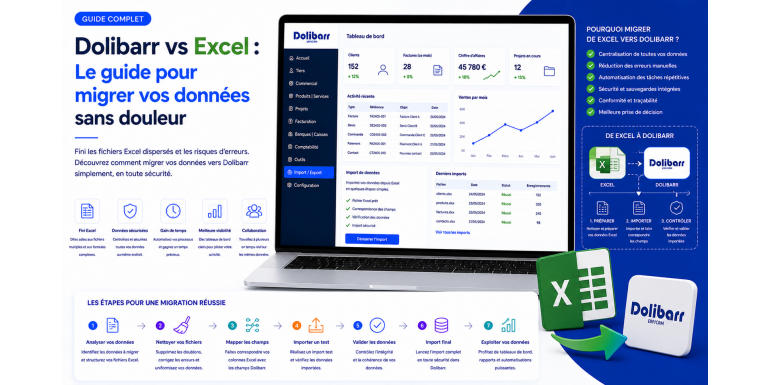
Excel is a remarkable tool. It has accompanied millions of companies over the past thirty years, it continues to serve every day in every function, and it will remain for a long time an essential work companion for ad hoc analyses, modeling, and flexible reports. But when Excel becomes the main engine of your company's management, that is, when you store customers, products, invoices, stocks, orders, and payments there, it begins to show its limits. Files become heavy, versions multiply, formulas break, entries contradict each other, and one fine morning you discover that a corrupted file has lost you six months of history.
This is typically when the idea of moving to an ERP gains ground. Dolibarr, through its free license, modularity, and simplicity, appears as a natural candidate. But the prospect of migration is intimidating. How do you move from a world where every spreadsheet is free to a structured world where data follow strict rules? How do you import a thousand customers without forgetting any? How do you avoid losing the billing history? How do you train teams without blocking production? In this comprehensive guide, NEXT GESTION shares the proven method used with its clients to succeed in this transition. You will find a structured approach, import templates, pitfalls to avoid, and best practices that transform a dreaded migration into a controlled project.
Table of Contents
- Why Leave Excel for Dolibarr
- The Hidden Limits of Excel as a Management Tool
- What Dolibarr Brings Concretely
- The Seven-Step Migration Method
- Prepare and Clean Your Excel Data
- Understanding Dolibarr Import Formats
- Importing Third Parties: Customers, Suppliers, Contacts
- Importing the Product and Service Catalog
- Importing Accounting Balances and History
- Importing Invoices, Quotes, and Orders
- Managing History: Reimport or Archive
- Test, Validate, Adjust
- Train Teams and Support Change
- Post-Migration Best Practices
- Frequent Mistakes to Avoid
- NEXT GESTION Support for Your Migration
- FAQ: Frequently Asked Questions About Migrating from Excel to Dolibarr
1. Why Leave Excel for Dolibarr
The decision to migrate from Excel to an ERP is never purely technical. It responds to an operational and strategic finding. Symptoms are often the same across companies. You spend hours each month consolidating multiple files to produce a single dashboard. You regularly discover discrepancies between what the salesperson says, what the accountant says, and what the stock manager says. New employees take weeks to understand where information is stored. Files shared on the network are opened read-only by other colleagues, blocking work. A network outage or a failing hard drive threatens business continuity.
To these operational symptoms add more strategic challenges. You want to pilot your company by real-time indicators rather than weekly extractions. You want to professionalize your customer image with polished quotes and invoices. You want to prepare the arrival of new employees without multiplying friction zones. You want to comply with legal obligations of account keeping and electronic invoicing. And ultimately, you want to gain time to focus on development rather than on data entry mechanics.
Dolibarr meets all these needs, provided it is properly configured and supplied. Its strength is to offer in a single tool what was previously scattered across dozens of files: third parties, products, quotes, invoices, payments, stocks, projects, contracts, accounting, human resources. The consistency between these modules is natively ensured, which eliminates discrepancies between versions.
2. The Hidden Limits of Excel as a Management Tool
Excel is not a bad tool; it is simply unsuited to certain uses. Understanding its hidden limits helps measure the migration challenge.
First limit, the absence of native concurrency management. When several employees open the same file, conflicts arise: overwritten saves, lost modifications, divergent copies. Cloud solutions like SharePoint or Google Sheets mitigate this problem without solving it, especially as files become voluminous.
Second limit, the fragility of formulas. A cell accidentally deleted, a range moved, a renamed tab can break an entire file. Detection of these breaks is manual and late; you discover the problem when the calculation returns an absurd result.
Third limit, the absence of consistency control. Nothing prevents a salesperson from entering a customer with different spellings each time, multiplying duplicates. Nothing guarantees that a product reference really exists. Nothing ensures that the VAT applied corresponds to the customer's status. Errors accumulate silently.
Fourth limit, the difficulty of aggregating. When you want monthly revenue by product and salesperson over three years, you must merge multiple files, deduplicate, harmonize. This operation is manual, tedious, and prone to error.
Fifth limit, the absence of history and audit. Who modified which cell, when, and why? Excel does not record these traces. A customer dispute, a tax audit, or an internal investigation becomes a nightmare to reconstruct.
Sixth limit, the fragility of backup. A file open during a power outage, a failed hard drive, an accidental deletion, and months of work evaporate. Manual backups are often too long outdated.
Seventh limit, the absence of native connection with third-party tools. To link Excel to your accounting software, your online store, or your electronic signature, you have to manually craft exports and imports regularly. Each bridge is a source of errors.
Dolibarr structurally resolves these seven limits by imposing a coherent data model, automatic controls, an audit trail, industrialized backups, and connectors to third-party tools.
3. What Dolibarr Brings Concretely
Beyond resolving Excel's limits, Dolibarr brings a set of benefits worth quantifying to motivate the move.
First, centralization. A single tool gathers your third parties, products, commercial documents, payments, stocks. Each datum exists in a single place. This uniqueness eliminates contradictions between files and accelerates all transversal operations.
Next, traceability. Each action is dated, signed, preserved. You know who created an invoice, who modified it, who sent it. In case of dispute or audit, you reconstruct history in a few clicks.
Then, consistency. An invoice created from an order automatically retains the lines, prices, conditions. A payment recorded updates the customer balance. A stock consumed on a sale is deducted from available stock. These automatic chains eliminate consistency breaks typical of Excel.
Automation comes next. Reminders for unpaid invoices, sending quotes by email, generation of progress billings, production of monthly reports can be automated. Time freed reinvests in business development.
Scalability too. Dolibarr supports growth: go from five to fifty users, add modules as needs arise, integrate new document types. No file to split or rebuild.
Finally, compliance. Dolibarr offers compliant accounting, legal numbering, secure archiving, and production of files compliant with fiscal and regulatory requirements. This foundation protects the company.
4. The Seven-Step Migration Method
A successful migration follows a disciplined method. NEXT GESTION systematically applies a seven-step approach that secures the transition without service interruption.
First step, scoping. You define the target functional scope, the Dolibarr modules to activate, the data to take over, the users concerned, the planning, and the success criteria. This scoping is formalized in a shared document and validated by management.
Second step, audit of existing data. You inventory all Excel files used, their content, their quality, their owners. This audit often reveals surprises: massive duplicates, inconsistent formats, obsolete data, forgotten parallel files. It is also the opportunity to decide what deserves to be migrated and what can be archived.
Third step, Dolibarr configuration. You configure the target: modules, VAT rates, payment conditions, document templates, user rights, chart of accounts, currencies. This preparation is essential before any import.
Fourth step, preparation and cleaning of Excel data. You transform your existing files into import files compatible with Dolibarr: structure, format, encoding, cross-references. Deduplication, code normalization, error correction are conducted in this phase.
Fifth step, technical imports. You successively import third parties, products, contacts, balances, historical documents. Each import is tested on a restricted volume before the full launch.
Sixth step, acceptance and validation. Your business referents check that imported data are correct, that daily flows work, that produced reports are faithful. Anomalies detected are corrected before production transition.
Seventh step, production transition and support. On a defined date, Dolibarr becomes the official tool. Excel moves to archive mode. During the first weeks, you support your teams, you correct adjustments, you consolidate uses.
This seven-step method, well conducted, transforms an anxiety-inducing migration into a structured project where each step is measurable and correctable.
5. Prepare and Clean Your Excel Data
Migration quality directly depends on the quality of prepared data. Importing a dirty Excel file means reproducing in Dolibarr the defects you wanted to eliminate. This step therefore deserves sustained attention.
First operation, deduplication. Are your customers all present only once? Check by name, by company number, by VAT number, by address. Multiple versions of the same customer are frequent: Dupont Company, Dupont LLC, LLC Dupont, Dupont Inc. Manual or semi-automatic consolidation reduces the file and facilitates later life.
Second operation, code normalization. Are your product references consistent? An identical product sometimes appears under multiple codes. A clear naming convention applied systematically clarifies the catalog.
Third operation, control of mandatory fields. Dolibarr requires certain fields to validate a record: third party name, country, type. Verify that each line of the source file contains these fields. Otherwise, complete or decide to discard incomplete records.
Fourth operation, format harmonization. Dates must all follow the same format, ideally YYYY-MM-DD. Amounts must use the same decimal separator. Country codes must follow the ISO standard. This harmonization prevents import errors.
Fifth operation, encoding conversion. The CSV format exported by Excel can generate encoding problems for accented characters. Verify that your files are saved in UTF-8, the standard format Dolibarr reads natively.
Sixth operation, enrichment. Take advantage of the migration to enrich records with missing information: complete address, phone, email, customer segment, pricing conditions. This enrichment transforms a transfer into a quality upgrade.
Seventh operation, documentation. For each source file, keep a sheet describing its content, origin, volume, and cleaning operations performed. This journal serves as reference for later questions.
NEXT GESTION provides clients with preparation file templates ready to be filled from existing Excel exports. These templates integrate automatic controls and considerably accelerate the cleaning phase.
6. Understanding Dolibarr Import Formats
Dolibarr offers a high-performance native import module that accepts CSV or Excel files. Understanding its operation is essential to succeed in the operation.
The import module presents itself as a multi-step assistant. You first select the data type to import: third parties, contacts, products, invoices, orders. You then load your source file. You map the columns of the source file to the target Dolibarr fields. You launch a simulation that detects anomalies without creating anything. You correct the errors. Finally, you launch the real import that creates the records.
Mapping is the most delicate step. Each column of your source file must correspond to a Dolibarr field. Some fields are mandatory, others optional. Some accept free values, others require a closed list. For example, the country field expects an ISO code, not a country name in clear. The Dolibarr documentation specifies for each field its expected format.
Simulation is your safety net. It simulates the import without modifying the base, and produces a detailed report: number of valid lines, number of error lines, reason for each error. Systematically use this simulation before any real import, even when you are confident. Surprises are frequent and costly to correct after the fact.
Test mode on small volume is another best practice. Rather than immediately importing ten thousand customers, first import fifty representative lines. Verify the result in Dolibarr, adjust mapping if necessary, then launch the full import. This progressive approach avoids massive rollbacks.
For large volumes or complex structures, Dolibarr also offers APIs that allow scripted imports. This route requires technical competence but offers more flexibility, particularly to manage dependencies between entities. NEXT GESTION systematically uses these APIs for voluminous or multi-entity migrations.
7. Importing Third Parties: Customers, Suppliers, Contacts
Importing third parties is generally the first migration operation. It lays the foundations on which all subsequent imports will rest: orders, invoices, contracts, projects.
Prepare a single file containing all your third parties, with a column indicating their nature: customer, supplier, or both. Dolibarr indeed allows a third party to be both customer and supplier, useful when you buy from a partner who is also a customer.
The minimum fields to fill are name, country, prospect or customer status, and ideally full address, email, and phone. For companies, add company registration number, intra-community VAT number, and business code. These data will be useful for automatic controls and legal declarations.
Think about commercial fields: payment conditions, payment method, default currency, discount rate, market segment, assigned salesperson. This information conditions the automatic creation of subsequent commercial documents and saves daily time.
If your third parties have multiple contacts within the same entity, plan a second import file dedicated to contacts, linked to the third party by a common identifier. Each contact can then receive their own email, phone, function, and role in the commercial relationship.
A post-import check is essential. Compare the number of imported third parties to the expected number, spot residual duplicates, open a few random records to check consistency. This quality control takes time but avoids propagating errors throughout the rest of the migration.
8. Importing the Product and Service Catalog
After third parties, the product and service catalog is the second pillar to import. It determines the speed of creating subsequent commercial documents and the consistency of applied prices.
Prepare a file containing for each product or service a unique internal code, a clear label, a long description, an excluding-tax sale price, a VAT rate, a sale unit, and a category. For products managed in stock, add the initial quantity, the reorder threshold, the average weighted purchase price, the possible storage location, and the main supplier.
Categorization deserves prior reflection. A clear tree structure facilitates catalog search and structures subsequent commercial analyses. Categories can be at multiple levels: family, sub-family, range. This structuring is prepared before import and reflected in the source file.
For variable-duration services, like a day of service or an hour of support, the unit price and sale unit must be explicit. A service sold daily carries a daily price; a service sold hourly carries an hourly price. Dolibarr handles both models, provided it is configured accordingly.
If you have different pricing grids by customer segment, volume, or geographic zone, plan a complementary file describing these specific prices. Dolibarr allows managing multiple price levels per customer or group of customers, automating application of the right tariff during billing.
For product variants, like sizes or colors, Dolibarr offers a dedicated module avoiding creating ten catalog lines for the same product in ten variants. The parent-child structure simplifies the catalog and clarifies analysis.
9. Importing Accounting Balances and History
Moving to Dolibarr is often accompanied by the launch of integrated accounting. This accounting must inherit existing balances to not restart from zero.
You take over two types of data. On one hand, the balance of each chart of account at the switch date: cash, banks, customers, suppliers, debts, fixed assets, capital. On the other hand, the detail of auxiliary accounts: the aged customer and supplier balance with, for each third party, the amount due and corresponding open items.
The takeover of balances is generally done by an opening entry that offsets the exercise opening. This entry is either entered manually or generated by import from a formatted file. Compatibility with your previous accounting software depends on the export format it offers.
For previous history, two strategies are possible. Full takeover integrates all accounting entries from previous years, allowing consultation of history from Dolibarr. It is heavy but offers total continuity. Balance-only takeover restarts from scratch at the switch date, and previous history remains consultable in the old tool. It is faster but segments company memory.
NEXT GESTION generally recommends an intermediate approach: full takeover of the current exercise for immediate continuity, and conservation of previous exercises in consultable archive without takeover into Dolibarr. This route balances migration heaviness and history availability.
10. Importing Invoices, Quotes, and Orders
Importing historical commercial documents is the most delicate operation of the migration. It follows different logic depending on document nature and target objective.
For pending quotes not yet signed, import is useful: you want to continue tracking their transformation in Dolibarr. Prepare a file containing for each quote the identifier, date, third party, status, detailed lines with price and VAT. Project attachment, responsible salesperson, and specific conditions are pluses.
For pending orders not yet invoiced, import is essential to ensure billing continuity. Each order is imported with its lines, progress status, and possibly received deposits. Rigorous verification is necessary to avoid discrepancies with previous history.
For unpaid invoices, import is mandatory to manage collection in Dolibarr. Each invoice is imported with its original number, date, third party, amount, and outstanding balance. Payment status and possibly already issued reminders can also be taken over.
For paid historical invoices, import is optional. You can decide not to import them and keep them in archive. This decision depends on your consultation need and the effort you want to devote to migration. Some NEXT GESTION clients choose to import the last two or three years to have a coherent analytical view, and archive the rest.
Numbering is a point of attention. If you import historical invoices, keep the original numbers to avoid creating legal duplicates. Dolibarr allows you to restart the sequence at a specific number for new invoices, ensuring continuity.
11. Managing History: Reimport or Archive
The question of history is recurrent in any migration and deserves thoughtful treatment. The general rule is that it is not essential to take over everything in Dolibarr; what matters is being able to find information when needed.
Archiving existing Excel files is an often-neglected step. Yet these files contain your company's history and can serve retrospective analyses, tax controls, or disputes. Before switching, organize a clean archive: structuring by year, activity, document type, backup on secure media, controlled accessibility. This archive gives serenity to preserve all information without having to reintegrate everything.
For business data, ask yourself the question for each type: quotes, invoices, orders, payments, accounting entries, product records. What depth of history is needed in Dolibarr? The main criterion is operational use: if you need to consult, analyze, or remind, import; if you only want to keep a trace, archive.
A pragmatic approach is to define a clear switch date. From this date, Dolibarr becomes the unique tool for any new operation. Previous data are either imported if useful, or archived if only for reference. This clean frontier avoids hesitation and accelerates migration.
The advantage of a clean switch is that it forces quality. Your teams invest in Dolibarr because they have no alternative. Uses solidify quickly, and the tool's added value reveals itself in the following weeks.
12. Test, Validate, Adjust
Before production transition, a structured acceptance phase is essential. It validates that Dolibarr fulfills its functional promise and that imported data are exploitable.
Prepare an acceptance plan listing the scenarios to test. Creation of a new customer, issuance of a quote, transformation into an order, delivery, billing, payment recording, report generation. For each scenario, define input data, actions to perform, and expected results. This plan serves as a reference for validation.
Have future users themselves test. Salespeople, accountants, project managers, executives must handle the tool on their real daily activity to spot friction. Purely technical acceptance misses usage problems.
Compare key figures. Revenue over the last twelve months calculated by Dolibarr must correspond to that calculated by Excel. Customer, supplier, bank balances must match. Any discrepancies reveal import problems to be treated before switch.
Document adjustments. Each discrepancy noted, each adjustment made must be traced in a migration log. This traceability protects against future questions and feeds the knowledge base for future migrations of complementary modules.
Prepare a rollback plan. What to do if migration reveals a major problem after switch? The possibility of temporarily returning to Excel, or launching a corrective import, must be considered and prepared. This safety net reduces anxiety and encourages quick decision-making.
13. Train Teams and Support Change
Technical migration is only half the journey. The other half is appropriation by teams. Without support, the best tool remains underused and expected value does not materialize.
Training must be adapted to each profile. Salespeople care about quotes, customer management, order follow-up. Accountants about invoices, payments, accounting exports. Project managers about projects, time, margins. Executives about dashboards and indicators. Cross-functional standard training is less effective than function-targeted modules.
Format also matters. A one-day in-person training allows immersion but costs time. Autonomous online training is more flexible but less engaging. A mixed approach, with structuring in-person sessions and online modules for deepening, often yields the best results.
User documentation is precious. Written procedures, short demonstration videos, quick reference guides accelerate onboarding and reduce support solicitations. This documentation is built during migration and enriched during first months of use.
An internal referent per profession is a success factor. This person, trained more in depth, becomes the daily relay for their colleagues. They filter questions, fluidify uses, and report improvement needs. NEXT GESTION systematically recommends designating these referents.
Post-launch support is crucial. During the four to six weeks following switch, regular listening times detect blockages, correct adjustments, and consolidate uses. Without this support, bad habits can settle durably and compromise expected benefits.
14. Post-Migration Best Practices
Once migration is completed, a few best practices guarantee the durability of benefits.
Back up the Dolibarr database regularly. A daily automated backup, monthly verified by test restore, protects against data loss. It is the inverse of the Excel model where backup was manual and uncertain.
Keep the catalog and third-party base up to date. Your activity evolutions must reflect in Dolibarr: new products, new customers, relocations, condition changes. A quality referent quarterly reviews the base and cleans anomalies.
Track key indicators. Set up a weekly dashboard piloting activity: revenue, customer outstanding, sales by product, margin by project. This ritual anchors the data-driven steering culture.
Train newcomers. An onboarding session on Dolibarr at hiring avoids workarounds and preserves entry quality. This training, short but systematic, becomes an HR reflex.
Evolve configuration. As your activity evolves, Dolibarr must evolve with it: new modules, configuration adjustments, integrations with new tools. A semi-annual point with your integrator paces these evolutions.
Measure return on investment. A few months after switch, compare time devoted to management before and after, data quality, team and customer satisfaction. This balance justifies the effort and orients future evolutions.
15. Frequent Mistakes to Avoid
A few mistakes return frequently in Excel-to-Dolibarr migrations and deserve mention.
First mistake, wanting to migrate everything at once. A big-bang migration embracing all modules simultaneously multiplies risks. A progressive approach starting with third parties and commercial then adding accounting and stocks secures the project.
Second mistake, neglecting data cleaning. Importing dirty files propagates defects into Dolibarr. Rigorous cleaning before import is an investment that pays off immediately.
Third mistake, underestimating training. Thinking Dolibarr is intuitive and teams will appropriate it naturally is an illusion. Structured training and post-launch support are success conditions.
Fourth mistake, keeping old Excel files as an alternative. As long as teams can return to Excel, they will at the first difficulty. A clean switch with file archiving favors Dolibarr appropriation.
Fifth mistake, forgetting backups. Migration creates a precious IT heritage that must be protected. A robust backup policy is non-negotiable.
Sixth mistake, not designating a referent. Without identified interlocutor to answer questions, teams discourage or bypass the tool. A referent per profession is a minimal investment relative to the benefit.
Seventh mistake, wanting to customize everything from the start. Standard Dolibarr covers the great majority of needs. Expensive customizations must wait until standard uses are stabilized and real customization needs emerge.
16. NEXT GESTION Support for Your Migration
NEXT GESTION has supported more than one hundred fifty companies in their migration from Excel to Dolibarr. Our proven method structures your project in five complementary phases.
The initial audit maps your Excel file heritage, current practices, needs, and constraints. It results in precise specifications and a costed planning.
Design defines your target Dolibarr: modules, configuration, document templates, integrations. This target is validated with your management before any technical start.
Data preparation includes cleaning, deduplication, normalization, and formatting of your Excel files. We provide import templates and transformation scripts that considerably accelerate this stage.
Implementation deploys Dolibarr, configures modules, imports prepared data, conducts acceptance with your business referents. This phase is paced by weekly points securing the project.
Onboarding support covers team training, assistance during first production weeks, correction of last adjustments. We remain available afterward via our maintenance contracts to support you over time.
If you are considering leaving Excel for Dolibarr and wish to secure this transition, NEXT GESTION is at your side to transform this dreaded project into operational success.
17. FAQ: Frequently Asked Questions About Migrating from Excel to Dolibarr
How long does an Excel-to-Dolibarr migration take? For an SMB of five to twenty people with a structured Excel heritage, count between four and eight weeks, training included. For a more complex organization or with very disorganized files, the project can extend over three to six months.
Do I have to stop my activity during migration? No. The seven-step method allows migration without rupture. You continue using Excel during Dolibarr preparation and configuration, and switch on a defined date after acceptance.
How much does a supported migration cost? Cost depends on data volume, file complexity, number of modules to deploy, and desired support level. For a standard SMB, count between five and twenty thousand euros all-inclusive. NEXT GESTION provides personalized quotes after audit.
Do my old Excel files remain accessible? Yes. Excel files are archived but remain consultable. This archive serves as reference if needed, without interfering with Dolibarr.
Can I continue using Excel for some analyses? Absolutely. Excel remains an excellent tool for ad hoc analyses or simulations. Dolibarr offers exports to Excel allowing you to prolong analysis in your favorite spreadsheet. The change concerns operational storage and steering, not occasional analysis.
What if migration fails? A supported and methodical migration succeeds in nearly all cases. The rollback plan, foreseen from scoping, allows temporary return to Excel in case of major problem, time to fix the anomaly. The real risk of failed definitive switch is low.
Are my data secure in Dolibarr? Yes. Dolibarr can be hosted on your internal servers or with a certified professional host. Backups are automated, accesses secured by user and rights, action audit native. The security level is well above shared Excel on an SMB network.
Does Dolibarr completely replace Excel? For business management yes: third parties, products, sales, purchases, accounting, stocks, projects. Excel keeps its place for ad hoc analyses, modeling, flexible reports. The Dolibarr-for-management plus Excel-for-free-analysis combination is very powerful.
Article written by NEXT GESTION, Dolibarr expert and partner of companies in their migration from Excel to a unified ERP/CRM solution. Are you considering leaving Excel for Dolibarr? Contact our consultants: contact@nextgestion.com.