
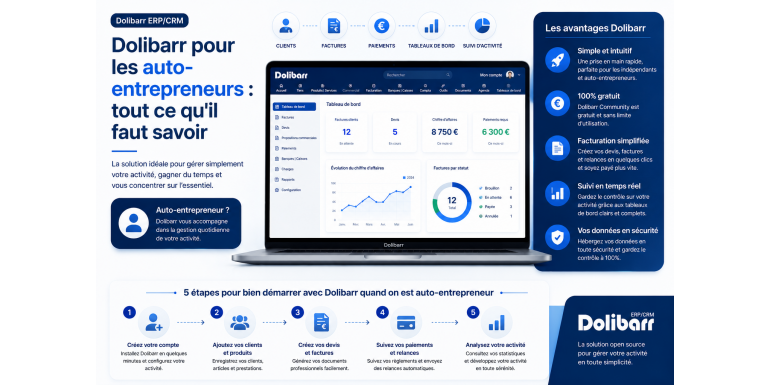
The complete 2026 guide to managing your micro-business with free and powerful software
When starting out as a self-employed individual, one of the first difficulties encountered is the administrative and accounting management of the business. Between creating quotes, issuing compliant invoices, tracking payments, managing clients, and preparing revenue declarations, the tasks quickly pile up. Many self-employed individuals turn to expensive paid solutions or, worse, to Excel spreadsheets that quickly reveal their limitations.
This is where Dolibarr ERP & CRM comes in , a free, open-source, modular software particularly well-suited to the needs of micro-entrepreneurs. But is Dolibarr really right for you? How do you install, configure, and use it effectively when you're managing your business alone? Which features are essential for a self-employed individual, and which can you ignore?
In this comprehensive guide, we'll answer all these questions. You'll discover why Dolibarr is an ideal solution for freelancers and independent professionals, how to install and configure it in minutes, how to use it daily for invoicing, customer management, and cash flow tracking, and finally, the best practices for getting the most out of it. Whether you're a consultant, tradesperson, freelancer, content creator, or retailer, this guide will save you time and help you professionalize your business today.
Summary
• What is Dolibarr and why choose it as a self-employed individual?
• Essential Dolibarr features for micro-businesses
• Dolibarr and the self-employed status: compatibility and specific features
• How to install Dolibarr: the different options
• Initial Dolibarr configuration for a self-employed individual
• Manage your quotes and invoices with Dolibarr
• Tracking customers, payments, and cash flow
• Prepare your URSSAF declarations with Dolibarr
• Useful modules to know
• Advantages and limitations of Dolibarr for micro-entrepreneurs
• Alternatives to Dolibarr and comparison
• Practical tips and good habits
• Conclusion
1. What is Dolibarr and why choose it as a self-employed individual?
Dolibarr is an open-source ERP (Enterprise Resource Planning) and CRM (Customer Relationship Management) software created in 2002. It is currently used by over 700,000 businesses and freelancers worldwide. Its main strength lies in its modularity: you only activate the features you need, making it particularly well-suited to small businesses such as sole proprietorships.
A 100% free and open source software
Unlike solutions such as QuickBooks, Sage, or EBP, which can cost several hundred euros per year, Dolibarr is completely free. You can download the software, install it, use it, and even modify its source code without paying a cent. This financial advantage is crucial for a self-employed individual in the startup phase, where every euro counts.
A modular and scalable solution
Dolibarr operates using modules. Initially, you can activate only the basic modules: third parties (customers/suppliers), quotes, invoices, and banks. As your business grows, you can add additional modules such as project management, expense reports, inventory management, or CRM. This scalability means that Dolibarr can grow with your company, from sole proprietorship to limited liability company (SARL) or simplified joint-stock company (SAS) if you decide to change your legal structure.
An active French-speaking community
Dolibarr is originally a French project, which translates into excellent support for the French language, specific French tax and accounting regulations, and a very active French-speaking community. You will find numerous tutorials, forums, and resources in French to help you get started.
Multi-device accessibility
Since Dolibarr is accessible via a web browser, you can use it from your computer, tablet, or even your smartphone. Whether you work from home, at a client's office, or while traveling, your data is accessible everywhere, provided you install it on an online server or opt for a cloud version.
2. Essential Dolibarr features for micro-businesses
For a self-employed individual, not all of Dolibarr's features are essential. Here are the modules that are truly useful in the vast majority of cases.
Third-party management (clients and prospects)
The Third Party module lets you centralize all your professional contacts: active clients, prospects, and suppliers. For each third party, you can save complete contact information, multiple contacts, the history of exchanges, associated documents, and even personal notes. It's your enhanced professional address book.
Creation of professional quotes
Before each project or sale, you can create a detailed quote and send it directly to your client via email from Dolibarr. The client can accept or reject the quote, and once accepted, you can convert it into an invoice with a single click. This feature saves considerable time and projects a highly professional image.
Invoicing in accordance with regulations
Dolibarr generates invoices compliant with French law, including all mandatory information: sequential invoice number, date, seller and buyer identification, description of services or products, pre-tax and post-tax amounts, payment terms, etc. For self-employed individuals exempt from VAT, you can configure the mandatory statement "VAT not applicable, article 293 B of the French General Tax Code" which will automatically appear on all your invoices.
Payment tracking
For each invoice issued, you can record payments received, whether partial or full. Dolibarr automatically calculates outstanding balances and provides you with a clear list of invoices awaiting payment, making it easier to follow up with customers.
Simplified banking management
The Banking module allows you to enter your banking transactions, reconcile customer payments with your statements, and monitor your cash flow in real time. You can even import your bank statements in CSV or OFX format if your bank offers this option.
Dashboards and statistics
From the homepage, Dolibarr presents you with a dashboard displaying key figures for your business: monthly revenue, unpaid invoices, pending quotes, etc. You also have access to detailed reports to analyze the evolution of your business over time.
3. Dolibarr and the self-employed status: compatibility and specific features
The status of self-employed (officially micro-entrepreneur since 2016) has specific tax and accounting features that must be taken into account in the configuration of Dolibarr.
The VAT exemption threshold
As long as you do not exceed the revenue thresholds (€37,500 for services and €85,000 for the sale of goods in 2026, subject to legislative changes), you benefit from the VAT exemption threshold. In practical terms, you invoice excluding VAT, and VAT does not appear on your invoices. Dolibarr makes it very easy to configure this mode by disabling VAT in the Invoices module settings.
Simplified accounting
Self-employed individuals have simplified accounting requirements: they simply need to keep a record of income (and a purchase ledger for sales activities). There's no need for a balance sheet, profit and loss statement, or cost accounting. Dolibarr can automatically generate these records from invoices issued and payments received.
Monthly or quarterly URSSAF declarations
Self-employed individuals declare their revenue monthly or quarterly to URSSAF, which collects social security contributions and income tax (if you have opted for the simplified tax payment). Dolibarr does not file directly with URSSAF, but it provides all the necessary statistics to complete your online declaration at autoentrepreneur.urssaf.fr.
The mandatory information on invoices
As a self-employed individual exempt from VAT, you must include the statement "VAT not applicable, article 293 B of the French General Tax Code" on your invoices. In Dolibarr, this statement can be automatically added to the bottom of the invoice via the PDF template customization settings, preventing you from forgetting it each time you issue an invoice.
The SIRET number and the APE code
Your SIRET number and APE code must appear on all your invoices. Enter them in your company settings in Dolibarr and they will automatically appear on all your business documents.
4. How to install Dolibarr: the different options
There are several ways to install Dolibarr. The choice depends on your technical skills, your budget, and your mobility needs.
Local installation on your computer
The simplest way to get started is to install Dolibarr locally on your computer. The project offers an all-in-one installer called DoliWamp for Windows, which automatically installs Dolibarr, Apache, MySQL, and PHP. Equivalent installers are available for macOS and Linux. Installation takes about 10 minutes, and you can then access Dolibarr through your browser at localhost. This solution is free, but it limits access to a single machine unless you configure a network share.
Installation on a shared web server
To access Dolibarr from anywhere, you can install it on a standard web hosting plan. Most hosting providers (OVH, Infomaniak, o2switch, Hostinger, etc.) natively support Dolibarr. Expect to pay between €3 and €10 per month for suitable hosting. Installation is relatively simple via an FTP client, but requires some basic technical skills.
Installation on a VPS or dedicated server
For freelancers who want complete control over their setup, a VPS (Virtual Private Server) from OVH, Hetzner, DigitalOcean, or Scaleway is an excellent option. Expect to pay around €5 to €15 per month. This option requires more technical skills (server configuration, security, backups), but offers superior performance and flexibility.
Dolibarr in cloud mode (SaaS)
If you don't want to deal with the technical aspects, several providers offer Dolibarr as a SaaS (Software as a Service). You pay a monthly subscription (between €10 and €30) and everything is managed for you: installation, updates, backups, and support. The official service is called DoliCloud, but other specialized hosting providers exist. This is the recommended solution for freelancers who want to focus on their business without worrying about the technical side.
Which option should I choose?
For a self-employed individual, we generally recommend the SaaS option if your budget allows, as it eliminates all technical constraints. If you are comfortable with computers and want to reduce your costs, shared hosting is an excellent compromise. Local installation remains relevant only if you work exclusively from a single computer and don't need mobile access.
5. Initial Dolibarr configuration for a self-employed individual
Once Dolibarr is installed, here are the essential steps to configure it correctly as a self-employed individual.
Enter your company information
Go to Settings > Company/Organization. Fill in all the fields: business name (your first and last name if you don't have a business name), address, postal code, city, country (France), phone number, email address, website, SIRET number, APE code, and upload your logo if you have one. This information will appear on all your business documents.
Disable VAT
If you are exempt from VAT, go to Settings > Company and uncheck the "Use VAT" option. This simple step automatically removes VAT from all your quotes and invoices.
Activate only the necessary modules
Go to Settings > Modules. For a typical self-employed individual, activate: Third Parties (customer management), Sales Proposals (quotes), Customer Invoices, Banks and Cash Registers, Products/Services, and optionally Categories and Calendar. Deactivate all other modules to avoid cluttering the interface.
Configure invoice numbering
Invoice numbering must be sequential and continuous; this is a legal requirement. Go to Configuration > Modules > Invoices > Settings and choose the numbering template that suits you. The recommended format is FAC-2026-0001, FAC-2026-0002, etc., which includes the year and a counter.
Configure payment terms
Define your default payment terms: upon receipt, within 15 days, within 30 days, etc. You can always modify them on a case-by-case basis, but having default values saves time.
Customize the invoice template
In Settings > Modules > Invoices, you can choose from several PDF templates (Crab, Sponge, Eratosthenes, Octopus). Activate the one you like best and set it as the default template. You can also customize the footer to include the statement "VAT not applicable, article 293 B of the French General Tax Code" as well as your bank details (IBAN and BIC).
6. Manage your quotes and invoices with Dolibarr
Let's now look at how to use Dolibarr on a daily basis for business management.
Create a quote
To create a quote, go to the Sales menu > Sales Proposals > New Proposal. Select the customer (or create one if it doesn't already exist), add the service or product lines, and enter the unit prices and quantities. Dolibarr automatically calculates the totals. You can then send the quote directly to your customer by email from the interface, or download it as a PDF to send it via other methods.
Converting a quote into an invoice
Once your client has accepted the quote, you can mark it as "Signed" in Dolibarr. A "Create Invoice" button will then appear, allowing you to generate the invoice with a single click, with all the quote information pre-filled. This avoids double entry and ensures consistency between the two documents.
Issue an invoice directly
If you don't need to create a quote, you can create an invoice directly via the Accounting/Treasury > Customer Invoices > New Invoice menu. The process is similar to that of a quote. Once the invoice is validated (status "Validated"), it receives a permanent number and can no longer be modified, in accordance with regulations.
Send the invoice to the client
From the invoice details page, you can email it to your client in just a few clicks. Dolibarr uses a customizable email template and automatically attaches the invoice PDF. You can also download the PDF to send it manually if you prefer.
Record payments received
When your client pays the invoice, open the invoice in Dolibarr and click "Enter payment." Enter the amount received, the date, the payment method (bank transfer, check, cash, etc.), and the relevant bank account. The invoice status will automatically change to "Paid," and the payment will be recorded in your accounting system.
Managing unpaid invoices and payment reminders
Dolibarr constantly displays a list of unpaid and overdue invoices. You can create email reminders directly from the interface, or use the Automatic Reminders module to send them automatically at defined intervals. This feature is invaluable for reducing payment delays, a well-known problem for freelancers.
7. Monitor your customers, payments, and cash flow
Beyond simple invoicing, Dolibarr allows you to manage your business professionally.
The complete customer file
For each client, Dolibarr maintains a complete record with a history of all interactions: quotes sent, invoices issued, payments received, emails exchanged, and documents shared. It's a truly streamlined CRM that allows you to maintain a clear view of your relationship with each of your clients.
The cash flow dashboard
The Dolibarr homepage displays your bank balance, outstanding customer balances, and unpaid invoices. At a glance, you know your financial situation. For more in-depth information, the Banking module allows you to track all your banking transactions and generate detailed reports.
Activity statistics
Dolibarr provides a wealth of useful statistics: revenue per month, per customer, per product or service, trends over several years, top customers, etc. This data helps you understand the dynamics of your business and make the right strategic decisions.
Anticipating slow periods
By analyzing the evolution of your revenue over several months or years, you can identify slow periods and anticipate them. This is particularly useful for self-employed individuals whose business is seasonal or irregular.
8. Prepare your URSSAF declarations with Dolibarr
Filing URSSAF declarations is an essential step in the life of a self-employed individual. Here's how Dolibarr can simplify the process for you.
Calculate your cash receipts
The self-employed individual declares their revenue received, meaning the payments actually received during the period, not the invoices issued. Dolibarr allows you to filter payments by period (month or quarter) and calculate the exact total to declare to the URSSAF (French social security agency).
Separate the activities if necessary
If you have several activities falling under different categories (for example, providing services and selling goods), you must declare them separately to URSSAF because the contribution rates differ. In Dolibarr, you can use product categories or accounting codes to distinguish your different activities and generate separate totals.
Export the data for your accountant
If you work with an accountant (rare for sole traders, but possible), Dolibarr allows you to export all your data in CSV or Excel format. Your accountant can then review your tax returns or help you optimize your tax situation.
Keep the supporting documents
Self-employed individuals must keep all their invoices and supporting documents for 10 years. Dolibarr automatically archives them in its database, eliminating the risk of loss. However, remember to perform regular backups of your Dolibarr database to prevent any IT disasters.
9. Useful modules to know
Over time, you will be able to activate additional modules to enhance your use of Dolibarr.
Calendar Module
The Calendar module lets you schedule your appointments, tasks, and deadlines. You can sync it with Google Calendar or an iCal-compatible calendar so you never miss anything.
Expense Reports Module
If you have business expenses (travel, equipment purchases, etc.), the Expense Reports module allows you to record and track them. For a self-employed individual, these expenses are not tax-deductible (since the system is based on a flat-rate deduction), but this tracking can be useful for understanding the true profitability of your business.
Projects Module
If you work in project mode (consultant, agency, creative freelancer), the Projects module allows you to associate quotes, invoices, tasks, and documents with each client project. This enables you to track the profitability of each assignment.
Products and Services Module
If you regularly offer the same services or products, this module allows you to create them once and for all, complete with descriptions and prices. This saves you time when creating each quote or invoice.
Point of Sale Module
For self-employed individuals with a retail business in shops or at markets, the Point of Sale module transforms Dolibarr into a simplified cash register. Very useful for tradespeople and small business owners.
Newsletter and Email Marketing Module
If you wish to communicate regularly with your customers, this module allows you to send email campaigns. Remember to comply with GDPR and obtain explicit consent from recipients.
10. Advantages and limitations of Dolibarr for micro-entrepreneurs
Like any solution, Dolibarr has its strengths and weaknesses. Let's take a look to help you make an informed decision.
The advantages
• Free and open source, therefore no mandatory recurring costs.
• Very comprehensive: it covers all the management needs of a self-employed individual.
• Modular: you only activate what you need.
• Customizable: interface, document templates, fields, everything is adaptable.
• Scalable: it grows with you even if you change your legal status.
• Compliant with French legislation.
• Active community with many resources in French.
• Accessible from any device with a web browser.
The limits
• The interface is sometimes considered austere or outdated compared to modern solutions like Indy or Tiime.
• Learning curve: it takes a few hours to get to grips with the tool.
• Requires technical skills for self-hosted installation (except in SaaS mode).
• No native integration with French banks for automatic account synchronization.
• No integrated URSSAF declaration: you must make the declaration manually on the URSSAF website.
• Community support only (unless you pay a service provider or a DoliCloud subscription).
11. Alternatives to Dolibarr and comparison
To help you make the right choice, here is a quick overview of the main alternatives to Dolibarr for self-employed individuals.
Indy (formerly Georges)
Indy is a French solution specifically designed for freelancers and self-employed individuals. It stands out for its direct bank integration (real-time account synchronization) and its ability to pre-fill URSSAF declarations. Pricing: from €12 per month. Simpler than Dolibarr, but a paid service and less comprehensive in its CRM functionality.
Tiime
Tiime offers several plans, including one specifically for freelancers. The interface is modern and intuitive, with an excellent mobile app. Pricing starts at €15 per month. A very practical solution for freelancers on the go, but it's a paid service.
Henry
Henrri is a 100% free invoicing software designed in France. It's simpler than Dolibarr and ideal if you only need invoicing. However, it doesn't include CRM management, project management, or other advanced features of Dolibarr.
Sumeria (formerly Lydia Pro)
Sumeria offers a professional account with integrated invoicing tools. It's an excellent solution if you're looking to combine banking and invoicing, but the offering is less comprehensive than Dolibarr in terms of business management.
Excel or Google Sheets
Many freelancers start out using spreadsheets. They're free and highly customizable, but their limitations quickly become apparent: no automatic PDF generation, risk of data entry errors, difficulty managing a growing volume of invoices, and no automatic dashboard. Avoid them as soon as your business expands.
What choice should be made?
If your budget is very tight, Dolibarr (self-hosted or local) remains unbeatable. If you want a turnkey, intuitive solution with excellent bank integration, solutions like Indy or Tiime can be worth their monthly cost. For very basic needs (only invoicing), Henrri is an excellent free option. Dolibarr particularly shines if you need a scalable solution that can grow with your business.
12. Practical tips and good habits
To get the most out of Dolibarr as a self-employed individual, here are some best practices to adopt from the start.
Perform regular backups
Losing your data could be catastrophic. Set up automatic backups of your Dolibarr database (at least weekly) and store them in a location separate from your main server (cloud, external drive, etc.). If using a SaaS solution, verify that your provider is performing backups.
Keep Dolibarr up to date
Dolibarr updates regularly bring bug fixes, security improvements, and new features. Remember to install them regularly, always making a backup beforehand.
Issue invoices quickly
The longer you wait to invoice, the longer payment will take. Make it a habit to issue invoices as soon as a service is completed or a product is delivered. This will significantly improve your cash flow.
Monitor payments closely
Check the list of unpaid invoices in Dolibarr each week and systematically send reminders to customers who are late. A friendly and professional reminder is usually enough to resolve the situation.
Organize your third parties and products
From the outset, make it a habit to fill out your customer and product/service records accurately. You will save considerable time later on and your statistics will be more relevant.
Train regularly
Dolibarr offers many hidden features. Take the time to watch YouTube tutorials, read the official documentation, or participate in the community forum. A few hours of training can save you dozens of hours of work later on.
13. Conclusion
Dolibarr is a remarkable solution for self-employed individuals looking for comprehensive, free, and scalable management software. While it requires a short learning curve and some technical skills for installation, it offers complete freedom, professional features, and no recurring costs, making it an excellent companion for your micro-business.
Whether you're just starting out or already well-established, Dolibarr allows you to professionalize your management, save time on administrative tasks, and focus on what really matters: your core business. If the technical aspects intimidate you, SaaS solutions like DoliCloud or specialized service providers can support you for a reasonable fee.
Ultimately, Dolibarr represents a real opportunity for freelancers to benefit from a professional tool comparable to those used by large companies, without any financial barriers. All that remains is for you to take the plunge: download Dolibarr, follow the steps described in this guide, and get started. You'll be surprised to see how much your daily life as a freelancer can be simplified with a well-configured tool.
To learn more, we recommend consulting the official Dolibarr documentation at dolibarr.org, joining Facebook groups and forums dedicated to French-speaking users, and exploring the Dolistore, which offers numerous add-on modules to extend the software's functionality. We wish you success in managing your business and growing your freelance activity!
─── End of article ───
This article was written to help self-employed individuals better manage their business with Dolibarr.