
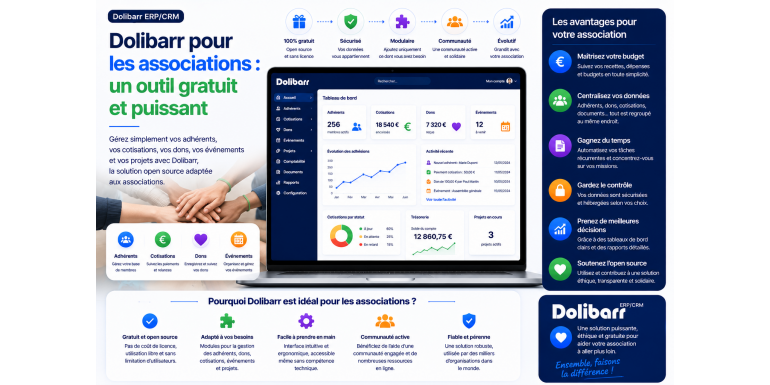
Dolibarr for associations: a free and powerful tool
Members, dues, donations, accounting, events: discover how this open source software can become the Swiss Army knife of your association, without spending a single euro on a license.
Managing an association is a constant juggling act. On one hand, a mission that mobilizes all the energy of the volunteers; on the other, a mountain of administrative tasks that do not excite anyone: monitoring memberships, chasing up unpaid dues, recording donations, keeping the accounts, preparing the general assembly… And all this, most often, with a budget close to zero and tools scattered between a spreadsheet, an email inbox and a few binders.
This is precisely where Dolibarr comes in. This open-source management software, originally designed for businesses, proves surprisingly well-suited to the needs of associations. It centralizes the management of members, dues, donations, finances, and communication in a single tool. And above all, in its self-install version, it is completely free .
In this article, we'll take a detailed look at why Dolibarr is becoming increasingly popular with associations, which features will truly be useful in your daily work, what "free" really means, and how to get started. Whether you're a treasurer, secretary, president, or simply a volunteer motivated by the idea of better organizing your organization, you'll find everything you need here to form a solid opinion.
What exactly is Dolibarr?
Dolibarr is a free and open-source management software, a hybrid between an ERP (Enterprise Resource Planning) system and a CRM (Customer Relationship Management) system. Behind these somewhat intimidating acronyms lies a simple idea: to bring together everything related to managing an organization in a single application . Contacts, invoicing, accounting, inventory, calendar, email campaigns… each area corresponds to a module that can be activated or deactivated as needed.
Developed in France in the mid-2000s, Dolibarr is supported by a large international community and features a fully French-language interface. It is used via a simple web browser, eliminating the need for installation on volunteers' computers: once set up, each user connects from home using their own login credentials and access rights.
For an association, this modular approach is a godsend. You're not overwhelmed by hundreds of unnecessary functions: you only activate membership management, donations and accounting, for example, and you keep a clear interface, focused on the essentials.
Why is Dolibarr so well-suited to associations?
Several software programs promise to simplify association life. What distinguishes Dolibarr is the rare combination of near-zero cost, truly rich functionality, and great flexibility. Let's break down its main advantages.
Free and open-source software
This is the number one argument for organizations with tight budgets. Dolibarr is distributed under an open-source license: you can download, install, and use it without paying any license fees, for as many users as you want. While proprietary solutions often charge a subscription per member or per month, Dolibarr, in its self-hosted version, costs you absolutely nothing in licensing fees .
An all-in-one tool
No more spreadsheets for members, notebooks for the cash register, or email inboxes for reminders. Dolibarr brings everything together in one place. When a member pays their dues, the information is immediately available to the treasurer, the secretary, and the accounting department. This centralization reduces errors, duplicates, and oversights, and saves valuable time, especially during the annual general meeting.
Customizable to suit your actual needs
A small neighborhood association and a large federation don't have the same needs. With Dolibarr, each only activates the modules it needs. You can start modestly, with just member management, then gradually add accounting, donations, or event management as the organization grows. The software evolves with you.
Your data belongs to you
With self-hosting, your data remains on your own server. You are not dependent on the whims of a provider who could shut down their service, raise prices, or misuse your files. For an organization concerned about the confidentiality of its members' data—a major issue under the GDPR—this control is a considerable advantage.
Good to know: Because Dolibarr is open source, you're never locked into a single provider. You can export your data at any time, change hosting providers, or upgrade the software through a provider of your choice. This is a freedom that few solutions offer.
The features that will really be useful to you
Let's get down to specifics. Here are the Dolibarr modules most useful for association management, and what they allow you to do on a daily basis.
Membership and contribution management
This is the heart of association life, and Dolibarr's dedicated module is particularly comprehensive. You create a profile for each member, including their contact information, membership type, and contribution history. The software distinguishes between members whose dues are up to date and those whose membership has expired, and can automatically send reminders.
You define different membership types (individual, family, benefactor, student, etc.) with distinct membership fees. And thanks to the online membership form, new members can join your association directly from your website; their profile is created automatically. This significantly reduces the secretary's workload.
Donation tracking
For charities that collect donations, Dolibarr allows them to record each contribution, track its origin, and generate the necessary supporting documents. Donation traceability is essential, both for transparency towards donors and for producing tax receipts that entitle them to a tax deduction.
Accounting and Treasury
Maintaining clear accounting records is mandatory for any even minimally structured association, and it's often a major headache for volunteers. Dolibarr offers banking and accounting modules that allow you to track accounts, reconcile entries, categorize income and expenses, and generate financial statements. This ensures you can present clear and concise accounts at your annual general meeting.
Communication with members
Maintaining contact with your members is vital. Dolibarr's email campaign module allows you to send targeted messages to all or part of your members: general meeting notices, newsletters, event reminders, fundraising appeals, etc. Because the emails are directly based on your member database, you can easily segment your mailings according to member type or membership status.
Events and agenda
Meetings, workshops, assemblies, events: community life is punctuated by events. The integrated calendar centralizes these appointments, allows them to be shared among volunteers, and keeps track of them. Combined with the ticketing or invoicing module, it can also manage paid registrations for workshops or outings.
Document management and projects
Articles of association, minutes, reports, grant agreements: an association quickly accumulates a mountain of documents. Dolibarr offers centralized storage space to organize and easily retrieve them. The project management module helps organize one-off events—a festival, a campaign, a community project—by tracking tasks and associated budgets.
Summary of useful modules
To help you understand, here is a summary table of the main modules and their associative use.
|
Module |
What is its purpose for an association? |
|
Members |
Manage members, membership types and dues tracking. |
|
Donations |
Record donations and produce tax receipts. |
|
Bank |
Track accounts, income and expenses on a daily basis. |
|
Accounting |
Keep the records and prepare the statements for the general meeting. |
|
Emailing |
Send out targeted invitations, newsletters and fundraising appeals. |
|
Diary |
Centralize meetings, events and appointments for volunteers. |
|
Projects |
Organize one-off actions with tasks and budgets. |
|
Documents |
Archive statutes, minutes, agreements and reports. |
"Free," really? Understanding the model
Announcing a "free and powerful" software deserves some clarification, because the reality is a little more nuanced — usually to your advantage, but it's best to be transparent.
The self-installable version: free
If you download Dolibarr and install it on a web hosting service, the software costs you nothing . No license, no subscription, no limit on the number of users or members. This is the most economical option, and it's perfectly suited to organizations that have some technical expertise, either in-house or through a volunteer.
The online version: a paid service in exchange for simplicity
Not all associations have a volunteer comfortable with a web server. For them, there are turnkey hosting solutions, including the official cloud offering, which handle installation, updates, and backups for a monthly subscription. You don't pay for the software itself, but for the convenience of not having to worry about any of the technical aspects.
Indirect costs to anticipate
Even with self-hosting, some expenses remain. Factor in the cost of web hosting (a few tens of euros per year for a small organization) and a domain name. Above all, consider the time involved: installing, configuring, and learning how to use the software requires an initial investment. This isn't a financial cost, but it is a very real cost in terms of volunteer time and effort.
In summary: Dolibarr is free software. Your only expenses are for hosting (which is minimal) and, if you choose, the support service or the online version. For the vast majority of organizations, the cost remains significantly lower than that of equivalent proprietary software.
How to get started in practice
Convinced and want to try it out? Here are the main steps to get started smoothly, without getting overwhelmed.
1. Define your needs. List what you want to manage as a priority: members, donations, accounting? There's no need to activate everything from the start.
2. Choose your hosting method. Self-hosting if you have the technical skills, or an online solution to delegate the technical aspects.
3. Install and activate the modules. Set up the software, then activate only the modules selected in step 1.
4. Import your existing data. Retrieve your membership file (often a spreadsheet) and import it so you don't have to re-enter everything manually.
5. Train the relevant volunteers. Show each manager how to use the section that concerns them, with rights adapted to their role.
6. Test it in a real-world scenario. Run Dolibarr through a full onboarding campaign before making a final decision.
There's no need to aim for perfection from day one. Start small, get a feel for it, and then enhance your usage over the months. Most organizations that successfully transition to Dolibarr have done so in stages.
Tip: Before installing anything, you can test Dolibarr with an online demo. This allows you to interact with the interface, explore the modules, and get a feel for the system, without any commitment or installation.
An asset for transparency and compliance
Managing an association involves responsibilities, particularly regarding the personal data of its members. In this area too, Dolibarr provides valuable services.
First, because it centralizes information and allows for easy export, correction, or deletion—all operations required by the GDPR . A member requests the deletion of their data? The operation is completed in just a few clicks, and you maintain a record of your compliance.
Secondly, because clear accounting and transparent financial statements strengthen the trust of members, donors, and public funders. When presenting the financial statements at the general meeting or justifying the use of a grant, having reliable and easily accessible data makes all the difference. Transparency is not just an obligation; it's also a key factor in retaining your supporters.
Limits to keep in mind
No tool is perfect, and honesty compels us to mention the points of caution before you begin.
• An initial learning curve. Dolibarr is feature-rich and requires a learning period. The interface, inherited from the corporate world, can be confusing at first.
• The vocabulary is business-oriented. We talk about "third parties," "invoices," and "clients" where an association would think of "members" or "partners." A little mental gymnastics is required.
• A technical need for self-hosting. Installing and maintaining the software requires a minimum level of skills, or the assistance of a service provider.
• Some functions are sometimes more extensive than necessary. Some very simple organizations may find Dolibarr oversized for their basic needs.
These reservations are not insurmountable; they simply encourage you to carefully assess your needs and resources before committing. For an association managing dozens or hundreds of members, the initial investment is quickly recouped.
Dolibarr versus spreadsheets and other solutions
Many organizations start their management with a spreadsheet. It's free, familiar, and sufficient… up to a point. Understanding where Dolibarr stands in relation to common alternatives helps make an informed choice.
Facing the spreadsheet
Spreadsheets remain unbeatable for getting started: everyone knows how to use them. But they quickly show their limitations as the organization grows. There are no automatic reminders, a high risk of errors and duplicates, difficulty working collaboratively without overwriting each other's work, and no reliable historical data. Dolibarr, on the other hand, structures information: one member, one record; one membership fee, one entry. Switching to the software becomes justified as soon as the volume of members or transactions becomes unmanageable manually.
Faced with specialized associative solutions
There are software programs designed exclusively for associations, sometimes easier to learn because their terminology is readily accessible. Their drawback: they are often subscription-based, less versatile, and tie you to a specific vendor. Dolibarr requires an initial learning curve, but in return offers free access, control over your data, and a versatility that few dedicated tools can match.
In contrast to proprietary management software
Compared to other commercial ERP and CRM systems on the market, Dolibarr offers a very similar level of functionality at a significantly lower cost. Where a proprietary solution charges hundreds or even thousands of euros per year, Dolibarr delivers the essentials without any licensing fees. For an association, the choice is clear.
The right approach: don't choose a tool based on its theoretical capabilities, but on what you actually need. If a shared spreadsheet is sufficient for your five members, keep it. If you manage dozens of members, donations, and accounting, Dolibarr becomes a very worthwhile investment.
Frequently Asked Questions
Is Dolibarr really free for an association?
Yes, in its self-install version. The software is free and there are no license fees, regardless of the number of users or members. Your only costs are for web hosting, or a subscription if you opt for a turnkey online version.
Do you need technical skills to use it?
For everyday use, no: once configured, Dolibarr is accessed through a browser, like a website. It's primarily the self-hosted installation and maintenance that require expertise. Online hosting services eliminate this difficulty by handling the technical aspects for you.
Is Dolibarr suitable for small associations?
Absolutely. Thanks to its modular design, a small organization only activates what it needs and maintains a simple interface. That said, for an association with only a few members, such a comprehensive tool might be overkill: weigh the implementation effort against the expected benefit.
Can we manage tax receipts for donations?
The donation module allows you to record and track contributions, which is essential for generating receipts that entitle your donors to tax deductions. Depending on your system configuration, generating receipts may require specific settings to suit your tax regime.
In conclusion: a valuable ally for your association
Dolibarr ticks an impressive number of boxes for the non-profit sector: free as software, comprehensive thanks to its modules, respectful of your data , and capable of growing with your organization. Where many associations struggle to juggle spreadsheets, notebooks, and email inboxes, it offers a centralized point that saves time and improves reliability.
Of course, it requires an initial effort to install and learn, and its corporate terminology takes a little getting used to. But for an organization that manages a significant number of members, donations, or events, it's well worth the effort.
The best advice? Don't just stick to theory. Try Dolibarr with a demo, activate two or three essential modules, import your membership list, and see for yourself. You'll likely discover that a professional, powerful, and free tool is now within reach of your association—and that your next general meetings will be significantly smoother.