
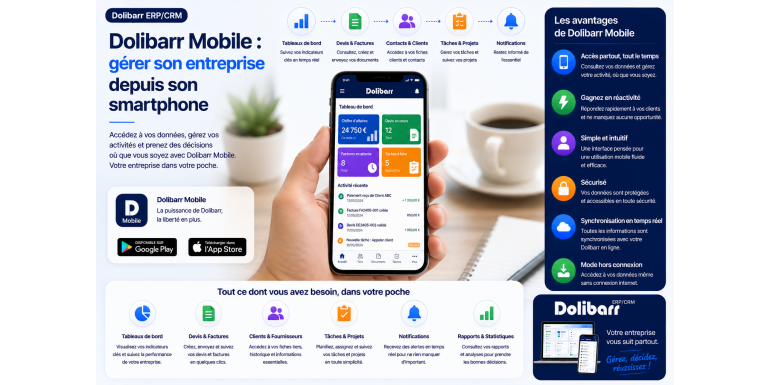
Dolibarr Mobile: Manage your business from your smartphone
Your ERP in your pocket: consult with a client during a meeting, check an invoice on the train, schedule a field intervention. Discover how DoliDroid, DoliMobile, and DoliPlusMobi make Dolibarr a truly mobile management tool.
Mobility · ERP · Dolibarr • Approximately 12-minute read
Summary
1. Why manage your business from a smartphone?
2. How Dolibarr communicates with a smartphone
3. DoliDroid: the historic Android application
4. DoliMobile: complete and modern access
5. DoliPlusMobi: the field-oriented PWA
6. Concrete use cases according to professions
7. Comparative table of the three applications
8. How to choose the right solution for your business
9. Best practices for worry-free mobile use
10. Frequently Asked Questions
11. Conclusion: Your ERP follows you everywhere
The office is no longer the only place where a business is run. Between client meetings, travel, construction sites, and remote work, professionals need access to their management tools anytime, anywhere. For the many businesses, freelancers, and associations that have adopted Dolibarr, one question keeps coming up: how can I comfortably use my ERP from a smartphone?
Good news: Dolibarr is well-suited to mobile use. Its web interface is natively responsive , meaning it adapts to screen size. But for a truly mobile-optimized experience, several dedicated apps exist within the ecosystem. In this article, we'll focus on three of them: DoliDroid , DoliMobile , and DoliPlusMobi .
We'll explore why mobile access is a game-changer, how the connection between Dolibarr and a smartphone works technically, and then we'll present these three solutions in detail, highlighting their strengths and uses. You'll leave with a clear understanding to choose the approach best suited to your business and take your management with you wherever you go.
Why manage your business from a smartphone?
Before comparing the applications, let's take a moment to consider what mobile access truly brings to the table. Far from being a mere gadget, it has become a lever for daily productivity.
Responsiveness, everywhere and at all times
A client calls to check the status of their order while you're out and about? With your ERP in your pocket, you can respond in seconds, without waiting to get back to the office. This responsiveness enhances your professional image and speeds up your decision-making processes.
Fieldwork made easier
For tradespeople, technicians, salespeople, and service providers, most of their work takes place outside the office. Being able to access a customer file on-site, record a service call, take a photo of a worksite, or create a quote directly at the customer's location transforms the way they work. Information is captured at the right time, without the need for subsequent re-entry.
The end of downtime
Travel, waiting rooms, queues: all these wasted moments can be transformed into productive time with a mobile phone. Approving an invoice, checking stock levels, or scheduling an appointment from your phone saves precious time that adds up over the course of a week.
Data that is always up to date
When each employee can update information in real time from the field, the database remains reliable and up-to-date . No more scribbled notes that are forgotten: information goes directly into the system, at the source, which reduces errors and omissions.
How Dolibarr communicates with a smartphone
To make the right choice, you need to understand the two main approaches that allow you to use Dolibarr on mobile devices. They are based on different technical principles.
The responsive web interface
The first approach is simply to open Dolibarr in your smartphone's browser. The interface automatically adapts to the screen: collapsible menus, adjusted layout, and touch navigation. It's immediate and free, as it requires no additional installation. This responsive design is also the foundation upon which some mobile applications are built.
Dedicated applications via the API
The second approach involves an application installed on the phone, which communicates with your Dolibarr server. Depending on the solution, this communication relies on the Dolibarr REST API or a connector module to be installed on the server side. The application then offers an interface specifically designed for mobile devices, often smoother and more user-friendly than a simple browser, sometimes with features that utilize the phone's hardware (camera, geolocation, contacts).
Key takeaway: regardless of the application, the security principle remains the same: the connection must be made via HTTPS, and the permissions defined in Dolibarr (each user's authorizations) also apply on mobile devices. A salesperson will only see on their phone what they are authorized to see on their desktop.
DoliDroid: the historic Android application
DoliDroid is one of the oldest mobile applications in the Dolibarr ecosystem, designed for Android devices . Its principle is to serve the Dolibarr mobile interface directly in a dedicated application, relying on the mobile display mode of the software.
Its operation
DoliDroid displays your Dolibarr pages in a version optimized for small screens. Specifically, the application connects to your server and presents the usual Dolibarr screens in a touch-friendly format. This allows you to retain the familiar logic and features, but in a format designed for mobile phones.
Its strengths and limitations
DoliDroid's main advantage lies in its close resemblance to the standard Dolibarr interface: no disorientation, you manipulate the same objects as in the office. However, since the application relies on the rendering of pages served by your system, its performance depends on the quality and configuration of that system.
One technical point worth noting: if your Dolibarr server is serving pages with errors (often due to a poorly designed external module), DoliDroid may struggle to load certain pages, even when a standard desktop application would display nothing. The solution is to check the installed external modules and ensure that the mobile display is working correctly. For Android users who prefer to keep their Dolibarr experience as is, DoliDroid remains a simple gateway to mobile access.
DoliMobile: complete and modern access
complete and unrestricted access to your entire Dolibarr system, directly from a smartphone or tablet. Available on Android and iOS, it targets professionals who want to access the full power of their ERP system while on the go.
An interface designed for mobile
While some solutions are limited to a few functions, DoliMobile boasts a modern and intuitive interface, with an elegant dashboard and a fluid side menu for easy navigation between different features. The stated goal is to manage your Dolibarr freely, anywhere and anytime, without feeling restricted by a small screen.
Access to all modules
One of DoliMobile's key selling points is its comprehensive connectivity : it boasts access to all Dolibarr modules, features, and users, including compatibility with external modules. For a company that has customized its installation with numerous modules, this is a significant advantage compared to applications that only cover a handful of functions.
The application also supports multi-company use for users with multiple instances and emphasizes performance optimization to maintain speed even on slow mobile networks. The connection to the server is secured via HTTPS.
Its operating model
On the practical side, the application itself can be downloaded for free from app stores. However, using it with your instance requires installing a Dolibarr server-side connector module , which extends the standard API to enable communication with the application. DoliMobile is therefore a client application: it doesn't provide a standalone service, but gives you access to your existing Dolibarr installation. Among the announced improvements is a simplified QR code connection.
Who is it for? DoliMobile is particularly suitable for companies that want a true mobile workstation, capable of covering all their Dolibarr uses, and that are willing to install a server-side module to benefit from this advanced integration.
DoliPlusMobi: the field-oriented PWA
DoliPlusMobi is the mobile application associated with the DoliPlus offer. Its distinguishing feature is its technical nature: it is a PWA , or Progressive Web App. Rather than a traditional native application, it is a web application that installs on the smartphone or tablet like a regular app, accessible via its icon.
The advantage of PWAs: multi-platform compatibility
The major advantage of a PWA is its cross-platform compatibility . A single application works on iOS, Android, and beyond, without requiring separate development for each system. In fact, in 2021, DoliPlusMobi replaced an older, outdated Android-only application. This approach ensures simplified maintenance and availability across all employee devices.
A complementary approach, not a copy.
DoliPlusMobi does not aim to replicate all the functionalities of the web application; that is not its purpose. Since the DoliPlus web application is already responsive , it remains usable on mobile devices for all tasks. DoliPlusMobi, on the other hand, focuses on specific field uses: managing interventions, field data entry forms, organizing events and tasks, and a messaging and calendar system designed for mobile teams.
Hybrid mode for the terrain
An interesting feature for field technicians: some DoliPlusMobi functions can operate in a hybrid mode. The network is used to load data, but actions such as filling out forms or taking photos can continue in standalone mode, even when the connection is poor. This is invaluable for technicians working in areas with limited coverage.
Finally, the application highlights a "zero configuration" approach for fleets of smartphones: once installed, it provides access to daily information without complex setup on each device, and rights to menus and features remain controlled from the central administration.
Concrete use cases according to professions
To make all this tangible, let's see how mobile access to Dolibarr translates into different activities. Each profile finds a specific benefit.
The salesperson on a meeting
When meeting with a client, the salesperson reviews the prospect's file, checks the history of previous interactions and recent orders, and then prepares a quote on the spot during the meeting. The client leaves with an immediate proposal, which significantly shortens the sales cycle and projects a responsive image of the company.
The craftsman or technician in the field
On a worksite or during a service call, the technician records their report, takes photos of the work completed, and checks off the tasks finished, sometimes without a network connection thanks to hybrid mode. Upon returning to a covered area, everything synchronizes. Billing can then be initiated more quickly, without waiting for data re-entry at the office.
The leader on the move
The manager, meanwhile, keeps a close eye on key indicators from his mobile dashboard: revenue, outstanding invoices, cash flow. He approves orders, releases funds, or responds to urgent requests without being tied to his office. Decision-making no longer stops as soon as he leaves the premises.
Comparative table of the three applications
To summarize, here is a recap of the main features of DoliDroid, DoliMobile, and DoliPlusMobi. Keep in mind that the features are constantly evolving.
|
Criteria |
DoliDroid |
DoliMobile |
DoliPlusMobi |
|
Kind |
Android app |
Native Android/iOS app |
Multi-platform PWA |
|
Platforms |
Android |
Android & iOS |
iOS, Android, etc. |
|
Approach |
Dolibarr mobile interface |
Full access to modules |
Field-oriented supplement |
|
Blanket |
Standard functions |
All modules |
Interventions, agenda, data entry |
|
Offline |
No |
According to custom |
Hybrid mode possible |
|
Ideal for |
Android users |
Complete mobile workstation |
Response teams |
How to choose the right solution for your business
There is no single "best" app: it all depends on your profession, your devices, and how you use it. Here are some guidelines to help you make your choice.
• Do you exclusively use Android and want to find Dolibarr exactly as it is? DoliDroid offers a simple entry point, faithful to the standard interface.
• Do you want full access to all your modules, on Android as well as iOS? DoliMobile aims for this broad coverage, at the price of installing a connector module.
• Do your teams work in the field, sometimes without a network connection? DoliPlusMobi, with its hybrid mode and data entry forms, is tailored for field operations.
• Do you have a one-off, lightweight need? Don't forget the responsive web interface: opening Dolibarr in a mobile browser is sometimes more than enough.
The best approach is to start with your actual usage patterns rather than the list of features. Identify the two or three actions you'll perform most often on the go, then see which solution makes them the smoothest. Most offer a trial or demo: test before you commit.
Best practices for worry-free mobile use
Whatever your choice, a few precautions will ensure a smooth and secure experience on a daily basis.
1. Enforce HTTPS. The connection between the application and your server must always be encrypted. Never compromise on this, especially on public Wi-Fi networks.
2. Respect the permissions. Carefully configure the rights of each user in Dolibarr: they also apply on mobile and protect your sensitive data.
3. Keep Dolibarr up to date. Mobile applications communicate with your server; an up-to-date installation ensures compatibility and security.
4. Check your external modules. Some poorly designed modules can interfere with the mobile display. If you experience any issues, try temporarily disabling them.
5. Secure your devices. Code lock, automatic disconnection, or even remote erasure: a lost smartphone should not become a vulnerability.
Tip: Before deploying an application to all your team's phones, test it on a single device with a limited-access account. This will allow you to validate its functionality and permissions without risking your data.
Frequently Asked Questions
Do you have to pay to use Dolibarr on mobile?
It depends on the solution. Accessing Dolibarr via a mobile browser, thanks to its responsive interface, is free. For dedicated applications, the model varies: some applications are free to download but require a module or a server-side subscription to work with your instance. Check the terms and conditions of each before proceeding.
Is my data safe on my mobile?
Yes, provided you follow best practices. The connection must be made via HTTPS, the user rights defined in Dolibarr must apply on mobile devices, and the device itself must be secure (locked, updated). Serious applications communicate with your own server: your data remains where it is hosted.
Can I do everything from my smartphone?
It depends on the application. DoliMobile aims for full access to all modules, while DoliPlusMobi focuses on specific field uses. In practice, operational tasks (consulting a client, creating a quote, scheduling an appointment) are well-suited to mobile devices, while complex configurations remain more comfortable on a computer.
What solution should be chosen for a team of technicians?
For field teams that frequently work outside the office, sometimes in areas with poor coverage, a field-oriented solution like DoliPlusMobi, with its hybrid mode and data entry forms, is particularly well-suited. If access to all modules is paramount, DoliMobile is an alternative worth considering.
Conclusion: Your ERP follows you everywhere
Managing your business from your smartphone is no longer a distant promise, but a reality accessible to all Dolibarr users. Between the responsive web interface and dedicated applications — DoliDroid , DoliMobile and DoliPlusMobi — everyone can find the solution that suits their business and devices.
DoliDroid impresses with its simplicity and faithful adherence to the standard Android interface. DoliMobile focuses on comprehensive and modern access to all modules, on both Android and iOS. DoliPlusMobi, a cross-platform PWA, excels in the field thanks to its hybrid mode and input forms. Three different philosophies, for three types of needs.
The best advice? Start with your actual needs, test the solution that seems closest to your daily routine, and gradually roll it out to your team. You'll transform downtime into productive time, streamline your fieldwork, and keep your data always up-to-date. Your business will literally fit in your pocket.