
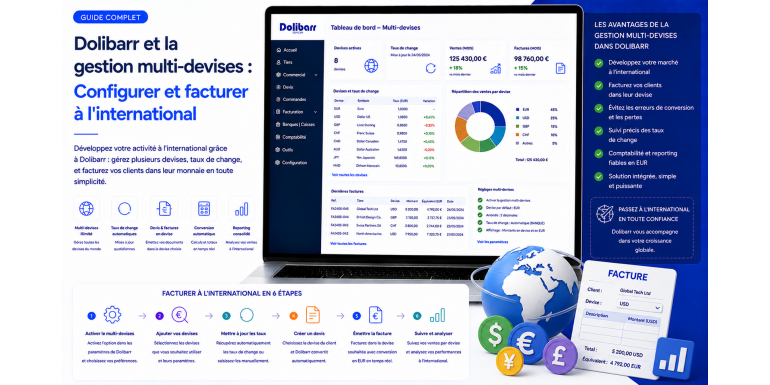
Introduction
In an increasingly globalized economic world, businesses — whether SMEs, very small businesses, or large corporations — are increasingly working with partners, suppliers, and customers located across the globe. This reality inevitably involves managing multiple currencies, issuing invoices in euros, US dollars, British pounds, Japanese yen, or Swiss francs, depending on the requirements of each international transaction.
It is in this context that Dolibarr ERP/CRM, one of the most popular open-source management software solutions in the French-speaking world, stands out with its multi-currency management features. Accessible, modular, and fully customizable, Dolibarr allows businesses of all sizes to efficiently manage their transactions in foreign currencies, configure exchange rates, issue international invoices, and track their finances with precision.
In this comprehensive article, we will explore in detail how to configure multi-currency management in Dolibarr, how to use it on a daily basis for international invoicing, what best practices to adopt, and what limitations to be aware of to optimize your use of the software.
1. Why is Multi-Currency Management Essential for International Businesses?
1.1 The Challenges of International Invoicing
When a company works with foreign clients or suppliers, several issues immediately arise:
- Which currency to use for invoicing? The client may want to be invoiced in their local currency to simplify their accounting.
- How to manage exchange rates? Rates fluctuate daily, which can have a significant impact on the actual margin of a transaction.
- How to ensure legal and accounting compliance? Each country has specific rules regarding VAT, local taxes, and currency reporting obligations.
- How to track the actual profitability of each international project or client?
An ERP like Dolibarr provides concrete answers to all these questions, provided it is correctly configured.
1.2 The Advantages of Integrated Multi-Currency Management
Integrating multi-currency management directly into your management software has many advantages:
- Considerable time savings: no need to manually convert amounts in spreadsheets.
- Error reduction: automatic calculations limit the risk of conversion errors.
- Better financial visibility: dashboards centralize all information in the reference currency.
- Increased professionalism: sending an invoice in the client's currency strengthens commercial trust.
- Accounting compliance: accounting books remain consistent thanks to automatic conversion to the reference currency.
2. Overview of Dolibarr ERP/CRM
2.1 What is Dolibarr?
Dolibarr is an open-source ERP (Enterprise Resource Planning) and CRM (Customer Relationship Management) software, developed primarily in PHP and using a MySQL or PostgreSQL database. It is distributed under the GNU GPL license and can be downloaded for free from the official website dolibarr.org.
Among its main features:
- Customer and prospect management (CRM)
- Supplier management
- Customer and supplier invoicing
- Inventory management
- Project management
- Accounting and treasury
- Human resources
- Contract management
- And of course: multi-currency management
2.2 Why Choose Dolibarr for International Management?
Dolibarr is particularly suitable for organizations that want a flexible and cost-effective solution. Its modular architecture allows only the necessary features to be activated. For companies that export or work internationally, Dolibarr offers a dedicated module for managing foreign currencies, which integrates perfectly with the invoicing, accounting, and CRM modules.
3. Configuring Multi-Currency Management in Dolibarr
3.1 Prerequisites Before Starting
Before configuring multi-currency management in Dolibarr, make sure you have:
- A recent version of Dolibarr (ideally version 14.0 or higher, which offers the best multi-currency features)
- Administrator rights on your Dolibarr instance
- A reference currency already configured (typically the euro for French companies)
- Knowledge of the currencies you wish to work with
3.2 Activating the Multi-Currency Module
The first step is to activate the corresponding module in the Dolibarr administration interface.
Procedure:
- Log in to your Dolibarr interface as an administrator.
- Go to Configuration → Modules/Applications.
- In the search bar, type "Currency" or "Multi-currency".
- Activate the Foreign Currencies module by clicking the corresponding button.
- Once activated, a new menu appears in the Configuration → Currencies section.
3.3 Defining the Reference Currency
The reference currency (or base currency) is the primary currency in which your accounting is maintained. For a French company, this would be the Euro (EUR). This currency serves as a reference point for all conversions.
To configure it:
- Go to Configuration → General Settings → Company Currency.
- Select your currency from the dropdown list.
- Save the changes.
3.4 Adding and Managing Foreign Currencies
Once the module is activated, you can add the foreign currencies you wish to use.
Procedure for adding a currency:
- Go to Configuration → Currencies.
- Click on "New Currency".
- Select the currency from the list (USD, GBP, CHF, JPY, CAD, etc.).