
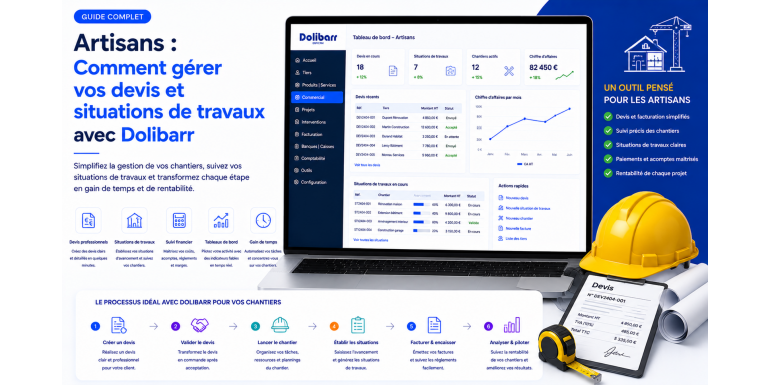
You are a plumber, electrician, mason, painter, drywall installer, carpenter, landscaper, or roofer. Your activity does not resemble that of a retailer selling stocked products or that of a consultant invoicing days. You work on construction sites that may last a week, a month, sometimes an entire year. You produce long and precise quotes, you split your services into lots, you bill progressively as the works advance, you handle deposits, retention guarantees, end-of-month progress billings, price revisions, sometimes subcontracting, and always a VAT with subtleties specific to your sector.
For this profession, simple invoicing software is not enough. You need a tool capable of handling the complexity of the craftsman cycle, from the first visit to the customer up to the lifting of reservations one year after the end of the works. Dolibarr, configured and customized for construction needs, then becomes a true daily ally: it streamlines your quotes, automates your progress billings, secures your retention guarantees, calculates the VAT to be applied, and gives you a clear view of each site's profitability. In this complete guide, NEXT GESTION shares the methodology it deploys with its craftsmen clients to transform Dolibarr into a true business ERP adapted to construction industry constraints.
Table of Contents
- The Specifics of Craftsman Invoicing: What Differs from Standard Activity
- Configuring Dolibarr for a Craftsman's Needs
- Building a Professional and Compliant Quote
- The Sales Cycle: From Quote to Order
- Progress Billings: Invoicing Progression
- Retention Guarantee: Securing and Releasing
- VAT in Construction: Reduced Rates and Reverse Charge
- Managing Subcontractors
- Tracking the Profitability of Each Project
- Technical Memorandum and Administrative Documents
- Using Dolibarr on the Move on Sites
- Reporting and Dashboards for Craftsmen
- Daily Best Practices
- Frequent Mistakes to Avoid
- NEXT GESTION Support for Craftsmen
- FAQ: Frequently Asked Questions from Craftsmen
1. The Specifics of Craftsman Invoicing: What Differs from Standard Activity
Understanding the specificity of your trade is the first step in choosing and configuring an adapted tool. Where a retailer sells an identified product at a defined price, you sell a complex, multi-line service, spread over time, subject to uncertainties and to legal rules specific to construction.
First point, the quote is not a simple price list but a structured, legally framed document that engages your liability. It must present the works by lots, mention the nature and extent of services, indicate the supplies and their origin, specify deadlines, signal warranty conditions, and respect mandatory legal mentions. For projects exceeding certain thresholds, it becomes a signed contractual document that serves as a reference throughout the project.
Second point, invoicing is almost never done in a single instalment. On a project lasting several months, you call for deposits at the start, then establish progress billings as the works advance. Each progress billing accumulates the actual progress, values the new portion, and deducts what has already been invoiced. The final progress billing, called the general and definitive statement, integrates any additional works, penalties, price revisions and allows the release of the retention guarantee.
Third point, you must manage a retention guarantee, generally set at five percent of the works amount, kept by the project owner for one year after acceptance or covered by a bank guarantee. This retention is not lost, it is deferred, and its rigorous tracking is essential to your cash flow.
Fourth point, VAT in construction follows particular rules. Depending on the nature of the works, the type of building, the age of the housing, and the customer's status, it can be at ten percent, five point five percent, or twenty percent. On subcontracted projects, the reverse charge mechanism may apply, transferring the VAT obligation to the main company. Incorrect application of these rules exposes to tax adjustments and customer disputes.
Fifth point, you work with subcontractors, suppliers and sometimes co-contractors. You must track purchase orders, delivery notes, supplier invoices, subcontracting contracts, social security certificates, accreditations. Documentary traceability is indispensable, both for invoicing and for administrative inspections or possible claims.
Sixth point, the profitability of a project is not visible on the customer invoice but in the comparison between the sold quote, the hours actually spent, the imputed purchases, and the indirect costs. Without analytical monitoring per project, you do not really know which ones bring you money and which ones cost you. This is one of the major weaknesses NEXT GESTION systematically corrects with its craftsmen clients.
2. Configuring Dolibarr for a Craftsman's Needs
Dolibarr installed in standard configuration already offers a solid base. However, to meet the needs of the craftsman trade, several adjustments and activations are necessary. This initial setup conditions the effectiveness of everything that follows.
Activate as a priority the modules third parties, sales proposals, customer orders, customer invoices, supplier invoices, products-services, projects, and margins. The projects module will be the pivot of your site monitoring: each construction site becomes a project to which all associated documents are attached, quotes, orders, progress billings, purchases, time spent. It is this systematic attachment that makes analytical monitoring possible.
Then configure your VAT rates. The configuration menu allows you to define all the rates you need and to associate them by default with products or services. Create a clear grid: standard rate for new construction, intermediate rate for improvement works, reduced rate for energy improvement works, reverse charge management for subcontractors. Document these rules so that your entire team applies them consistently.
Customize your document templates. Dolibarr's ODT/ODS template editor module allows you to create quote, invoice, and progress billing templates fully adapted to your visual identity and to the mandatory mentions of your trade. SIRET number, business code, trade register, ten-year insurance, payment guarantee, specific construction payment conditions, works acceptance modalities, as many elements your documents must carry.
Define your product and service categories. On the product side, organize your catalog by families: materials, supplies, equipment. On the service side, create reusable standard services: installation, removal, connection, finishing. This structuring facilitates the creation of subsequent quotes and allows you to industrialize your costing.
Implement the margins module and analytical accounting. Without these modules, you invoice without knowing if you are making money. With them, each quote line and each purchase are linked to a project-construction site, and the dashboard displays the forecast then real margin of each operation.
NEXT GESTION supports its craftsmen clients in this initial configuration phase, bringing both Dolibarr expertise and knowledge of construction specifics. Clean configuration from the start avoids years of patching and inconsistencies.
3. Building a Professional and Compliant Quote
The quote is your first commercial business card and a structuring legal document. Its quality conditions the signature rate, the fluidity of subsequent invoicing, and your coverage in case of dispute. Dolibarr offers all the tools to create impeccable quotes.
Start by splitting your works into logical lots, generally by trade or by project phase. Plumbing, electricity, plastering, painting, tiling, or alternatively shell, second works, finishing. Each lot groups service and supply lines that can be detailed, totaled and presented separately. This structuring into lots is indispensable for what follows, because progress billings will be established by progression of each of these lots.
Detail each line precisely: clear description, unit, quantity, unit price, VAT rate. For supplies, mention the brand or reference when it adds value, without exposing your sources of supply. For services, be explicit about what is included and what is not. An ambiguous quote generates conflicts; a clear quote secures both parties.
Add indispensable contextual information. The validity of the quote, the planned execution time, payment conditions with their deadlines, acceptance modalities, exclusions, calculation hypotheses. These elements generally appear in the conditions section or in a free text area, depending on your template. Dolibarr allows you to pre-fill them automatically from your basic configuration.
Insert mandatory legal mentions: company name, address, SIRET number, intra-community VAT number, business code, share capital, ten-year insurance and insurer details, payment guarantee, claim management mention. For individuals, add withdrawal rights mentions when applicable. These mentions must appear on the quote and on the invoice.
Customize the visual presentation. Logo, colors, typography, header, footer: your quote must reflect your brand image. A polished quote inspires confidence and differentiates your offer from competitors who simply use hastily printed spreadsheets. Dolibarr allows the creation of a template of professional elegance, provided you take the initial time for setup.
Validate and sign the quote. Beyond the physical signatory, Dolibarr offers an internal validation step that secures the process. To go further, external electronic signature can be integrated via a dedicated module, accelerating returns from your customers without breaking the digital chain.
4. The Sales Cycle: From Quote to Order
Once the quote is signed, the cycle continues. Dolibarr offers native transformation of the quote into a customer order, which becomes the reference document for triggering the construction site. This order retains all the lines, amounts, and conditions of the quote, and materializes the contractual commitment of both parties.
On the order, you can add information specific to the construction site: precise site address, on-site technical contact, access plan, schedule constraints, particular conditions. All these elements enrich the project file and remain accessible to all your concerned collaborators.
The project associated with the quote and the order becomes the unique file of the construction site. Inside, you can attach all useful documents: site photos, plans, site meeting reports, exchanged emails, various certificates. This documentary centralization is precious, both for operational follow-up and for defense in case of dispute or claim.
At this stage, you can also trigger the order of necessary materials from your suppliers. Dolibarr allows generating supplier orders directly from the needs identified on the customer order, ensuring traceability between purchases and construction site. This traceability is then the key to calculating real margin.
You then launch execution. Your teams clock their time on the project, either via Dolibarr in desktop mode or via a compatible mobile application. Consumed supplies are taken out of stock or purchased specifically with attachment to the project. Everything converges on the project file, which becomes the living dashboard of the construction site.
5. Progress Billings: Invoicing Progression
This is where Dolibarr, properly configured, makes the difference for craftsmen. On a construction site that spreads over time, waiting until the end to invoice would jeopardize your cash flow. The standard construction practice consists of establishing monthly or periodic progress billings that value progression and trigger an intermediate payment.
A progress billing is not a simple partial invoice. It is a document built according to precise logic: for each line of the initial quote, you indicate the percentage of progress to date, deduce the cumulative value, subtract previously invoiced progress billings, and obtain the new portion to invoice. The amount of the progress billing is thus the delta between current progress and previously cashed progress.
Dolibarr allows managing this mechanism via dedicated modules or via custom configuration that NEXT GESTION sets up. The standard structure of a progress billing reproduces the lots of the initial quote, adds for each line a cumulative percentage column, a cumulative amount column, a previously invoiced amount column, and a current progress billing amount column. The document footer totals the progress billing excluding tax, applies VAT, then displays the amount including all taxes.
At each progress billing, you update the progress percentages from the construction site observations, ideally co-signed with the project manager or their representative. This contradictory validation of progress secures both parties and avoids subsequent contestations. Once the progress billing is established, it is sent for endorsement, then transmitted to the project owner who pays it within the contractual deadline.
The deduction of any deposits paid at the start of the project also appears on the progress billing. The deposit is not an autonomous invoice, it is an advance on future invoicing. It is gradually allocated as progress billings are issued, until extinction. Dolibarr can track this allocation automatically with adapted configuration.
The last progress billing, called the general and definitive statement, integrates the entire construction site: progress at one hundred percent, possible additional works, increases, decreases, penalties, price revisions. It settles the contract and prepares the release of the retention guarantee one year later.
6. Retention Guarantee: Securing and Releasing
The retention guarantee is an amount that the project owner keeps on each progress billing, generally up to five percent, as a guarantee of the proper execution of the works. It is released one year after acceptance, except for unresolved reservations that would justify keeping it beyond.
In Dolibarr, the retention guarantee can be processed in several ways. The most common method consists of presenting on each progress billing the gross amount, deducting the retention, and displaying the net to pay. The retained amount is thus clearly identified on each intermediate invoice. Conversely, some contracts provide for a five percent bank guarantee instead of the retention: in that case, you invoice the full gross and attach the guarantee to the file.
Tracking the retentions accumulated on each construction site is essential. NEXT GESTION sets up a dedicated dashboard that displays for each site the cumulative retained amount, the acceptance date, the forecast release date, and the actual release status. Without this tool, retentions accumulate and end up representing considerable sums that you forget to claim.
One year after acceptance, you issue a retention guarantee release invoice, distinct from any works invoice. This invoice recalls the contract reference, the acceptance date, any lifted reservations, and the released amount. The customer pays it within the contractual deadline, and the construction site is then administratively closed.
7. VAT in Construction: Reduced Rates and Reverse Charge
VAT is probably the most technical aspect of craftsman invoicing. Its correct application requires knowing both the type of works, the nature of the building, its age, and the customer's status. An application error can generate a tax adjustment for you or a dispute with your customer.
For works in housing completed more than two years ago, the intermediate ten percent rate applies to improvement, transformation, fitting and maintenance works. The reduced five point five percent rate applies to energy quality improvement works: insulation, efficient heating, equipment using renewable energy. The standard twenty percent rate applies to new works and to housing less than two years old.
To benefit from reduced rates, you must hold a signed customer certificate, which certifies the eligibility of the property to reduced rates. This certificate must be kept for six years. Dolibarr can host these documents in the customer file or in the project file, guaranteeing their availability in case of inspection.
The reverse charge mechanism applies to subcontracting. If you intervene as a subcontractor for a main company, you invoice excluding tax and it is the main company that pays the VAT. This rule, established to combat fraud, must be correctly materialized on the invoice by the mandatory reverse charge mention and the absence of VAT. Dolibarr allows creating a specific zero VAT rate for these situations, accompanied by an automatic mention text on the invoice.
A fine analysis of the VAT rules specific to your activity, followed by the implementation in Dolibarr of a clear grid and mention templates associated with each case, is one of the recurring services of NEXT GESTION. This compliance setup protects your company and streamlines the daily work of your administrative team.
8. Managing Subcontractors
Many craftsmen occasionally work with subcontractors: a mason calling on a plasterer, a plumber subcontracting electricity, a general contractor orchestrating several trades. Managing this subcontracting in Dolibarr streamlines invoicing, payment, and administrative traceability.
Each subcontractor is created as a supplier in Dolibarr. Their file centralizes mandatory legal information: SIRET, bank details, social security certificate, tax certificate, insurance certificate, possible accreditation. For high-stakes projects, you must check these certificates at regular intervals and keep them in the supplier file. Dolibarr allows attaching these documents and setting validity dates with automatic reminders.
For each construction site, you establish a subcontracting contract specifying the scope of the entrusted works, the amount, the deadlines, the insurance obligations, and the payment terms. This contract is attached to the corresponding project and serves as a reference for supplier invoices issued by the subcontractor.
As the subcontractor executes their services, they send you their invoices that are entered into Dolibarr and attached to the project. The actual cost of subcontracting is thus imputed to the construction site, which feeds the analytical margin calculation. If reverse charge applies, the subcontractor's invoices are recorded excluding tax with the appropriate mention, and you pay the VAT in your declaration.
Tracking payments to subcontractors must be rigorous. The law provides for maximum payment deadlines and penalties in case of delay. Dolibarr allows scheduling deadlines, generating transfer orders, and tracing each payment.
9. Tracking the Profitability of Each Project
This is probably the most precious transformation that good Dolibarr configuration brings to a craftsman. Before Dolibarr, many craftsmen pilot their activity by feel, looking at their bank account at the end of the month. With a properly configured Dolibarr, they know in real time what each construction site brings.
The principle is simple: everything related to a construction site is attached to the corresponding project. The hours of your workers and yourself are entered via the time module. Purchases of supplies and materials are recorded as supplier invoices with attachment to the project. Subcontracting is also imputed. On the revenue side, issued and paid progress billings are automatically linked to the project.
At any time, the project file displays the detail of invoiced amounts, cashed amounts, committed costs, and forecast or real margin. You see immediately if you are within the limits of your initial quote or if you are slipping. This visibility allows reacting early, renegotiating amendments, adjusting methods, or drawing lessons for future construction sites.
Beyond gross margin per construction site, Dolibarr allows calculating a real hourly cost of your workers, integrating charges, holidays, sick leave, travel, tools. This loaded hourly cost is then reinjected into future costings, making your quotes more precise and more profitable. NEXT GESTION supports its clients in setting up this virtuous loop quote - execution - measurement - subsequent costing.
10. Technical Memorandum and Administrative Documents
To respond to public tenders or for demanding private projects, you must provide a technical memorandum: detailed document presenting your company, your references, your methods, your human and material resources, your certifications, your commitments in safety, environment, and quality.
Dolibarr can host all the necessary administrative documents: company register extracts, social security certificates, tax certificates, insurance certificates, copies of professional qualifications, sworn statements, organization charts, photos of achievements. These documents are stored in shared spaces with access control, accessible to your sales team during each tender response.
The constitution of a standard technical memorandum, complete and regularly updated, is an investment that pays off immediately at the first response. Later, you adapt this memorandum to each project by highlighting the most relevant references and adjusting commitments to the specifications.
11. Using Dolibarr on the Move on Sites
A craftsman does not stay behind a desk. They are on construction sites, with customers, traveling to suppliers. The ability to use Dolibarr on the move radically changes daily efficiency. Dolibarr is natively usable on a mobile browser, and several specialized applications extend its capabilities.
In the field, you can consult a customer file, see the history of exchanges, access ongoing quotes, check the payment status of an invoice, enter a new contact met on the neighboring construction site. You can take a photo, attach it to the project, add a note. The worker on top of a roof can signal an unforeseen via an event sheet, immediately triggering an amendment to the agency's estimator.
Mobile time clocking is one of the most useful functions. Instead of filling out paper sheets on Friday evening, each worker records their time from their smartphone, which directly feeds the analytical monitoring of construction sites and reliabilizes payroll. The lifting of late or erroneous entries is an immediate gain.
Electronic signature of quotes on tablet during the customer visit is another powerful transformation. The customer signs on the spot, the quote becomes an order, the agency prepares the purchase of materials, and the construction site can start sooner. The conversion rate from quotes to orders increases significantly when delays between sending and signed return are avoided.
NEXT GESTION supports its clients in setting up a coherent mobile system: terminal selection, Dolibarr configuration, connection security, field team training. This is often the step that tips Dolibarr from administrative tool to true business platform.
12. Reporting and Dashboards for Craftsmen
Beyond daily file management, Dolibarr produces indicators essential to piloting your craftsman business. A well-designed dashboard gives you in seconds the health of your activity.
On the commercial side, you track the portfolio of ongoing quotes, the conversion rate, the average time between issue and signature, the order book for the coming weeks. These indicators anticipate your loads and your manpower needs.
On the production side, you track the progress of construction sites, late sites, sites in budget overrun, team load. A construction site by construction site view, supplemented by a monthly aggregated view, gives you both detail and trend.
On the financial side, you track invoiced revenue, cashed revenue, customer outstanding, payment delays, available cash, and accumulated retention guarantees. The ability to anticipate cash flow over the coming weeks, from forecast progress billings and expected payments, is precious for serene piloting.
On the analytical side, you measure profitability per site, per type of operation, per customer, per worker, per trade. These analyses guide your commercial decisions: which operations to favor, which customers to retain, which segments to avoid, where to invest, where to train.
13. Daily Best Practices
Beyond technical configuration, the effectiveness of Dolibarr depends on the rigor of daily uses. A few best practices make all the difference.
Enter each new contact at the first meeting. A prospect who is not in your base does not exist for commercial monitoring. Immediate entry, even quick, ensures nothing is forgotten.
Record each quote in Dolibarr, even small ones, even urgent ones. Multiple exceptions create blind spots; systematization creates reliability. For very small files, preloaded templates make entry almost instantaneous.
Attach everything to the project: quote, order, customer invoices, supplier invoices, purchases, time, photos, emails. Without attachment, analytics is impossible. The simple rule "no movement outside the project" is the foundation of piloting.
Have progress billings validated by the project manager before invoice issue. This contradictory step avoids subsequent rejections, accelerates payments, and eases relationships with the customer.
Conduct a weekly progress and cash flow check. Thirty minutes on Monday morning with the Dolibarr dashboard are enough to anticipate difficulties and adjust actions. This ritual transforms business management.
Back up daily. A lost database means several months of evaporated history. An automated backup policy, regularly verified, is an absolute necessity.
14. Frequent Mistakes to Avoid
In the daily use of Dolibarr by craftsmen, certain mistakes recur frequently and deserve to be highlighted.
First mistake, not configuring VAT correctly and applying a single rate to all works. This generates invoicing discrepancies, customer disputes, and a tax risk. The VAT grid must be thought out and codified from the start.
Second mistake, forgetting to retain the guarantee on progress billings. At the time of the general statement, you discover that retentions have not been applied, and it is too late to catch up. Automatic configuration of the retention in the progress billing template avoids this pitfall.
Third mistake, not attaching purchases to the project. Without this link, margin analytics does not work, and you pilot blindly. A strict entry rule with weekly check prevents discrepancies.
Fourth mistake, neglecting subcontractor monitoring. An expired social security certificate at a subcontractor can engage you personally. Rigorous tracking of validity dates, with automatic reminders, protects you.
Fifth mistake, separating Dolibarr and accounting instead of connecting them. Regular accounting export from Dolibarr to your accounting software, or directly accounting kept in Dolibarr, eliminates double entries and transcription errors.
15. NEXT GESTION Support for Craftsmen
NEXT GESTION supports daily craftsman construction companies, from independent plumbers to general companies of more than fifty workers. Our approach is broken down into several stages: audit of current practices, adapted configuration of Dolibarr, team training, startup support, and continuous maintenance.
The initial audit maps your trade: nature of construction sites, types of customers, pricing structure, invoicing mode, subcontractor management, margin tracking, administrative requirements. This audit results in a concrete specifications document of your target Dolibarr.
The configuration implements the recommendations: enabled modules, VAT rates, document templates, project structures, margin rules, user rights. A test is conducted with your team to validate that daily flows work as expected.
Training prepares your teams for effective use: salespeople, site managers, accountants, executives. Content is adapted to each one's trade, with exercises drawn from your real activity.
Startup support covers the first weeks in production, where we remain available to answer questions, correct inevitable adjustments, check the quality of entered data. This phase is crucial to anchor good reflexes.
Continuous maintenance ensures the durability of your solution: updates, addition of modules, configuration evolutions, performance audits, strategic advice. You thus benefit from a partner who knows your trade and your instance in detail.
16. FAQ: Frequently Asked Questions from Craftsmen
Does Dolibarr allow managing measurement-based invoicing? Yes. You can create products or services with a linear meter, square meter, or cubic meter unit, and indicate the actually observed quantity at each progress billing. This logic suits painting, tiling, insulation, or masonry works where measurement conditions billable.
Can quotes and invoices be sent by email directly from Dolibarr? Yes. Once validated, each document can be sent by email via Dolibarr, with the PDF attached and a customizable accompanying text. Sending is traced in the document file, which materializes the official communication.
How are amendments and additional works managed? An amendment can take the form of a new quote linked to the initial project, which will then be integrated into the general statement. Dolibarr also allows adding additional lines to progress billings by identifying them as additional works, provided they have been the subject of a signed customer agreement.
Is electronic signature of quotes legally valid? Yes, subject to compliance with the European eIDAS regulation. Several providers offer qualified signature solutions integrable with Dolibarr. Legal value is equivalent to a handwritten signature, and digital traceability is even superior.
Is a specific module needed to manage progress billings? Not necessarily. With careful configuration of invoice templates, projects, and accumulation mechanics, the standard Dolibarr can be sufficient. For high volumes or specific requirements, a module or dedicated development brings additional comfort. NEXT GESTION advises on a case-by-case basis.
How to integrate Dolibarr with my accountant? Dolibarr offers accounting exports in standard format, compatible with most market software. Depending on your accountant's software, a direct connection or periodic file transfer is sufficient. NEXT GESTION sets up these integrations as part of its services.
Can multiple companies be created in the same Dolibarr installation? Yes. Dolibarr supports multi-entity, allowing a craftsman group or a manager of several structures to manage their companies in a single installation, with partitioned data and rights.
Is the GDPR module integrated? Dolibarr offers native features to manage consent, the right to be forgotten, and the export of personal data. For craftsmen who collect prospect and customer data, these functions facilitate compliance.
Article written by NEXT GESTION, Dolibarr expert and partner of construction craftsman companies in deploying and optimizing their ERP/CRM. Are you a craftsman wishing to modernize your management with Dolibarr? Contact our consultants: contact@nextgestion.com.