
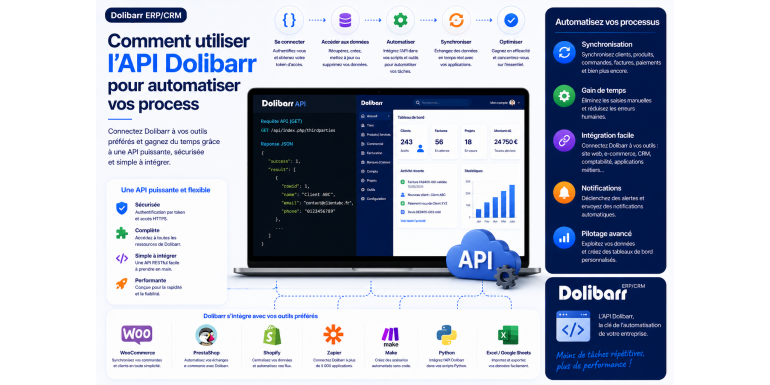
How to use the Dolibarr API to automate your processes
Synchronize your customers, automatically create invoices, connect your website to your ERP… Dolibarr's REST API opens the door to automation. Here's a complete guide to getting started and freeing up time on repetitive tasks.
Automation · REST API · Dolibarr • Intermediate level
Summary
1. What is the Dolibarr REST API?
2. Why automate your processes with the API?
3. Step 1: Activate the REST API module
4. Step 2: Generate and secure your API key
5. Step 3: Discover the Explorer API
6. Understanding endpoints and their structure
7. Step 4: Your first requests in practice
8. Concrete automation scenarios
9. Multi-company, responses and error management
10. Best practices for sustainable automation
11. Frequently Asked Questions
12. Conclusion: Let Dolibarr work for you
How many hours do you spend each week copying information from one software program to another? Manually creating customer records, generating invoices one by one, exporting and then re-importing data between your website and your management tool? These repetitive tasks, in addition to being time-consuming, are a source of errors and frustration.
The solution has a name: automation . And for Dolibarr users, it relies on a powerful and often overlooked tool: the REST API . Integrated into the heart of the software, this programming interface allows other applications to communicate directly with your Dolibarr, reading and writing data without any manual intervention.
In this comprehensive guide, we'll demystify the Dolibarr API. You'll discover what a REST API is, how to activate and secure it, how to make your first requests, and most importantly, how to use it effectively to automate your business processes. A few basic technical concepts are all you need: we explain each step by step. By the end, you'll be able to transform hours of manual work into a few lines of code that run automatically.
What is the Dolibarr REST API?
Let's start with the basics. An API (Application Programming Interface) is a set of rules that allows two software programs to communicate with each other. Rather than clicking through an interface, a program sends structured requests and receives responses, all automatically.
Dolibarr's API is REST- based , a web standard that relies on HTTP requests—the same ones used by your browser. Data exchange occurs in JSON format , a lightweight and readable text format compatible with virtually all programming languages. In practical terms, this means you can control Dolibarr from a PHP, Python, or JavaScript script, or even from a simple command-line tool.
Integrated natively into Dolibarr for several versions, this API provides access to most of the software's functionalities: third parties, products, orders, invoices, users, and much more. It is the cornerstone of any integration and automation around your ERP.
The four fundamental operations
The API is based on four basic actions, which correspond to HTTP methods. These are often referred to as CRUD operations (Create, Read, Update, Delete):
• GET — read data (consult the customer list, retrieve an invoice).
• POST — create a new data item (add a product, create a third party).
• PUT — update existing data (modify an invoice).
• DELETE — delete a piece of data.
Why automate your processes with the API?
Before diving into the technical details, let's consider the concrete benefits. Automation via API is not a developer luxury: it's a productivity lever with very real returns.
Save valuable time
Every automated repetitive task frees up time for your business. Synchronizing hundreds of clients, generating dozens of invoices, updating a product catalog: what used to take hours now takes seconds, unattended.
Eliminate input errors
Manual re-entry is the primary source of errors: a transposed digit, a forgotten line, a duplicate. By letting a program transfer the information, you guarantee the consistency and reliability of your data across your different tools.
Connect your ecosystem
The API allows Dolibarr to communicate with the rest of your software: your e-commerce site , your accounting tool, your CRM, a custom mobile application, or automation platforms. Your ERP ceases to be an isolated island and becomes the nerve center of a connected system.
Working in real time
An order placed on your website instantly creates the customer and the order in Dolibarr. A received payment updates the invoice. This real-time synchronization provides a constantly up-to-date view of your business and streamlines all your operations.
Step 1: Activate the REST API module
First, you need to activate the API in Dolibarr. Go to Home → Configuration → Modules/Applications , then find and activate the REST API Web Services module . This operation requires administrator privileges.
Once the module is activated, verify that the API is responding. It is served at the /api/index.php address of your installation. If your Dolibarr runs on Apache, the API is generally available without additional configuration. With Nginx, it may be necessary to adjust the server configuration to allow access to API requests.
Good to know: the API is served by the same web server as your Dolibarr application. If your site is accessible via HTTPS, your API is too — and that's exactly what you want to secure data exchange.
Step 2: Generate and secure your API key
API key authentication (a token). Each user can have one or more keys. To generate one, log in, open the user's profile in Users & Groups , then go to the API key tab and generate it. Copy this key and keep it safe.
This key must then accompany each of your requests. It is transmitted in a specific HTTP header:
DOLAPIKEY: your_secret_API_key
Crucially, authentication is linked to user rights. The key inherits the permissions of the user who generated it. Therefore, a request can only perform actions that this user is authorized to perform in Dolibarr. This is a fundamental security mechanism that must be used intelligently.
Good security practices
An API key is just as sensitive as a password. A few rules must be followed to avoid turning your entry point into a security vulnerability:
• Create a dedicated API user with only the rights strictly necessary for the intended automation. Never use an administrator account.
• Use one key per application . In case of compromise, you revoke the key in question without impacting other integrations.
• Never expose the key in client-side code (browser JavaScript, public application) where it would be visible.
• Enforce HTTPS to encrypt the transmission of the key and data.
• Replace the keys periodically to limit the risks in case of leakage.
Step 3: Discover the Explorer API
Dolibarr includes a fantastic tool for exploring and testing the API without writing a single line of code: the API Explorer , based on the Swagger interface. You can access it at /api/index.php/explorer/ in your installation.
This explorer lists all the endpoints available on your installation, along with their documentation automatically generated from the code. Even better, it offers interactive "Try it out" forms that allow you to execute a real request directly from your browser and view the response. It's the ideal place to understand the data structure and test your calls before coding them.
Tip: Make it a habit to always start with the API Explorer documentation. It's the most reliable source, as it accurately reflects the version installed on your system, including its specific modules. Before automating anything, test your query there.
Understanding endpoints and their structure
An endpoint (or access point) is a URL that corresponds to a data type. In Dolibarr, they follow a consistent structure, organized by module. The base URL is always /api/index.php/ , followed by the resource name. Here are the most common ones:
|
Endpoint |
What it allows you to manage |
|
/thirdparties |
Third parties: customers, prospects and suppliers. |
|
/products |
The products and services in the catalogue. |
|
/orders |
Customer orders. |
|
/invoices |
The invoices. |
|
/proposals |
Quotes and commercial proposals. |
|
/contacts |
Contacts associated with third parties. |
|
/users |
User accounts. |
|
/stockmovements |
Stock movements. |
Each endpoint accepts different HTTP methods depending on the desired action. To target a specific element, its identifier is added to the URL: a request for invoice number 42 will thus address the path to the invoice resource followed by this identifier.
Step 4: Your first requests in practice
Let's move on to practical application with the most universal tool: cURL, available via the command line on most systems. The following examples can be adapted to any programming language.
Read data (GET)
To retrieve the list of your third parties, a simple GET request with your key is all that's needed:
curl -X GET \
"https://votre-domaine.fr/api/index.php/thirdparties" \
-H "DOLAPIKEY: your_key_api" \
-H "Accept: application/json"
Dolibarr then returns a JSON array containing the third parties, with all their fields. You can refine the query with sorting, limit, or filter parameters to retrieve only what you are interested in.
Create a data (POST)
To create a new product, a POST request is sent along with a JSON body describing the object:
curl -X POST \
"https://your-domain.fr/api/index.php/products" \
-H "DOLAPIKEY: your_api_key" \
-H "Content-Type: application/json" \
-d '{
"ref": "PROD001",
"label": "Example Product",
"price": 100.50
}'
Update (PUT) and delete (DELETE)
The update process follows the same logic using the PUT method, targeting the element's ID and sending only the fields to be modified. Deletion, on the other hand, uses the DELETE method on the URL of the element in question. In all cases, the API key must accompany the request, and the user's permissions determine the success of the operation.
Concrete automation scenarios
Now that the basics are covered, let's see how all this translates into real gains. Here are some of the most useful automations.
Synchronize your online store
For every order placed on your e-commerce site, a script calls the API to automatically create a customer if one doesn't already exist, and then saves the order in Dolibarr. Your ERP reflects your sales in real time, without any manual data entry. Conversely, you can push your product catalog from Dolibarr to your online store to maintain consistent product information.
Generate and send invoices automatically
For subscriptions or recurring services, a programmed script can create the corresponding invoices each month via the API, then trigger their validation. The time spent on recurring billing literally drops to zero.
Populating an external dashboard
Do you want to track your key performance indicators (KPIs) in a visualization tool or a shared spreadsheet? A script regularly queries the API to extract revenue, unpaid invoices, or new orders, and populates your dashboard. Your performance data is always up-to-date.
Connecting Dolibarr to automation platforms
No-code automation platforms allow you to connect Dolibarr to hundreds of other services via its API. This lets you trigger a notification when an invoice is paid, create a task in your project management tool for each new order, or notify your team via email. The possibilities are virtually limitless.
Tip: Start by automating just one task, the most time-consuming and repetitive one in your daily routine. Once you've achieved this first success, you'll naturally identify the others. A small, well-run automation is better than a large, never-finished project.
Multi-company, responses and error management
If you are using Dolibarr in multi-company mode, the API handles this scenario using a dedicated header, DOLAPIENTITY , which allows you to target the entity relevant to the request. This enables you to manage multiple companies from a single automation framework.
On the response side, the API always returns JSON, accompanied by an HTTP status code indicating the result: a success code for a successful operation, or an error code in case of a problem (invalid key, insufficient permissions, data not found, malformed request). Your code must always check this status before using the response.
Effective error handling is essential for reliable automation. Always plan to address failures: log the error, retry if appropriate, and alert if the problem persists. Automation that fails silently is more dangerous than no automation at all.
Best practices for sustainable automation
To ensure your automations remain reliable and maintainable over time, keep these principles in mind:
1. Always test in Explorer first. Validate each request in the Explorer API before integrating it into a script.
2. Work in a test environment. Never develop your scripts directly on your production Dolibarr.
3. Limit the API user's rights. The principle of least privilege reduces the impact of a potential compromise.
4. Log your calls. Keeping a record of requests greatly facilitates debugging.
5. Manage volumes responsibly. For large processing tasks, paginate your queries and avoid overloading the server.
6. Document your integrations. Note what each script does and which key it uses: your future self will thank you.
Frequently Asked Questions
Do you need to know how to code to use the Dolibarr API?
For exploration and testing, no: the Explorer API allows you to make requests from the browser without code. For true automation, programming knowledge or the use of a no-code automation platform is necessary. The basics are sufficient to get started: the REST API is a simple and well-documented standard.
Is the API available in all versions of Dolibarr?
The REST API has been integrated into the core of Dolibarr for several versions and is now a standard module. Simply activate it in the configuration. Be sure to keep your installation up to date to benefit from the latest fixes and support for all endpoints.
What should I do if a request returns a permissions error?
A permissions error means that the user associated with the API key does not have the right to perform the requested action. Check this user's permissions in Dolibarr and grant them the necessary rights—but do not grant them more than strictly required.
Can I connect Dolibarr to my website without developing it myself?
Yes. Connectors exist for many e-commerce platforms, and no-code automation tools allow you to connect Dolibarr to other services via its API, without writing any code. However, for very specific needs, custom development remains the most flexible approach.
Conclusion: Let Dolibarr work for you
Dolibarr's REST API is a real treasure for anyone looking to automate their processes and free up time. In just a few steps—activating the module, generating a key, exploring the endpoints, and writing your first queries—you can pave the way for automations that eliminate manual data entry, ensure data reliability, and connect your ERP to the rest of your ecosystem.
The strength of this approach lies in its gradual nature. You don't need to revolutionize everything at once: start with a single automation, validate it in the API Explorer, and then deploy it with confidence. Each automated task is time reclaimed for what truly matters in your business.
The best advice? Open the API Explorer in your Dolibarr today, send your first GET request to your third parties, and observe the response. This small step will give you a sense of the potential at your fingertips—and the desire to go further. Your ERP is just waiting to work for you, provided you give it the instructions.