
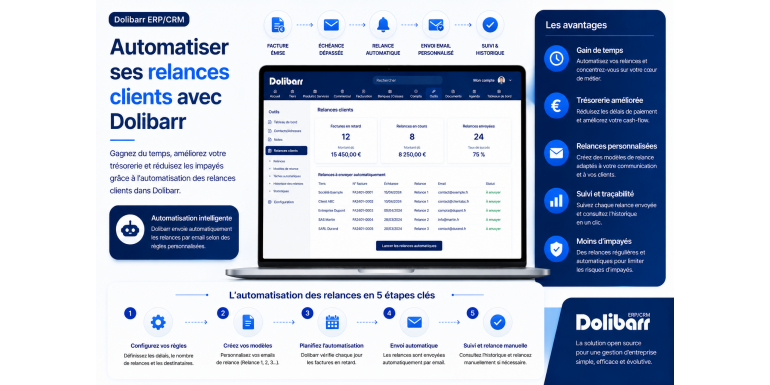
The complete 2026 guide to saving time, improving your cash flow and reducing unpaid invoices
Late payments are one of the biggest scourges facing French businesses. According to several recent studies, nearly one in four SMEs reports cash flow difficulties directly caused by unpaid or late invoices. For very small businesses and self-employed individuals, the problem is even more critical: a single large unpaid invoice can jeopardize the survival of their business. Yet, in most cases, these delays are not due to bad faith on the part of clients, but simply to oversight, internal disorganization, or slow approval processes.
Customer follow-up is therefore an absolutely essential activity, but it suffers from a formidable paradox: it's a time-consuming, thankless task, often postponed due to other priorities, even though it directly impacts the company's financial health. The solution? Automation. By automating the follow-up process in Dolibarr ERP & CRM , you transform a stressful chore into a seamless mechanism that operates without your intervention. Your customers automatically receive the right messages at the right time, you save several hours per week, and your cash flow improves significantly.
In this comprehensive guide, we'll explore in detail how to effectively automate your customer follow-ups with Dolibarr. You'll discover the various methods available (native module, third-party modules, custom scripts), how to design an effective follow-up strategy, how to write messages that convert without alienating the customer, how to integrate follow-ups with accounting and sales management, and much more. Whether you're a freelancer, a small business owner, or the finance manager of a small or medium-sized enterprise (SME), this guide will give you all the tools you need to put an end to late payments and regain control of your cash flow.
Article summary
• The importance of customer follow-up for your cash flow
• Why automate your follow-ups in Dolibarr?
• The prerequisites before automating your follow-ups
• The native restart module in Dolibarr
• Configure the relaunch levels in Dolibarr
• Customize follow-up email templates
• Schedule automatic sending with cron
• Third-party modules to go further
• Designing an effective recovery strategy
• Write effective follow-up emails
• Track and analyze your follow-ups in Dolibarr
• Managing special and contentious cases
• Legal aspects and best practices
• Conclusion
1. The importance of customer follow-up for your cash flow
Before diving into the technical aspects, let's take a moment to understand why customer reactivation is such a crucial activity for the health of your business.
The hidden cost of unpaid bills
An unpaid invoice doesn't just have a direct cost (the uncollected amount): it also generates significant hidden costs. First, the financial cost: if you wait 60 or 90 days to get paid, you tie up your cash flow and may have to resort to expensive bank overdrafts. Second, the administrative cost: each reminder takes time, ties up resources, and diverts your attention from your core business. Finally, the psychological cost: chasing money is demoralizing, generates stress, and can affect your overall sales performance.
According to the Payment Delays Observatory, payment delays cost French companies around 16 billion euros per year.
The snowball effect
The longer you wait to follow up, the more the client postpones payment. This is a well-documented psychological phenomenon: after a certain period without a follow-up, the client implicitly assumes you're not in a hurry, or even that you've forgotten. The likelihood of payment then decreases significantly over time. According to several studies, an invoice followed up within 7 days of the due date has a 90% chance of being paid quickly. If the follow-up occurs after 30 days, this rate drops to 70%. After 90 days, it falls below 50%.
The recovery as an indicator of professionalism
Contrary to popular belief, following up with a client is not a sign of aggressive sales tactics. On the contrary, it demonstrates professionalism and diligence. Clients understand perfectly well that a reputable company must follow up on its receivables. Conversely, a company that never follows up can give the impression of poor organization, or even instability. A firm but courteous follow-up enhances your brand image, not the other way around.
The special case of small structures
For freelancers and very small businesses, unpaid invoices can quickly become critical. Without substantial cash reserves, you can't afford to wait several months to get paid. Implementing a rigorous debt collection process isn't optional; it's essential for survival. And since your time is precious, automation becomes the obvious solution.
2. Why automate your follow-ups in Dolibarr?
Automating follow-ups in Dolibarr offers many advantages that make it an essential feature for any company using this software.
The considerable time saved
Manually handling payment reminders takes an average of 15 to 30 minutes per invoice: identifying unpaid invoices, writing a personalized email, sending it, updating the tracking spreadsheet, and scheduling the next reminder. With around ten invoices to follow up on each week, this represents several hours of work. With automation, this time drops to almost zero: Dolibarr identifies the invoices, prepares and sends the emails, and updates the statuses, all in the background without your intervention.
Unfailing consistency
The main drawback of manual reminders is their inconsistency. They're sent when you think of it, when you have the time, which is unpredictable. As a result, some clients are contacted quickly, while others are forgotten for weeks. Automation guarantees perfect consistency: every invoice is sent back exactly on time, without exception. This consistency is one of the major factors in improving collection rates.
The professionalization of the process
Automation forces you to formalize your follow-up process: how many levels, at what intervals, with what messages, and with what escalations. This structured approach improves the overall quality of your customer relationships and administrative management. Instead of improvising for each case, you apply a proven procedure, which increases efficiency and reduces stress.
Complete traceability
Dolibarr maintains a complete history of all sent reminders: date, level, message content, and customer status. In the event of a dispute or legal debt recovery proceedings, you have formal proof of all steps taken. This traceability is invaluable, even essential, for legal proceedings.
The consistency of the messages
When you follow up manually, you often (and sometimes clumsily) adapt your tone to your mood: too aggressive one day, too conciliatory the next. With automated templates, your tone remains consistent and professional, regardless of the client or your state of mind. This consistency strengthens your image and improves the overall customer experience.
3. Prerequisites before automating your follow-ups
Before implementing automation, some preparation is necessary. This preparatory phase is essential to avoid problems and unwanted mailings.
Ensure that customer emails are up to date
The automation sends emails to the addresses stored in customer records. If these addresses are outdated or incorrect, your follow-up emails won't reach their destination, or worse, they'll land in the wrong hands. Before implementing this system, review your customer records and verify that each active customer has a valid and up-to-date email address. For customers without email addresses, you'll need to provide an alternative communication channel (mail, phone).
Configure the Dolibarr SMTP server
For Dolibarr to send emails, you must correctly configure an SMTP server. Go to Configuration > Emails and enter the SMTP settings: server (for example, smtp.gmail.com or smtp.ovh.fr), port (usually 587 for STARTTLS or 465 for SSL), authentication method, username, and password. To prevent your emails from being marked as spam, it is best to use a professional domain with a properly configured SPF, DKIM, and DMARC.
Define clear payment terms
Automation relies on the payment terms defined for each invoice. Ensure that all your invoices have an explicit payment term: upon receipt, 30 days, 60 days, etc. Without a clear term, Dolibarr won't know when to consider an invoice overdue and when to send reminders.
Update invoice statuses
For automation to work correctly, payment statuses must be up-to-date in Dolibarr. If you habitually enter payments late or irregularly, you risk sending reminders to customers who have already paid. Establish a rigorous payment entry routine, ideally daily or bi-weekly.
Prepare the content of your messages
Before technically configuring the automation, think about the content of your messages. How many reminder levels? What intervals between reminders? What tone for each level? What elements to include (invoice number, amount, due date, bank details)? This preliminary planning will save you from technical trial and error.
Inform your customers
It's good practice to inform your clients about the implementation of an automated payment reminder process. You can add a note at the bottom of the invoice or in your terms and conditions. This helps clients understand that reminders are not personal and encourages them to pay on time. This transparency generally improves payment times.
4. The native restart module in Dolibarr
Dolibarr natively integrates several features related to restarting. Let's first see what is available without installing additional modules.
List of unpaid invoices
Dolibarr offers several standard views to easily identify unpaid invoices. Go to Accounting/Treasury > Customer Invoices > List, then filter by Unpaid status. You will get the complete list of unpaid invoices, with their due dates and amounts. A useful alternative is the Overdue Invoices filter, which displays only invoices whose due date has passed.
The follow-up dashboard
On the Dolibarr homepage (the dashboard), a widget displays invoices that need to be followed up. This overview allows you to quickly see the number of outstanding invoices and their age. It's an excellent starting point for planning your manual reminders or for verifying that the automation is working correctly.
Sending an email from an invoice
For each invoice, Dolibarr allows you to send an email directly from the interface. Open the record of an unpaid invoice and click "Send by email." You can customize the recipient, subject, and message body, and automatically attach the invoice PDF. This feature is the foundation of the payment reminder process, although it still requires manual intervention for each invoice.
Email templates
To avoid retyping the same message for each reminder, create email templates in Settings > Email Templates. You can create multiple templates corresponding to different reminder levels (first reminder, second reminder, formal notice). Each template can contain dynamic variables such as {refnum} for the invoice number, {total_ttc} for the amount, and {date_lim_reglement} for the due date.
The limitations of the native module
Dolibarr's native module provides the basics for payment reminders, but it has significant limitations for true automation. It still requires a lot of manual work: selecting invoices, choosing the right template, and sending them one by one. It doesn't natively support progressive reminder levels, tracking sent reminders, or scheduled automatic sending. For complete automation, you need to supplement it with third-party modules or custom scripts.
5. Configure the relaunch levels in Dolibarr
An effective relaunch strategy relies on several successive levels, each with a different tone and message. Let's see how to structure this progression in Dolibarr.
The principle of progressive levels
The concept behind the levels is simple: adapt the tone and intensity of the reminder based on how long the invoice has been overdue. A 3-day overdue invoice calls for a friendly reminder. A 30-day overdue invoice requires a firmer tone. A 60-day overdue invoice may warrant a formal demand letter, a prelude to potential legal action. This progression respects the client while remaining effective.
Level 1: The Friendly Reminder
The first level of communication is sent 3 to 7 days after the due date. The tone is courteous and assumes good faith: "We would like to remind you that your invoice no. XXX for the amount of YYY euros was due on ZZ. This may simply be an oversight." This initial message alone resolves a significant portion of the delays, which are often due to genuine administrative oversights.
Level 2: Firm recovery
The second level of communication is sent 15 to 20 days after the due date, if the first has had no effect. The tone becomes firmer while remaining professional: "Despite our reminder of [DATE], we note that your invoice no. [INVOICE NAME] remains unpaid. We would appreciate it if you could make payment within 8 days." You can use this stage to remind them of the terms and conditions and any applicable late payment penalties.
Level 3: The formal notice
The third level is sent 30 to 45 days after the due date. This is a formal demand letter, ideally sent by registered mail with return receipt requested (to ensure traceability in case of dispute). Dolibarr can generate the document, but physical delivery is often still done manually. The message clearly outlines the consequences of non-payment: late payment penalties, collection fees, and legal proceedings.
Configure levels in Dolibarr
Go to Configuration > Modules > Invoices > Settings. Look for the section related to reminders or deadlines. Define the number of days after the due date for each level, as well as the associated email template. If the built-in options are insufficient, you will need to supplement them with a third-party module or a custom script.
Adjust the levels to your activity
The suggested timeframes and payment terms are not universal. Adapt them to your business: for B2B services with large sums, you can extend the timeframes (the accounting departments of large companies need time). For B2C services with small sums, shorten the timeframes (the risk of non-payment increases rapidly). For public contracts, allow longer timeframes because the administrative process is slow.
6. Customize follow-up email templates
The quality of your email templates is crucial to the effectiveness of your follow-ups. Here's how to design them to be both professional and persuasive.
The ideal structure for a follow-up email
A good reminder email includes several structured elements. A clear and identifiable subject line: "Reminder: Invoice No. 2026-0042 pending payment." An introductory message appropriate to the level of the reminder. A precise reminder of the invoice in question (number, date, amount, due date). Bank details to facilitate payment (IBAN, BIC). A clear call to action: what should the customer do after reading the email? Your contact information for any questions or disputes. A polite closing appropriate to the tone of the email.
Use dynamic variables
Dolibarr templates support variables that are automatically replaced with the actual data. The main ones are: {refnum} for the invoice number, {total_ttc} for the total amount including tax, {total_ht} for the amount excluding tax, {date_lim_reglement} for the due date, {company_name} for the customer's name, {contact_firstname} for the contact's first name, and many others. Use these variables to the fullest extent so that each email is personalized without manual intervention.
Example of a level 1 model (friendly reminder)
Subject: Reminder: Invoice No. {refnum} pending payment. Hello {contact_firstname}, we are writing to remind you about our invoice No. {refnum} for the amount of {total_ttc} euros (including VAT), which was due on {date_lim_reglement}. It may simply have been an oversight. You will find a copy of this invoice attached to facilitate your processing. Our IBAN is located at the bottom of the document. If you have already made the payment, please disregard this message. For any questions, please do not hesitate to contact us. Sincerely, [your signature].
Example of a level 2 model (firm relaunch)
Subject: Reminder: Unpaid invoice no. {refnum}. Hello {contact_firstname}, despite our previous reminder, we note that our invoice no. {refnum} for the amount of {total_ttc} euros (including VAT) remains unpaid to date, even though its due date was {date_lim_reglement}. We kindly request that you make payment within 8 days by bank transfer to the account indicated on the invoice. In accordance with our general terms and conditions of sale, late payment penalties may be applied beyond this period. If you encounter any particular difficulty, please contact us promptly so we can find a solution. Sincerely, [your signature].
Pay attention to the subject line of the email.
The subject line determines whether your email will be opened or ignored. Avoid generic subjects like "Unpaid Invoice." Opt for clear and informative subject lines: "Reminder: Your invoice dated XX/XX is pending," "Action required: Invoice #XXX needs to be paid." Avoid excessive capitalization or multiple exclamation marks at all costs, as these can make your email appear spam.
Always include the invoice
Configure Dolibarr so that the invoice PDF is automatically attached to each reminder email. This saves the customer from having to search for the original invoice and simplifies the process. A customer who is made easy to process pays more quickly.
7. Schedule automatic sending with cron
To truly automate reminders, you need to schedule them to be sent at regular intervals without manual intervention. This is the role of cron jobs on Linux servers.
What is a cron job?
Cron is a tool integrated into Unix/Linux systems that allows you to automatically execute commands at specific times. You can schedule a task to run hourly, daily at a specific time, on the first of every month, and so on. It's the cornerstone of any server automation.
The Dolibarr cron script
Dolibarr provides a cron script designed to run automated tasks. This script is usually located in htdocs/cron/cron_run_jobs.php. To run it automatically, you must declare it in the server's crontab. A typical line looks like this: 0 8 * * * php /var/www/html/dolibarr/htdocs/cron/cron_run_jobs.php — which means: every day at 8:00 AM, run the script.
Configure a task in Dolibarr
Once the system cron job is configured, you need to create the automated tasks from the Dolibarr interface. Go to Configuration > Modules > Scheduled Jobs. Click on New Job. Enter the following information: the task name (for example, Sending Automatic Reminders), the execution frequency (daily, weekly), the class, and the method to execute (which depends on the reminder module used). Then activate the task.
Secure execution
The restart script can send dozens, or even hundreds, of emails with each execution. To prevent uncontrolled mass sending (for example, in case of a bug), implement several safeguards: a maximum limit on the number of emails per execution, a detailed log of each email sent, notification to the administrator in case of abnormal behavior, and a quarantine period for testing before deployment in production.
Test before putting into production
Before activating the cron job on your production installation, test it in a test environment or on a limited subset of clients. Verify that emails are sent correctly, that the correct invoices are selected, and that variables are correctly replaced in the templates. Once validated, you can roll out the automation more broadly.
8. Third-party modules to go further
Several third-party modules available on the Dolistore significantly enhance Dolibarr's recovery capabilities. Here are the main ones.
The Automatic Reminders module
This module is one of the most popular for automating follow-up emails. It offers granular control over levels, email templates, frequencies, and detailed tracking of all sent reminders. It integrates seamlessly with Dolibarr's cron job and allows for the configuration of complex follow-up strategies. The module costs between €30 and €80, with updates included for a limited time.
The accounts receivable management module
For organizations with a significant volume of receivables, specialized litigation management modules are available. These offer: tracking of recovery cases, automatic generation of formal notices, integration with partner bailiffs and lawyers, automatic calculation of penalties and recovery fees, and detailed recovery statistics. While the initial investment is higher (often €100 to €300), the ROI is rapid for companies facing numerous outstanding payments.
SMS modules
For some customers (particularly individuals or very small businesses), SMS is more effective than email for follow-ups. Modules exist to integrate Dolibarr with SMS sending services such as OVH SMS, Twilio, or specialized French providers. You can send automatically scheduled reminder SMS messages, either in addition to or instead of emails. Expect to pay a few cents per SMS sent.
Online payment modules
To facilitate payment after a reminder, several modules allow you to include a direct payment link in emails. The customer can then pay the invoice in just a few clicks via Stripe, PayPlug, Mollie, or other payment providers. This simplified payment process significantly increases the recovery rate, especially for small amounts.
Choose the right module
To choose the module best suited to your needs, ask yourself several questions: How many invoices do you need to send reminders for each month? What level of customization do you require? Do you need SMS notifications, online payment processing, or debt collection management? What is your budget? Carefully read the descriptions and reviews on the Dolistore before purchasing. Also, take advantage of demo versions when available.
9. Design an effective recovery strategy
The tool isn't everything: strategy remains essential. Here's how to design a recovery approach that maximizes the chances of payment while preserving the customer relationship.
Define the correct number of levels
Too few levels and you risk appearing aggressive quickly. Too many levels and you dilute your message. The standard is 3 to 4 levels: friendly reminder, firm follow-up, formal notice, and legal recovery. Adapt this to your business and the nature of your clientele. For high-value services, lengthen the progression. For numerous small transactions, shorten it.
Choosing the right intervals
The intervals between the different stages depend on several factors: the sector of activity, the nature of the clientele (B2B or B2C), and observed payment habits. A typical interval is: D+7 (first reminder), D+21 (firm reminder), D+45 (formal notice), D+60 (legal recovery). These timeframes can be adjusted based on your experience.
Customize according to the customer profile
Not all customers deserve the same treatment. A loyal customer who always pays on time and is occasionally late can benefit from a gentler approach. A customer known for consistently late payments may warrant a faster and more assertive follow-up. If your module allows it, create several customer groups with different strategies: VIP, regular, and those requiring monitoring.
Alternate communication channels
Email is the most commonly used channel, but it's not the only one. For more serious follow-ups, alternate with other channels: phone calls (the most effective but also the most time-consuming), text messages for a short and impactful reminder, postal mail (with return receipt for formal notices), and in-person visits for local and key clients. Using a variety of channels demonstrates your commitment.
Anticipate the escalations
Beyond standard reminders, develop an escalation strategy for persistent overdue payments. This may include: assigning the debt to a collection agency (generally charging a 10% to 25% commission on the amount recovered), initiating a payment order procedure (inexpensive, around €35 per case), or filing a lawsuit in commercial court (for large amounts). Define in advance when you will activate these escalation measures.
10. Write effective follow-up emails
Writing effective emails is a subtle art. Here are the key principles for writing successful emails.
Adopt a respectful tone
Regardless of the level of follow-up, always remain respectful and professional. Avoid aggressive language, inappropriate threats, and undue familiarity. Remember that your client may be going through a difficult time without any ill intent, and that an overly aggressive tone can permanently damage the relationship. Respect does not preclude firmness.
Be direct and precise
Lengthy preambles dilute the message. Get straight to the point: what invoice, what amount, what due date, what action is expected. Overly long follow-up emails are skimmed and lose their effectiveness. Keep the body of the message to 4-6 short, clear lines.
Include the factual elements
A credible reminder relies on specific facts: invoice number, date, exact amount, overdue date, and length of delay. The more precise and indisputable these details are, the more effective your reminder will be. Avoid vague terms like "some time ago": use "February 15th, which is 28 days ago."
Make payment easier
Everything should be geared towards one thing: making payment easy for the customer. Clearly provide your bank details (IBAN, BIC), offer several payment methods (bank transfer, check, online payment link), and specify the reference number to use to identify the payment. The simpler the payment process, the faster it will be processed.
Open the dialogue
A good follow-up isn't just about making a demand; it also opens the door to dialogue. If the client encounters a problem, they should say so. If there's an error on the invoice, they should point it out. A standard phrase like, "If you experience any particular difficulty or have any questions about this invoice, please contact us promptly," defuses tension and often resolves issues.
Carefully craft your signature
Your signature should include all your contact information to facilitate communication: name, job title, company, direct phone number, email address, and website. A complete signature demonstrates your professionalism and makes it easier for clients to get in touch. Avoid overly decorated signatures, as they make the email larger.
11. Track and analyze your follow-ups in Dolibarr
Automation does not eliminate the need for follow-up. On the contrary, regularly analyzing your follow-ups allows you to progressively optimize your strategy.
Key indicators to monitor
Several KPIs (Key Performance Indicators) deserve to be monitored regularly: the average payment period (DSO: Days Sales Outstanding), the on-time payment rate, the collection rate after each reminder, the number of invoices referred to litigation, and the total amount of outstanding receivables. These indicators allow you to objectively assess the effectiveness of your process.
Using Dolibarr reports
Dolibarr offers several useful reports for tracking receivables. Go to Accounting/Treasury > Reports to access statistics on customer invoices, payments, sales trends, and collections. You can also export this data to Excel for more in-depth analysis.
Analyze the reasons for the delay
When a client finally pays, politely ask them the reason for the delay. You'll discover recurring issues: tight cash flow, slow internal approval processes, administrative oversights, invoice disagreements, or poor communication. This information is invaluable for tailoring your approach: if many clients have bi-monthly payment cycles, adjust your follow-up accordingly.
Identifying good and bad payers
Classify your customers according to their payment habits. Good payers deserve preferential treatment (perhaps gentler reminders, or even favorable commercial terms). Repeated bad payers warrant increased vigilance, or even stricter payment conditions (larger deposit, payment upon order, etc.).
Evolve the strategy
Your relaunch strategy shouldn't be set in stone. After a few months, take stock: what's working? Which level is most effective? Is there a message that converts better than the others? Gradually adjust your strategy based on the data collected. Continuous improvement is the key to long-term success.
12. Managing special and disputed cases
Not all delays are the same. Some specific cases require special attention.
The customer who disputes the bill
If a customer disputes an invoice (incorrect amount, non-compliant service, etc.), immediately suspend automatic reminders. Continuing to contact a customer with a legitimate complaint severely damages the relationship. In Dolibarr, mark the invoice as disputed to remove it from the automatic reminder process. Address the dispute quickly and resume reminders once the situation is resolved.
The client in financial difficulty
When a customer honestly reports financial difficulties, the approach changes. Rather than insisting, offer a suitable payment plan. A customer in difficulty who pays in installments is preferable to a lost customer. Dolibarr allows you to create down payment invoices to formalize these payment plans. Document the agreement in writing to keep a record.
The client in receivership or liquidation
If a client files for receivership or liquidation, the rules change drastically. You must file your claim with the court-appointed administrator within the legal timeframe (generally two months). Immediately suspend all collection efforts and consult a professional (accountant, lawyer) for further action. Dolibarr can help you document your claim.
The client abroad
International payment reminders require adjustments: adapting the message language (English at a minimum), taking time zones into account for sending, allowing longer payment terms for international transfers, and anticipating potential cultural differences. For large outstanding debts abroad, legal recovery is more complex and requires specialists.
The major, indispensable client
With certain large clients on whom you commercially depend, follow-up can be tricky. It's best to prioritize direct contact (a phone call to the accounting manager) rather than automated emails, which can be off-putting. Configure Dolibarr to exclude these clients from the automated process and manage their follow-ups manually, with tact and sensitivity.
13. Legal aspects and best practices
Customer follow-up is governed by several legal rules that must be strictly observed.
Mandatory late payment penalties
In France, any late payment in B2B transactions entitles the customer to late payment penalties, which must be explicitly stated in the general terms and conditions. The legal interest rate is calculated based on the ECB's key interest rate plus 10 percentage points. A fixed recovery fee of €40 is also automatically due for each late invoice. These details must be included on your invoices and in your payment reminders.
Mandatory information to include on reminders
A formal notice must include certain information to be legally valid: clear identification of the creditor and debtor, precise identification of the debt (number, date, amount), reminder of the overdue date, explicit statement that payment is being demanded, a deadline for payment (generally 8 to 15 days), consequences of non-payment (penalties, legal proceedings), date, and signature. Without this information, the formal notice can be contested.
Respect for privacy
Your debt collection practices must comply with the GDPR: use only the necessary data, secure storage, do not share data with third parties without consent, and retain data only for the necessary period. If you use a debt collection agency, verify its GDPR compliance before sharing customer data with them.
The statute of limitations for debts
Trade receivables are generally subject to a statute of limitations of 5 years for B2B and 2 years for B2C. After this period, you can no longer legally claim payment. Therefore, never let unpaid invoices linger for too long. However, the statute of limitations can be interrupted by certain actions (registered formal notice, acknowledgment of debt from the debtor, legal action).
The prohibition of harassment
While reminders are legal and even encouraged, outright harassment is prohibited. Avoid repeated phone calls at all hours, threats, and excessive psychological pressure. A debtor who feels harassed may retaliate. The golden rule: firm but respectful, persistent but not intrusive.
Recording the procedures
In the event of legal debt recovery proceedings, you will need to prove that you have exhausted all prior amicable steps. Dolibarr automatically maintains a history of al