
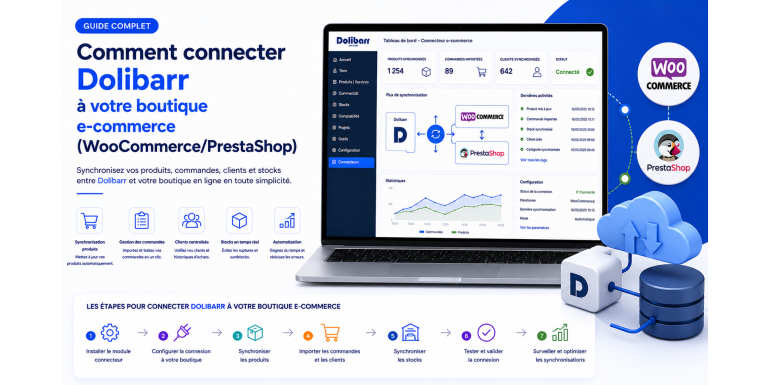
When a company sells online, two worlds often coexist: the e-commerce store (WooCommerce, PrestaShop, Shopify, Magento…) which manages the front-office and web orders, and the Dolibarr ERP/CRM which drives the back-office (stock, accounting, invoicing, suppliers, HR). As long as these two systems do not communicate, you waste time, multiply manual data entry, and accumulate the risks of errors: overstocks, stockouts, inconsistent invoices, customer frustration.
The solution? Connect Dolibarr to your e-commerce store to automate the synchronization of products, stock, orders, customers, prices, and taxes. In this comprehensive functional guide, NEXT GESTION explains how to succeed in this integration with WooCommerce and PrestaShop, the two most widely used open source e-commerce solutions in Europe. We will cover architectural choices, the data flows to set up, business best practices, security, and performance — staying functional rather than diving into code, while remaining precise enough to lead an integration project.
Table of Contents
- Why connect Dolibarr to your e-commerce store?
- Functional overview of the integration
- The different connection approaches
- Prerequisites and project preparation
- Choosing which flows to synchronize
- Connection to WooCommerce: key points
- Connection to PrestaShop: key points
- Product catalog synchronization
- Stock synchronization
- Order synchronization
- Customer synchronization
- Pricing, promotions, and multi-currency management
- Tax management and intra-community VAT
- Real-time or scheduled synchronization
- Securing the integration
- Performance and scalability
- Steering, monitoring, and indicators
- Maintenance and evolutions
- Common mistakes and best practices
- Conclusion
1. Why connect Dolibarr to your e-commerce store?
Before diving into implementation, let's recall the concrete benefits of such an integration:
- Elimination of double data entry: an order placed on WooCommerce automatically rises to Dolibarr, without human intervention.
- Stock reliability: a product sold online immediately decrements stock in the ERP, and a restock entered in Dolibarr updates the availability shown on the site.
- Automated invoicing: invoices are generated and numbered in Dolibarr according to your accounting plan, in compliance with legal requirements.
- Unified customer view: a single Dolibarr third party groups web, store, phone, and marketplace orders. You finally have a 360° view of the customer.
- Compliant accounting management: accounting is kept in Dolibarr, the legal and tax source of truth.
- Scalability: the same Dolibarr can drive multiple stores (WooCommerce + PrestaShop + B2B) simultaneously, and you can open a new channel without rebuilding your information system.
- Team productivity: your collaborators spend less time recopying data and more time serving customers, analyzing sales, or running promotions.
The initial investment is quickly amortized after a few dozen orders per day, and ROI grows with your business.
2. Functional overview of the integration
A robust integration relies on a clear vision of the information flows to put in place between Dolibarr and the store. Schematically, two flow directions coexist.
Dolibarr → e-commerce flow (downstream)
This is the direction in which Dolibarr feeds the store:
- Product catalog: reference, label, description, category, photos, attributes, and technical sheets.
- Stock: quantities available by warehouse and by variant.
- Prices: public rates, prices by customer group, tiered prices, promotional prices.
- Promotions and discount codes.
- Order statuses: progression from "prepared" to "shipped", tracking number.
E-commerce → Dolibarr flow (upstream)
This is the direction in which the store feeds Dolibarr:
- New orders: lines, options, shipping costs, taxes, total, payment method.
- New customers: accounts, billing and shipping addresses.
- Payment statuses: confirmed, cancelled, refunded.
- Refunds and returns.
- Reviews and customer messages (depending on configuration).
The role of the connector
The connector is the central piece that orchestrates these flows. It can take the form of a module installed in Dolibarr, an intermediary service (middleware), or a custom development. Whatever its form, it must accomplish three essential missions: translate the concepts of each system (a Dolibarr product ≠ a WooCommerce product in their data models), transport data reliably and securely, and reconcile regularly the discrepancies that will inevitably appear.
3. The different connection approaches
Three main approaches are available depending on your volume, budget, and the complexity of your business rules.
Turnkey modules
Dolibarr and its partners offer connector modules available on the Dolistore. They exist for WooCommerce, PrestaShop, Magento, and other platforms. Advantages: quick installation, accessible price (often less than €200), maintenance ensured by the publisher. Limits: sometimes incomplete functional coverage, little customization possible. This is the ideal approach for a pilot project or a store with standard rules.
Integration middleware
Tools like Make, n8n, Zapier, or Tray.io allow synchronization scenarios to be built without development. They centralize mapping logic and provide visual flow tracking. Advantages: flexibility, integrated monitoring, ability to connect other tools (CRM, marketing, accounting). Limits: monthly cost proportional to volume, dependence on a third-party provider. A relevant approach for organizations that want to drive several integrations at once.
Custom development
For very specific needs (B2B with differentiated catalogs, multi-brand, advanced multi-currency, complex pricing rules), a dedicated connector developed for your context remains the most flexible solution. Advantages: total functional coverage, optimized performance, ownership of the code. Limits: higher initial cost, need for ongoing maintenance. This is the approach NEXT GESTION favors for demanding projects.
The right choice depends mainly on three criteria: order volume, complexity of business rules, and your ability to internalize part of the maintenance.
4. Prerequisites and project preparation
A successful integration project starts well before the first configuration line.
Functional audit
Ask the right questions: how many products do you have? how many orders per day? what pricing rules apply? do you have variants (size/color)? multiple warehouses? multiple currencies? B2B activity with reverse charge? List special cases and exceptions precisely: they are what take a project from simple to complex.
Choice of source of truth
For each type of data, designate a single source of truth:
- Products: usually Dolibarr, which pushes records to the store.
- Stock: Dolibarr is master, the store reflects what it says.
- Orders: the store is master, Dolibarr receives.
- Customers: depending on cases, but generally the Dolibarr third party is consolidated from store accounts.
- Accounting and invoices: exclusively Dolibarr.
Without this rule, you head for unsolvable conflicts.
Versions and compatibility
Verify that your versions are up to date and compatible with each other. Dolibarr 19 or 20, WooCommerce 8 or 9, PrestaShop 8 are the most stable combinations today. Any older version should be updated before the project.
Environments
Imperatively prepare a pre-production environment identical to production: copied database, anonymized real data, same versions, same modules. All integration tests will take place there. Never test a new connector directly in production.
Data mapping
Document the correspondence table precisely: which WooCommerce/PrestaShop property corresponds to which Dolibarr field? what transformations to apply (excl./incl. tax conversion, category grouping, date format, currency)? This mapping is the cornerstone of the project.
5. Choosing which flows to synchronize
Rather than synchronizing everything from the start, it is wiser to proceed in stages. Here is a proven deployment order:
- Product catalog downstream (Dolibarr → store): to ensure your references, labels, and prices are consistent.
- Stock downstream: the store reflects actual availability.
- Orders upstream: web orders create orders in Dolibarr.
- Customers upstream: new web accounts create or enrich Dolibarr third parties.
- Order statuses downstream: Dolibarr informs the store of shipment.
- Invoices and refunds: depending on your processes, automatic generation in Dolibarr and sending to the customer.
Each stage is validated in pre-production before going to production. This incremental approach considerably reduces risks and allows your teams to build skills gradually.
6. Connection to WooCommerce: key points
WooCommerce, an extension of WordPress, equips about a third of e-commerce sites worldwide. It is a particularly rich platform thanks to its plugin ecosystem, but this also complicates integration.
Functional points to watch
- WordPress permalinks: they must be configured in "Post name" mode for flows to work properly.
- User accounts: a dedicated application account, distinct from the administrator, must be created for the connector. It carries the strictly necessary permissions (read/write on products, orders, customers).
- Stock management: enable it in WooCommerce and choose "per product" or "per variation" mode according to your catalog.
- Tax classes: explicitly create the classes corresponding to your VAT rates and map them to Dolibarr.
- Custom statuses: if you use specific order statuses (preparation, partial shipment…), plan a mapping to the equivalent Dolibarr statuses.
Specifics to anticipate
WooCommerce manages variable products with attached variations (size/color). Mapping with the Dolibarr Variants module requires particular attention. Similarly, shipping costs are specific lines on the WooCommerce order that must be translated correctly (service item or free line in Dolibarr).
Finally, WooCommerce exposes events that the store can send to Dolibarr: order created, order updated, customer created… These events avoid periodically polling the store and ensure near-instant updates.
7. Connection to PrestaShop: key points
PrestaShop is a French platform widely used in Europe, particularly suited to rich catalogs and multi-store activities.
Functional points to watch
- Webservice: it must be explicitly enabled in advanced settings, and a dedicated access key for the connector must be created with the appropriate rights (products, categories, customers, addresses, orders, stock, taxes, manufacturers).
- Multi-stores: if you manage multiple stores under the same PrestaShop installation, specify which
id_shopeach flow applies to. - Multi-language: product labels are multilingual. Decide which language is master in Dolibarr and configure mapping with the corresponding PrestaShop
id_lang. - Combinations: equivalent of WooCommerce variations, they correspond to product variants (size, color). Mapping to Dolibarr variants is specific.
- Carriers: PrestaShop carriers must be mapped to Dolibarr shipping methods.
Specifics to anticipate
PrestaShop strictly separates the customer and their addresses: the same customer can have multiple billing and shipping addresses. This separation is well reflected in Dolibarr (third party + contacts), but requires properly orchestrating the joint creation of entities during a new order.
PrestaShop also applies tax rules per group that depend on the country of delivery. The connector must therefore integrate the European OSS logic for B2C intra-community sales.
8. Product catalog synchronization
The catalog is generally the first flow to set up. A few golden rules:
The product reference, the key to everything
The internal reference (SKU) must be unique and identical on both sides. It serves as the pivot identifier. It is recommended to generate it in Dolibarr according to a consistent nomenclature (e.g., CAT-FAM-NUM) and then push it to the store. If you migrate from an existing e-commerce, align references first above all else.
Enriched information
Beyond basic fields (name, price, description), think about the elements that make catalog quality online:
- Short description and long description (often in HTML).
- Main category and secondary categories.
- Brand or manufacturer.
- Technical characteristics (weight, dimensions, material…).
- SEO keywords.
- Main photos and image gallery.
- Associated documents (manual, technical sheet).
All these elements can be managed in Dolibarr via native fields and extra fields, then pushed to the store.
Product life cycle
Clearly define statuses: a product in draft in Dolibarr should not appear in the store. An obsolete product should be deactivated on the site but kept in the ERP for history. A promotional product can have a validity period.
Images
Image synchronization is often overlooked but represents a significant data volume. It is crucial to optimize formats (WebP recommended), respect dimensions imposed by the store, and plan for gradual ramp-up during the first synchronization.
9. Stock synchronization
Stock management is the critical point of any e-commerce integration. A stockout discovered at shipment time is one of the main sources of customer dissatisfaction.
Modes for calculating displayed stock
Several strategies are possible:
- Single consolidated stock: the store receives the sum of all warehouses. Ideal if you ship from a single site.
- Stock per warehouse: useful if you have multiple logistics sites with shipping rules by geographic zone.
- Virtual stock: takes into account pending customer orders and expected supplier orders, providing a dynamic view.
- Stock with buffer: a few units are systematically removed from the displayed stock to absorb latency between the two systems.
The safety buffer is particularly recommended for fast-moving products where the risk of overselling is high.
Oversell prevention
To minimize overselling:
- Enable cart reservation in WooCommerce/PrestaShop: stock is locked as soon as the product enters the cart.
- Configure immediate synchronization at order time: the store notifies Dolibarr instantly, and Dolibarr returns the new stock to the store.
- Set up an alert when a product falls below a critical threshold (e.g., stock = 3) to anticipate replenishment.
Synchronization frequency
A synchronization every 5 to 15 minutes is generally sufficient, supplemented by an immediate event for each order. A full catalog synchronization can be scheduled at night to catch any divergences.
10. Order synchronization
This is the most visible flow: each order placed on the store must trigger the creation of an order in Dolibarr.
The typical scenario
When a customer validates their cart and pays, the store transmits all the order information to Dolibarr: customer, addresses, lines, shipping costs, discounts, taxes, total, payment method, status. Dolibarr then performs several operations in chain:
- Search or creation of the third party (by email, VAT number, or store identifier).
- Creation of the customer order in Dolibarr with all its lines.
- Automatic validation or pending review, depending on your configuration.
- Stock decrement in the proper warehouse.
- Invoice generation as soon as payment is confirmed.
- Possible shipment creation when the order moves to preparation.
Payment method mapping
Each store payment method (credit card via Stripe, PayPal, bank transfer, check, cash on delivery) must be mapped to a corresponding Dolibarr payment method. This ensures accounting consistency and report readability.
Order status mapping
WooCommerce/PrestaShop statuses do not exactly correspond to Dolibarr statuses. You must define a mapping table:
- Pending → Draft or Validated depending on settlement.
- Processing → Validated + in preparation.
- Completed → Delivered and invoiced.
- Cancelled → Cancelled.
- Refunded → Credit note generated.
Special cases
Several situations deserve particular attention: mixed orders (stock products + services), orders with deposit, pre-paid or deferred orders, partial cancellations. Document each of these cases in the specifications and test them in pre-production.
11. Customer synchronization
An e-commerce customer becomes a third party in Dolibarr. Several cases arise.
Guest or registered account
An order can be placed by a customer who creates an account or by a visitor in guest mode. In both cases, Dolibarr must create a third party, but with different rules: a registered account can be consolidated with future orders, while a guest can be considered a one-off third party.
Deduplication
To avoid duplicates, the connector must search before creating. Deduplication criteria are usually: exact email, intra-community VAT number, store identifier. Without this logic, you accumulate duplicate records that make your analyses ineffective.
B2B case
For professional customers, validate the intra-community VAT number with the European VIES service. A valid number opens the right to reverse charge and therefore tax-free invoicing. An invalid number must be rejected or marked as such for manual processing.
Multiple addresses
Dolibarr allows multiple contacts per third party (billing, shipping, technical contact…). The store must feed these contacts respecting semantics: billing address, shipping address, possible contacts for professional accounts. This refinement greatly improves the quality of delivery notes and invoices.
Communications and marketing
If you synchronize customers, you can also push their preferences: marketing opt-in, newsletter, segments. This information is valuable for your campaigns.
12. Pricing, promotions, and multi-currency management
Customer group pricing
Dolibarr offers several price levels: prices by level (multi-prices) and prices by customer. To expose them correctly in the store, you must decide which level is public and which levels are reserved for specific groups (resellers, professionals, loyal customers). WooCommerce and PrestaShop have the notion of customer groups that map to these levels.
Promotions
Two philosophies coexist:
- Promotion managed in Dolibarr: discounts are defined in the ERP and propagated to the store.
- Promotion managed in the store: the store handles promo codes and sends the reduced total to Dolibarr at order time.
The second approach is generally simpler. The connector must then create a discount line in the Dolibarr order and preserve traceability of the code used for marketing analysis.
Multi-currency
If you sell in multiple currencies, the Dolibarr Multi-currency module must be enabled. Each order keeps the original currency and the exchange rate applied at the time of purchase. This allows correct reconciliation of payments (often paid in the sales currency then converted) and accounting (generally kept in euros).
13. Tax management and intra-community VAT
B2C sales in the European Union
Since July 2021, the OSS one-stop-shop regime requires applying the VAT rate of the country of delivery as soon as the annual threshold of €10,000 is exceeded. This means a sale to Belgium applies 21%, to Germany 19%, to Italy 22%, etc. The connector must:
- Identify the country of delivery.
- Apply the correct rate according to the OSS matrix.
- Configure in Dolibarr the corresponding tax codes.
- Prepare quarterly OSS declarations with amounts by country.
B2B intra-community sales
If the B2B customer provides a valid intra-community VAT number, the invoice is tax-exclusive with the mandatory mention "Reverse charge – Article 196 of VAT Directive 2006/112/EC". This entails several functional implications: upstream VAT number validation, application of a 0% VAT rate, automatic addition of the legal mention on the PDF invoice.
Sales outside the EU
For exports outside the European Union, the invoice is generally tax-exclusive with mention "Export – Article 262 ter of the General Tax Code" (or local equivalent). The connector must handle these specific cases based on the customer's address.
Tax class configuration
In WooCommerce and PrestaShop, explicitly create the corresponding tax classes (standard, reduced, B2B exempt, outside EU) and accurately map them to Dolibarr tax codes.
14. Real-time or scheduled synchronization
Polling approach
In this approach, a program runs periodically (every 5, 10, or 15 minutes) and queries both systems to detect changes. It is simple to set up but introduces latency: a customer can order at 2:00 PM and the order arrive in Dolibarr only at 2:10 PM.
Event-driven approach
In this approach, the store notifies Dolibarr immediately when an event occurs (order created, payment validated, product modified). Dolibarr reacts in real time. It is more complex to orchestrate but offers a significantly superior experience, particularly for stock management and customer confirmation.
Hybrid approach
This is the recommended strategy: event-driven for critical flows (orders, stock, payments), reconciliation polling every 15 minutes to catch any failures and ensure long-term consistency.
Queues
To absorb traffic peaks (flash sales, sale periods) without saturating Dolibarr, insert a queue between the store and the ERP. Events are deposited there and processed by one or more workers at the rate Dolibarr can sustain. This architecture avoids losses in case of peaks and allows automatic retry of failed operations.
Idempotence
Whatever mode is chosen, each event must be idempotent: receiving the same notification twice must not create two orders. The connector keeps a log of processed events to guarantee this property.
15. Securing the integration
The integration opens a sensitive communication channel between your store and your ERP. Its security must never be neglected.
Authentication
Systematically use dedicated API keys for the connector. Never reuse administrator credentials. Store these keys in vaults (HashiCorp Vault, cloud secret managers) or configuration files with restricted permissions, never in clear text in shared code.
HTTPS everywhere
All exchanges must go through HTTPS with TLS 1.2 minimum, ideally TLS 1.3. No exception, even in pre-production.
IP address restriction
If possible, restrict access to integration endpoints to only the IP addresses of the store (and vice versa). This significantly limits the attack surface.
Notification signing
Each notification sent by the store must be signed with a shared secret. The connector verifies this signature before processing the notification. Without this, anyone could inject fake orders into Dolibarr.
Rate limiting
Set up rate limiting on the Dolibarr side so that a faulty connector (or an attack) does not saturate the server. Beyond a certain threshold of requests per minute, new requests are temporarily rejected.
Logging
Trace all events: who called, when, with what result, how long it took. These logs are essential for audits, debugging, and anomaly detection.
16. Performance and scalability
Pagination of exchanges
When synchronizing large volumes (several thousand products or orders), it is imperative to paginate requests: retrieve data by pages of 50 or 100 rather than all at once. This avoids timeouts and relieves the server.
Batch processing
For massive imports, use the batch endpoints of WooCommerce and PrestaShop, which allow creating or updating multiple entities in a single call. The performance gain is significant.
Caching
Some data changes rarely: VAT rates, payment methods, categories, carriers. Cache them on the connector side to avoid requesting them at each operation.
Database indexing
On the Dolibarr side, verify that fields used for third-party deduplication (email, VAT number) and product references are well indexed. Otherwise, each order creation can take several seconds as the database grows.
Horizontal scaling
For very large volumes (more than 10,000 orders per day), plan an architecture where multiple connectors can process events in parallel, behind the same queue. Dolibarr can also be deployed behind a load balancer with shared sessions.
17. Steering, monitoring, and indicators
An integration is not a "one-shot" project. It must be steered daily.
Operational dashboard
Set up a dashboard that displays:
- Number of orders synchronized per hour.
- Number of products updated.
- Volume of stock discrepancies detected.
- Average synchronization latency.
- Queue size.
- Number of events in error.
Proactive alerts
Configure alerts for critical anomalies: blocked queue, error rate above 5%, no order received for more than 30 minutes during business hours. These alerts can be sent by email, Slack, or Microsoft Teams.
Periodic reconciliation
Once a week, run a reconciliation report that compares data between Dolibarr and the store: missing products, price discrepancies, stock discrepancies, unreceived orders. This report detects slow drifts before they become critical problems.
Business reporting
Beyond technical monitoring, feed your business dashboards: revenue by channel (web vs store), best-selling products online, abandoned cart rate, average web order value. All these analyses are possible as long as Dolibarr centralizes the data.
18. Maintenance and evolutions
APIs and platforms evolve. WooCommerce, PrestaShop, and Dolibarr regularly publish new versions, sometimes with impactful changes.
Versioning the flows
Your integration flows must always specify the API version used. A version change must be validated in pre-production before deployment.
Automated tests
Set up an automated test suite that validates the main scenarios: product creation, stock synchronization, order creation, invoice generation. This suite is replayed after each update to immediately detect regressions.
Functional watch
Follow the publishers' announcements (Dolibarr release notes, WooCommerce changelog, PrestaShop blog). Anticipating a major evolution rather than enduring it saves considerable time.
Continuity plan
Document a continuity plan: what happens if the store breaks down? if Dolibarr is unavailable for a few hours? if the queue saturates? Having these answers ready considerably reduces stress during incidents.
19. Common mistakes and best practices
Over projects, certain pitfalls recur:
- Underestimating the data mapping phase: half the work is in the precise definition of correspondences. Don't skip this step.
- Testing only in production: this is a guarantee of serious problems. Invest in a realistic pre-production environment.
- Neglecting third-party deduplication: in a few weeks, you accumulate duplicates that make your analyses ineffective.
- Forgetting shipping costs: they often represent 10% of revenue and must be properly accounted for.
- Not anticipating sales or flash promotions: the load peak can shake a connector sized for daily operations.
- Lacking monitoring: without alerts, a failed connector goes unnoticed for hours or even days.
- Confusing display currency and billing currency: can create unrecoverable accounting discrepancies.
- Ignoring user training: a good connector poorly used remains a bad tool.
Conversely, structuring best practices are: clearly defining sources of truth, deploying in stages, testing systematically, monitoring continuously, and documenting everything that is out of the ordinary.
20. Conclusion
Connecting Dolibarr to WooCommerce or PrestaShop is a high-ROI project, but one that requires functional rigor and clear vision. Done well, it transforms your operations: data entry automation, stock reliability, increased customer satisfaction, simplified accounting. Done badly, it becomes a daily source of bugs and frustrations.
At NEXT GESTION, we support e-commerce companies in the design, deployment, and operation of Dolibarr connectors, custom-made or based on existing modules. Our approach: in-depth functional audit, suitable technological choice, iterative deployment with pre-production acceptance, production monitoring, ongoing support, and change management assistance.
Do you have a Dolibarr ↔ e-commerce integration project? Contact us at contact@nextgestion.com for a free audit. We will know how to propose the most suitable solution for your volume, business constraints, and budget.
FAQ: Connecting Dolibarr to WooCommerce / PrestaShop
How much does a Dolibarr e-commerce connector cost? From €99 for a standard Dolistore module, to several thousand euros for custom development. ROI is generally achieved within a few months thanks to productivity gains.
Should I choose real-time or batch synchronization? Hybrid. Real-time for critical events (orders, stock), periodic reconciliation synchronization every 15 min to catch any failures.
Can multiple stores be connected to the same Dolibarr? Yes, via the MultiShop module or middleware that aggregates flows. Each store can be identified for traceability and channel-based analyses.
What is the impact on Dolibarr performance? With a good architecture (queue, cache, indexing), no perceptible impact up to several thousand orders per day.
How to manage the transition from an existing connector? Maintain both in parallel for a few weeks in read-only mode to validate discrepancies, then switch the write direction progressively. Initial reconciliation by product reference is essential.
How long does an integration project last? For a turnkey connector with configuration: 2 to 4 weeks. For a complete custom development: 2 to 6 months depending on complexity.
Article written by NEXT GESTION, expert in Dolibarr ↔ e-commerce integration. For an audit or consulting, contact us at contact@nextgestion.com.