
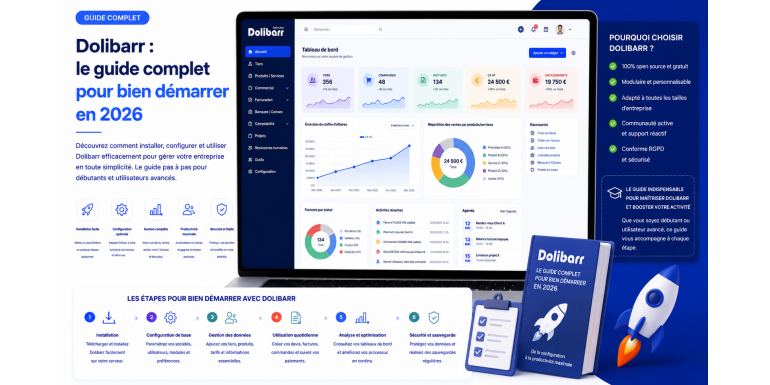
Dolibarr has become one of the most popular open-source ERP/CRM software solutions in France and the French-speaking world. Whether you are a freelancer, a small business owner, a tradesperson, an association manager, or the head of a small or medium-sized enterprise (SME), Dolibarr offers a complete, free, and modular solution to manage your entire business from a single platform.
In 2026, with the gradual implementation of mandatory electronic invoicing and the rise of open-source software compared to proprietary solutions, Dolibarr is emerging as a serious alternative to tools like Sage, EBP, Ciel, or Cegid. This comprehensive guide will help you understand what Dolibarr is , who it's for, how to install and configure it, and, most importantly, how to make the most of its many features to effectively manage your business.
What exactly is Dolibarr?
Dolibarr ERP/CRM is free and open-source software created in 2002 by Rodolphe Quiédeville, and actively maintained and developed by an international community of over 700 regular contributors. Licensed under the GPL v3, it can be freely downloaded, installed, modified, and redistributed without any restrictions. Today, it is one of the most successful and enduring French-language open-source projects in the field of business management.
Unlike many traditional ERP systems, Dolibarr was designed from the ground up to be simple, intuitive, and accessible to non-IT professionals. Its responsive web interface works on any modern browser, on computers, tablets, and smartphones. No software installation is required on the user side: all you need is a browser and an internet connection to access the application, wherever you are.
Dolibarr 's strength lies in its modular architecture. The core software remains lightweight, and users only activate the modules they need: invoicing, quotes, CRM, inventory management, accounting, payroll, projects, manufacturing, point of sale, membership management, etc. This approach allows the tool to be finely tailored to each type of business, without paying for unnecessary features, and to evolve the configuration as the company grows.
Dolibarr 's main features
Complete business management
Dolibarr covers the entire sales cycle: creating sales proposals, quotes, purchase orders, delivery notes, customer and supplier invoices, credit notes, down payment invoices, and recurring invoices. PDF documents are fully customizable with your logo, colors, and legal notices. Payment tracking, partial payment management, and overdue payment reminders are natively integrated, significantly simplifying cash flow management.
CRM and sales prospecting
The CRM module allows you to manage your prospects, customers, contacts, and sales opportunities. You can track the complete history of each interaction (calls, emails, appointments), schedule reminders, manage a sales pipeline by stage, and generate valuable statistics to drive your sales activity on a daily basis.
Accounting and Treasury
Dolibarr includes an accounting module compliant with French standards. It allows users to maintain a chart of accounts, generate the general ledger, balance sheet, and income statement, and, most importantly, produce the Accounting Entries File (FEC) required by the tax authorities in the event of an audit. Bank account management, bank reconciliations, expense reports, and fixed assets are also included as standard.
Inventory management and purchasing
For businesses that sell physical products, Dolibarr offers multi-warehouse inventory management, movement tracking, valuation, stocktaking, supplier management, purchase orders, and goods receiving. Alert thresholds and automatic replenishment are configurable to suit your needs.
Project and service management
The project module allows you to track your internal or billable projects: tasks, schedule, resources, time spent, budget consumed, and profit margin. Combined with the invoicing module, it facilitates time-based billing for web agencies, freelancers, service companies, and consulting firms.
Human Resources
Dolibarr offers management of employee records, contracts, paid leave, expense reports, time sheets, as well as a basis for payroll management via additional modules available on the official DoliStore .
Point of sale and e-commerce
The Checkout module allows you to transform a tablet or computer into a cash register for businesses. Native connectors or third-party modules are available to synchronize Dolibarr with WooCommerce , PrestaShop, Magento, Shopify , eBay, or Amazon. This allows you to centralize your entire multi-channel business in a single tool.
Why choose Dolibarr in 2026?
Several reasons make Dolibarr a particularly relevant choice in 2026, in a context where companies are seeking to control their costs while complying with increasing regulatory requirements.
First, it's completely free software. Unlike proprietary ERP systems that charge per user, per module, and per month (with annual budgets easily exceeding €5,000 for an SME), Dolibarr has no licensing fees. You only pay for your hosting (starting at just a few euros per month), any premium modules from the DoliStore , and any integration services you choose to outsource.
Furthermore, Dolibarr offers complete technological independence. Your data belongs to you, hosted on your own premises or with the hosting provider of your choice. There's no risk of sudden price increases, no risk of service shutdowns, and no lock-in to a proprietary ecosystem. This data sovereignty has become a major selling point in 2026, at a time when data privacy and location are central concerns for entrepreneurs.
Legal compliance is also a decisive factor. Dolibarr keeps pace with evolving French regulations: GDPR compliance, the 2018 anti-VAT fraud law, and the management of electronic invoicing and e- reporting required by the 2026-2027 reform. NF525-certified modules are available for businesses, guaranteeing compliance with tax requirements.
Its active community ensures constant development. Several major versions are released each year, with numerous improvements, bug fixes, and the addition of features requested by users. The official forum, dedicated Facebook and LinkedIn groups, as well as numerous service providers in France, provide invaluable support and assistance to all users, from beginners to experts.
Finally, its unique modularity allows Dolibarr to adapt to both a sole trader and a 50-employee SME, by progressively activating modules as the business grows. It's a tool that grows with your company, without the need to change software at each stage.
Who is Dolibarr designed for ?
Dolibarr is primarily aimed at very small businesses and SMEs in all sectors of activity: commerce, crafts, services, consulting, construction, e-commerce, liberal professions, catering, training, etc. Self-employed individuals will find it a simple tool for invoicing and tracking their activity, while non-profit organizations will appreciate its free access and its module dedicated to managing members and contributions.
Construction professionals benefit from specific modules ( DoliBTP , DoliChantier ) tailored to their trades, including progress tracking, retention payments, and payment certificates. Web agencies, freelancers, and consulting firms utilize project management and time-based billing features. Retailers use the Point of Sale module, sometimes combined with multi-store inventory management.
Dolibarr , however, is not designed for very large companies with complex industrial needs (MES, advanced ERP, sophisticated multi-country cost accounting), for which solutions like Odoo Enterprise, SAP, or Oracle remain better suited. But for approximately 90% of French micro-enterprises and SMEs, Dolibarr more than adequately covers all management needs.
How to install Dolibarr in 2026?
There are three main ways to set up Dolibarr , each corresponding to a different profile and level of technical skills.
The self-hosted installation
This is the most economical and flexible method of use. You install Dolibarr on your own server, whether it's shared web hosting with OVH, Hostinger , Infomaniak , or o2switch, a VPS, a dedicated server, or even a Raspberry Pi for very small organizations. The technical requirements are minimal: an Apache or Nginx server, PHP 8.1 or higher, and a MySQL/ MariaDB or PostgreSQL database . Most French shared hosting providers support Dolibarr without any special configuration.
Installation is done via a web wizard in a few simple steps: download and extract the official archive, access the installation URL from your browser, enter the database settings, and create the administrator account. Allow 15 to 30 minutes for a fully functional initial installation.
Use in SaaS (cloud) mode
For those who prefer not to worry about hosting, providers like DoliCloud (published by the Dolibarr Foundation ) or DoliSaaS offer Dolibarr on a subscription basis, starting at €9 to €25 per month depending on the options chosen. Automatic backups, updates, and technical support are all included in the subscription. It's the ideal solution for getting started quickly without any technical skills.
Installation via an integrator service provider
For companies seeking a customized Dolibarr solution , configured for their specific business needs, with integration of existing data, training, and support, partnering with a certified integrator is a wise choice. Prices range from €1,000 to €10,000 depending on the project's complexity, but this initial investment is quickly recouped through increased productivity and high-quality configuration.
Initial setup of Dolibarr : step by step
Once Dolibarr is installed, the initial setup is crucial for efficient and compliant use. Start by entering your company information in Home > Configuration > Company/Organization: company name, address, SIRET number, intra-community VAT number, logo, and mandatory legal notices. This information will appear on all your business documents, and its accuracy is essential.
Next, activate the modules you need via Home > Configuration > Modules. For a standard start, activate at least: Third Parties (customers/suppliers), Products/Services, Sales Proposals, Orders, Invoices, Banks, and Calendar. You can activate other modules as needed, without restriction.
Configure your numbering in each module: invoice prefixes, year formats, sequences. French law mandates continuous and unbroken numbering for issued invoices, and Dolibarr complies with this requirement by default.
Configure your PDF document templates in Home > Settings > PDF. Several templates are provided by default, and you can create your own using the ODT module or by downloading an additional template from the DoliStore . Customizing your documents reflects your company's professional image.
Define your VAT rates, payment terms, payment methods, bank accounts, and exchange rates if you invoice internationally. Then create your users and groups with access rights tailored to each profile: salesperson, accountant, administrator, etc. Granular access control ensures secure access to your company's sensitive data.
Dolibarr and electronic invoicing in 2026
The French reform of electronic invoicing, initially planned for 2024 and then postponed several times, will gradually come into effect between 2026 and 2027. All companies subject to VAT in France will have to issue and receive their B2B invoices in structured electronic format (Factur-X, UBL, CII) via a State-approved Partner Dematerialization Platform (PDP).
Dolibarr has prepared for this deadline with several dedicated modules: Factur-X invoice generation (PDF/A-3 with embedded XML), connectors to PDPs such as Generix , Tenor, Doc Process, Esker, and the PPF (Public Billing Portal). The Dolibarr community is actively developing solutions to meet this regulatory requirement.
If you're starting Dolibarr in 2026, anticipate this requirement during installation by verifying compatibility with your existing PDP and activating the electronic invoicing modules. This is an excellent time to migrate to Dolibarr , as the transition will occur simultaneously with compliance, thus optimizing your time and effort.
Dolibarr facing the competition
Compared to Odoo, Dolibarr is simpler, less feature-rich, but also much less expensive in the long run. Odoo Community is free, but Odoo Enterprise (the truly complete version) quickly costs several thousand euros per year per user. Dolibarr is better suited to very small businesses and SMEs, while Odoo is better suited to more structured companies with complex processes and a substantial budget.
Compared to Sage, EBP, or Ciel, Dolibarr offers the advantage of being free, multi-platform, remotely accessible, and open source. While proprietary French software remains more advanced in certain highly specific accounting areas, the gap is narrowing every year thanks to the sustained activity of the Dolibarr community .
Compared to SaaS solutions like Pennylane, Indy, or QuickBooks , Dolibarr offers more modules, greater customization, and the advantage of complete data ownership. However, it does require a slightly higher initial investment for setup and training.
Dolibarr really cost ?
Dolibarr itself is completely free. The costs to anticipate for a professional deployment are as follows:
• Hosting: from €3 to €30/month depending on whether you choose shared or dedicated VPS.
• DoliStore add-on modules : sold individually, generally between €10 and €200 for a one-time purchase, without a subscription.
• Training your teams: if you choose a service provider, between €500 and €2,000 depending on the duration and the number of people.
• Initial integration and configuration: optional, between €1,000 and €10,000 depending on the complexity of the project.
• Evolving maintenance: optional, in the form of an annual contract with a specialist provider.
For a self-employed individual or a very small business, starting with Dolibarr can cost less than €100 in the first year, all inclusive. For a small or medium-sized enterprise (SME) with 10 employees, a budget of €2,000 to €5,000 in the first year is realistic for a thorough, supported, and effective implementation.
Mistakes to avoid when starting out with Dolibarr
Activating too many modules from the start is a common mistake: begin with the essentials and gradually add features as needed. An overloaded Dolibarr becomes difficult to use and loses readability.
Failing to perform regular backups is another classic mistake with potentially disastrous consequences. Configure automatic daily backups of the database and documents folder during installation, and test their restoration regularly.
Neglecting updates exposes you to security vulnerabilities and progressive incompatibilities. Schedule regular updates, ideally after each stable minor release, testing first in a pre-production environment.
Customizing the core of Dolibarr directly in the code will make future updates impossible. Always use hooks , custom modules, or triggers designed for this purpose to adapt the software to your specific needs.
Underestimating user training is probably the most costly mistake in the long run. Even though Dolibarr is intuitive, it requires a proper learning curve, especially for users unfamiliar with ERP systems. Investing in training ensures the tool's adoption by all teams.
Going further with Dolibarr
Once you are comfortable with the basic functionalities, you can explore more advanced uses: automation via Dolibarr 's native REST API , integration with other tools via webhooks , development of custom modules for specific business needs, use of custom reports and dashboards, setting up a multi-company environment for groups or holdings.
The official documentation on wiki.dolibarr.org, French-language forums, numerous YouTube tutorials, and training courses offered by providers constitute an inexhaustible source of information for progressing and exploiting the full potential of the software. The French community is particularly active and welcoming to new users.
Conclusion: Dolibarr , the smart choice for 2026
Dolibarr is a mature, comprehensive, and cost-effective solution for managing very small businesses, small and medium-sized enterprises (SMEs), associations, and freelance activities. Its adoption in France is growing every year, driven by the quality of the software, its dynamic community, and evolving regulations that favor open, sovereign, and compliant solutions.
Getting started with Dolibarr is now within everyone's reach: a few minutes are all it takes to install a trial version, and a few hours to complete a fully functional initial setup. Whether you're looking to replace expensive proprietary software, abandon Excel for a true management tool, or equip your new business from the outset, Dolibarr deserves serious consideration.
The time investment required to master the tool will quickly pay for itself through increased productivity, guaranteed legal compliance, and the absence of recurring license costs. In 2026, more than ever, Dolibarr stands out as the smart choice for entrepreneurs and managers focused on efficiency, autonomy, and cost control. Don't wait any longer to discover this powerful ecosystem that is already transforming the daily operations of thousands of French businesses.