
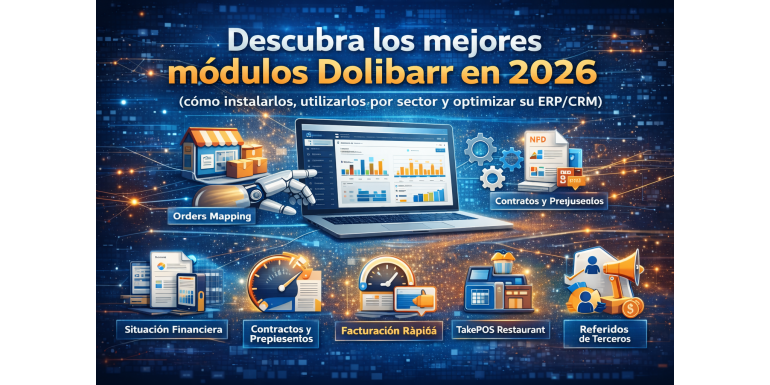
In 2026, Dolibarr ERP/CRM remains one of the most flexible, accessible, and modular open-source solutions on the market for SMEs, small businesses, and organizations of all sizes. Thanks to its modular architecture, each company can activate only the features it truly needs, making the system both powerful and lightweight.
In this article, we present the best Dolibarr modules—particularly those available on the NEXT GESTION store, explain how to install them, how to use them according to your business sector, and how they can help you optimize your ERP/CRM in 2026.
???? What Is a Dolibarr Module and Why Should You Use One?
Modules in Dolibarr are extensions that add new features to your ERP/CRM. Out of the box, Dolibarr already covers essential functions (sales, stock, invoicing, CRM, etc.), but modules allow you to go further by adding industry-specific features, integrations, and business automation.
➤ Types of Dolibarr Modules
-
Native modules: included by default in Dolibarr and activated from the interface.
-
Official external modules: available from official marketplaces or specialized editors.
-
Custom or third-party modules: developed by integrators and publishers such as NEXT GESTION.
???? How to Install a Module in Dolibarr (Recommended Process)
Before reviewing the modules, here is the standard procedure to install a Dolibarr module:
-
Download the module from the store (e.g., NextGestion) or an official marketplace.
-
Upload the files to the
/htdocs/custom/directory (or use the automatic installer if available). -
In Dolibarr, go to Home → Setup → Modules/Applications.
-
Enable the module from the list and configure it according to your needs.
-
Test the configuration in a test environment before deploying to production.
???? Must-Have Dolibarr Modules in 2026 (NextGestion Examples)
1️⃣ Orders Mapping Module – Order Visualization and Control
An essential module for companies managing large volumes of orders or needing a clear overview of order statuses.
It provides a consolidated view of order history, priorities, and progress, helping streamline sales operations.
Why use it?
✔ Improved sales team productivity
✔ Clear, centralized order tracking
✔ Better control of commercial workflows
2️⃣ Financial Situation Module
A key module for performance-driven companies, offering a comprehensive financial overview: dashboards, key indicators, expense tracking, and financial summaries.
Typical features:
✔ Monitoring of financial KPIs
✔ Visibility on margins, balances, and forecasts
✔ Automated reports to support decision-making
3️⃣ Contract ODT/PDF for Quotes Module
This module allows you to generate structured contracts and professional quote documents in PDF or ODT format directly from Dolibarr.
Best suited for:
✔ Service companies
✔ Consulting firms
✔ Training centers and educational organizations
It improves document formalization, legal compliance, and the professional appearance of commercial offers.
4️⃣ Quick Invoicing Module
Designed to speed up invoicing processes by reducing manual steps.
Key benefits:
✔ One-click invoice creation
✔ Reduced human errors
✔ Ideal for SMEs and micro-businesses issuing a high volume of invoices
5️⃣ TakePOS Restaurant Module
Perfect for retail businesses and restaurants, this module turns Dolibarr into a specialized Point of Sale (POS) system.
Features include:
✔ Intuitive cashier interface
✔ Table and on-site order management
✔ Fast payment processing fully integrated with Dolibarr
6️⃣ Loyalty Points Module
A powerful marketing tool for physical stores and online businesses.
✔ Assign loyalty points to customer purchases
✔ Convert points into discounts or rewards
✔ Strengthen customer retention and repeat sales
7️⃣ Third-Party Referral Module
This module helps implement a customer referral program within your business.
✔ Rewards for customers who bring in new clients
✔ Automated commission or incentive management
✔ Boosts organic and word-of-mouth growth
8️⃣ Free Modules from NextGestion
In addition to premium modules, NEXT GESTION also provides useful free modules, such as:
✔ Hourly rate tracking based on task time – helps measure productivity and cost based on time spent.
✔ Additional free utilities for permissions management, code generation, and workflow improvements.
???? Dolibarr Modules by Business Sector
???? For Retail & Commerce
-
Orders Mapping – centralized order management
-
Loyalty Points – customer retention
-
TakePOS Restaurant – POS and in-store sales management
???? For Service Providers & Consultants
-
Contract ODT/PDF for Quotes – professional contracts and offers
-
Quick Invoicing – automated billing
???? For Growth-Oriented SMEs
-
Financial Situation – financial monitoring and dashboards
-
Third-Party Referral – customer acquisition and referral management
???? How These Modules Optimize Your Dolibarr ERP/CRM
Modules do more than add features—they transform how a company operates:
✔ Automation of repetitive tasks
✔ Improved decision-making through dashboards and KPIs
✔ Better user experience
✔ Strong alignment with business processes
✔ Industry-specific customization
???? Best Practices for Choosing the Right Modules
-
Analyze your business needs before purchasing or installing a module.
-
Test modules in a staging or sandbox environment before going live.
-
Ensure compatibility with your Dolibarr version.
-
Think long term: updates, support, scalability, and security.
???? Conclusion
In 2026, Dolibarr remains a highly flexible and powerful ERP/CRM solution thanks to its rich modular ecosystem. To fully leverage this power, choosing the right modules—such as those offered by NEXT GESTION—is a strategic lever for growth, operational optimization, and customer satisfaction.
Explore the modules available on NextGestion.com, install them according to your business needs, and turn Dolibarr into an ERP truly tailored to your company in 2026.